
Free Gibson guitar Ableton Live rack
A virtual instrument created with the sounds of an acoustic guitar. The strings of my Gibson acoustic were sampled and racked up in Ableton Live to create a lush pad sound. Enjoy and spread the word!
Download @ http://bit.ly/freesynth32

“My Gibson acoustic guitar is a true one of a kind, it has a sound like no other and plays like a dream. I’ve exploited it previously with my Gibson E-bow rack and this week I have put it to work again in another free Ableton Live Rack. I sampled each of its six strings and racked them all together inside Live, added effects, and created what turns out to be a nice atmospheric pad sound. I’ve designed it with a compressor ready made for easy side chaining, so you can get this instrument breathing and moving in time with other elements of your tracks. Have fun with it and spread the word!”
Amazing guitar studio
Not much to say but “Prepared/Filtered/Guitar” hehe
Teaser pics of the new Rockmate for iPad

Fingerlab is bringing the amazing new app called Rockmate to the app store soon. “We have developed Rockmate with the intention of delivering the best realtime rock music performance environment for iPad. Your guitars are always well tuned, no need to carry your drum-set or to patch your keyboard. A smart metronome and a realtime looper will help you to compose and record your songs and demos. Share your recording by mail, Facebook or iTunes sharing folders.”
Here are the features:
- Realistic design and animations
- High quality samples*
- 4 players available in one single iPad
- Realtime Looper with unlimited undo
- Metronome with light and custom sounds
- Mixer with level and pan control
- Realtime Fx (distortion, multiFX, powerchord)
- Chords progression customizable (select 2X4 chords from 160)
- Guitar open tuning
- Save your styles (Chords progression, FX, Drum, keyboard style…)
- Audio Background
- Export: .wav or .aac
- Sharing: iTunes sharing folder, Facebook and Email.
Derek Buddemeyer demo Phrase Sampler in JamUp
Derek, (Hangnail Guitars), shows a demonstration of JamUp PRO by PositiveGrid with a few amp models/effects and overdub capabilities of the phrase sampler.
Available in the iTunes App-Store!
http://www.positivegrid.com/jamup/
JamUp is a guitar/bass multi-effect app, gives you a load of authentic guitar tones, sound-on-sound looping and 30+ modules right on your iPad and iPhone!
Powered by the newly developed multi-stage MESH Modeling engine, JamUp includes 6 historic amp models and 6 matched convolution speaker models, comes with classic and fuzzy stomp, spring and digital reverb, tangy modulations, tape and digital delays, filter, compressor, noise gate and other essentials.
JamUp is born with great “play alone” capabilities. The phrase sampler can capture loops and riffs and create instant sound-on-sound overdubs, it’s the easiest way to create a one-person-band sound in minutes. With the Jam Player, you can play along with any tracks from your iTunes library, plus, you can easily create a loop and control the tempo and pitch with built-in high fidelity time stretching engine.
Featuring the Xotica BX-1 Various Demos – Roland GI-20 VG-99 GR-300 GR-700 US-2
Collection of video demos featuring the Xotica BX-1. This is one of a few hand crafted boutique guitars built by Xotica, and custom guitar shop based in Kenosha, WI. Features of this guitar include a Roland GK-3 pickup, Buzz Feiten tuning system, Sperzel locking tuners, Baby Grand Hip Shot bridge, Rockfield pickups and a Honduras Mahogany body with g\orgeous Fiddle Back Maple binding.
“Kokoni Iruno”- Musuki Aruvavo Lee & Yuichi Onoue
“Kokoni Iruno(I’m Here)”- Musuki Aruvavo Lee & Yuichi Onoue
“ここにいるの” by ムスキ・アルバボ・リー & 尾上祐一
Written by Musuki Aruvavo Lee
Musuki Aruvavo Lee – Vocal , Guitar
Yuichi Onoue – Handmade Ribbon Controller
Live at Kouenji Muryoku-Muzenji on June 29th 2011
Special Thanks to Mr.Fujiemon(Austin Records)
高円寺無力無善寺におけるムスキ・アルバボ・リーと尾上祐一のデュオ演奏です。
More Musuki Aruvavo Lee’s Video
http://www.youtube.com/user/musukiaruba
NEW Misa Kitara – Sustainer & ZynAddSubFx VST (shipping this month!)
There have been lots of requests for showing the misa kitara connected to an external software synthesizer via MIDI:
“So in this video I have connected the kitara to my PC running my favourite open source synthesizer – zynaddsubfx (I recommend checking it out, it has some really interesting features). Also in this video, I show you how to sustain notes – you just drag upwards and any strings you have pressed down will not stop playing when you release them. Pressing another button on the string will set the sustained note to the newly designated one.
Also you can see “tap mode” in this video, where the screen is red. in this mode you can press the buttons on the neck and hear a sound, without pressing the touchpanel. it’s good for two handed tapping technique (although you can see how important using the touch panel is to re-attack the notes you are playing).
ps. use headphones if you want to hear the bass!! :)”
Time for some Moog Slim Phatty Jam
Quick demo of the You Rock MIDI guitar triggering a Moog Slim Phatty. Monophonic fun!! The Little Phatty is a true analog monosynth in every sense: it’s a monophonic, monotimbral, monaural subtractive synthesizer with analog circuitry throughout. Ideal for beginners and pros alike, the LP puts every parameter right at your fingertips…
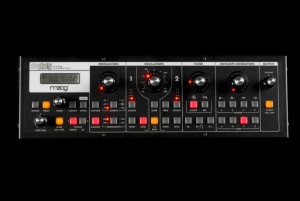
Based on the powerful Little Phatty sound engine, the Slim Phatty is the latest descendant of the iconic Minimoog Model D and features the classic Moog Ladder Filter, the touchstone of analog sound design.
In addition to shaping the sound of its on-board oscillators, the Slim Phatty’s filter is a valuable production tool that can be used to process external audio, sweetening your favorite audio source with everything from smooth analog warmth through wet, resonant filter sweeps.
The Slim Phatty’s convenient size makes it an ideal voice expander for your existing gear, with two oscillators of massive Moog sound that are always just a MIDI cable away. A new Tuning Scale feature and editor allows easy exploration of alternate scales and tunings. Microtonal, just intonation, quarter-tone, world music scales and more make the Slim Phatty an international traveler. Good thing it has a universal power supply!
In addition to the world of MIDI and USB gear, the Slim Phatty’s Control Voltage inputs give it unlimited realms of expression and sound design possibilities. “Modular synth” style patching with Moogerfooger effects processors, the CP-251 Control Voltage Processor and other Moog synths (even The Moog Guitar!) creates soundscapes previously available only on large modular systems. Connecting to the Etherwave Plus Control Voltage Theremin or the MP-201 Multi-Pedal adds unique and intuitive new modes of expression.
Free Weekly Ableton Live Rack – Guitar Harmonics Synth
The ever so persistent AfroDJMac is yet again here with a new rack for Live:
Using my Fender Mustang electric guitar, I sampled all the harmonics on each string at the 5th, 7th, and 12th frets. From there I brought it into Ableton Live and created a pretty cool sounding instrument. Enjoy!
Download it here: http://bit.ly/freesynth20
I’m very excited to be bringing you the 20th Free Weekly Ableton Live Rack: “The AfroDJMac Guitar Harmonics Synth.” It’s been really great bringing you these racks every week, and today is a special one, not just because #20 is something of a milestone, but also because it happens to be my birthday
Thanks to everyone who keeps coming back every week and to those who have been so instrumental in spreading the word about this project. Alright let’s get down to business.
So, I’m currently enjoying a visit from my family, including a surprise visit by my two little nephews. The eldest one, Sam, is five and when he got to my house and saw some of my musical instruments, he told me he was “really good at music.” So I took him into the basement studio and after he banged out a beat on the drums, I gave him my Fender Mustang. It was a lot of fun seeing the sense of discovery and innocence in his eyes as he banged away on the guitar, unaware that his left hand not only had to touch the stings, but also press them down on the fretboard. By just placing his hands over the strings, he was actually producing some nice harmonics for a few seconds, and that inspired me to create this rack. (If you are not sure what I mean by “Guitar Harmonics” check out this link).
This weeks rack was created by sampling the harmonics produced by each string at the 5th, 7th, and 12th fret. The instrument comes set up with a macro knob that allows you to switch between the different samples, each of which has its own unique character. This allows for some cool effects, such as holding the sustain pedal and changing the sample while you play, which creates an interesting morphing timbre. There’s a macro knob that reverses the samples, creating a swelling, somewhat glitchy sound, not unlike those from some of my favorite psychedelic Beatles tracks (or my 3rd Ableton Live Rack: Reversed Piano”). I’ve also been experimenting with the Grain Delay plug-in more and more these days, and there are some macro knobs to control that effect. Check it out and have fun! PS. If you are not a Live user, you can still use the samples included in the download.
FIRST LOOK: DigiTech iPB-10 iPad pedalboard – DEMO
Here’s some background information on the pedal. DigiTech’s iPB-10 is a guitar effects pedalboard like no other, for as well as offering footswitches and an expression pedal, it also contains a dock for an iPad. You can use this to set up your ideal rig – choose from 87 pedals, 54 amps and 26 cabinets – though all processing is done in the ‘board itself.
It’ll be available imminently priced at £499.
Pedalboard Simplicity
The iPB-10 allows you to create your ultimate pedalboard, all on your iPad. Design a pedalboard by simply dragging and dropping up to 10 different pedals, in any order, to each pedalboard. You can even add an amp and cabinet to each setup. With 87 different pedals, 54 amps, and 26 cabinets to choose from, your options are virtually unlimited. Simply swipe your finger across the iPad to rearrange your pedals, turn them on and off, or to adjust their knobs.
Multi-effects Flexibility
Traditional multi-effects have given you the flexibility to change the entire configuration of your signal chain with a single footswitch. The iPB-10 brings the concept of presets to a pedalboard. This allows you to save 100 of your favorite pedalboards with the touch or your finger, and instantly recall them with the stomp of your foot. You can have a different pedalboard for each gig, set, song, or even switch pedalboards within a song.
DATAMASKIN

