
David Guetta and UVI – ElectroBeats new version 1.5
NEW version 1.5
◆ New lower price : $4.99 instead of $9.99
◆ Support for iOS 6 and the iPhone 5
◆ New features : MIDI Input Support & User Samples Support
◆ New sounds and songs
ElectroBeats is a very intuitive beat making application for iPhone, iPad and iPod touch, conceived in collaboration with the worldwide-renowned and the most demanded producer David Guetta.
With a powerful real-time approach and an impressive sound library, you’ll create great sounding beats at a glance.
FEATURES
◆ Realtime workflow experience with sixteen pads and five different modes:
Pad, Pitch, Velocity, Erase, Mute/Solo
◆ Exclusive and electro oriented sound library, with hundreds of sounds including Bass Drum, Snare, Clap, Rimshot, Cymbal, Hi-Hat, Open Hi-Hats, Acoustic Percussion, Electronic Percussion, FX, Bass, Chords, Leads, Instruments, Vox…
◆ Synthesis oscillator
◆ Dozens of ready to use drum and construction kits
◆ Hundreds of patterns to use with the drum kits
◆ Note Repeat in multiple resolutions
◆ Dynamically change the quantize/repeat resolution while recording : the key to build beats very fast
◆ Default quantization for instant gratification
◆ Save and share your tracks using iTunes
◆ Bounce song in Wav format
◆ Import your files via File Sharing in iTunes
◆ Multitrack export for use in sequencers like Logic™, Live™, ProTools™, Cubase™ and many more.
◆ MIDI input support
◆ Tap Tempo
◆ Realtime previews (pattern, kits and sounds)
◆ Convenient undo with snapshots support
◆ Embedded help in English, French, Spanish and Japanese.
Nils – new real-time bitcrusher, sampler and looper for iOS
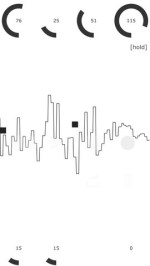
Erik Sigth has introduced Nils, a real-time bitcrusher, sampler and looper for iOS.
Here’s what he has to say about Nils:
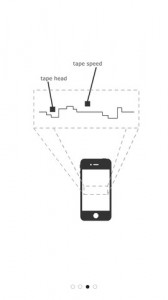
Nils is a real time sound effect machine with a minimalistic looper. It comes with bitcrush, delay and gain for distortion. As input you can use the internal microphone, your earpods or accessories like iRig. Can also be used as a sampler, by holding the delay buffer and changing its phase. Lo-fi looping for both beginners and professionals.
Features:
- Real time.
- Bitchrush.
- Sample rate (1 Hz – 44100 Hz).
- Delay.
- Hold delay buffer.
- Play delay buffer.
- Gain (goes up to 11).
- Limiter.
- Tape looper.
- Export (email, soundcloud, MAPI audio copy).
INSTRUMENT 1 – upcoming MIDI controller / musical instrument for iOS
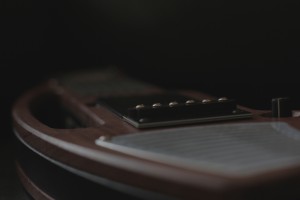
Artiphon has announce the INSTRUMENT 1 – an upcoming MIDI controller that they describe as ‘the most advanced musical instrument for iOS. INSTRUMENT 1 is controller that’s compatible with CoreMIDI iOS apps and designed to be a professional quality instrument. The body of the INSTRUMENT 1 is inspired by the forms of traditional stringed instruments and is cut from ‘heirloom-quality’ hardwood. It can be held in multiple familiar positions–from guitar and fiddle to lap steel and upright bass.

Artiphon INSTRUMENT 1 Specifications:
- Compatible with any CoreMIDI-enabled iOS app and thousands of audio apps.
- Patent-pending force-sensitive interface with six virtual frets and strings, and a strum section inspired by single-coil guitar pickups.
- Accommodates five playing positions: guitar, mandolin, bass, violin, & lap steel.
- High-quality onboard connections for headphones, microphone, ¼-inch stereo instrument cable, and MIDI in/out, and USB.
- Controls for volume, instrument modes, and octave switching.
- Rechargeable internal battery and 12v power input.
- Integrated stereo speakers and a 30-watt, class-D amplifier.
- Advanced control of multi-track recording apps including GarageBand, Pro Tools, and more.
- Body carved of specialty hardwoods and bamboo from sustainable sources.
- Designed and hand-built in Nashville, TN.
“We designed the INSTRUMENT 1 as a hybrid of pro-level components, ergonomic accessibility, and traditional instrument manufacturing techniques,” says Artiphon founder Mike Butera. “It’s been two years in the making and is unlike anything else on the market. We can’t wait to see all the ways musicians put it to work in their creative processes.”
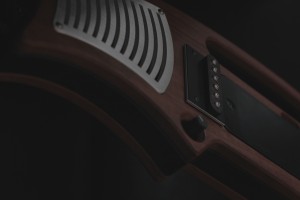
Note: The images shown here are based on an INSTRUMENT 1 prototype. The final prototype is nearly complete and production of the first units is planned for early 2013.
Price and Availability:
Artiphon will begin taking pre-orders for the INSTRUMENT 1 in the first quarter of 2013, at a price point under $1000.
Scape + Figure jam
-Scape app with ipad 1
-Figure app with iPod touch 4g
BeatEvolve – new generative music app
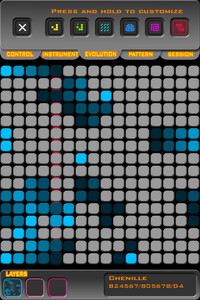
Team Popo has released BeatEvolve, a generative music app in which the grid of notes can ‘evolve’ according to rules such as Conway’s Game of Life.
Anyone can make music with BeatEvolve! With 31 instruments to choose from, the intuitive interface lets you combine 3 layers of harmonies to create awesome riffs!
Select from one of six preset evolution rules or create your own from scratch then sit back and watch as the music changes all by itself.
BeatEvolve features
- Three layers.
- 31 instruments.
- Six evolution presets including Conway’s famous Game Of Life.
- Experiment by creating your own evolution rules.
- Flip, rotate and shift the patterns you make.
- Tempo adjust.
- Save your musical creations to use later or show off to your friends.
Mouse on Mars: WretchUp, an Instrument for iPhone
WretchUp is a unique handheld effect and instrument for the iPhone that anyone can play. Developed by Mouse on Mars, it’s easy to learn, but also sophisticated enough that it’s heavily used in their live shows and new albums. Now with your help, we want to bring it to everyone.
“We’re launching an IndieGogo campaign to support developing WretchUp for all iOS users. (With enough funding, we’ll port to Android, too.) We’ll share exclusive music, updates from the band and development team, and more with backers – plus, of course, the app. And the entire project will be open source, including iOS projects and a free Pure Data (Pd) patch for users of any OS.
Here, Andi and Jan explain what the app is about and how they use it.”
See you on IndieGogo!
Peter KIRN, createdigitalmusic.com
Jan St. Werner, Mouse on Mars
Andi Toma, Mouse on Mars
Shot at Mouse on Mars’ studio at the Funkhaus, Berlin; edited by Peter Kirn
Audiobus: Looping Sunrizer with Loopy HD
iOS developer Audiobus has now released a proper teaser video demonstrating the workflow of its potentially revolutionary inter-app audio routing device. Audiobus is an app designed to allow audio to be streamed between multiple iOS music making apps. No release date has been announced yet, but the app has been approved by Apple. For more info on the app, check out the Audiobus official site.
DM1 The Drum Machine, Version 3.0
DM1 The Drum Machine V3.0 – a new version to this popular app is out, details below:
We are happy to bring you lots of new and shiny features to DM1, that – we know – many of you requested for some time : drum import, FX automation, FX per track, time signatures to name a few. Not to forget 22 new drum kits.
Download DM1 on the App Store:
http://itunes.apple.com/us/app/dm1-the-drum-machine/id431573951?mt=8&uo=4
Download DM1 V3.0.pdf User guide on www.fingerlab.net/DM1
What’s new DM1 V3.0
Drum kits
– Samples import: Import and edit samples from the iTunes music library, the microphone, your Dropbox, AudioPaste or your iTunes sharing folder
– Create custum user kits.
– 22 new Drum Kits
FX
– Select which track (kick, snare, etc) goes through an FX (FX per track).
– Record and playback any FX parameters in real time (FX Automation).
– Assign an FX per pattern.
– Record and playback the Pitch ribbon.
Time signature
– 4/4, 3/4, 6/8, 2/4, 5/4, 6/4, 7/4, 8/4.
– Custom time signature per pattern.
Mixer
– New fader track with Master volume control
Export
– Drop Box export
– Export separated tracks
– Export to (uncompressed) wav or (compressed) aac formats
Fixes
– Fixed timing issue in the sequencer
– Fixed export issue
– Battery issue fixed
What’s next ?
– A proper MIDI implementation
– iCloud (iPad/iPhone files stream)
Stay tuned.
The Fingerlab team
Audiobus Demo at the London Mobile Music Makers meet
A brief video of part of the demo from tonight’s demo of audiobus.
What’s the difference between Audiobus and Virtual MIDI?
Virtual MIDI is a local communications channel for passing around MIDI messages like “C# 1, Velocity 127“, or “Modulation, 50” – simple messages that control how a synthesizer should generate audio. Audiobus is a communications channel for sending live audio, like the audible output of a synthesizer app, or the output of a guitar amp effects app, for example.
GYM e.g.g. (Electro Groove Generator) iPhone App – fitness pacer and music generator
A new and fresh way to workout, train and get fit to music. Fresh and energizing, high quality generated sounds, electro beats and sequences that constantly evolve. Stimulating, sometimes hypnotic – the music is there with you in the background while you train and it’s different every time. Designed to keep you alert and at pace to the beat that suits you. You choose the speed and the music is generated for you as you go.
Have you ever been to the gym and find yourself running or cycling to the background beat? If you find a good beat that you can synchronize with, you often find you can push yourself harder. It is a bit like dancing. How many times have you listened to your favourite music but the beat is too slow or too fast or your playlist has a few tracks that do not work well while exercising? Well now you can set your own speed to train to. This will help you go that bit further by locking on to the pace of the beat that you choose.
AVAILABLE NOW
https://itunes.apple.com/us/app/gym-e.g.g.-electro-groove/id566147561?ls=1&am…
Progressive electro beats and grooves are constantly evolving. Influences range from House, 80’s electro to Dub-Step. Its not all just random! There are rules that have been created and the beats and melodies are all created from these rules. As with the nature of this app, there may be the odd time when the music is not to your liking so there is a “dislike” button which will completely re-generate the current song. Every ‘song’ gradually mixes into a new one when it is finished. Remember this is background music to train to so although you wont get a musical masterpiece, you will usually get electrifying electro goodness to keep pace to. Includes built-in audio effects.
To use: Press “go” then tap the “TAP” button to your pace. Use the + and – buttons to refine the speed. If the music becomes uninspiring or a bit crazy then tap the unhappy face or you can wait a few minutes as it will eventually change.
Pressing “stop” twice will reset the stopwatch. You can change the exercise graphics from running to cycling or rowing.
Warning: Do not set the BPM too high at first. Give yourself 5-10 minutes at a moderately easy speed to make sure you can keep up. This app is designed to help push you further by locking on to the beat of the music so make sure it is not set too high. If you feel out of breath or faint, stop immediately.
DATAMASKIN

