
New release of ANIMOOG featuring MIDI CONTROL
Animoog v1.1.0 is here! New features include longer recording time in the looper, categorized presets, and fully assignable MIDI cc’s. In this video Moog’s Product Development Specialist, Amos Gaynes, shows you how to use Animoog’s new MIDI control features and explores some of the creative possibilities.
You can learn more about Animoog at:
http://www.moogmusic.com/animoog
SpaceWiz Intro with Jordan Rudess
Now available in the iOS App Store! http://itunes.apple.com/us/app/spacewiz/id541828795
This is the introduction of a 6 part video tutorial on SpaceWiz.
SpaceWiz allows you to interact with and control your environment at the highest level of complexity. With the manipulation of your own fingers on the playing surface, together with the technological wonders of the Chaos and Satellite generators, you fabricate particles, which then collide into planets.
You can even add the onboard real time synthesizer with its independent set of sounds and parameters to create your sonic masterpiece.Regardless of your desires, this app will reward you with a mind-blowing creation. Sit back, and allow SpaceWiz to guide you on a uniquely woven audio-visual journey. Enjoy the ultimate sonic/visual wallpaper, or get busy and start throwing your own particles around the universe. Try rolling the dice for total randomization and see what happens! For creators who want to play a larger role in their SpaceWiz experience, you also have the opportunity to build your audio/visual world from the void!
Sona iPad App – ECAL
Background information on the ECAL project:
Tutors: Alain Bellet, Gael Hugo, Christophe Guignard
ECAL / University of Art and Design, Lausanne Switzerland
Bachelor Media & Interaction Design
ecal.ch + vimeo.com/channels/ecalmid
During the first half of 3rd year at ECAL, I made an installation project based on the visualization of sound. I am interested in how the spectator is immersed in the interactive piece in the presence of this element. I decided to continue my research on the themes of sound and atmosphere.
Sona is an experimental game on iPad inspired by the classic “Simon game.” The universe is composed of enigmatic sound paintings that the spectator must solve through simple interactions. The game is played with headphones to focus attention on the sound.
This project allowed me to study in detail the acoustic phenomena and how we store and perceive sounds. The immersion and sound have become essential elements for me in an interactive project.
Magellan iPad Synth with Jordan Rudess
Yonac Software’s new powerhouse analog synthesizer.
“A comprehensive instrument that i would consider a major release to the world of iPad music.”
Check it out here: http://itunes.apple.com/us/app/magellan/id544119998?ls=1&mt=8
Magellan is the bold new professional analog modeling synthesizer for the iPad. Not content with just one synth, we gave Magellan TWO independent polyphonic synth engines. Individually or together, they deliver a new powerful warmth to the sound of iOS music.
Complete with a full effects rack, a total of six oscillators, dual filters per engine, multiple unison stages, extensive modulation matrix, dedicated arpeggiators, powerful MIDI capabilities, and a polyphonic step-sequencer – the aural possibilities with Magellan are infinite!
Check out our awesome Magellan demo! www.youtube.com/YonacSoftware
\\\ Synth ///
• 2 independent virtual analog synth engines running simultaneously
• 3 oscillators per synth engine; total of 6 realtime oscillators
• Osc unison stage w/ adjustable detune & width, up to 24 simultaneous wave generators for super-saw type effects
• Realtime PWM Modulation for osc 1 & 2
• FM module w/ dedicated blend, ADSR envelope, adjustable contour
• Oscillator 1>2 ring modulation
• Noise generator w/ adjustable tone
• VCA ADSR envelope
• Separate voice unison stage w/ settable stereo spread, detune
• Dual Keyboards w/ individual pitch & modulation wheels
• Dual Touch Pad controls w/ settable key & scale, individual voice parameterization
• Polyphonic, Monophonic, Poly/Mono Legato operation modes
• Glide
• Matrixpad modulation w/ configurable x/y destinations, synth out select, optional snapback
• Realtime oscilloscope displaying output signal (iPad 2 and 3)
• Synth coupling – allow running both synths by a single control interface
• Audio backgrounding
• Tap tempo
• 16 voice combined polyphony (8 voice combined for iPad 1)
\\\ Filters ///
• 2 filter banks per synth engine, configurable in series or parallel
• Dedicated ADSR envelope for each bank; selectable envelope curve, adjustable contour
• 11 Filter types for each bank:
• “Magellan” 24dB Resonant Low Pass
• “Victor” 24dB Resonant Low/High/Band Pass
• “Voyvoda” 12dB Low/High/Band Pass
• Formant, Comb, All-Pass, Notch filters
• True bypass
\\\ Modulation ///
• Dual LFO’s per synth
• Up to 4 freely assignable destinations per LFO
• Dedicated amp setting for each LFO destination
• 3 reset modes
• Adjustable phase & delay
• Frequency tracking
\\\ Arp ///
• Dedicated arpeggiator in each synth engine
• 10 arp patterns; Settable note value & gate; swing
• 6 octaving modes, plus settable note and octave repeats
\\\ Sequencer ///
• Analog inspired 16/32 step polyphonic sequencer
• 8 track poly output per pattern in 16-step, 4 track poly out in 32-step “link” mode
• Track wise selection of target synth engine
• Settable pitch, velocity, gate, octave per step
• 6 sequence direction algorithms for each pattern
• Swing
• Timeline for creating song length sequences w/ patterns
• Import/Export song files containing sequences
\\\ Chordmaker ///
• Dedicated Chordmaker module for each synth
• Create/save chord progressions, played by pressing a single key
\\\ Effects ///
• Comprehensive FX rack: Reverb, Stereo Delay w/ BPM sync, Phaser, Chorus, Flanger, Waveshaper/Distortion, Bitcrusher, Sonic Expander
\\\ Recording & Sharing ///
• Built in tape deck for recording app audio
• Metronome
• Export audio files via email, SoundCloud
• Export/Import audio files via WiFi, Intua or Sonoma Audio Copy / Paste
\\\ MIDI ///
• CoreMIDI
• Virtual MIDI, both vMIDI In and vMIDI Out ports
• Control Magellan w/ external MIDI controllers
• Synth-wise MIDI In channel select
• MIDI Out w/ settable channel or omni
• MIDI Learn w/ over 80 control destinations
• Save MIDI CC configurations to file for later use
• Sync w/ external MIDI clocks to control sequencer, arp modules
\\\ Presets ///
• Over 242 factory presets
• 34 presets and a song designed by Sunsine Audio
• Export/Import presets, banks via email or iTunes; Create/save unlimited banks & presets
Polyphonics: CASSINI Synth for iPad
An introduction to the CASSINI Polyphonic Synthesizer for iPad
http://iphone.icegear.net/cassini_ipad/
3 OSCs + 2 Filters + AMP + 9 EGs + 6 LFOs + 3band EQ + Saturator + 2 Delays + Arpeggiator
Beatmaker 2 – Walkthrough
BEATSURFING – THE ORGANIC MIDI CONTROLLER BUILDER
It allows you to draw a 3-dimensional controller and use it in two different and complementary ways. You can tap it like you would with your regular MPC or any other beatmaking device, but the best and most innovative use you can make of it is definitely by surfing your fingers along routes, colliding with objects, triggering samples or effects. It’s all about movement, and bringing back this intuitive way to make music. It can control any MIDI-enabled device (Software, Hardware, or even selected iPad apps through Virtual MIDI), features a very intuitive in-app editing system and integrates seemlessly in any existing Studio or Live setup. Objects Behaviours can be set to link objects together and multiply the available commands on the surface of the iPad.
Video background information:
Second part of the appsformusicproduction.com walkthrough of building a track in beatmaker. Hope you’ve found it useful so far.
Twitter: @appsformusic
For music app reviews tutorials, tips, and more:
http://www.appsformusicproduction.com/
WerkBench Ambient Experiment **First look at 1.1.0!**
WerkBench is available in the app store: http://bit.ly/L6jhd9
http://www.facebook.com/werkbench
Here is some ambient music generated from a single sample in real-time. The combination of pitch shifting and feedback makes for giant percolating pads. Enjoy! All of the sounds are being sampled with the internal mic and speaker. I live in a noisy place so there is a lot of texture added with each level of feedback. This video features WerkBench 1.1.0 which should be out in the first few weeks of August. I am making use of panning, high-pass filters, and decay settings for each step. These will be available soon!
Noisepad Sequencer – Sneak preview
Here’s a teaser for the upcoming release of the updated Noisepad Sequencer, check it out, details can be found below:
SOON AVAILABLE ON THE APPSTORE : Noisepad with build-in sequencer. Now you can make your own patterns with the Noisepad sequencer.
New features:
– Save up to 12 patterns
– Variable pattern length (bars)
– BPM
– Tap
– Swing
– Metronome
– Organize your samples (drag and drop on your pads)
– Hold button.
Check out our website for the latest updates http://www.noise-pad.com
Tic Tac Beatz Electro and Drumatron for iPad
This is V1.0. Check out V1.1 updated version here http://www.youtube.com/watch?v=od6L3yJknzI
Also check out the “How to Save and Load” and V1.2 update video here http://www.youtube.com/watch?v=03ar3cdRPhI
A quick demo of this new Ipad app and what it can do.
8 tracks split into drums, bass, synth, chords and effects. Designed exclusively for electronic style music.
It is on the app store now and at a bargain price. More info here:
http://itunes.apple.com/gb/app/tictac-beatz-electro/id520672407?mt=8
Facebook page for this app:
https://www.facebook.com/TicTacBeatzElectro
Not just a super cool looking drum pad but a professional drum pad machine with almost all the drum sounds you would ever need and with lots of tweakablity. Almost 100 sounds to choose from ranging from rock and dance drums, bongos and maracas, special effects and more. You can edit each pad’s sound, level, pitch and decay. Store up to 4 custom drum kits. Velocity control on each pad depending on where you hit the pad. Ergonomically designed for either one-handed use or using both thumbs with ease. With visual feedback and lighting effects that add more enjoyment especially in the dark. Pad 3 is linked to pad 4 so you can mute an open high hat on pad 4 with a closed hat on pad 3 if you wish.
All sounds designed exclusively for this app and created from real drums and high quality drum synthesisers.
No latency. Any delay in this video is from the video/audio sync
Available here now!
http://itunes.apple.com/us/app/drumatron/id546175262?ls=1&mt=8
Cats Do Different Tracks – Live session on Loopseque
Cats Do Different Tracks live session on Loopseque.
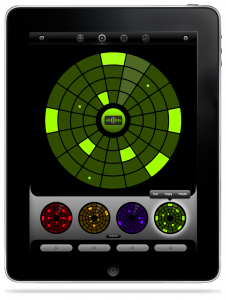
Loopseque it’s a new music ecosystem which includes powerful sequencer, sampler, fx processor and record store with many beautiful releases from talented artists.
The basement of Loopseque is a circle – a natural solution for visualization of cyclic music structure. Music starts with the first touch and within seconds becomes alive. It’s not just a rhythmic pattern in your hands, but the whole composition.
Playing Loopseque doesn’t require music education or any professional skills. An intuitive interface combined with inspiring sounds gives an opportunity to plunge into the world of music to everybody.
• Easy to use sequencer
• Sample editor, uploader & browser
• Onboard Samples library
• Audio effects
• Live track recording & loop bouncing
• SoundCloud sharing
• Project sharing via e-mail
• 22 professionally designed electronic sample sets
• 14 original project presets
• Loopseque Store with new projects and tracks by talented artists
• Dropbox Sync and iTunes File Sharing for your own sounds
• Audio copy/paste (General Pasteboard with import and export)
• WIST support for syncing with other iOS music apps
• Master Classes & Tutorials
DATAMASKIN

