
Magellan for iPad Tutorial – MIDI Basics
More tutorials coming your way from Yonac:
In this tutorial, we show you how to control Magellan with your external MIDI controller, including connecting your iPad to the controller, adjusting Synth 1 & 2 channels, and more!
Visit http://www.yonac.com for more info.
Magellan on iTunes: http://itunes.apple.com/us/app/magellan/id544119998?mt=8
Clavia launches free Nord Beat iPad app
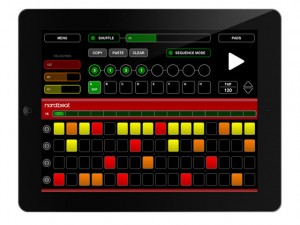
Clavia gets into the app game with a nice looking iPad step sequencer known as Nord Beat. It’s free and, thanks to its CoreMIDI support, can be used to control not only Nord modules and synths – it’s been designed with the Nord Drum particularly in mind – but also any other MIDI instrument. Nord Beat offers four tracks, a 16-step sequencer and up to eight patterns. You can either loop one of these or chain them together (repeating patterns if necessary) to create a song. You can choose from three velocity levels and adjust the amount of shuffle, while a Pad mode gives you the option of playing your drum sounds.
You can download Nord Beat for iPad now from the App Store.
Clavia Nord Beat official info
Nord Beat is a 4-track CoreMIDI Step Sequencer for iPad. Nord Beat is a perfect companion for your Nord Drum and is available for free at the App Store!
Sequencer
Nord Beat lets you create drum beats in classic 16 step grid with up to 8 patterns and offers great control over velocity. Patterns can be played back in two ways: In Sequence Mode, up to 8 patterns can be cued and will play in a chained fashion. Each pattern can be set to repeat up to 8 times to create a song progression. When Sequence Mode is turned off, a single pattern will loop until you cue another. Any pattern can be edited while playing and the Copy/Paste function lets you create variations over a pattern very quickly. There are 3 velocity levels represented by colors, and are easily changed by swiping up or down on the desired notes. The actual velocity values can be altered with the velocity faders for changing accents and dynamics in real-time. The Shuffle amount can also be changed on the fly and each of the 4 tracks can be muted individually. The Pattern length can be shortened (1-16) while playing for creating breakdowns or alternative time signatures.
Pad Mode
Nord Beat also features a Pad Mode that lets you play the Nord Drum (or other MIDI gear) with your fingers and even gives you great control over the velocity! The center zones transmit full velocity and gradually gets lower towards the edges. The pads can be used simultaneously with the sequencer.
Easy Setup
Although designed with the Nord Drum in mind, Nord Beat can be used with any MIDI instrument. Just choose the desired MIDI-channel and Note Numbers in the Nord Beat Settings menu and you’re ready to go!
A CoreMIDI compatible MIDI interface is required.
“Hundled Hirch” TC-11 iPad Improv by Jeff McLeod
Created using a custom-made patch on Bit Shape’s TC-11 multi-touch synth for the iPad. A teardown/rebuild of the original patch “Bundled Birch.”
More info here: http://www.bitshapesoftware.com/instruments/tc-11/
And here: http://www.jeffmcleod.net
Patch controllers:
Creation Time Since Previous Touch: Multi Oscillator Level & AHDSR-0 Scale
Touch Y Position: Panning
Distance To Center: SEQ-0 Add
Creation Time Since Previous Group: Mix LPF Frequency Cutoff
Group Count: LPF Frequency Cutoff
Touch Began: AHDSR-1 Start & SEQ-0 Step
Touch Ended: AHDSR-0 End & AHDSR-1 End
AHDSR-0: Amplitude
AHDSR-1: Waveshaper Mix
SEQ-0: Multi Oscillator Frequency & Mlit Oscillator Transpose
SEQ-0 Trigger: AHDSR-0 Start
Auria Tutorial: AudioCopy/AudioPaste and Fabfilter Micro
This video tutorial features creating a simple synth part in a synth called Magellan and using AudioCopy/Paste to import the resulting audio into Auria. Then the optional In-App Purchase, Fabfilter Micro, is used to create some filter sweeps.
About Auria:
The mobile DAW you’ve been dreaming of has finally arrived. Auria is a 48-track digital recording system designed from the ground up for the iPad. With professional-level features like AAF import/export, and optional third-party plugin support from names like PSPaudioware, Overloud, Fab Filter and Drumagog (available via In-App purchase), Auria clearly sets a new standard for mobile recording.
FEATURES:
• 48 tracks of simultaneous playback of stereo or mono files. (24 tracks on iPad 1)
• Up to 24 tracks of simultaneous recording when used with compatible USB audio interfaces (Camera Connection Kit required)
• Supports sample rates of 44.1KHz, 48KHz and 96KHz, at 24 bits (iPad 1 supports only 44.1KHz and 48KHz)
• Vintage-inspired ChannelStrip on every channel by PSPAudioware includes Expander, Multiband EQ and Compressor
• MasterStrip on all subgroup and master channels featuring PSPAudioware BussPressor, EQ and Mastering Limiter
• 64 bit double-precision floating point mixing engine
• Third party VST effect plugin support available via in-app purchase (only iOS-version plugins are supported. All plugins must be purchased through the in-app store)
• AAF import and export allows transferring complete sessions between popular DAWs like Logic, Pro Tools, Nuendo, Samplitude and others
• Convolution reverb plugin with included IR library by MoReVoX
• ClassicVerb reverb plugin included
• StereoDelay and StereoChorus plugins included
• ReTune plugin included for auto pitch correction of vocals
• 8 Assignable subgroups and 2 aux sends
• Powerful waveform editor with features like cut/copy/paste, crossfade, duplicate, separate, gain, normalize, dc offset, reverse, and more
• Flexible snapping tools allow snapping to events, cursor, bars, beats and more
• DropBox, SoundCloud and Audio Copy/Paste support
• Track freeze for minimizing CPU usage
• Full automation support on all controls with graphical editing
• True 100mm faders when used in Portrait Mode
• Optional video import feature allows sample accurate sync of video to an Auria project with adjustable offset times and video export capability
• Timeline ruler options include minutes:seconds, bars:beats, samples and SMPTE time
• Auto-punch mode
• WIST support for wireless syncing of other compatible music apps
• AuriaLink allows two iPads running Auria to play and record in sync, allowing for 96 tracks of playback and 48 tracks of recording
• Full delay compensation on all tracks, subgroups, and aux sends
• Adjustable metering modes, including pre or post fader, RMS and peak
• Adjustable pan laws
• Sample accurate loop function
• Automatic sample rate conversion
• Built-in metronome
Wolfgang Palm Caught In The Act Of Testing The PPG Wavegenerator App
More teasers of the new application from PPG:
Wolfgang tells us he is working hard on the App now we know otherwise…
We used security footage to catch him playing the new PPG Wavegenerator App for iPad
Amazing soundhouse – featuring SpaceWiz, Omnisphere and Logic pro
Alex Solarte has made this video, here’s what says about it in short:
“amazing soundhouse, made with spacewiz, omnisphere and logic pro – i call this random music ;-)”
Jordan Rudess Presents Music App Spectacular
Don’t know which music creation apps to buy for your iPad, then this might be a good source of inspiration:
Jordan Rudess says; Here are some of my favorite music apps Pt 1:
Magellan
Tachyon
Cassini
Nlog
Cylon Voice
Garage Band
Geo Synthesizer
DrumJam
NanoStudio
SynthX
VoiceSynth
BitWiz
SpaceWiz
Animoog
iDensity
iKaossilator
PixiTracker
TC-11
MorphWiz
SampleWiz
Editors note: SpaceWiz, MorphWiz and SampleWiz are Jordan’s own creations which might indicate a somewhat biased inclusion on the list 😉
A late night iPad ReBirth Jam
Jamming with ReBirth for iPad. Two TB-303s, a TR-808, a TR-909 and various effects, all in one App with a pretty nice interface
Description:
ReBirth is back! Propellerhead Software’s legendary Techno Micro Composer has been resurrected and customized for the iPad. ReBirth faithfully emulates dance music’s three backbone devices: The Roland TB-303 Bass synth and the Roland TR-808 and 909 drum machines. Combine these with FX units, fully featured pattern sequencers and a gorgeous-looking interface and you’re ready to make killer tracks on your iPad. Share your music with friends on Facebook, Twitter and more using the built in sharing features.
Features
2 x TB-303 Bassline Synthesizer with pattern sequencer
The original Acid House and Techno bass synth. Unrivaled power, unmistakable sound.
TR-808 Drum machine
Roland’s sub-heavy 1980 beat computer. Instant hip-hop.
TR-909 Drum machine
The go-to beatbox for everything House and Techno. Press play and you’re dancing.
Tempo-synced digital delay
Bouncy and hypnotic, always in time with your music.
Compressor with threshold and ratio
A bare-bones compression unit for added beefiness.
Distortion unit with amount and shape
Raw and rugged distortion for that extra edge. Works wonders with any 303 bassline.
PCF effect
Pattern controlled Low-pass / Band-pass filter – a tweaker’s delight.
Mixer
Device specific mixer sections with pan, delay sends and FX switches
Mod support
Includes 7 original user mods with alternative sound sets and graphics
Sharing features
Share function with easy publication of songs to Facebook, Twitter and other social networks.
Magellan for iPad Tutorial – Dual Synths
Here is the first video in our series of tutorials for Magellan – Professional Analog Modeling Synthesizer for iPad. In this video, we show how to operate Magellan’s TWO independent polyphonic synth engines, including: loading presets, foregrounding a synth, adjusting parameters, synth coupling, and other advanced settings.
Visit http://www.yonac.com for more info!
Magellan on the iTunes Store: http://itunes.apple.com/us/app/magellan/id544119998?mt=8
Specifications:
\\\ Synth ///
• 2 independent virtual analog synth engines running simultaneously
• 3 oscillators per synth engine; total of 6 realtime oscillators
• Osc unison stage w/ adjustable detune & width, up to 24 simultaneous wave generators for super-saw type effects
• Realtime PWM Modulation for osc 1 & 2
• FM module w/ dedicated blend, ADSR envelope, adjustable contour
• Oscillator 2>1 ring modulation
• Noise generator w/ adjustable tone
• VCA ADSR envelope
• Separate voice unison stage w/ settable stereo spread, detune
• Dual Keyboards w/ individual pitch & modulation wheels
• Dual Touch Pad controls w/ settable key & scale, individual voice parameterization
• Polyphonic, Monophonic, Poly/Mono Legato operation modes
• Glide
• Matrixpad modulation w/ configurable x/y destinations, synth out select, optional snapback
• Realtime oscilloscope displaying output signal (iPad 2 and 3)
• Synth coupling – allow running both synths by a single control interface
• Audio backgrounding
• Tap tempo
• 16 voice combined polyphony (8 voice combined for iPad 1)
\\\ Filters ///
• 2 filter banks per synth engine, configurable in series or parallel
• Dedicated ADSR envelope for each bank; selectable envelope curve, adjustable contour
• 11 Filter types for each bank:
• “Magellan” 24dB Resonant Low Pass
• “Victor” 24dB Resonant Low/High/Band Pass
• “Voyvoda” 12dB Low/High/Band Pass
• Formant, Comb, All-Pass, Notch filters
• True bypass
\\\ Modulation ///
• Dual LFO’s per synth
• Up to 4 freely assignable destinations per LFO
• Dedicated amp setting for each LFO destination
• 3 reset modes
• Adjustable phase & delay
• Frequency tracking
\\\ Arp ///
• Dedicated arpeggiator in each synth engine
• 10 arp patterns; Settable note value & gate; swing
• 6 octaving modes, plus settable note and octave repeats
\\\ Sequencer ///
• Analog inspired 16/32 step polyphonic sequencer
• 8 track poly output per pattern in 16-step, 4 track poly out in 32-step “link” mode
• Track wise selection of target synth engine
• Settable pitch, velocity, gate, octave per step
• 6 sequence direction algorithms for each pattern
• Swing
• Timeline for creating song length sequences w/ patterns
• Import/Export song files containing sequences
\\\ Chordmaker ///
• Dedicated Chordmaker module for each synth
• Create/save chord progressions, played by pressing a single key
\\\ Effects ///
• Comprehensive FX rack: Reverb, Stereo Delay w/ BPM sync, Phaser, Chorus, Flanger, Waveshaper/Distortion, Bitcrusher, Sonic Expander
\\\ Recording & Sharing ///
• Built in tape deck for recording app audio
• Metronome
• Export audio files via email, SoundCloud
• Export/Import audio files via WiFi, Intua or Sonoma Audio Copy / Paste
\\\ MIDI ///
• CoreMIDI
• Virtual MIDI, both vMIDI In and vMIDI Out ports
• Control Magellan w/ external MIDI controllers
• Synth-wise MIDI In channel select
• MIDI Out w/ settable channel or omni
• MIDI Learn w/ over 80 control destinations
• Save MIDI CC configurations to file for later use
• Sync w/ external MIDI clocks to control sequencer, arp modules
\\\ Presets ///
• Over 242 factory presets
• 34 presets and a song designed by Sunsine Audio
• Export/Import presets, banks via email or iTunes; Create/save unlimited banks & presets
PixiTracker 1 Bit First Look
PixiTracker 1BIT is a simple and fun tool to quickly create musical sketches, chip tunes and experiments with TRUE 1-BIT SOUND (like on old microcomputers).
No musical knowledge required!
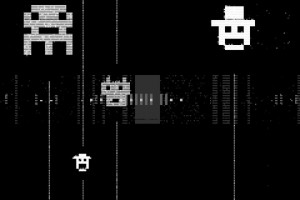
[ Key features ]
• true 1-bit sound: only 1 and 0 in the final mix;
• pattern based sequencer (tracker);
• max number of tracks: 12; max number of steps: 64;
• MIDI keyboard support;
• several packs with unique sounds;
• mic/line-in sound recording;
• Wi-Fi export/import;
• export to WAV;
• audio copy/paste;
• iTunes File Sharing;
• warm pixel interface!
DATAMASKIN

