
PPG WaveGenerator iPad App – Show And Tell
Wolfgang is back sharing more of the wholesome goodness found in his new baby PPG WaveGenerator App.
The PPG WaveGenerator comes with a multitude of wavetables. The sound material contains the typical sounds from the original PPG wave models, as well as many new sounds generated by versatile analysis tools and also hand edited waves.
This app enables the user, to create his own wavetables in a playful way, and to hear the result immediately. Also you can construct the waves by adding harmonics very precise. Another way is to transform a picture into a wavetable. You can load photos from your album or even shoot a picture with the camera.
The waves are collected in a grid of 256 fields, to which the 3 oscillators of the synthesizer have arbitrary and independent access. In a 3D display you get a visual impression on how the sound evolves. You can turn around the 3D object and zoom in and out, The Parameters of the synthesizer are divided into modules, which allows easy, yet powerful editing. It contains 3 oscillators with independent control of pitch and waveform. Each oscillator has its own glide, which gives a very dynamic sound.
With a sophisticated routing system, the diverse modulation sources can be connected to all important control points. The keyboard is configurable totally freely, so you can setup all well-known musical scales, but also all imaginable custom scales that best fit into your music. PPG WaveGenerator benefits all advantages of the iPad, like X/Y control after the key on event, or two finder gestures for spectrum control. After a key is hit, the tone may be modified and modulated in various ways, just by moving your finger.
A comfortable browser lets you sort the sound programs; you can categorize and rate them. Also complete custom sound banks may be created. All significant parameters are controllable via MIDI. There is a built in context specific help for all pages and modules.
New iPad Controller For Reason
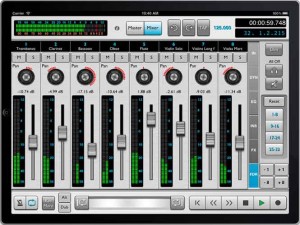
Harmony Systems, Inc. has announced the worldwide availability of Delora rsTouch, an iPad application that offers control surface functionality for the Propellerhead Reason music application on a Mac or PC. rsTouch emulates Reason’s Mixer and transport functions, allowing nearly complete operation of Reason’s transport controls and Main Mixer from the iPad.
rsTouch works with Reason 6.5 or higher, Reason Essentials 1.5, or Record 1.5 installed on a Mac or Windows PC. It supports either “wired” MIDI connections using an iPad compatible USB MIDI interface, or “wireless” MIDI connections using iOS compatible network MIDI. Reason control surface support files are required and are available free from the Delora website.
rsTouch expands the Delora Software line of music controller apps for iOS devices, including lpTouch for Logic, gbTouch and gbRemote for GarageBand, and vKiP and vKi for Kyma.
Record and mix songs, mute or solo any channel during playback. Channel fader meters, master volume meter, and “Big Meter” provide visual feedback to monitor audio levels. Set start and ending loop points and navigate through the song with the jog strip. Know where you’re at with the timecode and bar-beat display, and channel name and number identification.
Sound setting and level adjustments are made easily with large, multi-touch, color-coded rotaries and faders. rsTouch’s seven screens offer the ability to edit send effects, insert parameters, and EQ settings, as well as adjust channel, pan and dynamics levels. A dedicated Master screen allows full adjustments of Reason’s Main Mixer master section.
rsTouch is available for $9.99 (USD) on the iTunes App Store.
More information:
Magellan and Cassini – iPad Show
This week Sonic State takes a look at the new update to Animoog and hooking up class compliant devices for MIDI and audio connectivity. Then they check out two new synth releases
Yonac – Magellan and Icegear’s Cassini
Featured Apps:
Animoog – innovative Moog synth at a price $29.99/ £20.99
Magellan- complex analog modelled synth $4.99 / £2.99
Cassini – clean, tabbed synth $4.99 /£2.99
Hosts
Gaz Williams – Songsurgeon.co.uk
Nick Batt – editor sonicstate.com
Digital turntable for iPad – Helix Beatmix Demo
As Peter describes it:
I made a new digital turntable from the ground up. It redefines what a turntable in the iPad should be. It has a lot of creative ideas packed into it.
This is the first turntable to have a circular on-the-groove audio waveform, custom colors, totally real-world accurate geometry, and a high dynamic range pitch adjust that can move by a hair, with special metering graphics, over a huge range.
Thanks for having a look, and I’d be happy to hear your feedback and suggestions.
Taking a closer look at the Yamaha Arp & Drum Pad
Music iPad App – first look at some of the features of the Yamaha Synth Drum Pad.
“My first impressions are that this is one mother of an app. The sonic possibilities are great, although I’m a little in awe of it.”
Overview
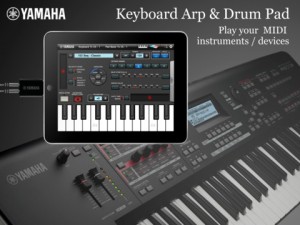
Keyboard Arp & Drum Pad is a Core MIDI application that transmits notes to external MIDI instruments and includes a keyboard, arpeggiator and assignable drum pads. You can play the built-in keyboard, trigger arps and play various patterns of instruments like drum, keyboard, or guitar. Also the drum pads let you play drum phrases or assign the multiple notes on one pad and play chords. You can set the Keyboard Arp and Drum Pad to different channels so you can play drum beats and pad chords along with the sequence phrases run by the arpeggiator.
*Yamaha MOTIF XF offers you WiFi connectivity which enables wireless control.
*If you use the Yamaha i-MX1 iPhone/iPad MIDI Interface, you can connect to any MIDI instrument.
Features
Keyboard Arpeggiator
– You can choose from 342 arps including many different instrument categories.
– Each arp phrase can be modified in real time for swing, beat stretch, octave range and variation
Drum Pad
– Each of the 16 Drum Pads can have up to 5 notes with assignable velocities, so you can play chords or layered percussion with one pad.
– You can even split the pads in half and assign different notes or velocities to the left side and right sides of the pad.
– A learn mode makes it easy to program the pads directly from the MOTIF XF.
– 64 user templates
Tap Tempo
– A Tap Tempo feature allows you to quickly set the Tempo of the arps
Ribbon Controller
– A Ribbon Controller let’s you control Velocity, Pitch and 2 Assignable Parameters
*For the detailed information please refer to the following url.
http://4wrd.it/YAMAHASYNTH
*In order to have the WiFi connection, you need to get an OS updater for MOTIF XF from http://4wrd.it/YAMAHASYNTH and buy a compatible Wi-Fi USB adapter.
FEED For iPad with Jordan Rudess
New video from Jordan Rudess exploring the FEED iPad app:
FEED is a new iPad app by David Gunn that has an interesting interface. It’s a very creative way to manipulate sound! You can check it out here: http://itunes.apple.com/us/app/feed/id517836626?mt=8
Also make sure to check out my very own SpaceWiz iPad app which is sure to blow your mind and can be found here:
http://itunes.apple.com/us/app/spacewiz/id541828795?mt=8
Rolodecks effect with Machinedrum, Octatrack & Slim Phatty
This is a demonstration of the iPad control and display with the Ableton Live DAW.
Equipment used: Twisted Tools Rolodecks, Elektron Octatrack & Machinedrum, Moog Slim Phatty, DJ TechTools Midi Fighter,
Thanks for watching …
iPad trilogy – An Evening with Hindole Majumdar and Kevin Schlei
Somewhat on the ethnic side of things 
‘An Evening with Hindole Majumdar and Kevin Schlei’ was a concert on August 19th, 2012 that explored electronics + tabla. This piece, ‘Idiom,’ is a fully improvised, on-the-spot composition by myself and Hindole. A basic rhythmic pattern forms that he and I use to ground ourselves, and we play off of each other’s accents and phrases.
I am using my iPad instrument TC-11 with three iPads, and Hindole is playing his D tabla set with an extra E dayan. You can find more information about Hindole at his website, sites.google.com/site/hindolemajumdar/, and about TC-11 at bitshapesoftware.com/instruments/tc-11
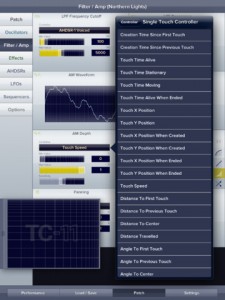
TC-11 is the only fully programmable, professional multi-touch synthesizer for the iPad. Choose from the 96 included presets, or build your own using touch controls, device motion, and on-board modules. Create music with the next evolution of synthesizer control!
iDesignSound App of the Week 12.17.2011
– idesignsound.com
“This thing is ALIVE! TC-11 is really fascinating and I’m having some fun experimenting with it. It is very, very cool!”
– Jordan Rudess, keyboardist, Dream Theater
“TC-11 is making my jaw drop every few minutes; realizing new and increasingly complex routing options. Rating: Essential.”
– Tim Webb, discchord.com
“Creating, routing, configuring, and general tweaking is unbelievably robust and complex. This is a big leap forward in design. A madhouse of sonic possibilities at your touch.”
– David Israel, smitematter.com
FEATURES:
√ 96 built-in presets
√ Unlimited user patches
√ Fully controlled by multi-touch / device motion
√ Built-in recording + AudioCopy
√ 23 modular synthesis objects
√ 22 oscillator waveforms
√ 3 controller modules: AHDSR, LFO, Sequencer
√ Email custom patches to your friends
√ Full display customization
√ Retina graphics
MULTI-TOUCH CONTROL:
There are no on-screen knobs, keys, or sliders to fiddle with; all synthesis is driven by your multi-touch performance. Touch relationships like distances / angles / timings perform all the controller functions. It’s just you and the full screen multi-touch performance area.
EVERY synthesis parameter can be controlled by ANY multi-touch controller. The patch possibilities are limitless!
DEVICE MOTION CONTROL:
Use the iPad’s accelerometer, gyroscope, and even the compass to attack your synthesis patch! Tilt and move the iPad to change any filter, effect, or module. You can create real vibrato by moving the iPad during performance, or change the speed of a sequencer by tilting forward and backward!
SYNTHESIS:
TC-11 has 8 voice polyphony for full, real-time synthesis. The audio engine has been highly optimized to deliver crisp, responsive performance. Choose from 22 oscillator waveforms, 3 oscillator types, 3 filter types, 4 unique effects, amplitude modulation, and panning control.
Fully programmable AHDSR, LFO, and sequencer modules make TC-11 the most capable iOS synthesizer in the world.
Use TC-11 in your band during live performances. Add TC-11 into your laptop orchestra. Experiment and create with the next evolution of synthesizer control!
Download the complete user guide to read more:
http://www.bitshapesoftware.com/instruments/tc-11/tc-11-user-guide-1.5.pdf
TableTop TT-303 vs ReBirth
A quick comparison of Retronyms TableTop TT-303 and Propellerheads ReBirth on the iPad.
“They sound like the same synth engine to me 😉 What do you think?”
Checking out the music iPad app Clap Box
usic Ipad App Clap Box. This app is inspired by the 1980s Simmons Clap Trap, a legendary hand clap synthesizer used on countless records. A promising app by Pure Magnetik and a great deal of fun to use. Well laid out and simple to use. Best results on an Ipad.
DATAMASKIN

