
AmpliTube Fender apps for iPhone, iPod touch and iPad are now available for download
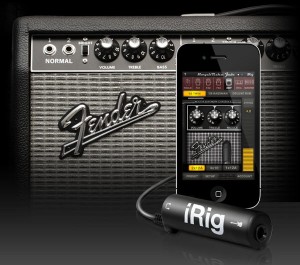
IK Multimedia has announced that its AmpliTube Fender apps for iPhone, iPod touch and iPad are now available for download from the iTunes App store.
Designed and developed in close cooperation with Fender Musical Instruments Corporation, AmpliTube Fender™ is a full featured recording studio, guitar amp and FX rig offering the legendary Fender™ tone.
AmpliTube Fender features
- Real time guitar mobile multiFX + recording and practicing app.
- Full rig with 3 stompboxes (iPhone)/4 (iPad) + amp with effects + cabinet + mic.
- 6 Fender™ Stomps — Fender™ Phaser, Fender™ Blender™, Tape Delay, Overdrive, Compressor (by registering) and Noise Filter.
- 5 Fender™ Amps with matching Cabinets — ’65 Deluxe Reverb™, ’65 Twin Reverb™, ’59 Bassman™ LTD, Super-Sonic™ and Pro Junior™.
- 2 Microphone models, dynamic and condenser.
- Single track recorder (with re-amping) expandable to full 4 track (iPhone)/8 track (iPad) recording studio with master effects through in-app purchase.
- Import and play up to 50 songs/backing tracks directly from your iPod library on your device or from your computer.
- Ultra-realistic tones derived from the AmpliTube Fender Mac/PC studio.
- Slow down or speed up the tempo (-50% to +200%) of imported songswithout affecting their pitch.
- 36 presets can be saved/named/recalled on the fly.
- Includes tuner and metronome.
- Low-latency for real time playing.
- FREE version also available – can be expanded by individual gear model purchases, or bundle purchase via the in-app purchase feature.
- Can be incorporated into the AmpliTube 2 for iPhone/iPad app via in-app purchase.
The AmpliTube Fender apps for iPhone and iPad are currently available from the iTunes App Store, and cost $14.99 USD / 11.99 EUR each. Free versions are also available for iPhone and iPad, both expandable with the individual amps and effects a-la-carte through in-app purchases.
The 4-track recorder and 8-track recorder with master effects’ sections on the iPhone and iPad cost $9.99 USD / 7.99 EUR and $14.99 USD / 11.99 EUR respectively as in-app purchases. AmpliTube 2 for iPhone/iPad users are able to add AmpliTube Fender™ stomp box and amplifier models as individual in-app purchases for only $4.99 USD / 3.99 EUR per amp, $2.99 USD / 2.39 EUR per stomp box, or $14.99 USD / 11.99 EUR for the entire collection of models.
More information: IK Multimedia
Singing Fingers for Iphone
More fun then useful I would suspect, but still 
This is an app called Singing Fingers. It’s a great idea as u can see. Check it out! Singing Fingers lets you fingerpaint with sound. Just touch the screen while you make a sound, and colorful paint appears. Touch the paint to play back the sound again!
iFourmance-Purple Haze
Let´s rock it
iFourmance-the iphone-ipod-ipad-band-video-clip-purple haze,all instruments played on iphone and ipod
get an entire music production studio in your phone
INTUA BeatMaker 2 – Official demo
BeatMaker 2 : the most advanced mobile music workstation.
Combining music production tools that made the success of countless artists, BeatMaker 2 brings a powerful and easy-to-use composition interface for amateurs and professionals alike.
Build your own virtual home-studio creating multiple instruments, connecting them to a full-range of audio effects.
Compose, record, arrange and transform your ideas into complete songs, ready to be shared with others.
Import your own sounds or use the included sound library: more than 170 high-quality instruments and drum presets from synthesizers to realistic orchestral sounds.
You can even import songs from your iPod library!
STUDIO
- Create multiple instruments with Drum Machine or Keyboard interface
- 10 effect units to choose from: Reverb, Compressor, Filter, Delay, EQ, Flanger, Chorus, AutoPan, BitCrusher, Overdrive.
- 3 effect slots for each instrument, unlimited global effect racks
- Customizable Cross Controller for all effects, to manipulate multiple parameters at once
DRUM MACHINE
- Up to 128 trigger pads: 16 pads over 8 different banks
- Chop Lab: Slice audio loops to automatically create new sound presets
- Control sound parameters on individual pad: volume, pan, mute, output bus, semitone, fine tune, reverse and autoscaling
- Low/high pass filter per pad with cutoff and resonance control
- Choose between various pad trigger modes: one-shot, hold & loop
- Customizable envelope (ADSR) control for each pad
- Exclusive groups and polyphony management
- “Live” modes: trigger, mute, reverse, velocity and tune spreading.
KEYBOARD SAMPLER
- 128 keys keyboard with pitch wheel with double keyboard mode, note display and zoom controls
- Easily create your own instruments from any sample combination with the keygroup editor
- Volume and filter ADSR envelopes
- Low/high pass filter with cutoff, resonance and key tracking
- 2 LFOs with customizable amplitude, offset and rate (synchronizable), controlling volume, pitch and filter parameters
- Polyphony control, with up to 32 voices per keyboard sampler
- Legato play mode with customizable glide
- Keygroup controls: volume, pan, semitones, fine-tune, reverse and one-shot, hold, hold & loop trigger modes
MULTI-TRACK SEQUENCER
- Create unlimited instrument and FX tracks
- Automations: Record, edit and replay instrument and effect parameters
- Record, draw, arrange and resize patterns along the timeline to build your song
- Compose and modify patterns with a piano-roll interface. Edit notes, parameters, and automations.
- Instrument and effect recording options: Quantize, take or partial undo, pre-roll, Overdub, note erasing.
WAVE EDITOR
- Full-fledged wave editor with intuitive pinch and selection for manipulating samples
- Basic edition tools: trim, cut, copy, paste, with 8 levels undo/redo
- High quality time-stretching and pitch-shifting algorithms
- Audio tools: normalize, silence, reverse, fade in and out, cross-fade
- Record new samples from device microphone or plugged instrument
- Loop points and tempo/signature editor
MIXER CONSOLE
- Realistic multi-track mixer with level meters
- Edit volume, pan, solo, mute and bus routing features for individual tracks
LARGE SOUNDBANK INCLUDED
- 68 Drum Machine presets from all genres
- 111 Keyboard Sampler presets, from synthesizers to realistic orchestral instruments.
SHARING & GLOBAL OPTIONS
- Export your songs to Audio or MIDI files
- Transfer and manage your files from your computer using the integrated FTP server
- Import any songs from your iPod library to create new remixes
- Upload your songs directly to your SoundCloud account
- Share audio content with more than 20 other music applications using the iOS pasteboard
- Supports BeatMaker 1 kits and projects
- Fully supports Retina display
- Native iPad version coming soon as a free update
BeatMaker 2 is available for iPhone & iPod touch now in the App Store.
Sync-Gen II Proto Demo
Rough hand held iPhone demo video. Sync-Gen II software under Ableton Live 8 driving Cync-Lock and Kawai R-100 via Din-Sync. Single audio loop in Live playing across grid-locked R-100 pattern. Precision Sync and Slave Transport taken care of by Sync-Gen II
Baby Scratch
Async’s “Baby Scratch”, a free app that lets you sample any sound and then “scratch” it on the on-screen turntable over a handful of selectable beats
Baby Scratch is a free App available at Apple AppStore. Made a little try out as handling is pretty amazing with awesome sample sound. App has 3 build in beat loops and some samples and voice recording to scratch. Latency of scratch sounds is noticeable but still best of all checked scratch Apps.
Give it a try!

Mixtikl – generative music system for mobile, tweeting, web & desktop
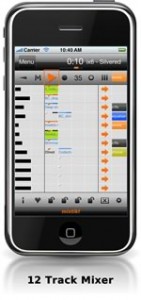
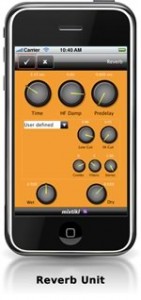
Intermorphic has released version 2.5.0.2 of Mixtikl, a generative music system for mobile, tweeting, web & desktop.
Mixtikl lets you easily create stunning generative music mixes, performances & new ideas from mixing together up to 12 tracks of generative music, audio & MIDI loops plus many customisable sound FX.
Changes in Mixtikl v2.5.0.2
- iDevice: Added support for Sonoma AudioCopy and AudioPaste (as alternative to Apple General Pasteboard – both supported).
- iDevice: Free – 3 AL Collections (15 AL Tiklpaks – previously $2.97) via “Loop Essentials” in-app download.
- iDevice: Fixed: losing of GenBars / CellRepeat range settings when rotating.
- iDevice: Fixed: iPad issue using in-app store in Portrait mode.
- New checkbox filters in New Mix screen make it easier to see/select only the Tiklpaks you want to use.
- More customisable randomisation settings in the New Mix Settings screen.
- Improved controls in mix Tempo and Root screen.
- Clear Everything and Clear All Track Settings now set all track generative bars+range / repeat+range values to zero.
- Fixed: Import of mixtikls from email.
More information: Intermorphic
Free Wireless MIDI control app for iPhone/iPad
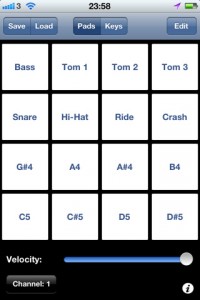
Onoko has released Pad MIDI (App Store link), a free Wireless MIDI control app for iPhone/iPad.
Features:
- Supports native Mac OS Network MIDI (Core MIDI)
- 16 assignable / renameable MIDI pads
- Full 88 key piano
- Selectable MIDI channel and velocity
There’s a tutorial on setting up MIDI on an OS X network at Nix Fox-Gieg’s Tutorials.
Tap DJ – The Ultimate Pocket DJ app for iPhone and iPod
Not sure it is the “ultimate” but still
Short demo of Tap DJ app available at tap.dj
Tap DJ is a fun app for mixing and scratching your iPod library.
Add FX, and Equalize your tunes.
Record your mixes to share with the world.
Tap DJ (App Store link) is a new $1.99 iPhone DJ app.
Features:
- Integrated iPod Library Access
- FX, and 3-Band Equalizer for each Deck
- Integrated 9 Pad Sampler
- 3 Loopable Cue Points per Deck
- Record your mixes
- Voice Recording
- GyroScratch Technology
- 2 Included Skins
- Import tracks from USB, or WiFi in addition to iPod
- Discover new music by sharing and viewing top mixes
- Stunning realistic turntable interface
- Live waveform views for precise scratching and mixing
Introducing the Synse for iPhone
Synse is a new Visual Music App. It combines music and related visuals with only a touch to an interactive, audiovisual experience for the iPhone/iPod-user.
t’s available in the App Store for $1.99.
Functions:
Video Mode (Device in portrait or landscape with Home button on the left)
In this mode you control each instrument/track and their visuals with one touch. Each instrument has its own touch area. To show these areas, simply tap on the “Show Grid” area on the left or right corners at the bottom of the screen.
Sequencer Mode (Device in landscape with Home button on the right)
Arrange a whole song by tapping inside the sequencer grid and scroll through the arrangement by swiping left or right.
Sequencer buttons:
- PLAY/PAUSE: Lets you play and pause the song.
- STOP: Stops the song and the locator jumps back to the beginning of the arrangement.
- LOOP: When activated, loops the current bar of the arrangement.
- SETUP: Shows the setup screen, where you can
- ?load a different set (music and visuals)
- ?save and load arrangements
- ?change the length of the song
- ?turn off LiveTouch mode (disables touching in video mode)
- ?activate Shake mode (toggle video and sequencer mode only by shaking the device)
Hint: Hold the STOP button with one finger and tap in the sequencer grid to move the locator.
Note: This Version includes three sets: PARIS, FLUID and LIFETIME. More sets are planned.
DATAMASKIN

