
New versions of its M-Audio Axiom USB MIDI keyboard controller
Avid today introduced new versions of its M-Audio Axiom USB MIDI keyboard controller series designed for live performance and software-based music production: Axiom 25, Axiom 49, and Axiom 61.
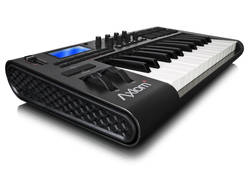
Building on the comprehensive feature set that popularized the original Axiom line, new features and highlights include:
DirectLink technology: Provides dedicated control surface functionality that automatically maps keyboard controls to common mixer and virtual instrument parameters, giving users hands-on control over their mix and their music, without any complicated set up or user configuration required. DirectLink works with popular DAWs, including Pro Tools®, Ableton Live, Apple Logic Pro and Steinberg Cubase.
Enhanced keybed: An updated semi-weighted piano-style keyboard delivers a musically satisfying playing experience—ideal for playing software and hardware instruments.
Redesigned user interface: Offers better ergonomics for the studio and stage with an angled top panel that makes controls easier to access and view in any environment. New low-profile mixer-style faders (Axiom 49 and Axiom 61 only) enable a hands-on mix experience, while smooth rotary encoders provide precise control over software and MIDI parameters. All models provide informative feedback via a graphic LCD, which is centrally positioned on the Axiom 49 and Axiom 61 for easy viewing.
“Our new Axiom keyboard controllers were designed to make it easier for musicians and producers to play and work with software instruments within their DAW of choice,” said John Krogh, audio segment marketing manager for Avid.
“With out-of-box integration with the industry’s most popular music software, an enhanced keybed, and a modern, ergonomic interface, players and producers can elevate their performance using an affordable, flexible, easy-to-use solution – in the studio and on stage.”
Organ Emulation Keyboard
Joey Defrancesco has put his name on a new keyboard by Studiologic: the Numa Organ. (Studiologic is one of the brand names of the keyboard manufacturer Fatar).
All of the controls that the Hammond player would want are there, in the right places, including reverse-color preset keys, which provide a way to make quick changes during performance. This is significant, because until now, only organs with the Hammond name, specifically the XK-3, XK-3c and New B3 include the preset keys. In addition to the functionality they provide, they look really cool.
Now for a rundown of the features of the Numa Organ:
- Pitch and mod wheels – Provide extra functionality to use the Numa as a keyboard controller. The mod wheel doubles as a rotating speaker slow/fast switch, and because of the way it is oriented, switching from slow to fast requires a motion similar to using a traditional half-moon Leslie switch.
- Vibrato control – A rotary knob, just like on a vintage B-3, with switches to turn the vibrato effect on/off for the upper and lower manual.
- Drawbars – A set of nine drawbars are provided plus switches that specify which manual is affected by the current drawbar settings: upper, lower or bass pedals.
- Split and Transpose – The keyboard can be split so that the lower manual or bass pedal sounds are triggered from the left part of the keyboard and the upper manual sounds from the right. Transposition can be done in half steps.
- Percussion – four buttons control the percussion effect, like on a vintage Hammond: on/off, soft/normal, slow/fast, and 2nd/3rd harmonic.
- Effects – Rotary controls provide for adjustment of reverb, drive, key click and tonewheel leakage.
- Equalizer – bass and treble controls.
- Keyboard touch control – allows switching between organ mode and dynamic mode
At just 22 lbs., The Numa Organ is one of the most lightweight organ emulation keyboards on the market. What is missing – which I hope they include on a future model – is a second set of drawbars and a set of pedal drawbars.
Sounds of KORG
Cool sounds made the microStation from KORG
1. Sugar Smash Lead: A big trancey lead sound with real-time control of cutoff, EG amount and EG release
2. AutoPilot Arp: The arpeggiator is endless fun. Here’s a synth sound with various real-time parameter tweaks
3. Suitcase: The microStation is also packed full of more obviously ‘workstation’ sounds if dance music isn’t your thing
4. PsychoKit: This FX heavy kit gets many of its real-time controllers manipulated to keep it dynamic
5. Uni-Saw Lead: This synth is simply packed full of made for the dancefloor noises
6. Lead Guitar: This Lead guitar makes good use of the joystick for ‘feedback’ sounds
7. Bass Seq: Each sound features an Audition riff and these can be the spark for some great ideas. Here’s a Bass Sequence audition manipulated in real-time
Beatles go wild on the keyboard
Continuing on the theme from yesterday, here is another funny clip featuring the Beatles jamming as robots
Enjoy 
Thanks to Arthur Joly for sharing
Beatles + Dexter Salutti – a short stop-motion animation, featuring The Beatles and a Thingamagoop music robot.
The HEX Harmonic keyboard
Hex Series is musical keyboard software for iPhone / iPad / iPod touch, which has substantial 98 keys. The keyboard layout can be changed in order to extend tone range by a single shake while you play in iPhone / iPod touch. Hexagonal keys have certain note relationships like guitar chords. When you know the patterns, you can transpose smoothly. Furthermore, both Hex OSC and Hex OSC Full transmit OSC(Open Sound Control), so you can control software and hardware ,which can deal with OSC. You can also control MIDI software and hardware by converting OSC to MIDI.
Launch of Waldorf Largo
Waldorf have released Largo, their first ever software instrument. It’s a synthesizer that the developers say features the same kinds of sounds as the Blofeld and Q hardware synths, giving the user a diverse sonic palette, from complex pads to screaming leads.

Many producers and synthesizer enthusiasts asked for a full-blown Waldorf Synthesizer for their virtual rack. So have I, and now Largo. Largo is the first pure software synthesizer with Waldorf DNA. And again – it is the cutting edge sound that makes the big difference.
Largo has three oscillators with a variety of waveforms that include shapes from the PPG and Wave hardware synths. Two multi-mode filters can be used in parallel or series, and each has a drive section and can self-oscillate. There are three LFOs, one of which has a step sequencer-style waveshape arpeggiator generator, and there’s a selection of effects, including chorus, flanger, phaser, overdrive and delay. Largo runs as a plug-in inside VST and Audio Units hosts.

Choosing the right MIDI keyboard
Summary: Essential things to think about before buying a MIDI controller keyboard, Personal Keyboard or Digital Piano
- Number of keys?
- 49 key controllers are excellent for entering music and basic or intermediate keyboard learning. They don’t require a lot of space and are quite inexpensive. They will certainly take you up to Grade 3 standard without any problem
- Larger keyboards are essential if you plan on learning advanced piano techniques or are used to playing on a full size keyboard
- For composing and sequencing, maybe the number of keys are not so important as the availability of a range of controllers such as knobs and sliders to get more hands-on control of the software control panels
- Controller or keyboard or piano?
- A controller doesn’t create any sound on it’s own – it uses the sounds in your computer or sound module. The advantages of controllers are their price and the fact that you can upgrade the sound card without having to buy a new keyboard
- A personal keyboard doesn’t require a computer or sound module to create sound. Some will also include speakers. Keyboards are generally more expensive than controllers, but they can be used as an instrument on their own.
- If you really want to play the piano, and have it available without turning on the computer, then a digital piano is also a great option. They all come equipped with MIDI ports to connect up to your PC. The only disadvantage might be the physical set up you can achieve as digital pianos are larger than keyboards, which may make it tricky to site them right next to your computer workstation.
- Touch sensitive or weighted action?
- Touch sensitive keyboards will play louder or softer according to the velocity of your playing (how hard you play)
- Weighted action keyboards imitate the action of a real piano – these keyboards are usually heavier and more expensive. Choose a weighted action keyboard if you want to be as close to real piano action as possible
Key take aways:
The wide range of available keyboard controllers pretty much ensures you’ll be able to find one that meets your needs. You just need to take a little time to ask the following questions, which will help define what you want or need:
What’s your application?
• If live performance is your focus, you’ll want to consider sturdiness and reliability (many controllers are almost entirely made of plastic), along with your preferred action and key count.
• For a club DJ, who often must work in cramped quarters, a compact unit will work best. Remember, the controller still needs plenty of knobs and sliders to control your software parameters!
• If you do a lot of recording in bed (or on a plane, in a car, etc.) portability counts. Also consider whether your controller can run on bus power (usually USB), which can be convenient – you won’t need another power adapter.
How many keys?
Limited space on your desktop or in your live rig? You need a compact controller, with 25 or 37 keys. If you want a piano-style experience go for an 88-key controller. Other options include 61 keys (that’s five octaves) and 76 keys.
What type of action?
Action should be appropriate to your application. If you need piano-style realism, get a weighted action. Semi-weighted keyboards appeal to many players, offering a nice balance between resistance and springiness. Synth-action keyboards are often perceived as easier to play for non-keyboardists, and can also be more economical.
How many/what type of knobs, sliders, and buttons?
What will you control? Synths? Effects? Software? Do you prefer sliders, knobs, or both?
What computer and sound module connectivity do you need?
Do you need USB connection to a computer? Almost all of today’s controllers have a USB MIDI connector. Many include a 5-pin MIDI connector as well, so you can connect an external sound module to your controller.
Do you need a built-in audio interface?
If you want an all-in-one MIDI and audio solution, then select one of the controllers that include an audio interface.
Keyboard Action Types
A vital quality of any keyboard controller is the keyboard action – the manner in which the key responds to playing. You, the player, need to feel comfortable using the controller, whether live on stage or in your songwriting or recording studio. Don’t underestimate the impact of having a less-than-ideal keyboard on your creativity and productivity! The type of action you prefer is usually determined mostly by what you are accustomed to, and also by the particular style of music that you play, which may call for one type of action over another. You can choose from three basic keyboard action types:
|
Weighted Hammer Action Many controllers have 88-note keyboards that replicate the mechanical action of a conventional piano keyboard. This is difficult to do because a controller has no strings or hammers. Manufacturers use different methods of applying weights and springs to mimic a piano’s action. Others add a hammer action to more closely replicate a true piano “feel.” For example, the CME UF8 employs a weighted piano-action keyboard with four different velocity curves so you can choose the most comfortable feel. If your primary instrument is piano, or if you compose a lot of piano-oriented music, the realism of a weighted hammer-action keyboard might be ideal for you. |
|
|
Semi-weighted Action Similar to a weighted action, but with less key resistance and a slightly springier release, semi-weighted actions are popular with some players. If you don’t need realistic piano response but don’t care for spring-loaded synth actions (see below), try a semi-weighted keyboard. The M-Audio Axiom 61 is a controller with a semi-weighted action and MIDI trigger pads, rotary encoders, and sliders. |
|
|
Synth Action A synth-action keyboard, on the other hand, feels more like an electronic organ. The spring-loaded keys are light and capable of being moved very quickly. They also tend to return to their resting position much more quickly. This can be an important advantage when trying to play very fast parts such as lead lines or fast arpeggios. Many keyboard controllers, such as the economical Korg K49 come with synth-action keys. Synth-action keys are perfect for musicians who aren’t pianists by nature, such as guitarists wanting to add MIDI functionality to their setup. |


C-Thru Music Axis
Midi – thinking outside the box

Most likely the perfect complement for electronic musicians who wants to experiement a lot.
The keyboard of the Axis is a honeycomb-like grid of hexagonal buttons. The MIDI note numbers these buttons produce are not individually programmable: The layout is fixed. Since it’s not an ideal layout for all purposes, the lack of programmability may limit the unit’s appeal. The range of the keyboard is 64 notes — a bit more than a standard five-octave keyboard. There’s a global transpose parameter, but no dedicated octave shift buttons.
There are 192 key buttons in total, which means that three different buttons can play each note. This gives you lots of ways to finger any given chord or pattern. It also allows the Axis to have an isometric layout, which is a fancy way of saying that you can play in all 12 keys using identical fingerings. The buttons are about the size of an average fingertip, with beveled edges. The beveling makes it a bit easier to avoid playing wrong notes than on the white keys of a standard keyboard, because you get a bit of tactile feedback when your fingers drift out of position. The buttons sense velocity, but not aftertouch. The key dip is shallow: about two millimeters, as opposed to the ten millimeters that typical piano-type keys travel downwards.
[youtube=http://www.youtube.com/watch?v=RgpvNqQNBgo]
DATAMASKIN

