
The open source MIDIBox soon to be released
I have posted on this little beauty before, but than there were not much to see – but now I must say we are up for a treat 
[vimeo http://vimeo.com/5250512]
The MIDIbox.org site reports that MIDIbox Sequencer version 4 will be released “soon”.
Details on the demo below.
MIDIbox is an open source hardware platform for making MIDI sequencers and controllers.
MIDIbox Sequencer Version 4 Demo
[0:00] The electronic harp is played by Sculpture (part of Logic Audio) – a Physical Modelling Synth which I really like!
[0:00] MBSEQV4 plays the 16-step sequence with a new “step progression” feature: on each 4 step interval, the step is triggered twice. In addition, a customized groove template is applied on the velocity to accent the notes based on the master measure. This results into a more complex sequence which varies on each beat, but still sounds nice and not too random!
[0:01] to understand the “step progression” feature watch the GP LEDs – they are stopping each 4th step
[0:11] an Echo Fx is added with 64T delay. Note value is increased by +3 and forced to scale
[0:17] an additional VST synth is added which gets use of the new “step progression” feature as well
[0:21] Echo Fx: temporary increased to 6 repeats with +3 Note Value and +150% delay on each echo – let’s scrub the harp!
[0:31] adding drums
[0:41] adding more synth lines, again with “step progression” to vary the sequence
[1:04] adding a chord sequence played by MIDIbox SID V2 (a typical arpeggio patch is used)
[1:48] probably you haven’t noticed it due to the bad video quality, but I switched to another pattern which plays the electronic harp at C-3 on each step – the groove template is still enabled (boring?)
[2:05] now something completely different: a LFO is applied on the harp sequence with sine waveform and an interval of 4 steps. Force-to-Scale is enabled
[2:07] the LFO also sends a CC to Sculpture to vary the timbre.
[2:13] adding Echo Fx (1 repeat, 64ppqn delay, +150% tick) to this “modulated sequence”
[2:19] changing LFO waveform to Triangle
[2:31] changing LFO waveform to Sawtooth
[2:36] changing Echo Fx to 6 repeats
[2:46] slowly changing LFO the period to 16 steps (enjoy the change-over effects!)
[2:52] slowly changing LFO reset to 16 steps (enjoy the change-over effects!)
[3:00] changing LFO waveform to Sine, play drums again
[3:14] changing LFO waveform to Triangle
[3:21] changing CC offset of LFO
[3:33] unmuting the other instruments
[3:56] switching back to original sequence (my favourite moment 
[4:16] muting/unmuting the toms…
[4:30] slowly muting the tracks
[4:40] thanks for listening! 
This track is the result of a rainy saturday afternoon.
The next generation personal studio
When the Nano suite from KORG came I thought this was it in terms of a portable studio, but I soon learned that this is just the beginning of things, check this out!!

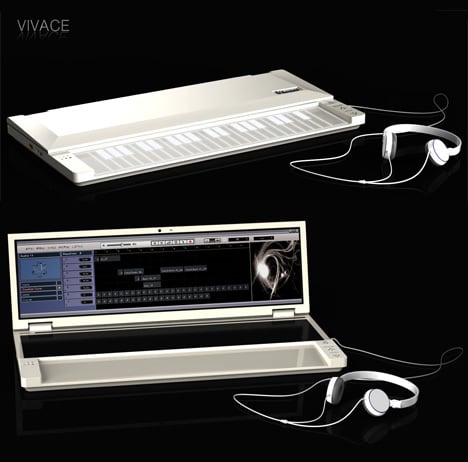
Vivace is a solution that looks to be more integrated than anything I have seen before. Designed by Young-Shin Lee and Hae-Jin Jung, it looks something like a musical laptop: a slimline device that offers a touch-sensitive musical keyboard and fold-out touchscreen display. Vivace is a concept product at the moment and ‘specs’ are thin on the ground, but you can clearly see octave up/down buttons to the right of the keyboard, and we can only assume that audio I/O is built-in.
Designers: Young-Shin Lee & Hae-Jin Jung
Studio One may change the rules of the game
Introducing Studio One – The Future of Music Production is Here. a groundbreaking music creation and production application for Mac OS X and Windows XP/Vista that makes audio recording, MIDI sequencing, and audio mastering ridiculously simple right out of the box, yet provides a wealth of professional features.
Fresh code, innovative drag-and-drop MIDI mapping and plug-in management, auto-configuration with PreSonus hardware, insanely good audio, unlimited tracks and plug-ins per track, and a powerful, inventive Start page that literally puts the whole project right in your hands are just a few of the compelling features that make Studio One the next generation in audio software. Far from just another music-production program, Studio One changes the rules of the game, giving you a complete solution from raw tracks to finished master, while supporting the latest standards and technologies.
Studio One is based on a cutting-edge audio engine that delivers unparalleled sound and automatically switches between 32-bit and 64-bit floating-point processing on the fly (even with a 32-bit OS), ensuring the highest quality audio at all times. It is compatible with any ASIO-, Windows Audio-, or CoreAudio-compliant audio interface, including, of course, the entire line of PreSonus interfaces.
[youtube=http://www.youtube.com/watch?v=nIxV-BsqdyY]
Features:
- Elegant single-window work environment
- Powerful drag-and-drop functionality
- Unlimited audio tracks, MIDI tracks, virtual instruments, buses, and FX channels
- Content browser with convenient sort options and preview player
- Integrated mastering solution with automatic mix updating, waveform editing, effects, Red Book CD burning, and digital release
- Automatic delay compensation
- Advanced automation
- 64-bit processing (even on 32-bit machines)
- Easy-to-use sidechain routing
- Awe-inspiring 64-bit effects suite
- Stunning virtual instruments
- User-friendly sampler
- Most intuitive MIDI-mapping system available
- Real-time audio timestretching and resampling
- AU, VST2, VST3, and ReWire support
- K System metering
- Gigabytes of inspiring content
- Compatible with any ASIO-, Windows Audio-,or Core Audio-compliant audio interface
For music nerds only: DotCom 960 & Kaoss 3
[youtube=http://www.youtube.com/watch?v=pNX6uyCO1EU&eurl=http://matrixsynth.blogspot.com/&feature=player_embedded]
Samples on the KP3 pad from the Synthesizers.com Q960 analog sequencer. Showing using Cubase as the MIDI timing and real-time looping into the KP3.
Cheers
Still in doubt if you should buy the KORG Nanokeys?
Then watch these videos by Jordan Rudess. The Nanokeys are really doing the trick if you’re an on the road musician.
[youtube=http://www.youtube.com/watch?v=oTr42NuUT7k&eurl=http://newecho.typepad.com/blog/&feature=player_embedded]
[youtube=http://www.youtube.com/watch?v=GEpOrx12aDc&eurl=http://newecho.typepad.com/blog/&feature=player_embedded]
Still in doubt?
Here’s what KORG writes about them:
These USB-powered, slim-line controllers are designed to make the most of your valuable studio space, and are small enough to take with you on any musical journey. Place one in front of your laptop, rest one on your workstation, park one on a recording console – or anywhere else you need versatile control over your DAW, virtual instrument, effect or DJ software. Small in size, all three controllers go HUGE when it comes to functionality, yet their intuitive layouts provide extremely easy operation for any user.
So c’mon; meet the nanos! The nanoKEY features a great-feeling 25-key velocity-sensitive keyboard that’s ideal for song production. Each key can also be set to send MIDI control data, further expanding its power. Next up is the nanoPAD, featuring 12 highly responsive trigger pads, each capable of sending up to eight notes – or eight MIDI control messages – simultaneously, in addition to an X-Y touchpad with roll and flam functions for realistic drum programming. Last but not least, nanoKONTROL offers nine faders, nine knobs, 18 switches, plus a full transport section for expansive control; even a flexible note input mode to help you lay down your next big groove!
AudioMulch 2.0 Revealed

AudioMulch 2.0 is not just a new version, it is the next generation of AudioMulch. It will provide a foundation for a new cycle of feature development and improvements that will be rolled out in regular updates after the 2.0 release. AudioMulch has long been a cult favorite for people wanting to patch together unusual sonic tools and performance rigs. That puts it in a category with apps like Reaktor or Max/MSP, but unlike those tools, AudioMulch has a lot of stuff built for you already.
New in version 2.0:
- An all-new UI, built from the ground up, with drag-and-drop patching and faster MIDI control and parameter access
- Gray is out; black is in.
- Dockable windows stretch across multiple screens.
- Up to 2X performance efficiency increase
- Patchable MIDI routing, finally – so MIDI matches up with the power of audio in the first version
- Metasurface, tempo, and transport can now be controlled by MIDI and automated
- Complex time signature support, automated time signature changes, additive meters
- Improved support for consumer multichannel audio (see note below)
- Startup enabling of audio, MIDI, networking
DIY, the 8-step GorF step sequencer
This is a demo of the GorF, a minimal step MIDI sequencer that offers analog-style sequencing.
It sends MIDI notes and velocity on a user selectable MIDI channel, along with two MIDI CC’s (user selectable. the GorF offers variable sequence length. You can also turn steps on an off using the buttons, though this is not demo’d.
The sound is coming from the MonowaveII sound skin.
[youtube=http://www.youtube.com/watch?v=qHdpEM4l3Xg&eurl=http://createdigitalmusic.com/&feature=player_embedded]
With four sequences with parameters, steps with pitch, gate, and Control Change, sequencing controls, legato mode, and the planned ability to both send and receive clock, this is one useful-looking device. And from the video above, it looks like it’s progressing really nicely.
Don't want to create your own patches – Check out L'il Poly-Ana
 L’il Poly-Ana 1.14 |
 |
L’il Poly-Ana offers all the same sound features as her big sister, all we’ve done is remove most of the voice editing controls to make her a preset player only. We have however left in all performance related controls, allowing you to customize your patches to your desired playing style. And we’ve also included the most popular controls for live sound tweaking, the filter cutoff and resonance controls. All fully automatable and MIDI CC controllable, just like with “big” Poly.
There’s also been an evaluation reset for both products, so even if you’ve tried them before, you can download and try them again. We offer a free, fully functional evaluation peroid for the first week, so go ahead and try them out, save and recall your work, sample the sounds, even make hit records with them — we don’t care! The 7 day free evaluation period is there for you to enjoy actually using our products in real-life production scenarios. We feel you should be able to “Try B4 Buy”, and we believe our products truly sell themselves. Our fully functional demos are there to prove it, so try ’em out!
L’il Poly-Ana contains all of the sound features and capabilities of Poly-Ana. What makes it L’il, however, is the restriction on your ability to design new patches. It almost works on the honor system, however, as Admiral Quality decided to leave in every performance control and the entire simulation control section which includes Quality (CPU), Saturator and the new Analog Drift Feature. What’s more, Admiral Quality left in the cutoff and resonance controls for both filters for live usage. L’il Poly-Ana is only available as a VST instrument. The full version includes an effect version of the plugin.
The intended L’il Poly-Ana customer is someone who does not want to create their own patches, possibly someone just beginning a venture into computer sound. However, even Poly-Ana users might find L’il Poly-Ana useful for recalling patches and saving screen space. That should be good news for Poly-Ana users because if you’re one of them, you get L’il Poly-Ana for free.
Finally I can buy the KORG NanoSeries…
….they are finally launched in black
Well joke aside I have tried these for some time now and I believe for the frequent flyer musician they are a must have. NanoKontrol looks great, with a good number of knobs, buttons and sliders, useful (if rubbery) transport controls. It’s hard to overstate how cheap and plasticky these things are. The faders are tiny and toy-like, the cases would need to be taped down to stop them moving across the table.

KORG NANO CONTROLLERS
nanoKEY Slim-Line USB Keyboard
nanoPAD Slim-Line USB Controller
nanoKONTROL Slim-Line USB Controller
The nano Series from Korg – Serious Music Production in a Seriously Small Space
Meet the most compact family of USB-MIDI controllers ever! Introducing the new Korg nano Series USB powered slim-line controllers – so small you can put them on your workstation, in front of your laptop, on a recording console or anywhere else you need versatile control over your DAW, virtual instrument/effect or DJ software.
Three Flavors to Satisfy Your Creative Palette
Despite their small size, all three controllers go HUGE when it comes to functionality, yet their intuitive layouts provide extremely easy operation for any user. The nanoKEY features a great-feeling 25-key velocity-sensitive keyboard that’s ideal for song production. The keys can also be set to send MIDI control data, further expanding its power. The nanoPAD features 12 highly responsive trigger pads, also capable of sending both notes and MIDI control data, plus an X-Y pad with roll and flam functions giving you a unique interface for realistic drum programming. The nanoKONTROL offers nine faders, nine knobs and 18 switches plus a full transport section for expansive control; plus it features a note input mode to help you lay down your next big groove!

Also available in black later this year
What’s a Controller Without Software?
Even if the Korg nano Series controllers are your first foray into MIDI control, you can rest assured that you’ll be able to get connected to software quickly. As an added value, the nanoKEY includes a download code for the full version of Korg’s M1Le, which faithfully recreates the legendary Korg M1 workstation. Plus, an upgrade path will let you graduate to the Legacy DIGITAL EDITION software suite, which has an even more expansive version of the M1, the renowned WaveStation and 19 great MDEX effects. The nanoPAD comes complete with a download code for Toontrack’s EZDrummer Lite, offering super-realistic, highly responsive drums in a convenient plug in, plus you can upgrade to the full version of EZDrummer for a special price. The nanoKONTROL includes a discount coupon for Ableton Live LE software. What’s more; a free downloadable Editor/Librarian will help you create setups to suit your specific control needs in all three models.
New version of Reaper available
REAPER Latest Version
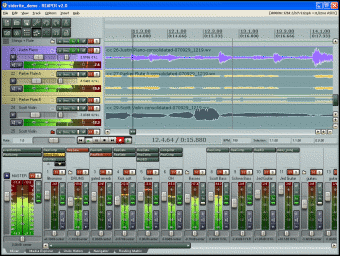
before spending big bucks on a software package (or worse, pirating it), try Reaper – it’s fully operational straight away and you’re free to demo it for as long as you want, has features enough to rival a lot of commercial packages and only costs $40 if you decide to support it at some point by registering it.
| REAPER v2.51 – September 26, 2008 Download: 3.4 MB installer
|
DATAMASKIN

