
FL SynthMaker | Creating Effects
Get the projects here – http://forum.image-line.com/viewtopic.php?p=682966#p682966
More info here – http://www.image-line.com/documents/synthmaker.html
FL SynthMaker is an audio programming application that is used to create virtual instruments, effects & controller plugins without the need to write programming code. The plugins you create in SynthMaker can be used in FL Studio in ‘FL Studio native’ format and projects can be shared with other SynthMaker users.
SynthMaker Manual – http://www.image-line.com/support/FLHelp/html/SynthMakerUserGuide.pdf
FL SynthMaker Manual Supplement – http://www.image-line.com/support/FLHelp/html/FLSynthMaker.pdf
MTribe (MIDI editor and control surface for the Korg Monotribe)
Background details:
Editor and Control Surface for the Korg Monotribe.
MTribe is available at: http://www.fabriziopoce.com/MTribe.html
Requires a MIDI mod (such as http://amazingmachines.com.br/store.html or any similar midi mod)
Feature list:
– MIDI IN/OUT for all MIDI supported features in a practical GUI.
– New: Presets (load/save for storing and recalling presets!)
– New: Key Tracking. In real time pitch modulates LFO intensity / VCF cutoff.
– New: LFO as second oscillator, auto tuned based on harmonics schemes.
– New: Glide emulation and finer pitch bending (more precisely than raw MIDI)
– New: XY Pad for two parameters at once (with reset and spring mode)
– New: (optional) note off removal (to remove gate clicks) and velocity off/on.
– Moreover: simple, but useful, presets editing (copy, paste and name preset)
– Moreover: preset randomizer for each section (VCA, LFO, modulation, glide)
– Supports MIDI learn for the GUI through extra MIDI input (standalone).
– Supports Ableton Live MIDI learn and envelopes in the Max for Live version
– Integration: if you do not use Ableton Live / Max for Live, you can still integrate the MTribe standalone with your DAW using MIDI (IAC bus on Mac / MIDI Yoke on Windows)
Notes: standalone does not requires any additional software to run.
Only Ableton Live device version requires Max for Live.
News: the additional devices used in this video (StepSequencer64 and PatDrummer) are now available at http://www.fabriziopoce.com/download.html
Ghost Machine – new multipart algorithmic composing machine
HG Fortune has released Ghost Machine – a multipart algorithmic composing machine for Windows.
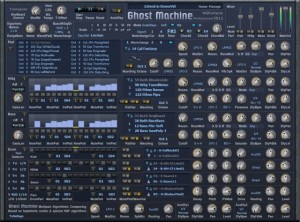
Ghost Machine features:
- a Pad part with Long Wave Sequencing
- a HiSq part with a 16 step sequencer and customizable note pattern
- a bass part with a 16 step sequencer and customizable note pattern, and
- a drum part with 4 instruments parts each with a 16 step sequencer.
Here’s what they have to say about Ghost Machine:
These 16 step sequencers are pattern driven which are changing due to an internal algorithm to create music. In AutoPlay mode you can let the machine do all the composing work for you, or you can transpose manually at realtime to change the current rootnote. As the system is based on scales (97 heptatonic) you need not worry about getting some ‘wrong’ notes in between. For a more advanced usage i.e. not just playback of a patch, it is recommended to fade in/out and/or mute a part at realtime, or, even more, ‘hold’ some pattern for a certain time in disabling algorithmic pattern change. In fact the spirit of this machine is more about flowing pattern changes and arranging a track or performance at realtime.
There are three different sequencers driving one the other. The main sequencer with 16 beats drives HiSq, Bass and Drum part, and after several loops triggers the Note Sequencer to change the root note which then triggers the third sequencer to advance the count for the Wave Sequencer at the Pad part til its end count is reached to change to next wave. The step count at the Note Sequnecer for the root note is also incremented, and the one at the Wave Sequencer respectively, if transposed manually via MIDI keyboard. Thus the algorithmic system does work in manual transpose mode too. Along with the fairly slow progressing of Note and Wave Sequencer certain algorithmic rules have been applied to change pattern and waves at the HiSq, Bass and Drum part.
GhostMachine Pro Suite is available now for 49 Euro til June., 21st. After that, it will be priced at 79 Euro. See the HG Fortune site for details.
Acoustica has announced the release of Mixcraft 6
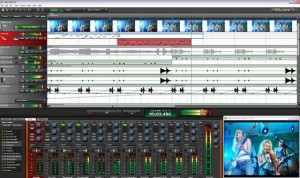
Acoustica has announced the release of Mixcraft 6, the latest version of the powerful music production and multi-track recording workstation that comes packed with thousands of music loops and dozens of audio effects and virtual instruments.
Mixcraft enables you to record audio, arrange loops, remix tracks, compose with MIDI and virtual instruments, add effects, score and edit video, and mix and master your tracks to create polished, professional compositions.
Mixcraft is your music production dream come true, instantly turning your computer into a fully-stocked professional recording studio.
New in Mixcraft 6
- New interface & artwork.
- Over 6,000 loops in version 6.
- Major improvements to MIDI editing, piano roll.
- Submix tracks for grouping tracks together.
- Multiple lanes for tracks (including multiple MIDI channels).
- Improvements to loop library including loop importing & search.
- Loop recording mode with multiple takes.
- Video transitions, automation, text & titles, still image importing.
- Built-in guitar tuner on every audio track.
- New virtual instruments (ComboV & ComboF organs, Acoustica Studio Drums).
- Improved quantize and other new MIDI Editing tools.
- Reverse audio clip feature.
- Drum maps in the piano roll interface.
- Control surface support for transport & plug-in controls.
- Support for VSTs with multiple outputs.
- ReWire support.
- Output busses.
- Route MIDI track data to audio plug-ins.
- Live automation recording.
- Option to mix down all individual tracks for exporting project to another DAW.
- Insert/Remove time from project.
- Ability to draw selection in the time-line (to select data in all tracks).
- Improved time signature support.
- Effect chain presets.
- Phase reverse option on audio clips.
- Faders & meters now logarithmic when in dB mode, MX6 now defaults to dB mode.
- New project folder helps to keep your recordings organized.
- Backup file created every time a project is saved.
- Auto-rewind to playback start preference added (on by default).
- Ability to arm MIDI tracks for a specific MIDI device.
Mixcraft for Windows is available to purchase for $74.95 USD.
Noatikl 2 – desktop generative music software
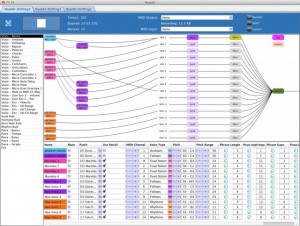
Intermorphic has introduced Noatikl 2, the latest version of their desktop generative music software for Mac & Windows.
It’s currently available, in beta stage. Here’s what’s new…..
Noatikl 2 Features:
- Integrated Partikl multi-synth & modular synth/fx network
- Built-in support for the the advanced Partikl MIDI, sound & FX multi-synth for sound generation as previously featured in Mixtikl
- Full MIDI output support still retained; Partikl output is optional (but enabled by default)
- Partikl? checkbox in transport panel makes it a snap to enable/disable Partikl output
- Makes it easy for new Noatikl users to get going without any preparation of hooking-up to separate synthesizers; Noatikl makes sounds right out of the box!
- MIDI output from Noatikl is now optional – no need to configure Noatikl with MIDI devices!
- Plug-ins: Noatikl generates both optional Partikl audio data (new!) and MIDI data (1.x)
- The complete set of synth/effects presets as featured in Mixtikl
- Supports built-in custom sample wavetable (DLS1/Ogg/Wav based) (dialogs not available Mixtikl)
- By default, now saves to .partikl format, which includes all noatikl rule data and associated partikl sound data
- New main Noatikl Network editor view
- Shows both Noatikl Voice networks and Partikl Synth/Effects network
- Drag Voice to MIDI Channel (or vice-versa) for easy MIDI channel mapping
- Drag Voice to Voice for easy Follow/Repeat voice networks
- Tap synth/effects boxes to pop-up built-in Partikl FX/Synth network/unit and sample editors
- Supports built-in custom sample wavetable (DLS1/Ogg/Wav based)
- Improved transport panel
- Templates from Mixtikl now built-in
- BellsMetalsArps
- Dronemaker1
- Gen Drums 1 MIDI (previously sold as an add-on for Noatikl at $6.99)
- Gen Drums 1 Owt
- Gen Drums 2 MIDI (previously sold as an add-on for Noatikl at $6.99)
- Gen Drums 2 Owt
- Gen Elements 1 MIDI (previously sold as an add-on for Noatikl at $6.99)
- Gen Elements 1 Synth
- GenMix1
- GenMix2
- GenMix3
- GenMix4
- GenMix5
- GenMix6
- GenMix7
- Noatikl Seed
- LoopBeats 1
- LoopBeats 2
- ZZZ_rests
- Built-in support for playing partikl:// and noatikl:// URLs
- Share your Noatikl compositions via Twitter!
- Export your Noatikl compositions as “mixtikls” so Mixtikl / Mixtikl Free users can hear them!
- New Menu options:
- Export -> Export With Partikl Sounds
- Export -> Export as Mixtikl Mix (share your Noatikl compositions with Mixtikl users – even those with Mixtikl Free!)
- Export -> Export Noatikl Rules
- Export -> Save As Noatikl Rules
- Tools -> Show Folders -> Noatikl MIDI Recordings
- Tools -> Show Folders -> ~/Library/Noatikl (Mac only!)
- Tools -> Show Folders -> Noatikl data folder
- Tools -> Show Folders -> Partikl TG
- Tools -> Show Folders -> Partikl FX
- Options -> Devices -> Output
- Options -> Devices -> Input
- Help -> Other IM Creativity Tools -> Mixtikl / Liptikl
- Minor changes
- Replaced the Pattern Editor dialog “Default” button with a “Presets” button, matching all various options in Mixtikl’s drill-down Noatikl editor. This makes it *far* faster to get going with patterns.
- Mac: by default use ~/Library/Noatikl, rather than ~/Documents/intermorphic/noatikl
- Renamed various items in the Noatikl object/parameter group side-bar
- If you try closing when a modified file is mid-edit, you’re prompted first to save or close the file.
- Various bug fixes
Cakewalk: Blog Bytes; Building Custom Cost Effective Acoustic Treatment
Cakewalk’s Artist Relations Manager Jimmy Landry demonstrates how he built low-cost acoustic treatment for his music studio.
Tabletop Updates (HD)
A quick peek at auto-routing, and gesture tweaks
The heart of Tabletop is a modular environment where you can mix and match different devices. Select from over 20 devices including samplers, mixers, effects, sequencers and more. Buy only the gear you need from an expanding catalog.

Tabletop is the first musical environment designed from the ground up exclusively for the iPad. Each device has its own uses, characteristics, personality—ranging from classics like drum pad samplers to touchscreen effects.
- 27 unique devices
- Over 500 sounds (multisample instruments, loops, phrases)
- Record sequences, arrange into songs
- Adjustable quantization (pre- and post-record)
- Recordable parameter automation
- Overdub and replace record modes
- Trigger sequences and patterns live
- Multitouch instruments and devices
- Sampling (internal mic, line in)
- Adjustable tempo with optional swing
- Import your own sound library, save presets
- Support for imported .mid phrases
- Insert and send/return (master) effects
- Undo history
- 44Khz, studio-quality audio
- Share recordings directly to SoundCloud
- Sync 2 iPads running Tabletop or other apps with WIST
- Import sounds from dozens of apps with AudioPaste
- … and much more! See the full feature list
Sequoia 12 DAW for Broadcast, Mastering, Audio Post & Music Production
MAGIX, the German software developer who also created Samplitude, launched the new Sequoia 12 DAW this week.
Sequoia 12 significantly updates a strong player in the DAW sector. While Sequoia has long been known as a mastering, broadcast and audio post Digital Audio Workstation, it is also integral to the workflows of music producers, journalists, sound editors, and audio engineers of all stripes.
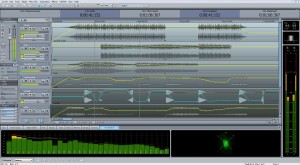
According to MAGIX, flexibility levels in Sequoia 12 has ramped up considerably, owing to significant updates for metering, support of all current broadcast standards and their new “docking” concept, which allows users to adjust the interface with simple drag & drop control. The Independence Sampler Workstation, with over 70 GB of content, has also been integrated into Sequoia 12 to accelerate music production.
Visitors to Musikmesse will be able to get a first look live and in person at Sequoia 12, which is shipping for 2500 Euro, or $3,297.75 at today’s exchange rates. Owners of previous versions will be able to upgrade.
Here’s how MAGIX describes the latest updates to their high-end DAW:
“Whether in the recording or broadcast studio, at live concerts, or on location for a special live report, Sequoia 12 is the perfect tool for any situation that demands professional audio production. From recording to editing and on through to mastering and authoring, Sequoia 12 offers a seamless workflow that gets the job done better and faster. This comprehensive, high-definition DAW is now available from MAGIX for €2500.00 (taxes not included) and great deals on upgrades are available for owners of previous versions.
Visitors to the MAGIX stand (Hall 5.1, C79) can get a first look at Sequoia 12 at the Frankfurt Musikmesse from March 21 to March 24.
Cutting edge technology combined with seamless workflows: The new features in Sequoia 12
Time is of the essence when audio engineers are working on a broadcast or putting the finishing touches on a production in the mastering studio. Everything has to fit together perfectly and every step in the workflow is crucial to meeting tight deadlines. But there is also no room to cut corners and it is vitally important that the latest technology and standards are applied to ensure a professional production. The developers of Sequoia 12 kept all of this in mind while designing the new features and making the comprehensive improvements that make this version of Sequoia even more flexible and efficient than its predecessors.
Loudness Metering according to the EBU recommendation R 128 is an important part of the latest version which supports the transition from peak-based measurements to loudness-based measurements for radio and television. The meter’s display has also been redesigned and offers various visualization layouts and presets for common broadcast standards.
Visitors to Musikmesse can get the first look at Sequoia 12.
The new docking concept allows the user to adjust the interface with simple drag & drop control. Whether for broadcasting, mastering or audio post-production, the layout can easily be rearranged for any type of workflow.
An important aspect of any efficient workflow is speed, and that is where the new macro functionality comes into play. Commonly recurring processes can be saved and activated quickly using shortcuts.
Another helpful feature is track-level spectral editing which can quickly deal with the noise interference that occurs during live recording or multitrack recording. And even more special features have been added for complex spectral editing projects such as audio restoration.
Another great time-saver is the new auto ducking feature which is particularly useful for radio and speech broadcasting where background music can be faded in and out automatically according to audio cues.
In modern broadcasting it is important to be able to edit in realtime. With Sequoia 12, recordings can be exported during the broadcast and can be saved in a database where everyone involved can access them and remain informed about the current status of the project.
The new VCA groups make daily studio routines more efficient. Productions are now even easier to mix and finalize directly in the DAW thanks to the grouping of tracks through virtual VCAs (Voltage Controlled Amplifiers).
Getting the most from the hard drive is also crucial for maximum efficiency and is now possible with full 64-bit support.
The integration of the Independence Sampler Workstation into Sequoia 12 is a welcome addition for anyone working on music productions. Over 70 GB of content and hundreds of instruments make this sampler the ultimate production package for the creation of professional musical compositions.”
Time to update your studio?
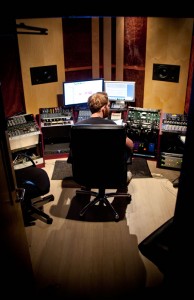
Every now and then – all of us who are in to music making in some shape or form gets that sudden urge either to by more equipment or just expand or re-arrange your studio setting.
Well if you feel that urge right now then we have got some inspiration for you – check out the pictures below and watch more photos on the linked website:


Introducing The One DJ software
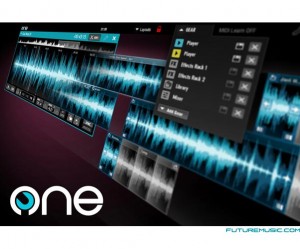
Audio Artery, aka EKS – the Finnish controller manufacturer, presents The One DJ software. The concern claims that The One is a new breed of DJ software that offers new level usability and features while staying close to the roots of DJing.
The One claims to allow “total customization of your working environment.” Choose the features you need and arrange it exactly the way you like. Everything you see on screen can be freely moved and resized.
The advanced Timeline Edit mode turns player decks into audio edit stations, in which you can chop or combine tracks or even create complete DJ mixes while the track is still playing. Just drag tracks, audio clips and samples to the timeline from the browser. Snap to grid functionality makes synchronization of clips fast and easy. The audio engine guarantees no stalling even when seeking or scratching simultaneously at minimal latencies.
The One’s modular audio routing system allows effects and mixers to be assigned to anywhere in the audio chain – meaning that effects can be placed between players and mixer, or used as master effects. The One is also designed to fully utilize the possibilities offered by DJ controllers via advanced midi mapping possibilities.
One Core edition featuring all the essential DJing elements is currently in beta testing stage and may be available this spring for the price of $59 / €49. A premium edition may be released later in 2012.
Via FM
DATAMASKIN

