
Brief introduction to the Audulus user interface
Audulus is a minimalist modular audio processing application. Design sound from first principles. With Audulus, you can build synthesizers, design new sounds, or process audio. All with low latency real-time processing suitable for live performance. Audulus’s user interface is clean, simple, and easy to learn, allowing you to focus on sound.
Features include:
* audio unit hosting – use your favorite plugins
* fluid interface – smooth animated interaction
* midi control – use your midi control surface or keyboard
* presets – quickly change between settings
* unlimited history – everything you do is stored
* polyphony – process multiple voices
* encapsulation – group nodes into sub-patches
* diverse nodes – from ADSR to ZeroCross
* audio unit version – run Audulus as an Audio Unit inside other apps (free download)
Neo Reference – new VST plug-in that combines dithering and noise shaping algorithms
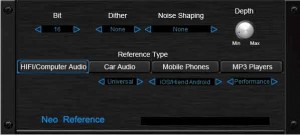
Neo Reference is a brand new tool for the final processing of digital music. It combines several of Sound Magic’s cutting edge dithering and noise shaping algorithms that will change the sound of your music and let you find the best timbre for your individual style. The company says that each dither and noise shape has its own unique timbre and that what you need to do is listen to them carefully and you find the one that works best for your sound.
“You can also use Neo Reference to show you what your music will sound like on different playback devices. This killer feature allows you to preview your music as it would sound in your car, iphones, on a boom box – or an audiophile system. By Using Sound Magic Award Winning Modeling Technology, Neo Reference uses different algorithms to emulate the Signal to Noise Ratio, Stereo Crosstalk and Frequency Response Curve of the several most commonly used playback devices. Evaluate the sound quality of your music on different playback devices. Hear what your music will sound like on HIFI devices, Computer Audio, Car Audio, Mobile Phones and MP3 players. Make your style of music explode on all of these devices, adjusting your sounds for optimal playback – without having to run out to your car with a CD that you just burned! Your music will sound better and more balanced on all of these devices, not just your monitors. You can even use it to make different versions of your music to better market to specific customer groups – which may lead to more music sales!”
Neo Reference is provided as a Windows VST or Add-on for Supreme Piano 2.
Features
- Internal 64-bit floating point precision
- 4 Types of Dithering with depth control
- 15 Sound Magic’s cutting edge noise shaping algorithms
- Accurate modeling on Signal to Noise Ratio, Stereo Crosstalk and Frequency Respond Curve of common used playback devices
- Can be combined use with Headphone Mix Version 3.0 for complete playback system emulation
Pricing and Availability:
€49.00
More information:
How to make your drums punchy – Reason Sound Design
More info on Reason: http://www.propellerheads.se/products/reason/
In this Reason Sound Design video Propellerhead product specialist James Bernard give you some tried and tested engineering tips to help get your drums punching through your mix. It may seem redundant at first. After all, drums are punchy by their very nature so why do we need to MAKE them punchy if they already ARE punchy. The simple answer is that when you layer other instruments on top and everything starts fighting for the same sonic frequency space, your drums can get lost in the process.
James will show you through proper EQ, compression, and parallel processing how you can lift your drums back out of the mix and have them punching through your song exactly as you hope for.
Making Music With Apps – MIDI / Audio Connections for iOS
More info below:
http://www.pointblankonline.net/courses/ableton-live-courses.php
In this tutorial Danny J Lewis breaks down the connection process when recording material from your music apps into your chosen DAW (in this case Ableton Live). He uses a camera connection kit to connect a MIDI keyboard to bring a traditional method of inputting note data, and a simple stereo mini jack to 2 x mono phono jack lead to connect the iPad to your audio interface.
Go to: http://www.pointblankonline.net/courses/ableton-live-courses.php to find out how you can learn more about using Ableton Live as a recording tool. Please get in touch with our course advisors at advice@pointblankonline.net if you want to find out more.
HyperTunes – new iOS music sequencer that frees composers from the multitrack timeline

Exploded Views Media has announced HyperTunes, a new iOS music sequencer app that frees composers from the multitrack timeline.
HyperTunes lets composers/songwriters express music directly in terms of musical structure, such as verse-chorus-bridge song forms. It also lets them collect and organize any number of musical patterns, song fragments, and songs within the app, all ready to “plug and play” in a new song with just a few touches.
Unlike other music studio software, in which songs are recorded and edited on a linear, multitrack timeline, HyperTunes represents song sections and instrument parts as discrete elements that can be readily navigated and reorganized even on a small screen, even one-handed. This structured approach helps users focus on the big picture as they compose – like trying out different variations of a song form – rather than getting bogged down in note-by-note tweaking on the timeline. Ready access to virtually all of one’s musical ideas and assets means new songs get off the ground quickly through the use of stock parts, and allows ideas not used in one project to be easily recycled in later projects, rather than getting lost and forgotten.
“I’ve owned lots of Digital Audio Workstations and hardware sequencers, and recently several mobile music studios too. They’re all fantastic for recording and mixing, but none of them let me try different song ideas as quickly and easily as I wanted,” explained Exploded Views Media founder James Mahoney. “I wanted to explore song variations with the same fluidity that I can explore melodies or chord progressions on a musical instrument.”
HyperTunes is designed to be as accessible to non-musicians and beginning composers as it is powerful for seasoned pros.
HyperTunes features
- Flexible creative process – Start from a song form and plug in instrument parts later, the way a painter might sketch out a piece before filling in the details. Or, work in a more exploratory manner, adding one new section at a time. Rearrange the entire song in one step, just by selecting a different song form from the extensive built-in menu, or by typing in your own custom form.
- Intelligent sequencing – Assign an instrument part to a section and HyperTunes automatically transposes it to fit; reorder sections and it automatically merges pickup notes to make the transitions seamless.
- Powerful analysis tool – Rapidly break up existing songs into their component sections, so that you can freely rearrange them, repurpose their parts in new songs, mash them up with other songs, or simply as way of learning from great songs.
- General MIDI format – Import original content and third party pattern libraries in General MIDI format. Export arrangements as General MIDI for performance, or for further production using other tools. More music formats are planned for future versions.
HyperTunes for iOS is available to purchase for $9.99 USD.
Korg MS-20 tutorial: External sound processing
Background data:
I have read some posts on forums how to process external sounds thru a Korg MS 20. Yes it is very easy but some forget that you have to trigger the envelope to hear the processed sound. This can be done manually by playing the keyboard or via CV/Gate.
I decided to make a short tutorial how to process external audio thru the MS-20 playing the keyboard live. This is the easiest way to start.
In this demo the Elka Synthex plays a string sound and is controlled by MIDI.
You can also use the MS-20 Trig Out in the External Signal Processor section to trigger the envelope. You need some patch cords to achieve this. I will cover this in “Korg MS-20 tutorial: External sound processing Part 2”.
How to remove unwanted frequencies using filters
“Even non music-makers are aware of filters and the effect they can have on the way music sounds. What you might not be so sure of, however, is what the different varieties of filter are and how they work.
If you fall into this camp – or if you simply want a quick refresher course – check out the video above.
You can download the audio files that the video refers to by clicking here.”
Introducing the All-Tube “Black Box” Mic Preamp
The Black Box Microphone Preamp was designed and built by Black Box Analog Design – established in 2009 by studio owners and audio engineers Eric Racy and Robert Wainscott. This tube pre has reportedly been “designed from the ground up, using the best parts and ignoring all of the standard ideas of how a preamp ‘should work’. The result is an incredibly versatile piece of gear that not only sounds amazing but shatters the idea of what a preamp can do.”
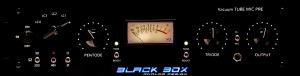
The all-tube Black Box mic pre (introductory price $1,995)
This tweak-friendly all-tube design features continuously variable triode and pentode stages, which puts the tonal character of the preamp in the user’s hands.
According to the product announcement:
“The Black Box enables users to uniquely shape their sound by implementing unconventional methods and such features as an entirely analog audio path, custom, hand wound Cinemag input and output transformers, hand soldered point-to-point wiring, independently controlled Pentode and Triode tube stages (as well as independent Pentode / Triode “Tone Boost” switches), 350v linear power supply and the ability to shape the frequency response without the use of an EQ.
For a complete list of specifications, click here.
Said Wainscott: “I approached the design of the Black Box Microphone Preamp in the same manner I would set up for a mix session. I mixed a single tube with everything plugged into a ‘patchbay’ and all the values that shape how the tube works were fluid. Everything from plate voltage to blocking capacitors could be changed in real time, which afforded me the room to perfect the Mic Pre’s design, resulting in the unit we have today.”
The Black Box Mic Pre (MSRP $2,500) is now available through Vintage King Audio at an introductory MAP price of $1,995.
For more information, visit www.blackboxanalog.com.
Resonance Sound releases Sounds of Revolution – Clicks & FX Vol.1
Resonance Sound has announced the release of Clicks & FX Vol.1, a new micro series package by Sounds of Revolution.
“You know the story: Your next track is almost ready and you`re searching for that one sample to throw your mix into new dimensions to get the crowds pumping, but your current library of sounds lack enthusiasm?! This is where this sample pack comes into play! Clicks & FX Vol. 1 will spice up any electronic music production instantly and effortlessly. Being part of SOR`s Micro Series, this selection of contemporary elements delivers loops and single sounds that will enhance your production instantly while matching seamlessly. Add sounds like trendy clicks or exceptional FX-samples to sharpen up your tracks and make them more inspiring.”
All 75 click-loops have been produced at 127 BPM and Resonance Sound says that, with 354 loop elements (fragments, ready to be effectively triggered from your sampler to create animated effects) and FX-sounds, Clicks & FX Vol. 1 makes the ideal solution for up-to date Minimal, Techno and Tech House tracks.
Formats: 235 MB (599 files) sample pack, 24-bit Wavs (180 MB/504 files), REX Loops (Stylus RMX ready), EXS24 und Kontakt 4 Patches.
Pricing and Availability:
13.36 Euro + VAT
More information:
New concept for level independent dynamic processing
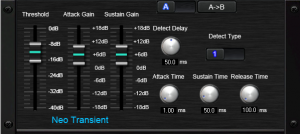
Sound Magic has introduced Neo Transient:
Unlike common compressors and limiters, Neo Transient reacts on Transients – those short peaks in the audio signal – rather than the overall signal loudness level. In this way, Neo Transient creates an entirely new way to process your tracks.
Neo Transient allows you to completely reshape the attack and sustain characteristics of a sound. You can shorten or lengthen the attack of all kinds of percussive signals, such as the bass drum, snare drums, toms, congas and so on, to give them more impact, change them to a punchier sound. Or go the other direction and make those sounds gentler than before.By boosting the attack period of a sound, such as a bass drum, the mix can be made to sound more transparent. Instruments can be mixed at lower volume while still maintaining their positions in the mix without costing needed headroom. By boosting the sustain stage of the sound, you can emphasize the ambiences and reverb-tails of the sound.
Neo Transient offers two entirely different sets of detection algorithms.These two algorithms have different sounds and will provide you more choices on the final sound it shapes. Parametric controls in Neo Transient are arranged in a easy to understand, musical manner. Neo Transient is a “must have” for processing your percussive signals while recording, mixing or mastering.
Features:
- Two Innovative algorithms, One for level independent dynamic processing , One for peak dependent processing.
- Parametric controls are arranged in a easy to understand, musical manner.
- Adjustable Delay for look forward processing
- Built-in A/B Compare function enables you to compare different settings
- Up to 32Bit/384KHz resolution
Neo Transient is available now for €49.00.
DATAMASKIN

