
Korg iKaossilator: First Look and Review
Ean Golden reviews the Korg iKaossilator app for iPads and iPhones. It’s the normal Kaossilator, but cheaper and on your iOS device!
Learn more at http://www.djtechtools.com/2011/10/18/ikaossilator-for-ip…
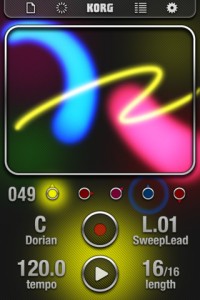
iKaossilator for iPhone Highlights :
● Play sounds by simply stroking, tapping, or rubbing the screen with your finger
● Bold Visual Effects move along with your performance and add excitement
● 150 diverse built-in sounds cover any style of dance music
● Scale/Key settings allow anyone to perform with musical precision
● Easily create tracks with the loop sequencer using up to five parts
● Control loops in real time for DJ-Style live performances
● WIST capability allows wireless sync-start with other apps such as the iELECTRIBE
☐ Perform Using A Single Finger
iKaossilator uses the unique X-Y interface made famous by Korg’s entire Kaoss Line, including the original hand-held KAOSSILATOR. Create melodies and phrases simply by stroking, tapping, or rubbing the touch screen with your finger; no musical knowledge is required.
☐ Bright, Colorful Visual Effects
iKaossilator is also focused on its graphic design, which shows up beautifully on the iPhone’s high-quality display. The visual effects on the iPhone’s display move along with your performance and add excitement. These bold, colorful graphics provide an exciting performance experience.
☐ 150 Diverse Sounds Covering Many Musical Styles
Use the 150 built-in sounds to perform and produce a broad range of dance music styles including hip-hop, house, techno, dubstep, nu-disco, and electro. Enjoy the synth leads and synth bass sounds you expect from a synthesizer, as well as acoustic sounds that simulate piano or guitar chords, even the popular sound effects used by DJs. The drum sounds let you play and manipulate various patterns simply by moving your finger.
☐ Loop Sequencer
The built-in loop sequencer lets you layer up to five musical parts. To create a track, simply assign a loop such as synth, bass, chords, sound effects, or drums to each part. Fifty loops created by professional musicians are built-in to help you get started quickly. In addition to its track-making capabilities, this loop sequencer is also a great feature for live performance. The Mix Play feature makes it easy to enjoy live remixing; you can switch seamlessly to another loop or extract a specific part from another loop while the playback continues.
Full review of Moog’s ANIMOOG by Mark Jenkins
ANIMOOG the first polyphonic synth software app by Moog reviewed in detail by Mark Jenkins, author of “Analog Synthesizers: Understanding, Performing, Buying – from the Legacy of Moog to Software Synthesis”.
Mark performs using Animoog and other iPad apps at the BIRMINGHAM THINK TANK SCIENCE MUSEUM PLANETARIUM (UK) on Saturday November 26th 2011, tickets on sale now, and on the EAST COAST USA in March 2012. www.markjenkins.co
Btw, here’s one more 
Moog released Animoog today as their first synthesizer on the iPad and I absolutely love it!
This video gives a brief overview of the Animoog’s features and also shows how expressive it is when played with an Eigenharp Pico over MIDI using poly-pressure.
The Eigenharp and Animoog seems like a match made in heaven since the Eigenharp is able to send three independent detailed per-note performance data streams and the Animoog is able to react to this on a per-note level. Also, the visualization of the sound on the Animoog is marvelous, it gives a great representation of what your sound is doing.
The iPad is hooked up to my MacBook Pro using USB MIDI from the Alesis iODock, the Eigenharp Pico is also hooked up to the laptop and sends MIDI from the EigenD application to the ‘dock’ MIDI port. This uses a small MIDI-only Eigenharp Pico setup that loads very quickly and provides 16 MIDI playing keys with poly-pressure and three independent data streams for each key (pressure, left/right, up/down), as well as two 3D controller keys that are somewhat similar to little joysticks and are sending each three independent streams of MIDI CC data also.
Arturia Jupiter 8V review
The original Jupiter 8 was an 8 voice polyphonic analog subtractive synthesizer released by Roland in 1981 responsible many classic 80’s tracks. Arturia have had a crack at recreating this iconic synth in plugin format. I was going to playing some samples but wanted to get you a bit closer so we are going to quickly walk through the original interface and the extras goodies Arturia have added. Sorry there aren’t more audio examples but this episode is already way too long!
Disclaimer: This is no way a complete walk through, please dont get upset because I missed out X function. I know I missed out X function.
Interested to hear what you guys prefer in a review a walk through like this, or more audio examples & over view approach?
Source:
thedspproject.com/arturia-jupiter-8v-review
TABLE DRUM App Review – Makes ANY objects (or your voice) into drums!
“Makes ANY objects (or your voice) into drums! This IS as fun as it looks. The programmer has granted permission for this video. ”
TableDrum is the Augmented Audio application that allows you to sync the sound of any real object and trigger a real time response of high quality drum sounds. You can now build your own drumset from practically anything. Drum applications where users tap the screen are things of the past. This is the future! Take it to the streets, show your kitchen table who’s the boss or simply let your stuff feel the rhythm. With the TableDrum application the world is now your virtual drum set. You can sync the sound of basically any real object to your iPhone, iPad or iPod Touch and link it to high quality drum samples of your choice. Included in the app is the Classic Rock kit with 8 high quality drum samples. By expanding your sound library with the Ethno & Jazz kit and Electro and Glitch kit you can get access to another 32 high quality sounds to play with.
Some things to get started
Gear up with a couple of pencils and some office supplies, each one with unique acoustic characteristics, to drum on!
Use headphones for best result.
To link a drum to a real physical object
1. Hold down a drum pad until it starts glowing.
2. Release and tap a real physical object several times (4-8) while the light fills the circle.
3. When the linking process is done, the rim of the pad will glow.
The app recognizes sound, so for the app to work at its best, the sounds you link should be different and distinguished. While you are playing, hit the object the same way as when you linked it.
Teenage Engineering’s OP-1 – Full Review
Here’s a nice review of the OP-1:
Firstly, you’ll be surprised at how well built this is – CNC machined case (think unibody) massively over specified buttons and four, rotary encoders (industrial grade avionics quality) and a gorgeous AMOLED 360×120 LCD display.
The 24-key keyboard is just switches (think well built nanoKey) and does not transmit velocity, but the synth will respond to it via MIDI over USB. A tiny but surprisingly loud built-in speaker as well as stereo output, built in mic and line in complete the connections. The unit is battery powered, with up 16hrs from this non user removable Li-ion cell. Charging is handled via USB.What Is It?
So the Teenage Engineering OP-1 (Operator 1) is a synth wirth up to 6 voices, with eight synthesis engines which can played one at a time – its monotimbral.
Synth Engines:Cluster – Multi layered oscillator cluster
Digital – True digital synthesis
String – Waveguide String Model
Pulse – Dual Pulsetrain Oscillator
FM – Four operator FM synthesis
Phase – Phase Distortion
Dr Wave – Frequency Domain Synthesis
Synthesizer Sampler Engine – Teenage Sample PlayerEach engine has a single VCA envelope ADSR, single effect and an LFO for routing and modulation – sources include – LFO, FM radio – yes there is one built in, and G sensor – that’s gravity – shake it and modulate baby.
Review: Rhythm Studio for iOS + a sneak peak at their new drum machine
Rhythm Studio is an analog synthesizer studio for iOS
About:
Rhythm Studio balances advanced music making features by using an easy to understand interface resembling real instruments. This means that one button does one thing just like it would with real hardware. Knobs turn, switches slide, and buttons press. You won’t get lost in abstract interfaces, menus, or design.
Imagine having a studio of rare vintage synths and drum machines in the palm of your hand. Beautifully rendered synthesizers make seeing the app as enjoyable as hearing it. Rhythm Studio is the next best thing to having the real hardware.
Rhythm Studio allows you to make music the way you want to by giving you three different ways to create your song.
1. Use the step sequencer like the real hardware.
2. Use the Control Pad to play the synths live.
3. Instantly create a random pattern.
====================
FEATURES
– Dynamic workspace full of awesome audio gear
– Intuitive pinch, double tap navigation
– Robust pattern and song sequencer
– 3 easy methods to making your songs
– Recreation of a classic drum machine
– Recreation of classic synthesizers
– Mixer
– FX
– X/Y style control pad
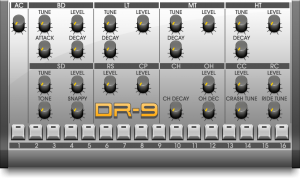
Sneak peak at the DR-9 Drum machine:
Polyoptics: FantasticleWorld – Teenage Engineering Op-1
Tiny OP-1 review (kind of):
The Op-1 arrived a couple of days ago, I wanted to experiment a lot more, but I ended up getting caught making a track straight off the bat. Great fun! The voice was sampled from the internal radio.
Goods:
Easily playable, intuitive, great interface, recording, looping, fm radio for sampling, super fun and addictive, amazing tech squeezed in (that’s why its so heavy I guess).
Not so good:
No midi clock sync, crashes a _TON_ when doing tape edits (although it boots back up with no loss, just takes time and funks up the workflow), faint but audible high pitch noises.
Verdict:
I love it!
Review of Synth-Werk – Going Kraftwerk all the way, or…
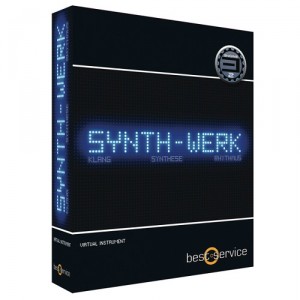
We have had the pleasure of reviewing the recently released sampler studio called Synth-Werk from Best Service, powered by Yellow Tools’ Engine 2. The product was originally released under the name Kraftworker based on the clear fact that with this sample library you get basically all possible sounds inspired by this legendary band.
Our first impression, browsing through this 7,7Gb large sound library, is impressive. Every possible sound we are trying to think of, coming out of the old studio in Düseeldorf, is there in one form or another, everything neatly packed into its respective catalogues; i.e. FX, Bass synths, Vocoders, Lead sounds etc. Although with a slight overweight, in our opinion, on the more recent sounds pertaining to Kraftwerk’s latest release – the “Tour de France soundtrack”. Which in no sense is bad, since a lot of those nice metallic echo based sounds used on that album will easily fit any modern electro, EBM, synth pop, trance type tune.
The favorite section is probably the one containing bass synths since they faithfully reproduce several of those unique and groovy synth bass lines that has made the sound of Kraftwerk so characteristic. This especially true, for several of the sounds using arpeggiator or other types of sequenced rhythms. Forest Kingdom is also something that sounded completely amazing to us. If you compare it with TITAN which we would assume is one of Best Service’s top selling products, and somewhat marketed as a “Kraftwerk-sounding product”, we can easily say that Synth-Werk takes you 10 miles deeper into the realms of the Kling Klang studio. One possible down side is the way all these samples have been named. They are more or less all, in each catalogue, branded as Bass 1, Bass 2, Bass 3 etc, making it very difficult to track which tunes you wanted and, thus, making the built in search function pretty useless.
Synth-Werk comes bundled with Engine 2, a sampler instrument developed in cooperation with Yellow Tools, a product that can either be used as a VST or stand-alone instrument. The use of Engine 2 is something that has generated a lot of debate on various forums (like KVR for example) – stating that they would prefer a more general wav library so that they can use any program they like, e.g. Kontakt, and that they do not need yet another VST or that it makes their systems slow. We loaded Engine 2 onto a MacBook Pro and can at least from a performance perspective say that Engine 2 was easy to install and ran smoothly all through the trial period.
Review: Up close with the KORG Monotribe
MONOTRIBE! Review Part A – Dub At First Sight! Electro, Dubstep, Reggae, etc.
“Now available in the US of A – Even better than I thought it would be. 😉 To demonstrate, I’m rockin’ the new KORG Monotribe – a machine both classic and new.”
Shared by VJFranzK
Review impOSCar2 and Hardware Controller
SonciState takes a closer look at the impOSCar2:
Gforce software release the new impOSCar2 software synthesizer while Touch Digital Controllers – release a hardware controller to match it. We check ’em both out..
DATAMASKIN

