
Geiger Counter – non-harmonic percussive sequencer for Kontakt
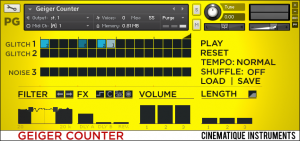
Cinematique Instruments has released Geiger Counter, a non-harmonic percussive sequencer based pattern generator module for Kontakt.
It is contrary to Cement a non-harmonic percussive module which is best suited to lend your music production a contemporary percussive color. You can easily create groovy patterns built out of bits, glitches and blips!
Geiger Counter comes up with two different sound groups which can create numerous sound colors: There are firstly six different sounds of bits, glitch and blips – available twice at two separate tracks and secondly six different noise samples. For modifying the character of your pattern, Geiger Counter provides plenty of options to change the sound to your very own requirements: lowpass- and highpass filter (with a random high- and highpass filter (with a random high- and low pass modulator), distortion-, lofi- and speaker switches, a cacophony (!) switch, separate fader to set the length and volume of all three tracks and separate slider to set the amount of two delays and a reverb.
Geiger Counter runs in Standalone mode as well as in-sync to your host application. Select one of the six different samples by clicking the mouse button and moving it over on the 16th note of your choice to play the sound. That´s it! Beside that Geiger Counter provides shuffle- and tempo modes and finally load/ save switches to save/recall your entire setting of Geiger Counter.
Geiger Counter for Kontakt is available to purchase for €16 EUR (excl. VAT).
Vintage sequencer exploration – Triadex Muse
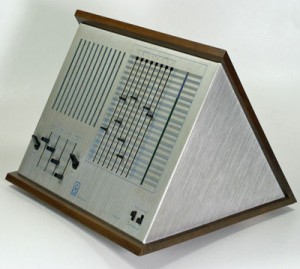
The Triadex Muse is a sequencer based synthesizer. It was produced in 1972. It was a deterministic event generator that used early digital integrated circuits to generate an audio output that could sound very musical. It was designed by Edward Fredkin and Marvin Minsky at MIT. It is an algorithmic music generator: it uses logic circuits to produce a sequence of notes based on the settings of various parameters. It has four small sliders that control Volume, Tempo, Pitch, and Fine Pitch. It is not known how many were made, but they are considered very collectable.
It was known to be used by the first wave of electronic musicians in the Philadelphia area in the late 70s. Users included: Charles Cohen, Lenny Seidman, Jeff Caine, George Keutemeyer, Rex X Ray and Stephan Spera, Paul Wozniki and the groups: Heavenside Layer, Ghostwriters, Watersports and The Orchestra of Philadelphia Electronic Musicians. Muse was also used during the WXPN radio show Stars End by host Gino Wong in the fall of 1977.
For years, the Muse was a featured exhibit at the Museum of Science, Boston. The signage explained the device’s algorithmic (and deterministic) approach to the creation of its seemingly-random music. Far from being random, its preset “song” played continuously — and was even given a name, “Museum Musings,” by the staff.
The front panel sliders, which control the melodies that are generated, allow for the possibility of 14 trillion musical note combinations. The four small sliders in the lower-left control Volume, Tempo, Pitch, and Fine Pitch. The switches to either side of the sliders are used to start and stop the sequence, or to step through it note-by-note. Of the eight larger sliders on the right, four control the musical intervals used (labeled A, B, C, and D), and four control the theme (labeled W, X, Y, and Z). There is also a “Rest” toggle switch at the lower right which acts as a “lowest note”.
Using the camera to transmit MIDI notes
Aurora Sound Studio HD for iPad as a MIDI sequencer. Using the camera connection kit you can transmit MIDI notes on 16 channels to MIDI hardwares and softwares.
Preview of Otomata – Generative Sound Sequencer
Get from iTunes store: http://batu.in/iotomata
Play from your browser: http://batu.in/otomata
Otomata is a generative sound sequencer – a musical toy that you can play with using your web browser or your iPhone/iPad/iPod.
Enjoy the mobile version of the generative music application that millions enjoyed through the web, with your iOS device!
If you want to see what Otomata is about, play with it through the web player first: http://batu.in/otomata
Otomata is a generative musical instrument that anyone with or without a music training can enjoy. You just need to create an initial scene on the cellular grid by tapping on the screen (simple as that!), and Otomata will generate and play endless melodies with beautiful visuals for your enjoyment.
When you are satisfied with your piece, you are able to share it with the world using your favorite social networking site, using just your mobile device.
This version of Otomata has:
* 40 hand picked musical scales for you to play with
* Flexible tempo
* Loaded with best presets chosen by the Otomata community
* Preset Load/Save support
* Twitter and Facebook integration to share your music with the world
* Support for playing your endless pieces when you lock your device. Press play, lock your device and do your thing with a soothing and constantly evolving musical background!
* HD graphics for Retina displayOtomata will surprise you with your musical skills (whether or not you think they actually exist).
Cement – nice pattern generator for Kontakt
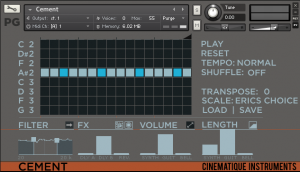
Cinematique Instruments has released Cement, a pattern generator instrument for Native Instruments Kontakt.
Cement is a sequencer based pattern generator which is well suitable to enrich your music production and lend it a specific character. As the name suggests you can easily create cementing textures, crawling patterns or a fundament for your musical idea.
Cement comes up with three layered instruments which can create numerous sound colors. The instruments are: a sinus synth, a banjo combined with guitar harmonics and a music box. For changing the entire sound character, Cement provides plenty of options to modify the sound to your very own requirements: lowpass- and highpass filter (with a random high pass modulator), distortion- and speaker switches, an alternate sinus sci-fi sound, separate length settings and separate slider to set the amount of two delays and a reverb.
Cement runs in stand alone mode as well as in-sync to your host application. Just easily click on the 16th note of your choice to play the sound – a second click increases the velocity level – a third click removes the note, then click on the note symbol to change its pitch. That´s it! Beside that Cement provides 4 different kinds of scales, transposing functions, shuffle- and tempo modes and finally load/ save switches to save/recall your entire setting of Cement
Cement (requires Kontakt 4 or higher full version) is available to purchase for €19 EUR.
CHAOS NAND synth with 16 step analog sequencer JAM!
New video uploaded by http://www.synthrotek.com
“Check out our NEW complete build of the Chaos Nand synth! Very cool micro synth with pitch and two oscillators. Takes CV in (depending on how much voltage you have) or a trigger in. Use it with your drum machine to get that extra glitch and 8 bit sound. enjoy.”
KORG iMS20 meets Cyclus 3
Korg iMS20 is controlled by a Spectral Audio Cyclus 3 sequencer, all 7 channels of the iMS20 are used, the Elektron TM1 interface connects the two.
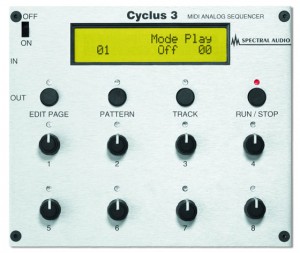
Cyclus 3 is a hardware MIDI sequencer combining both analog and digital style sequencing. It gives you old-school analog-style sequencing for your MIDI gear (no CV/Gate unfortunately). It offers 112 patterns with each 8 tracks. Patterns can be arranged into as many as 30 songs, each with 80 steps of pattern change and 1 to 32 loops and TRACK ON/OFF change. Each song can be named (8 characters). Each of the 8 tracks has 5 subtracks: note (pitch), xtranote, step length, note off time, velocity, ctrl value, ctrl length, ctrl glide on/off (you have to choose between xtranote or one of the controller subtracks). The ctrl tracks can also transmit pitch bend. A Last step (Loop point) can be set separately for each of the subtracks for creating ever-changing complex tracks. All tracks can loop independently, they don’t have to be equal in length. One track can even modulate the basic pitch of another track. Tempo is stored with each pattern.
Create new tracks for an external MIDI-device, in real or step time or by tweaking the Cyclus knobs (analog style). After a real time recording, it analyzes the note and controller data, and creates analogue style tracks from them, which then can be totally tweaked – analog style, even when the Cyclus is running. Create songs step by step, or start the Cyclus in rec mode, and change patterns in real time. There’s plenty of memory for all patterns/songs (will never write “out of memory”). The Cyclus 3 is very accurate due to its interrupt based sequencing machine. It also transmits/receives MIDI-clock. RAM Dump allows storage of your songs onto a PC and the possibility to import data from other sequencers and firmware updates over MIDI is possible. It can be used as a dektop module or rack-mounted with optional rack-ears.
Pulsator – analog synths, sequencers & drum machines
Music composition based around old skool sequencing programming combined with some edgy synth sounds. Featuring Jomox Xbase09 drums, SH101 & Pro-one sequences, Juno & JP8 arpeggiators, JP6 lead, Prodigy bassnotes, plus other bits & pieces.
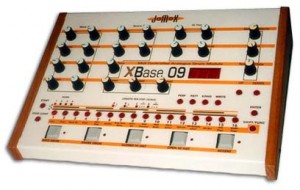
The XBase-09 is serious about emulating the Roland TR-909. Like the 909, it is an analog drum machine, and it sounds just like the 909, and more! It offers the same types of analog controls that the TR-808 and TR-909 did such as tuning, level, decay, snap, etc. However it provides more of these controls for more sounds than the originals ever did and has MIDI implementation and Patch memory making the XBase-09 a much more versatile machine than those originals.
Kick and snare are true analog, not emulation and not sampled. The Hihats, cymbal, ride, rimshot, claps and noise sounds are samples but are still quite tweakable. All your edited sounds can be stored into the 100 patches of memory. Use the built-in LFOs to modulate the Bass drum pitch, Snare Tune, Snare Snap, Snare Noise Tune, HiHat Tune or LFO 2.
The XBase-09’s built-in sequencer is also more advanced yet faithful to the style of its mentors. Step or Real-Time programming just like it’s done on the 909 and 808! However, on the XBase, any edits to the sounds will also be stored with the pattern or song! This really liven’s up your beats and allows you freedom and control to do things not easily possible on the original beat boxes! There’s also an extensive Shuffle mode. Of course the XBase-09 is also happy as a simple drum tone module, with all editable controls accessible using MIDI. The controls also send MIDI data when tweaked so you can record real-time edits into your external sequencer.
Technos Acxel gets sequenced by the Elektron Octatrack
The Technos Acxel may look similar in operation to a sampler, although its workings were very different and the sound structure is accessible. Where samplers used an A/D converter to convert a continuously-variable analogue signal into digital data, the Axcel worked on the premise that any sound, no matter how harmonically complex, could be broken down into a finite number of sine waves, and that these sine waves could be individually altered to fundamentally change the sound, producing what Technos founder Nil Parent termed re-synthèse. The Acxel was invented by Pierre Guilmette, the operational design was Nil Parent realization, the system was developed at Technos, company own and directed by Pierre Guilmette, Nil Parent and other partners.
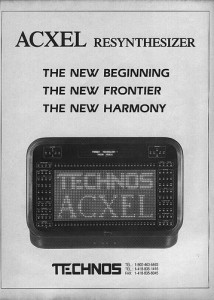
Utilising a FFT (Fast Fourier Transform) analysis, sounds inputted into the Acxel were broken down into a number of variable-amplitude and variable-frequency sine waves, up to a maximum of 1024. Once sounds had been processed by the Acxel, all the constituent waves could be pitched up or down by the same factor, which had the effect of increasing the pitch of the sound without affecting length, or introducing any of the digital artefacts that traditional samplers did (for example, pitching all waves up by a factor of 2 would raise the overall pitch of the sound by 1 octave, without affecting length. Using a traditional sampler, pitching a sound up by 1 octave would result in it being halved in length).
The Acxel also had the capability to synthesise sounds from scratch. The same 1024 sine oscillators, that in fact can be of various waveforms including of draw-able shape, which were used to resynthesize sounds could also be used for additive synthesis. You can either take Analyzed sounds and modify them. A large palette of parameters and controls is accessible, on the same manner if you start from scratch or from analysis, and in Real Time:
Features:
o Draw waveforms directly onto its LED matrix display with finger-tip (a feature once offered by the Fairlight CMI almost 10 years previously, albeit using a video monitor and light-pen).
o Draw dual Spectrum type shapes for Amplitudes, Frequencies (with separate: Integer / Decimal parts, and Envelope Variation), Phases – Corresponding to each parameter the base spectrum and the MIDI control spectrum.
o Draw dual Envelopes to each Oscillator Parameter: Amplitude, Frequency – Corresponding to base envelopes and MIDI control envelopes, independent on each oscillator.
o Draw dual Envelopes to each voice parameter: Volume, FM, Color, LFO1, LFO2 – Corresponding to base envelopes and MIDI control envelopes. Draw waveforms for LFOs.
o You can also apply a digital type of filtering named COLOR filter. With center frequency envelope. The frequency is expressed as harmonic number, then you apply the filtering on the same manner at 100 Hz or 2000 Hz or 5000 Hz. With possible selection of harmonic numbers to be filtered or not (example to keep fundamental). With drawn envelope and filter shape (Low pass, High pass, Band, User-drawn response curve – for example Comb type shape)
o FM (Frequency Modulation) envelopes is also accessible and applied on the created sound structure (or analyzed).
o Other controls and editing: Timbre interpolation, Time stretch / expansion, extended MIDI controls (programmable control curves), muting elements, chorus.
In this video:
Technos Acxel gets sequenced by the Elektron Octatrack, lfos controls different arpeggiator settings. the sound from the Acxel gets routed back into the Octatrack for some effects mangling.
Synthrotek 16 Step Analog Sequencer w/ Space Drum Synth & Echo Quest
Quick demo of Aynthrotek´s analog sequencer in action.
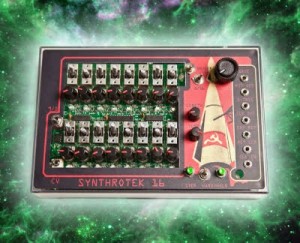
Features:
– Full 16 Steps, that can be reset from 1-16 with the flip a switch and turn of our 8 step switch!
– On, Hold-Through, and Off functions per step
– Gate and S-Trig (for Moog synths)
– CV OUT with 2 voltage modes 9v and 5 volts (switched)
– Clock INPUT
– Clock OUT
– Reset sync for connecting multiple sequencers
– LED per step
– Variable Gate length (staccato to full step duration)
– Momentary and hard hold (stop) function for tuning each step
– Retro Console Design
– knobs and switches
DATAMASKIN

