
Introducing ARP – advanced polyphonic arpeggiator and note sequencer
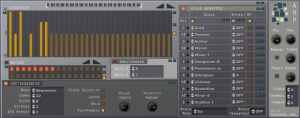
Homegrown Sounds has introduced ARP, an advanced polyphonic arpeggiator and note sequencer with scale remapping for powerful sequencing possibilities.
Here’s what they have to say about it:
With ARP, sequences can be re-mapped based on the played note – so, for example, a sequence can be forced to fit to the major scale. The idea behind this is to break away from the typical note sequencer where every key simply transposes the sequence, the ability to remap each note results in a much more creative sequence.
The Muter Section is a gate sequencer which decides which notes will play. ARP is also polyphonic and so can be used as a typical Gate Sequencer, or even more interesting as a polyphonic sequencer that syncopates. There is also the ability to offset the start note of each sequence so that when 2 notes are pressed together they automatically play syncopated. Finally there is OmniChorder which allows triggering up to another 2 notes when one note is pressed to create a chord, this becomes interesting when used with the Scale Remapper which can leave you with a selection of interesting one finger chords.
The demo version is fully featured, but times out after 10 minutes, it can downloaded here.
Full Feature List:
- Arpeggiator – Can be used as a classic ARP with the usual UP/Down/Alternate modes.
- Note/Sequence Repeats – This is used to play the note or sequence x amount of times before moving to the next note in sequence.
- 32 Note Sequencer Mode – This has a 2 octave range, centre value represents actual note pitch.
- 32 Note Muters – Basically a gate sequencer that decides if a note should play or not, can be used with the Sequencer or the Arpeggiator.
- 1-4 Octaves – Once the sequence is complete it will go up an octave as far as 4 Octaves.
- Fixed Velocity Mode – can use a fixed Velocity instead of played velocity, which is set via a knob.
- Latch Mode – Holds the note until the next one is played.
- Pulse Width – When Latch is off, this determines how long the pulse is, affecting how long the note trigger is held.
- Hold – This will hold any pressed keys until hold is depressed.
- OmniChorder – This can be used along with the Sequencer and also when the ARP is disabled. It allows setting 2 further notes to trigger to form a chord from pressing one key. Once this is enabled, the Scale Remapper can be used to manipulate the chord for each note in the octave, reminiscent of the classic Omnichord.
- Scale Remapper – Allows changing the Scale on each note (C – B) so that a sequence can be squashed to the scale:
- Over 70 scales to choose from.
- Sequence Offset – This allows offsetting the start note of each sequence when it is triggered. For example in Poly Mode pressing 2 keys together will start both sequences running, one could be set to start on step 2 so that it will syncopate. In Monophonic mode it allows building more complex sequence patterns as they iterate.
- Pitch Disable per note – This can prevent a sequence playing on the selected note, so that for example note C won’t play the sequence but just C notes. This is useful in Polyphonic mode so that one key can be consistent whilst another note can play a sequence alongside it.
- 7 Scale Mapping Modes – The mode decides how the scale is altered, when a note doesn’t match the scale, Up will select the next above, Down the next one down etc. There is also nearest, furthest and alternate. There is also a mode which holds the pitch of the octave, and simply uses the scale remapper to force the scale, useful for music without key changes.
- Works with the OmiChorder even when the ARP/Sequencer is switched off.
- Polyphonic – When used with a polyphonic instrument, notes can trigger individual sequences which is great for use with the Muters(Gate Sequencer) which can create complex rhythmic patterns.
- Midi Out – Can be used with any software or hardware midi instrument with host that support midi routing such as Reaper and Cantabile.
- Midi Volume and Pan – These can be used to set the volume and Pan of external gear (CC7 and CC10).
- Midi Channel – Use this to set which midi channel should be used.
- Manual Tempo – Normal Operation is based on the Host Tempo so that it remains in sync with the project, however manual mode can be used in the fashion of an old analog sequencer.
- Swing – Swing can be applied when the tempo is set to 32, speed can be reduced by changing the master clock tempo.
- Full VST Automation.
- Global / Local Randomizer/Default Buttons.
ARP for Windows (VST) is available now for US $20.
Arp sequencing on the Roland System 100 model 101
Test using arp sequencer
Awesome for spaced out effects, as well as extremely warm bass and leads. The filter is great, and even though it’s only a single osc. synth, without a sub-osc, it sounds huge. Extremely warm sounds. Because it’s semi-modular, you can get things super spacey. The sounds can actually have a very vocal quality at times. I’ve actually had it sounding like a child crying. Really weird = super cool!
SympleSynth – for built in sequencers
More information about the SympleSynth:
This is my answer for an Ultra Simple Synth voice for your Baby 10 or other sequencer build. It’s designed to be EASY to build and uses the absolute minimum of parts for its functions. It was a response to so many people building Baby 10’s and using them to make terrible sounds with 555 circuits.  You know who you are.
This will make music/noise/sound with anything that outputs a CV (Control Voltage) (1 to 5 volts or so) and Gate or Trigger of a couple volts – for example the SympleSeq DIY sequencer kit. You could even plug your vintage analog synth keyboard or Ribbon controller into it if you want – but don’t expect 1 volt per Octave. This IS a very crude VCO, VCF and VCA approximation on one small PCB with about $15 worth of parts (much less if you shop smart)
Top two knobs are Filter cut off and Filter Res, second two are Attack / Decay, Red knob is VCO 2 pitch, and the switch chooses VCO1, VCO2, or Both
This is recorded direct into the computer – no processing.
Genome MIDI sequencer goes modular
Using the Genome Midi sequencer for the iPad to sequence a modular synthesizer. The ipad is sending midi out thru the Alesis iDock to the Encore Expressionist for midi to cv conversion for the modular. The Metasonix D1000 is receiving its triggers from the 4MS Rotating Clock Divider clocked by ch 5 of the Genome app. Recorded into Ableton Live in one take.
Teaser for the Genome MIDI Sequencer
Genome MIDI Sequencer for the iPad, in action.
Genome MIDI Sequencer (GMS) is a pattern based MIDI sequencer. It’s simply the best app on the iPad for controlling all your MIDI gear. You can sequence single patterns or an entire 16 track song. GMS is fun, easy and portable. Whether you want to make music from the couch, a hotel room or on stage, GMS is the right tool for the job. It is great for people looking to try an alternate studio setup, searching for a compact sequencer to bring to band practice or those who just want to find a way to ditch the bulky laptop. GMS easily syncs your drum machines and arpeggiators by sending and receiving MIDI clock messages. General MIDI files are easily exported and imported for integration with desktop apps. GMS is compatible with the Line6 MIDI Mobilizer and any interfaces that support CoreMIDI using the Camera Connection Kit or Network MIDI. Network MIDI allows you to send events to your Mac Desktop or to other iOS devices and apps.
A sneak preview of the new version of IanniX
IanniX is a graphical open-source sequencer, based on Iannis Xenakis works, for digital art. IanniX syncs via Open Sound Control (OSC) events and curves to your real-time environment.
Modular Sequenced with Ribbon Controller
http://youtu.be/IFYlz-Onto0
Background information:
Using a hybrid 5U modular synthesizer, this recording is a live performance with a Walking Stick 500mm ribbon controller solo. The synth is running multiple sequencers, oscillators, filters, and envelopes, in order to play all of the parts at once. A dotcom Q119 sequencer is used for three lines of sequence, and it is triggered by a STG Trigger Store. Nothing is multi-tracked.
In beta: Groove Machine – new groove box instrument plug-in by Maxx Claster
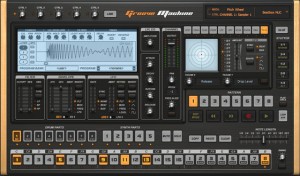
Image-Line has released a beta version of Groove Machine, a groove box instrument plug-in by Maxx Claster.
Groove Machine is a performance-oriented multichannel (drum)sampler, multitimbral hybrid synthesizer, sequencer and last but not least a ‘Groove Box’ inspired by hardware Groove Boxes. Special attention is paid to live performance via MIDI controllers.
Groove Machine features
- Step sequencer with integrated Note Editor driving 8 sampler tracks, 5 synth tracks and 10 performance oriented effects for every track.
- Synthesizer features a hybrid additive, FM & RM design.
- Per step automation with automation graphs.
- Pre-mapped to general MIDI keys.
- Stutter, beat repeat effects module.
- 2 envelopes, 2 LFO’s.
- Multi-mode filter.
Groove Machine beta is currently available to download as a VST plug-in for Windows for registered Image-Line users.
More information: Image-Line
Turbulence – a new modular waveshape sequencer AU plug-in
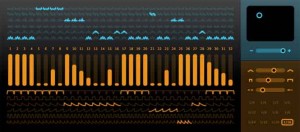
Sinevibes has announced Turbulence, an AudioUnit effect plugin for creating rich animated synth textures. At it’s core it employs unique waveshaping algorithms that drastically transform the input signal, enriching it’s spectral content. But most fun stuff comes from it’s flexible step sequencer which drives waveshape modulation, envelope matrix and model matrix, allowing you, say Sinevibes, to create almost any rhythmical pattern imaginable. With all these tools combined, Sinevibes believes that Turbulence can easily turn simple waveforms into a huge variety of complex motion sounds with incredible richness and character.
Turbulence features:
- Sequencer with up to 32 steps, variable swing and speed.
- Waveshape matrix with 6 high-definition algorithms.
- Envelope matrix with 6 shapes, adjustable time and smoothness.
- Intuitive, high-contrast user interface.
Pricing and Availability:
Turbulence is immediately available as a download for $39. It requires Mac OS 10.5 or later, and a 32 or 64 bit AudioUnit host application that supports Cocoa user interface technology.
More information:
NodeBeat HD 1.5 – iOS Music Sequencer
This is a brief video showcasing some of the new features in NodeBeat HD 1.5. The same features will be coming to the iPhone/iPod Touch version of NodeBeat in the coming weeks.
New Features Include:
– Entirely new user interface design
– Drag and drop new nodes
– Drum Generator Node
– Sine, Triangle, Sawtooth, and Square waveform selection
– Tempo and BPM controls
– Compress recording for faster e-mailing of recordings
– Create ringtones from recordings
– Sleep Timer. Now you can fall asleep to NodeBeat
– Shake to Clear Screen
– 5 Finger multitouch reset all
———————————————-
NodeBeat is an experimental node-based audio sequencer and generative music application for the iPhone, iPod Touch and iPad.
By combining music and exploration, NodeBeat allows anyone to create a variety of rhythmic sequences and ambient melodies in a fun and intuitive fashion.
NodeBeat.com – for free Desktop (TUIO compatible) version and iOS information
Created with openframeworks.cc, puredata.info, gitorious.org/pdlib/pages/Libpd
DATAMASKIN

