
More on the Misa Digital Instruments Kitara
Finally, we introduce – Kitara – available for pre-order!! 
http://www.misadigital.com
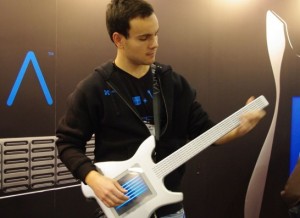
Misa Digital Instruments debuted the Kitara and Kitara Limited Edition digital guitar instruments.
The Misa Digital Instruments Kitara and Kitara Limited Edition are unique 100% digital guitars. The Kitara includes a multifunction touch-screen, MIDI controls and an on-board polyphonic synthesizer with effects. Instead of using strings, guitarists control sound through their fingertips, using the touch-screen and fret board to play, enhance and alter sounds in real-time.
Updated Omnisphere synth launched
Spectrasonics have announced version 1.5 of their flagship Omnisphere softsynth.
New Features include:
- Innovative “Orb” ‘circular sound manipulation’ interface with Motion Recording and “Dice” button for infinite variations and one-touch sound customization.
- Expanded Synthesis capabilities:
- Harmonia: New zoom page shows all Harmonia parameters per layer adding up to 10 oscillators per patch with new independent modulation options for Levels and Fine Tuning on each Harmonia oscillator.
- Waveshaper: New zoom page with extreme new processing modules including polyphonic ‘Crusher’ and ‘Reducer’ sections with ‘Force’ and ‘Animation’ controls that can all be modulated.
- Granular Synthesis: New ‘Speed’ and ‘Position’ modes. New zoom page with new ‘Granular Visualizer’ showing a graphic model of the effect of parameter edits which makes Granular synthesis easier to use.
- Patch Library Update: Over 700 brand new patches created by renowned Spectrasonics sound development team gives Omnisphere over 5,000 patches and 8,000 total sounds.
- New 5-Column Browser view displays more sound categories and attributes simultaneously.
- New Online Video Tutorials for Version 1.5 capabilities.
- Support for new ‘Omni TR’ iPad app.
- New “Recently Added” Browser sorting option.
- Added support for MIDI devices which send polyphonic aftertouch.
- New ‘Clone Part’ feature allows easier editing/setup with multichannel MIDI controllers.
- New MIDI Learn hardware control mode follows Live Mode selection.
- Modulation Envelope points can be key-command snapped to semitone when modulating pitch.
- User-assignable Legato Interval rule added.
- FREE update for registered users of Omnisphere.
Omnisphere is available now from all Spectrasonics dealers – MSRP $499 / €379.
Version 1.5 is set to be released February 15th, 2011.
The update will be free for all registered users and can be downloaded from the Spectrasonics website.
Misa Digital Instruments Kitara
I like the blue chords, looks really cool – reminds me of something new I will share with you all very soon
Finally, we introduce – Kitara – available for pre-order!!
http://www.misadigital.com
New powerful virtual synth for free from B.Serrano
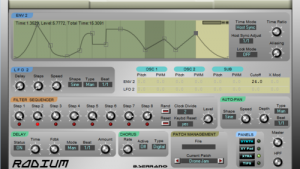
B.Serrano has released Radium on his web site for free download. Radium looks to be a pretty Xen-Arts that offers a combination of subtractive / virtual analog and frequency modulation (FM) synthesizer engines. Features include 16 voices of polyphony. Substractive synthesizer with 2 oscillators. FM synthesizer with 2 operators. Dynamic user definable envelopes. Programmable XY Pad controller. Filter step sequencer. MIDI learn implementation. Auto Pan functions and much more. Download Radium for free at http://bserrano.free.fr/Synt…
µTonic 3.0 is here after 5 years
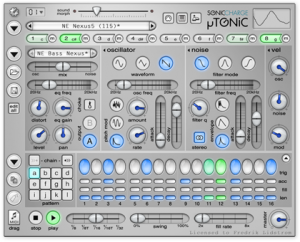
Sonic Charge has released µTonic 3.0, an updated version of its virtual drum machine instrument for Windows and Mac.
It’s the first major update to µTonic in five years. µTonic users will find more than 20 new features, though, and an updated user interface. It’s free for registered users, too!
Details below.
Here’s what’s new in µTonic:
- A morph slider allows you to interpolate all eight drum patches simultaneously between two end-points. You can edit the drum patches with the morph slider at any position and it will adjust the interpolation end-points accordingly. Morph is an automatable and MIDI controllable parameter, so it can be used both as a performance parameter as well as an editing feature.
- Matrix editor window for viewing and editing the pattern steps of all eight drum channels simultaneously. (Bonus feature: you can drag channel labels to reorder the drum channels of the preset.)
- MIDI Program Change message support for instantaneously switching between up to 16 different presets (loaded into memory). (It is also possible to switch programs with MIDI notes.)
- Drag and drop patterns as MIDI files directly into your sequencer (supported by all major hosts).
- “Edit All Channels” button enables adjusting parameters for all drum channels simultaneously. E.g. turn up the distortion on all channels. µTonic will write parameter automation for all affected channels, so the effect can be automated.
- A new “choke group” feature lets you assign two or more channels that should play mutually exclusively and cut each other off. Useful for closed and open hi-hats for example.
- A preset name display sits in the top of the window, with previous and next preset buttons and a popup list when you click the display.
- Support for MIDI Pitch Wheel for real-time pitch transposition with a range of up to 2 octaves.
- A new “Stop Voices with MIDI Note Off” option makes it possible to sustain the sound while you hold down MIDI keys (if you use µTonic as a synth). It is also useful for changing the length of drum sounds with note lengths in your sequencer.
- Alternative “pattern launch modes”: “Switch Next” (the behavior in earlier versions of µTonic), “Switch Directly”, “Retrigger” and “Retrigger Gated”.
- Undo / redo.
- Shift-click menu buttons to quickly repeat last selected menu item.
- New 3D-rendered skin. Sharper, brighter, sexier with 32-bit graphics. (Yes, µTonic version 2.0 was using 20th century 16-bit RGB graphics still).
- Lots more, details here.
µTonic for PC and Mac (VST/AU) is available for US $99. Registered customers can update for free.
Playing with Xtrument virtual keyboard
Playing with the amazing Xtrument created by Rob Fielding. It works as a virtual MIDI controller for your Mac using the keyboard. The Xtrument is open source.
Fielding is the programmer behind the iPad music app Mugician.
Xtrument is available here (.tar).
More about MusicApps and Mobile Music on www.MusicApps.com.br
How to Make a Trance Pluck Sound
Step by step video tutorial, how to make a Trance pluck sound similar to the one used in Cosmic Gate – Barra tune. This time a hardware synth is used as an example but the tutorial can be recreated with most virtual instruments.
Two free virtual Minimoog synthesizer instruments for Windows
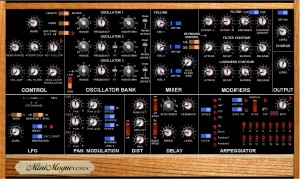
VoltKitchen has released version 2.3 of MinimogueVA and MinimogueLUXUS, two free virtual Minimoog synthesizer instruments for Windows.
Changes in MinimogueVA/MinimogueLUXUS v2.3
- New 24dB filter and a button to switch between the old 12dB filter and the new 24dB filter. The new filter is very advanced with built-in distortion, so it will use much more CPU. The old 12dB filter did not open up completely, but now you can enjoy the bright sound like the orignal when cutoff set to max when 24 db filter is selected. All sounds in the factory bank are set to the old filter, but I hope we can upgrade the synth with some new 24dB filter sounds later. Many of the old sounds have high resonance, and I advice you to reduce resonance level when switching to the new filter.
- Osc drive(offset) has been changed. It still has a little bit of offset just like the original, but much less than the 2.2 version.
- 10 new sounds by Sinisa Lupis.
- Added midi learn for bar-sync and the 16 gate off/on buttons.
- LUXUS version has got a new layout of controls to look similar to the new controller by Mario Jurisch of Synth-project.de.
MinimogueVA and MinimogueLUXUS are available to download as freeware VST instruments for PC.
More information: Gunnar Ekornås
Rob Papen takes BLUE to the next level
This exciting synth delivers FM Synthesis, Phase Distortion Synthesis, Wave Shaping Synthesis and Subtractive Synthesis is one creative combination!
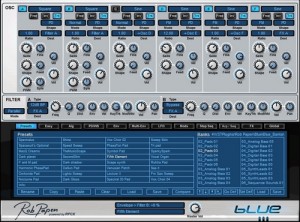
Rob Papen has released version 1.9 of BLUE, a virtual synthesizer instrument for Windows and Mac.
This exciting synth delivers FM Synthesis, Phase Distortion Synthesis, Wave Shaping Synthesis and Subtractive Synthesis is one creative combination! We call it “Crossfusion synthesis”.
Changes in BLUE v1.9
- Different tuning scales – Clicking on the BLUE logo brings up the back panel, where you can load in tuning files. They added a number of world tunings: Arabic / Burmese / Chinese / Indian / Persian / Thai / Turkish / Standard European. Users can add in there own personal tuning files, either by creating their own .tun files or using other .tun files.
- New factory presets – Two new banks are added 19_Effect_04 and 13_Diverse Dance 01. New cool effects and some new contemporary dance sounds.
- New presets by Dr. Tim Waters – Some brilliant sounds are uploaded to the “user presets” section.
BLUE is available to purchase for PC and Mac (VST/AU/RTAS) for 199 EUR incl. VAT / $239 USD.
More information: Rob Papen / BLUE
ScapesWizard – new virtual synthesizer designed for soundscapes and more
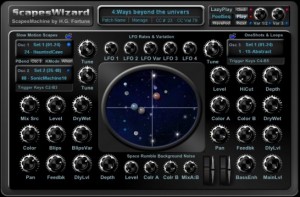
H.G. Fortune has released ScapesWizard, a new virtual synthesizer designed for soundscapes, atmospheres and textures in motion.
Description:
ScapesWizard is a machine for soundscapes with a very different control concept by triggering different samples via keyboard, or, using LazyPlay play a pool of waves in sequence or at random driven by inbuilt clock or triggered by keyboard to advance manually.
There are three different soundengines: Slow Motion Scapes (Osc 1&2), OneShots and Loops (Osc 3), and Space Rumble Background Noise. Each engine has got some dedicated soundmodifiers partly with special controls. But the most important feature is you can trigger i.e. switch samples with a dedicated tune setting via keyboard which is ideal for live interaction too!
Basically you have a keyboard split to trigger samples of Osc 1 & Osc 2 (alternating or Osc 1 only) from C2 to B3 (left side) and Osc 3 from C4 to B5 (right side). So simply give a key a short push and the resp. sample will play until it’s changed. For Osc 3 looped sampled can be faded out by giving key C6 a short push, and even you can retrigger it via key F6.
You have 2 x 24 samples (= 2 x 2 octaves) in direct access via keyboard. To each keyrange (from C2 to B3 and C4 to B5) a different waveset out of 5 can be assigned. This makes the plugin suited very well for usage with trigger pad controllers. Also for live interaction pitchwheel can be used for Osc1 & Osc2 with a range of +1/-1 octave and for Osc 3 the same for Modwheel.
The basic usage is intended to have a setting ‘in motion’ and then play different samples. Although there seem to be very few control elements most of these have a double function: left side is setting a dedicated value while right side adjusts modulation amount. Note those knobs with a marker at top/mid.
There are four LFOs adjustable in Rate plus a Variation knob changing the waveforms for all 4 LFO. You will notice there are no LFO selectors at all present. This is due to the fact that no LFO is used directly. Always there is used a mix of 2 LFO controlled i.e. mixed by a 3rd LFO to achieve more complex modulation waves giving more variation. Anyway the small ‘planets’ in the mid display show motion & amount of the resp. modulation.
ScapesWizard Pro for Windows (VST) is available for 29 EUR through 1 January, 2011 (50% off the normal price). A demo version is available.
DATAMASKIN

