
StudioBLADE Sounds v2
http://youtu.be/4C8lRhICYGs
Background on the StudioBLADE: Keyboard production stations can be loosely defined as keyboard workstations that are connected to a computer, which is needed to provide additional processing power and features. While keyboard workstations are suited for live performance and sketching out ideas for a song, keyboard production stations, with built in high-power computer cores, allow users to go from composition to recording to mixing and finally mastering of songs that are ready for radio or direct Internet distribution.

StudioBLADEs are powered by high-performance computer cores utilizing Intel® processors that are perfect for today’s demanding musicians and the virtual instruments and software applications they use. Running Windows® 7 (64-bit), StudioBLADEs are extremely versatile, powerful and perpetually upgradeable. Base models equipped with Intel® Core™ 2 Duo processors can be easily upgraded to the latest Intel® Core™ i5 processors for even more performance. StudioBLADEs can be upgraded from the standard 4GB of RAM memory up to 8GB of RAM. More RAM means the system can run more software application, VSTs (virtual instruments) and tracks. In the past, the high-powered processor usually sat idling, waiting for information to be fed to it. With the 4GB limitation lifted, StudioBLADEs are able to fully utilize every bit of processing power from its Intel processors, making even the base model StudioBLADE, upgraded to 8GB of RAM, out perform any other keyboard production station or workstation. StudioBLADEs are available in 61-key and an 88-key versions, perfect for live or studio use. The keys are velocity-sensitive, semi-weighted action, and are professional in feel and ultra roadworthy. Pitch and Mod wheels as well as octave up and down buttons with indicators are also included.
Built into each StudioBLADE are Music Computing’s ControlDAW™ midi controller and GeoMIDI™ midi mapping software. ControlDaw presents the user with four (4) banks of eight (8) plus one (1) master channel strips each with three (3) mappable encoders with LED indicator light rings, one (1) knobs for panning, solo and mute buttons and a high-quality fader. An 8X8 grid of lighted pads (64 total) is also provided that can be used as drum trigger pads, a Monome (with appropriate software) or as a trigger pad for sequences, etc. Controls for note-repeat enabled software and transport buttons are included as well as real-time feedback between the controllers and software making ControlDAW the ultimate midi controller for music production. Included with each StudioBLADE is a high-quality wireless QWERTY (computer) keyboard and mouse. The optional computer keyboard stand (shown in main images above) allows for great ergonomics in any size work space.
Music Computing’s TriggerGrid™, included with each ControlDAW, is a sample player that allows the user to trigger sampled sounds via controllers such as the ControlDAW or ControlPLAY™. Unlimited number of banks each containing sixty four (64) samples can be loaded and played. Per pad controls included: Frequency, Attack and Release, Gain, Pan and Reverse. Per pad wave editor allows for simple drag to trim/truncate samples. 16 – audio outs for use in a DAW. File formats include: wave and mp3. Save feature allows all 64 pads to be saved as a kit. Unlimited number of kits can be saved that can be instantly loaded for playback. Simple drag and drop interface to populate pads.
Thousands of Sounds: SonicSource™ by Music Computing is a virtual synth (VSTi) equipped with three sample-playing layers, two multi-effect racks, and a library of multi-sampled instruments. The sample playing layers allow blending of waveforms and instruments into a wall of sound or alternatively, the use of the three multi-timbral layers as a workstation. These layers can then be further processed through SonicSource’s powerful multi-effect racks.
In this video:
Hear the audio capabilities of the StudioBLADE as well as some of the many VST (virtual instruments) you can load and play using the StudioBLADE.
Virtual instruments are sound libraries which only keyboard production stations like the StudioBLADE can play and represents some of the best sounds available today.
Jean Michel Jarre talks about mastering
Essentials and Rarities – about mastering
Guess this post is pretty self explanatory and Mr Jarre hardly needs any further introductions 
Dr Who on the tesla coil
Last week we heard Lady Gaga being performed using the tesla coil, now it is time for Dr Who. The Dr Who theme is almost 50 years old – and yet it seems to have as many lives as the Doctor himself. Here, Austin, TX based Arc Attack performs the famous Ron Grainer theme (via Delia Derbyshire) on half a million volts of MIDI-controlled Tesla Coil lightning. The video is from Arc Attack’s performance at the 2011 San Mateo Maker Faire.
When Arc Attack isn’t doing covers of sci fi theme songs, they stay busy by doing electrocuting high school science teachers and otherwise educating students about the awesomeness of science.
Link:
Here’s a treat for all you synth and Kraftwerk fans – The Kraftworker
http://youtu.be/a0n4b_I627A
Best Service has introduced Kraftworker – a Kraftwerk inspired virtual instrument for Mac & Windows. Features Orchestron, Stylophone, Speak & Spell & More
Kraftworker includes sounds made famous by Kraftwerk, including:
- Orchestron
- TI Language Translator: german-english-french-spanish
- FX-501P Pocket Calculator
- Speak & Spell
- Stylophon
- BG Rhythm Machine
The virtual instrument comes with 1,300 electronic sounds:
- Synthesizer Sounds
- Chord Sounds
- Electronic Speech Synthesizers, Choirs, Vocoders
- Computer Sounds
- Pad Sounds
- Organic Sounds
- Basses
- EFX Sounds
- Musical Patterns and Sequences
Features:
- Digital Modular system
- Flexible routing of all modules und effects
- Extreme fast Sound-Loading average access and loading of a new instruments with all its parameters and effects in less than a second
- Direct stepping through the soundpool
- Analog reproduction of digital sounds
- Solo-Mode, Legato Mode, Portamento und Samplestart shifting
- Multi Mode Filter / Resonator
- QuickEditPage: Blue english Kraftworker interface with instant access to all important parameters
- ProEdit Page: Offers every possible parameter, FX-Rack with 46 effects, Convolution Reverb etc.
- Infinite Polyfonie
- Infinite number of modulators
- Infinite number of effects
- Extrem flexibler Arpeggiator inklusive Midifile Abspieler •Extrem flexible Arpeggiator including Midifile player
- Step und Modular Sequencer
Pricing and Availability
Kraftworker is available now for 249,00 €, inc VAT.
Link:
Filter modulation on the U-HE ACE
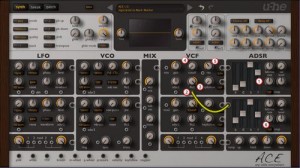
My friend Mark Mosher has posted a nice article on how to modulate a filter with an envelope:
U-HE ACE is my favorate analog modeled virtual synth and once you “grok”” the cabling you can do amazing things with it. If you find the cabling confusing, checkout my video from last year “U-HE ACE Tutorial: Patch Cables 101” which I’m happy to report is closing in on 12,000 views.
Via a YouTube I got a question from a reader on how to modulate the filter with an envelope so I thought I’d put together a quick step-by-step tutorial. Click the image above to see a larger version to follow along.
- Bump the “r” or release time on the amp envelope to give us more sustain time so we can make room for the filter envelope to work
- Patch a cable from the output socket of ADSR2 to the socket under LFO2. Now the knob for LFO2 turns into a bi-polar gain knob.
- Turn the the gain knob all the way up for maximum modulation from the ADSR
- Turn cutoff to 0 so the filter is 100% controlled by ADSR2
- Turn the “res” up just to make the effect more pronounced
- Adjust the ADSR value to match the screen shot
Tweak to your heart’s desire.
Mixing a concert guitar with breakbeat
Not your everyday mix up
In this video:
here i am trying to mix concertguitar and breakbeat… this are the steps to my coming live shows. keep control over various parameters makes my performance challenging but also fun
if technical detail is needed, please ask me
SoundStrip Max4Live device playing the SteamPipe synth in Reaktor
SoundStrip is a DIY Midi Ribbon Controller made using an Arduino and some simple sensors. This video shows the SoundStrip Max4Live device playing the SteamPipe synth in Reaktor
Can anyone explain this?
I enjoy watching videos of modular synths and experimental stuff in the studio, as anyone would know who read this blog on a regular basis. And from my point of view the descriptive text below is often key to understand the context, but does anyone knows what this guy is talking about (without sneak watching the video):
started this patch inspired by richard devines e580 karplus-strong feedback demo then evolved with phonogene granular micro percussion cv controlled by the z8k, µstep- hertz donut kick and piston honda snare running through the flame fx6, gamma wave source accents controlled 4ms RCD and breakout and e350 accents FMed by the gamma wave source with variance controlled by the wogglebug smooth cv out.
Circuit Bending with CMKT4 and Creme DeMentia
In this video:
I got to meet Austin, Jeff and Zach last week. These three guys are a band, but also make their own contact microphones. They are currently traveling across the country playing shows and showing people how to make their contact microphones.
The music they make is a mix of acid rock and circuit bending, the end product is something that’s mind blowing. The video highlights what I can’t explain here, because they understand it much better than I do.
Tara Busch & John Foxx & Benge in the studio
Tara Busch & John Foxx & Benge in the studio with Moog
DATAMASKIN

