
The Assembly re-united at the Mute festival (Clarke’s post-Yazoo project)
The Assembly were a synthpop project formed in 1983 in Basildon shortly after Clarke disbanded Yazoo. The members were Vince Clarke (songwriting, keyboards, backing vocals) and sound engineer Eric Radcliffe (songwriting, production). Feargal Sharkey was hired as a guest vocalist for the A-side of the group’s only single, “Never Never”. Clarke and Radcliffe had planned to use a different singer on each track the group recorded, but the group disbanded after the release of “Never Never”, and no other vocalists were employed by the duo.
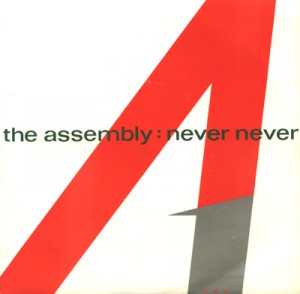
The Assembly ‘reunited’ for one song in-between the Erasure set which itself was preceded by 3 songs by Yazoo. It was Andy Bell who introduced Sharkey, saying that Vince Clarke had an impeccable taste for excellent singers.
Lady Gaga performed on Tesla Coils
Lady Gaga on a Tesla Coils is a real treat. Girl Talk (aka friend-of-the-blog Gregg Gillis) submitted his song “This Is the Remix” as part of an experiment by the Tesla Orchestra called the Open Spark Project. The venture asked musicians to hand over music that the orchestra could play on its giant Tesla coils.
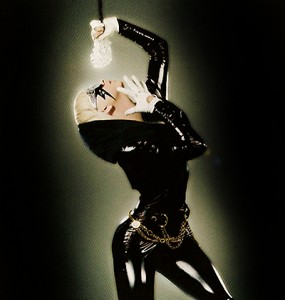
Artists submitted MIDI files of their music, which the Tesla Orchestra then turned into spark tunes (many of them can be heard following “This Is the Remix” in the clip above). The orchestra performed the songs Saturday in Cleveland.
With the exception of Gillis’ track and a Bach song, all the music collected for the Open Spark Project was original and most of it was composed to be performed using Tesla coils, which can only play one note at a time. Using coils with those limitations made it harder to arrange Girl Talk’s track, said Tesla Orchestra music director Keith Lewis in a phone interview with Wired.com.
“Taking something where there’s chords and multiple melodies, you’ve got to pick and choose which ones you use for the coils,” Lewis said. “We pick out the main melody and usually the bass line or harmony line from the existing track and plug them into a standard MIDI track and send that information to the coils and then play the backing track along with it.”
The coils themselves were built by the Tesla Orchestra, which hails from Case Western Reserve University in Cleveland. The machines are designed to emit bolts of electricity that match the notes on a keyboard.
For SID fans: M.S.S.I.A.H
http://youtu.be/ajDsJ54yHTw
In this video:
A new awesome computer has entered my house to help me with project MSSIAH. A big thank’s again to Mark (UKretrogames) for this wonderful mahine ! Truely very grateful. The MSSIAH is a midi interface/sequencer that allows the SID sounds to be triggered / controlled via a midi controller keyboard.
Mark UKretrogames channel : Has lots of cool videos of computer history and interviews www.youtube.com/ukretrogames
Kevins Channel: Not computer related, but very cool self made movie shorts:
www.youtube.com/jamaicanpenguin
Exploring the Casio PT-82
Here’s a bit of a background on the PT-82. This keyboard from 1986 has many similarities with the Casio VL-Tone 1 and PT-1, but includes a “melody guide” key lighting feature for music teaching (not the keys itself light up but a row of small LEDs above them) and a ROM- Pack music cartridge slot. Unfortunately this instrument is missing the great built-in synthesizer, sequencer and 3 octave switch of the VL-Tone.
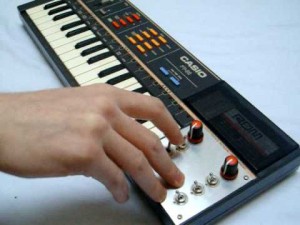
Although the music playback from the ROM- Pack includes wonderful polyphonic accompaniments, the player can play own musics only monophonic with thin and dull sounding blip rhythms. A bit unusual is that this white keyboard has brightly coloured orange and red buttons and red lines while Casio normally preferred pastel colours. Also a red case version of the PT-82 was made. In 1987 it was re-released in grey as Casio PT-87.
The PT-82 was likely intended as a technically simplified successor of the Casio PT-80. The speaker has an unpleasant, loud mid- range resonance. The main voice sounds are the same like with the PT-80, but tend to sound a little thinner and harsher. These sounds resemble much a Casio VL-Tone 1; unfortunately they don’t include the famous “fantasy” sound of the latter.
In this video:
This was my first ever instrument when i was 4 years old. I was wating too long to make something with this! So this is a music track from this and only with this. It has an exeptional meaning for me…
Reverb, delay,some chorus and an octaver for the organ bass. All sounds are presets of the PT-82. No other instrument is responsible for this track.
Kangding Ray explains
Kangding Ray explains to Electronics Beats TV about his ideas and approach to music and graphics. Really interesting.
Also spotted: NI Maschine, Ableton Live, Waldorf Microwave XT, Jomox T-Resonator, Novation Zero SL, MRX stomp box.
Also, checkout Kangding Rays new video:
Or from Nicolas Lelievre on Vimeo.
Ready to take your DJ performance to the next level?
djay for iPad, the premier DJ app, is now optimized for iPad 2! Taking full advantage of the iPad 2’s high-performance dual-core processor, djay now features Key Lock (time-stretching) and high-precision beat-grid analysis.
djay transforms your iPad into a full-fledged DJ system,
allowing you to mix your iPod music library on a hyper-realistic turntable interface. Perform live, record mixes on-the-go, or enable Automix mode and let djay mix your favorite playlist automatically. With unprecedented ease-of-use and innovative multi-touch mixing features, djay for iPad takes DJing to the next level and offers a unique experience for beginners and professionals alike.
To learn more visit http://www.algoriddim.com/djay-ipad
or simply search for “djay” on the App Store.
Track: Johnson & Haske vs. Jerome Isma-Ae — Telling the Story feat. Mo Morsy (Jee Productions)
Polychord 2 is drums, bass and chords all wrapped into one
A quick rundown of different sounds you can achieve with polychord’s synthesizers. We’re using the strum keys and making changes to the envelope, wave, cutoff & resonance, tremolo, and more.
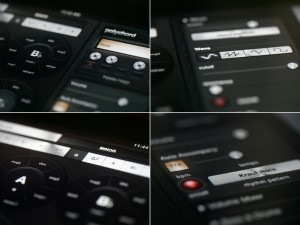
Shoulda Woulda Coulda has released Polychord 2, a music app for the iPad.
Polychord is drums, bass, chords, and accompaniment all wrapped into one.
Simply press one of the chord circles and your on you’re way to writing a song. Drums and bass follow the chords automatically, but the coolest part is probably the strum keys on the right: simply swipe your finger over the yellow keys (or chrome keys in version 2) to strum a chord.
Changes in Polychord 2
- Record and share songs with SoundCloud.
- Sleek new UI made in collaboration with Jonas Eriksson.
- Palettes, so you can save your settings.
- Palette f-keys, for fast switching between palettes.
- Sine, Sawtooth, Triangle and Square Waves for each instrument. (We used an ‘analogue simulation’ technique for generating the synthesizer waves, which warms them up a bit.)
- Bitshift features for drums: full control over the reduction of bits / bitrate, allowing you to completely decimate the sound or just add a touch of noise.
- Basic low-pass filtering, resonance for each instrument.
- Tremolo Depth controls.
- Scale mode for the strum keys: rather than the strum keys playing the notes of the current chord, you can set them to numerous other scales.
- Arpeggiator based on time-signatures. Full control over the speed and count of the arpeggiator — allows you to mix a different time signature over the beat. Arpeggiator now has all of the same synth controls as the other instruments.
- The UI now highlights the last chord you pressed, rather than always highlighting the root-note.
- Octave control for every instrument.
- Precise BPM control, with text input.
- A global on/off switch for Auto Accompany.
- File manager for renaming/deleting/loading palettes, songs, etc.
- Pitch bending on strum keys (sends out MIDI too).
- Skins panel lets you switch back to the classic color scheme.
Polychord 2 is available to purchase for $9.99 USD.
Audio Interface for iPhone 4
AR-4i is an audio interface for iPhone4 dock connector. The high quality stereo microphone inputs with AD converter improve the audio quality of iPhone4’s video recording, video streaming via Ustream, LiveStream etc. as well as recording of live performance and ENG.

Main Features
- 3 microphone inputs with plug-in power for vertical or horizontal use.
*Input level control and EQ can be done using the dedicated App. - 2 x cardioid plug-in microphones come as standard. Third-party microphones can be used.
- LED Level Meter for input level monitoring. •Microphone gain control. •Headphone jack for input monitoring.
- 2 x AAA batteries for more than 10 hours operation. External power can be fed via USB. •Ergonomic design for secure holding.
- Screw hole provided for optional camera gears such as tripod, grip etc.
Moby on Destroyed – British Journal of Photography
British Journal of Photography’s news and online editor Olivier Laurent speaks to Moby about his first photography book – Destroyed, which will be released with his new album.
For more information and a sneak peek at Destroyed, visit bjp-online.com/2044924.
Interview filmed using the Canon EOS 5D Mark II, courtesy of Canon UK.
Get an entire orchestra in your iPad
WI Orchestra is a full orchestral library and composition tool for iPhone and iPad. You can now create and record your own orchestral music on the iPhone, layer by layer, using the instruments and built-in recording features of WI Orchestra. Choose between a full range of orchestral strings, brasswinds, woodwinds, saxophones and percussion. When starting WI Orchestra for the first time, press the “play” button to listen to the included demo song, which was made with the WI Orchestra app in only a few hours! WI Orchestra features a velocity sensitive keyboard (requires iOS 4.0 or higher) allowing you to play different dynamics by touching the keyboard harder of softer. The simplest way to use WI Orchestra is to choose one of the dynamics presets (pp, p, mp, mf, f or ff) and play only using the keyboard. You can work on as many as 98 different projects at a time, and export your songs to your computer, as *.wav files, via the “Apps” tab in iTunes (requires iOS 4.0 or higher). iOS devices with less than 256 MB RAM are capable of 1 minute length projects (iPhone 3GS and earlier) while iPhone 4 and iPads are capable of 5 minute length projects. For those who are unfamiliar with orchestral music, each instrument in WI Orchestral comes with a picture and description of the instrument. For the brave, you can also choose to use the microphone as a breath controller!
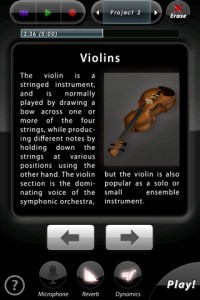
WI Orchestra is a universal iOS app, with a native full-screen iPad version and beautiful high-resolution graphics on iPhone 4 retina displays. Five amazing instruments from the different sections of the orchestra are included for free, Violins, Trumpet, Flute, Tenor Saxophone and Timpani! TIP: For first-time users on iPhone/iPod Touch, in order to access the keyboard you need to press the “Play!” button!
TECHNICAL SPECIFICATIONS
————————————–
All wind instruments in WI Orchestra are based on the WIVI technology, an additive synthesis/behavioral modeling pioneered by Wallander Instruments with the professional music production software WIVI.
Strings and percussion in WI Orchestra uses a new patent-pending filtering technology by Wallander Instruments, that allows seamless dynamic changes of any sampled instrument in real-time.
WIVI technology is used on a daily basis for producing music for movies, TV and writing classical scores, by composers all over the world.
CONTENTS (Instruments marked with * are included for free)
————————————–
STRINGS
– Violins*
– Violas
– Cellos
– Double Basses
– Violins Pizzicato
– Violas Pizzicato
– Cellos Pizzicato
– Double Basses Pizzicato
BRASSWINDS
– Trumpet*
– Piccolo Trumpet
– Trombone
– Bass Trombone
– French Horn
– Wagner Tuba
– Tuba
– Cornet
– Flugelhorn
– Euphonium
WOODWINDS
– Flute*
– Piccolo
– Alto Flute
– Bass Flute
– Recorder
– Clarinet
– Bass Clarinet
– Oboe
– English Horn
– Bassoon
– Contrabassoon
SAXOPHONES
– Sopranino Saxophone
– Soprano Saxophone
– Alto Saxophone
– Tenor Saxophone*
– Baritone Saxophone
– Bass Saxophone
PERCUSSION:
– Timpani*
– Harp
– Mixed percussion (Bass Drum, Toms, Bongos, Castanets, Triangle, Cymbal, Gong, Snare, Tambourine, Wood block, Tam-tam)
– Glockenspiel
– Xylophone
– Marimba
– Vibraphone
– Celesta
– Piano
In this video:
An amazing new app for iPad and iphone! Arne Wallander is some kind of magician in the fact that he squeezes all these amazing dynamic models into an IPAD app!
DATAMASKIN

