
Ready for some serious Atari action, then check this one out
Really neat software that you can download right here >>
A little background:
The Atari ST was a notable home computer, based on the Motorola 68000 CPU, with 512 KB of RAM or more, and 3½” floppy disks as storage. It was similar to other contemporary machines which used the Motorola 68000, the Apple Macintosh and the Commodore Amiga. Although the Macintosh was the first widely available computer with a graphical user interface (GUI), it was limited to a monochromatic display on a smaller built-in monitor. The Atari ST was the first computer with a fully bit-mapped color GUI. It had an innovative single-chip graphics subsystem (designed by Shiraz Shivji) which shared the full amount of system memory, in alternating clock cycles, with the processor, similar to the earlier BBC Micro and the Unified Memory systems that have become common today. It was also the first home computer with integral MIDI support.
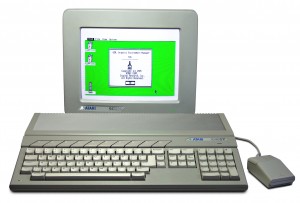
The ST was primarily a competitor to the Apple Macintosh and the Commodore Amiga systems. This platform rivalry was often reflected by the owners and was most prominent in the Demo Scene. Where the Amiga had custom processors which gave it the edge in the games and video market, the ST was generally cheaper and had a high-resolution monochrome display, ideal for business and CAD. Thanks to its built-in MIDI ports it enjoyed success as a music sequencer and controller of musical instruments among amateurs and professionals alike, being used in concert by bands such as Tangerine Dream and 90s UK dance act 808 State. In some markets, particularly Germany, the machine gained a strong foothold as a small business machine for CAD and Desktop publishing work.
The ST was later superseded by the Atari TT and Falcon computers.
Since Atari pulled out of the computer market there has been a market for powerful TOS-based machines (clones). Like most “retro” computers the Atari enjoys support in the emulator scene.
Music / Sound
The ST’s low cost, built-in MIDI ports, and fast, low-latency response times made it a favorite with musicians.
The ST was the first home computer with built-in MIDI ports, and there was plenty of MIDI-related software for use professionally in music studios, or by amateur enthusiasts. The popular Windows/Macintosh applications Cubase and Logic Pro originated on the Atari ST. Even today some people (such as Fatboy Slim) are still using the Atari ST for composing music.
Music tracker software was popular on the ST, such as the TCB Tracker, aiding the production of quality music from the Yamaha synthesizer (‘chiptunes’).
An innovative music composition program that combined the sample playing abilities of a tracker with conventional music notation (which was usually only found in MIDI software) was called Quartet (after its 4-note polyphonic tracker, which displayed one monophonic stave at a time on colour screens).
Due to the ST having comparatively large amounts of memory for the time, sound sampling packages became a realistic proposition. The Microdeal Replay Professional product featured a sound sampler that cleverly used the ST cartridge port to read in parallel from the cartridge port from the ADC. For output of digital sound, it used the on-board frequency output, set it to 128 kHz (inaudible) and then modulated the amplitude of that.
In addition to the sound sampling functionalities, the availability of software packages with MIDI support for music composition and efficient sound analysis contributed to make the Atari ST a forerunner of later computer-based all-in-one studios.
A machine capable of modifying sound structure
For those of you not so familiar with the Phonogene concept a short background may be appropriate.
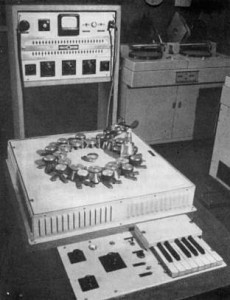
The phonogene was a machine capable of modifying sound structure significantly and it provided composers with a means to adapt sound to meet specific compositional contexts. The initial phonogenes were manufactured in 1953 by two subcontractors: the chromatic phonogene by a company called Tolana, and the sliding version by the SAREG Company (Poullin 1999). A third version was developed later at ORTF.
- Chromatic: The chromatic phonogene was controlled through a one-octave keyboard. Multiple capstans of differing diameters vary the tape speed over a single stationary magnetic tape head. A tape loop was put into the machine, and when a key was played, it would act on an individual pinch roller / capstan arrangement and the tape played at the specified speed. The machine worked with short sounds only (Poullin 1999).
- Sliding: The sliding phonogene (also called continuous variation phonogene) provided continuous variation of tape speed using a control rod (Poullin 1999). The range allowed the motor to arrive at almost a stop position, always through a continuous variation. It was basically a normal tape recorder but with the ability to control its speed, so it could modify any length of tape. One of the earliest examples of its use can by heard in Voile d’Orphee by Pierre Henry (1953), where a lengthy glissando is used to symbolise the removal of Orpheus’s veil as he enters hell.
- Universal: A final version called the universal phonogene was completed in 1963. The device’s main ability was that it enabled the dissociation of pitch variation from time variation. This was the starting point for methods that would later become widely available using digital technology, for instance harmonising (transposing sound without modifying duration) and time stretching (modifying duration without pitch modification). This was obtained through a rotating magnetic head called the Springer temporal regulator, an ancestor of the rotating heads used in video machines.
In this video:
Covering basic functions of the Phonogene.
GENE-SIZE – Dictates the size of the sample.
SLIDE – When the GENE-SIZE is activated, SLIDE allows you to select the start position of the grain/gene.
SPLICE – You can manually (and with CV) insert trigger points.
ORGANIZE – Allows selection of the different trigger points created.
VARISPEED – Controls the overall frequency. Recording at lower frequency ranges allows for greater record time at the expense of fidelity. Recording at higher frequencies allows for higher quality playback but shorter record time
HOLD SPLICE – Clears the memory of trigger points you inserted.
HOLD SPLICE + REC – Clears the memory of the sample
There are a lot of features not covered in this video, such as GENE-SHIFT, SOS (Sound on Sound) CV Input, EOS (End of sample) Trigger, Optimal Recording, etc. but you can read about that when the manual makes an appearance any day now. Again, these are just the basic functions, I’m sure Richard will have a ridiculous video utilizing all functions at the same time.
Short notice: DSK TechSynth Pro
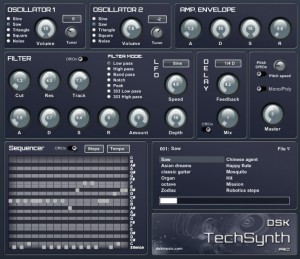
We don´t know much about this one more then that it has recently been rleased :-). DSK Music has released DSK TechSynth Pro, a free virtual synthesizer instrument for Windows. DSK TechSynth Pro features 32 steps sequencer.
– 2 Osc with 5 waveforms
– Amp. envelope and detune control
– Advanced filter with ADSR and LFO
– Delay filter
– Pitch / poly control
– +60 patches
– Velocity response
– 32 steps sequencer
*Turn on the sequencer and enjoy it 😉
Heads up on the modular open source project – Synkie
Although uploaded a couple of days ago we thought it good to give you some heads up on this open source project:
The Synkie is a modular open source analog video processor, developed by Michael Egger, Flo Kaufmann and Max Egger.
Like the venerable modular Moog synthesizer it lets you toy around with the signal using patch cables – but this time not producing sound but images. It is an instrument for video, a playground, a platform to explore new ways to transform a video signal.

Synkie is still in development, we constantly develop new modules – and even the base specifications may still change over time. But right now there’s already enough stuff to have fun playing around and the instrument has already a complexity that gets hard to control…
Synkie’s main goal is playability not image quality, even though we try to design each module as best as we can. But patching is done with 2mm laboratory cables – not shielded 75Ohm BNC cables as one would normally use for video. No, you can even use any blank wire and tinker around with the signal in real time on the sk90-breadboard module
The laboratory plugs can be stacked, so you can easily divide the signal into multiple paths, feeding multiple modules at once and change the configuration on the fly. The resulting image can get quite messy down the road, but that’s part of the fun, or maybe even the main goal…
More information
* Synkie channel on Vimeo
* SVN Repository
* What’s the idea behind Synkie
* Blog posts tagged with Synkie
Synkie Modules
Basics
* sk00-Power Supply
* sk01-Sync Splitter – input Module: Separates sync and conditions the video signal for further use
* sk02-Resyncer – output module: Merges sync and modified video, conditions for monitors etc…
* sk04-Aux In – conditions an additional synchronized video source for use in the Synkie system
* sk05-Mux – voltage controlled Multiplexer
* sk07-Comparator – generates Black and white image with threshold
* sk08-Inverter – inverts the image
* sk09-Scalebias – shift and spread brightness
Mixing
* sk10-VCA – voltage controlled amplifier
* sk11-Adder – adds up to four signals together
* sk12-Difference – calculates difference between two signals
* sk14-Twoway Mixer – mixes two signals
* sk15-Fourway Mixer – mixes four signals
* sk16-Sixway Mixer – mixes six signals
Filters
* sk20-Bandpass – bandpass filter
* sk30-Gamma – contrast
Oscillators, Control Voltage
* sk50-LFO – triple low frequency oscillator
* sk51-Envelope Follower – audio to CV
* sk52-PLL – phase locked loop
* sk53-Pulsedelal
Misc
* sk60-Delay – line and frame delay
Back in time – Analog electro 80s
All things analog and here among other things you will witness the Jupiter 8.
The Jupiter 8 was Roland’s first truly professional analog synthesizer. The Jupiter 8 features 16 rich analog oscillators at 2 per voice, eight voice polyphony and easy programming! At eight voices you can get some pretty thick analog sounds. Easy and intuitive programming via front panel sliders, knobs and buttons for all your tweaking needs. The legacy of the Jupiter synthesizers is due to their unique voice architecture and design, creating sounds that were so unreal and amazing that they have to be heard! No other synths in the world can create analog sounds as cool and authentic as these.
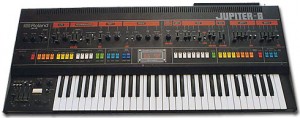
The Jupiter 8 was the biggest and fattest of them all (Jupiters and Junos)! It was one of the first synths to allow its keyboard to be split and layered – it’s eight voices of trance heaven! Cross-mod, oscillator sync, a great LFO and a classic arpeggiator are also on-board. There’s also two killer resonant analog 24dB/oct filters with 2-pole and 4-pole settings as well as low- and high-pass filtering methods. Unfortunately for the earlier models, tuning was very unstable but that seemed to be resolved in later models. Unlike its smaller counterpart, the Jupiter 6, the Jup 8 does not feature MIDI, only Roland’s DCB sync can be found on some models. However, MIDI retro-kit’s are available from various companies. Patch presets can store keyboard splits, arpeggiator settings, voice assign mode, hold, portamento and modulation settings.
But you will also notice the fat sound of the TR808:
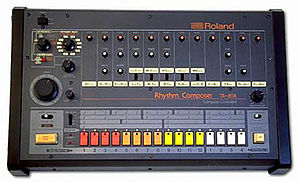
The Roland TR-808 Rhythm Composer was one of the first programmable drum machines (“TR” serving as an initialism for Transistor Rhythm). Introduced by the Roland Corporation in early 1980, it was originally manufactured for use as a tool for studio musicians to create demos. Like earlier Roland drum machines, it does not sound very much like a real drum kit. Indeed, because the TR-808 came out a few months after the Linn LM-1 (the first drum machine to use digital samples), professionals generally considered its sound inferior to sampling drum machines; a 1982 Keyboard Magazine review of the Linn Drum indirectly referred to the TR-808 as sounding like marching anteaters. However, the TR-808 cost US$1,000 upon its release, which was considerably more affordable than the US$5,000 LM-1.
Drum machines in general became an integral part of hip hop music as a cheap and simple way of producing a drum sound. The Roland TR-808 held specific appeal because of the ability of its bass drum sound to produce extremely low-frequency sounds.
In this video:
This video features a Jupiter-8 bass patch U: (21), slightly edited with Fc set to 6 with no resonance. this patch is in poly-1 mode, (half of JPs oscillators used). Also featured is the TR-808 with an original pattern programmed just before the recording. Both the Jupiter-8 and TR-808 are magic machines!
In the studio with DX5, EMU and various Poly 800 sources – DM cover
So what is the EMU EMAX?
The Emax is a classic sampler workstation from E-mu. It is sort of a next generation Emulator II, it’s not as good as an Emulator III but it’s more powerful than previous EII’s. The Emax can be found in several forms: the Emax, the Emax Rack, the Emax HD (built-in 20MB hard disk, pictured above), the Emax HD Rack (pictured below) and the Emax SE (Synthesis Enhanced) with a built-in synthesizer section. The Emax’s editing system will be familiar to users of E-mu’s excellent ESI series.
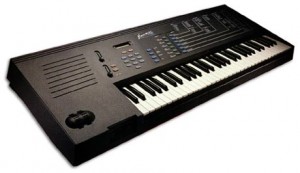
The Emax has an extensive library collection of samples that can be loaded via the built-in 3.5″ hard drive. Or you can sample your own sounds. The Sampler is powerful, but lo-fi. It samples at 12-bit resolution with variable sample-rates up to 42kHz. The built-in memory is 512K which only gives you a few good seconds really. Sampling and editing is easy, complete and intuitive with auto sample placement, auto-looping, truncating, reversing, velocity cross-fade, etc. The Emax also features individual channel outputs and stereo outputs and extensive MIDI implementation.
In this video:
One of the last videos shot in this studio. I am moving to a temporary one while building the definitive (say goodbye to the flower power sofa and curtains…).
I added a Simmons SDS 8 module for drum effects. The only original pad I have is too weared, so I used two standar pads for triggering the unit.
Upper Keyboard: Emu EMAX II HD
Lower: Emu Emax.
All sounds were synthesized by me, sampling them into the emaxes. Sources were JP8000 DW8000 Poly 800, and my Emax library.
Composed by Martin L. Gore.
Getting to know the MFB Schlagzwerg
SCHLAGZWERG combines the power of analogue drum and percussion sounds with modular versatility in a convenient and compact desktop unit. SCHLAGZWERG fusions CV-controllable percussion modules and a six-track CV/Gate-sequencer into a unique drum-machine for live and studio applications.
Thanks to its semi-modular concept, SCHLAGZWERG is ready to go without any need for patch-connections. Its internal pre-wiring comprises trigger-assignments for the gate-tracks of five (of six) drum-sounds as well as hihat decay-control. The additional CV-tracks can freely be patched to any of the modules’ functions. Naturally, the available CV-inputs can also be addressed by external control sources like LFOs, envelope generators or a Theremin-controller.
An additional CV/gate-track-pair can be used to either control a variable function of a drum-module or an analogue synthesizer like MFB’s KRAFTZWERG. The CV-track output is quantized in pitch for perfect tuning.
The internal sequencer can store sixteen patterns, each holding A- and B-parts. Patterns can be advanced using gate-signals as well as thru start/stop and reset remote inputs. The sequencer can be externally synchronized. Start/Stop and clock-sync can also be remote controlled from the units MIDI-input without any further patch connections.
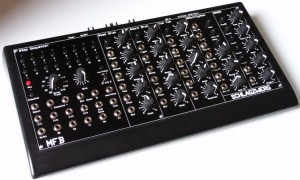
SCHLAGZWERG will double as a sixfold MIDI-CV/gate-converter. Two modes cover drum-sound control and a basic CV/gate-output of the sequences. Two additional modes allow conversion of incoming MIDI-data into CV/gate with the internal sequencer being inactive. Here, every drum sound is controlled by an individual MIDI-channel with a pitch range of two octaves. A separate channel with five-octave-range is used for synthesizer control.
The individual drum-sounds derive from our MFB’s drum-sound-modules. Trigger inputs are level-sensitive and allow dynamic performance thru drum-pads, piezo-pickups or microphones. All drums offer CV-inputs for different parameters. In difference to our modules, the different drum-sounds do not need attenuators because the sequencer allows for scalable CV-output.
The bass-drum offers the powerful sound MFB’s MFB-503 drum-machine respectively our DRUM-04 module. It offers a wide variety of possible kick-sounds due to its parameter-set with attack, tune, decay, pitch and drive.
The snare-drum is also based upon the MFB-503, respectively our DRUM-05 module. Snap, decay, tune and pitch parameters allow for broad sound-variations.
The tom-sound derives from the MFB-503 respectively our DRUM-06 module. Here, pitch and panorama-position can be coupled to achieve the classic pan-spread sound of hi-, mid- and lo-toms.
Hihat and cymbal derive from our MFB-522 drum-machine, respectively DRUM-07 module. The sounds are based upon a six-oscillator-mix. Cymbal, open and closed hihat can be triggered separately. In addition, the decay of the cymbal- and open-hihat-sounds is under CV-control.
All drum-sounds are routed into the internal mixer with adjustable panning and stereo outputs. Alternatively, the sound modules also offer individual outputs.
In the video:
peterdyer.net Some fiddling after being away from my analog beauties for a while, ended up like some Tron dubstep. You’ll hear the MFB Schlagzwerg controlling the Kraftzwerg, with a mixer to fade things in and out, and then me playing some Voyager over the top. And thats it! No laptops allowed on this one! Sadly my camera does not capture bass too well. The Voyager does have an Xotic effects AC Booster on it for beef.
Meteor Multi Track Recorder for the iPad released
Developer 4Pockets has released Meteor – a new digital multi-track recorder for the iPad. The program features up to 12 tracks of digital audio, a built-in mixer and multi-effects processor.
According to the developer, Meteor is ‘ideally suited for creating musical compositions, and also a great tool for journalists and business people who need to splice and piece together voice notes, narration or dictation’.
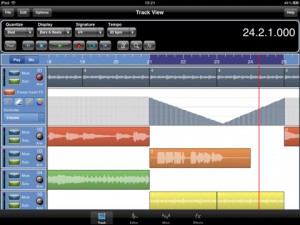
Meteor includes a full-featured sound editor, allowing recordings to be trimmed or spliced together. You can apply various effects to your recordings either directly, as part of the recording process or in real time during playback. Editor features include cut, copy, paste, fade in/out. clear, reverse, gain, normalize, remove DC offset, time stretch and pitch shift. Effects include digital delay, chorus / flanger, reverb, graphic equalizer, tone boost, compressor (with side chaining) and distortion.
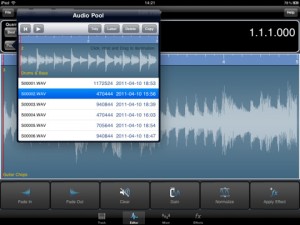
Recordings can be exported to standard file formats.
Features:
- Record up to12 tracks of CD quality audio
- Multi-Effects Processor
- Integrated 12 channel Mixer
- Integrated Sample Editor
- 3 Global Send Effect Busses
- Insert Effects with freeze facility to reduce CPU load.
- Record Effects & Record Monitor
- Mixer and Effect Automation
- Metronome
- Mixdown / Bounce Facility
- Import samples and iPod songs.
- Export to compressed CAF and WAV formats
- Automatic Delay Compensation
- In-App Purchases through the Online Shop found in the Help Menu.
Pricing and Availability
Meteor MultiTrack Recorder is available now for US $19.99.
Link:
An Introduction to Music Theory
http://www.aim.edu.au/
David Cashman Coordinator of academic studies at the Australian Institute of Music presents a Part 1 of a series of videos on Music theory. This video he take us through a basic introduction of pitch, what it is and how its defined.
Dave Gahan sings Joy Division’s Love Will Tear Us Apart
Dave Gahan Music Cares Benefit Concert May 6th 2011
Depeche Mode lead singer Dave Gahan has been honored during the 7th annual MusiCares MAP FundSM benefit concert at Club Nokia in Los Angeles on Friday, May 6, 2011. MusiCares MAP Fund provides members of the music community access to addiction recovery treatment regardless of their financial situation.
Gahan was honored with the Stevie Ray Vaughan Award for his dedication and support of the MusiCares MAP Fund, and for his commitment to helping other drug addicts with the addiction and recovery process.
Next to sets by Jane’s Addiction, Ozomatli and Paramore, also Dave Gahan performed a few songs (8 in total) including cover versions of Joy Division’s “Love Will Tear Us Apart”, David Bowie’s “Cracked Actor” and the Damned’s “New Rose”. Other songs in the setlist were his solo songs “Dirty Sticky Floors” and “Saw Something” and the Depeche Mode songs “I Feel You” and “Personal Jesus”. Note that the latter featured that other Depeche Mode member Martin Lee Gore as guest.
Via SL
DATAMASKIN

