
ENSONIQ ESQ-1 VINTAGE SYNTHESIZER 1986 DEMO
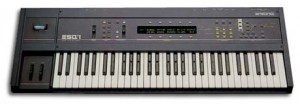
The Ensoniq ESQ-1 is a hybrid synthesizer from 1986. It has 32 digital waveforms and analog lowpass filter. It is flexible, since it employs 3 oscillators, 4 envelopes and 3 LFO’s per voice. Also it has a built in pattern sequencer.
“The ESQ-1 is a mostly digital (It has analog filters) 8 voice polyphonic, synthesizer with multitimbral (8-part) capabilities and MIDI. Sounds can be split or layered. One nice feature is that changing the sound while the previous sound is still playing doesn’t cut the first sound off. It can store 40 sounds internally, and another 80 to cartridge. Sounds and sequencer data can also be stored via cassette tape.
Each sound, or timbre is constructed with up to three Oscillators. Using all three oscillators can give very thick, rich string pads and brasses, especially as the sounds can be de-tuned and panned in a variety of different ways.
Each oscillator draws upon a bank of 32 hybrid digital/sampled waveforms including sawtooth, sine, square and a variety of conventional waveforms such as piano, human voice and organ. This may not sound very many in comparison to today’s synths, but there are enough editing features to independently change these basic waveforms in an almost limitless fashion.
One of the strongest parts of the ESQ architecture is the filter section, which features analog four-pole (24dB/octave) resonant filters. The filter covers a broad sonic range, and can be modulated via a number of inputs including key velocity, modulation wheel, any of the three LFO’s and any of the four Envelopes.
The ESQ-1 comes standard with an 8 track 2400 note sequencer which can be expanded to 10,000 notes. The sequencer features a flexible ‘pattern play’ facility for chaining patterns one after the other in any order. The ESQ-1 sequencer does all the usual stuff, but has one extremely useful feature: You can record a sequence (or Pattern), comprising of up to 8 independent tracks (Bass drum, Snare, hats, synth, strings, bassline etc) and copy this to another location. You could then for example, remove the bass drum track from one of the sequences, but leave it in the other. While the sequence with the bass drum track is playing, you can select the one without the bass drum track, which will start to play with seamless integration once the first sequence has played to the end. This method of letting you chain any of the sequences in any order you like, continuously and seamlessly, means that you have total freedom with song arrangement. After trying out arrangement ideas this way, the 8 track sequences (of which 30 can be stored) can finally have their ‘play order’ fixed into a Song. I haven’t come across another sequencer that gives you the ability to play a looped sequence as many times as you want before selecting another sequence, without first having to save the order in which you want them to play. This is a very useful feature in Dance music and Techno music where the song is generally built up over time in the same key, but with additional instruments coming and going. You are not limited to using only the ESQ-1 sounds on the sequencer, as each track can be made to play the ESQ-1’s internal sounds, external sounds over MIDI, or both.”
The ultimate robotic sound library?

Bluezone has released Robotic Division, a collection of sci-fi sound effects.
Robotic Division: Sci-Fi Sound Effects’ has been designed to offer you the ultimate robotic sound library, with extremely great precision for sounds, either in dynamic or stereo width.
Including mechanical robotic modern sounds, futuristic communications, textured outer space ambiences, heavy impacts and tension raising, this sample pack take your creativity to the next level.
‘Robotic Division: Sci-Fi Sound Effects’ is an overdose of 243 powerful samples including ascending and descending frequencies, robot malfunctions, transformations and more.
Robotic Division is available to purchase for €16.95 EUR.
lines and angles
a track i submitted for mcrp 10: the monome community remix project.
grayscale monome 128, ricochet 0.3.1, renoise 2.7, ardour 2.8.11, gentoo linux.
audio download: soundcloud.com/ioflow/lines-and-angles
Josh explains how the “meta-remix” came about — by limiting to 15-second samples, and pooling results, an entire community of producers was able to work collaboratively:
I admit that this is slightly in my own interest, since I’m on this album (as “ioflow”). But even though this is the first album I’ve ever appeared on, being new to the world of electronic music production, what’s really newsworthy is that it’s another outstanding effort by all the monome artists. these guys are super-talented.
This MCRP theme: the meta-remix project. Each participant grabbed a 15-second sample from a previous MCRP track, and submitted the unaltered clip to the pool. the participants then used the pool to craft their own original tracks.
Man, what they did is crazy. I had access to the samples and I still can’t tell how they got those sounds. they’re a fine buncha talented
folks, so maybe this is a news item of interest: monomers around the world coming together to create a free album, created at least in part
with free software (i even used Windows software on Linux), using tracks previously made freely-available on other MCRP albums.
Hot of the Mute Channel: Yann Tiersen – Monuments
Available now is the video for the brand new Yann Tiersen single “Monuments”, out on the Mute label on August 8th 2011. The single announces Yann Tiersen’s upcoming album “Skyline” which is also due out in August. “Skyline” is Yann Tiersen’s seventh studio album.

41-year old Yann Tiersen is a French musician. His music is characterized by the use of a large variety of instruments using primarily the guitar, synthesizer or violin together with instruments like the melodica, xylophone, toy piano, harpsichord, accordion and typewriter. His musical style is reminiscent of Frédéric Chopin, Erik Satie, Philip Glass and Michael Nyman.
Before releasing scores under his own name, Tiersen recorded background music for a number of plays and short films, such as “La Vie Rêvée des Anges” (1998), “Alice et Martin” (1998) and “Qui Plume la Lune?” (1999). He rose to domestic fame upon the release of his third album, “Le Phare”, but remained relatively unknown outside France until the release of his score for “Le fabuleux destin d’Amélie Poulain” in 2001, which was a mixture of both new and previously released material.

New advanced drum machine exclusively designed and developed for the iPad
FingerLab has released DM1-The Drum Machine. DM1 is an advanced drum machine exclusively designed and developed for the iPad, powerful, elegant and very easy to use. It should appeal to musicians with its special selection of vintage drum kits and its smart features for sound editing and song writing. It will also appeal to music fans with its approach to beat making.
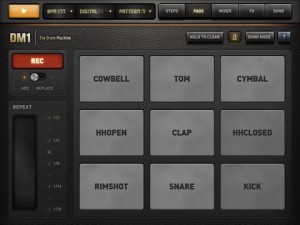
DM1 is an advanced vintage Drum Machine. It turns your iPad into a fun and creative beat making machine.
Easy and fast to use, loaded with 24 superb electronic drum kits and beautiful hyper-realistic graphics, DM1 has been designed for a lot of instant fun.
As electronic musicians ourselves, we, at Fingerlab, have developed DM1 with the intention of delivering the perfect mix between fun playability and powerful sonic capacities. We always keep in mind the importance of a beautiful design with the right balance of powerful abilities while avoiding clumsy, overbusy interfaces.
Check our 24 electronic drum kits. 12 classic vintage drum kits plus 12 in-house produced electronic kits, edited and mastered at Fingerlab professional studio.
DM1 offers 5 main sections:
1 – THE STEP SEQUENCER frees your imagination with a smart use of the multi-touch screen. Just turn on and off steps in your sequence with the tip of your fingers to create cool beats, or unexpected rhythms!
2 – THE DRUM PADS simply lets you play and record the beat that tickles your fingers. No need to be a first-class drummer, automatic quantize does the work for you.
3 – THE MIXER for quick and subtle sound mixing of your drum kits. Featuring settings for volume, pitch, sample length, custom drum kit element for each channel, mute and solo mode.
4 – THE FX TRACKPADS a creative duo of FX trackpads to distort, modulate and transform your beats. The effects include: Overdrive, Delay, Phaser*, Texturizer* and Robotizer* (* for iPad 2 only).
5 – THE SONG COMPOSER allows you to quickly make a song with the beat patterns you have created. Just drag and drop the patterns onto the timeline. Fast and easy.
Specifications:
✔ Graphic design by Jonas Eriksson
✔ Smart ergonomy for fast creativity and fun
✔ 24 vintage and produced drum kits, mastered at in-house Fingerlab Sound Studios
✔ Mixer page with pitch, length and level rotary controls, and custom drum kit per channel
✔ Extra fast drum kit loading
✔ Playable pattern selection for extra creativity
✔ 9 Big Drum pads, quantized recording and MPC-like Repeat touch-stripe
✔ Step Sequencer with multi-touch matrix
✔ Duo FX Trackpads for real-time sonic destruction and multi-FX
✔ Mode song with intuitive editing
Coming soon:
✔ More FX
✔ High-quality export to email or iTunes shared folder
For its release the company is offering a special deal with a 70% discount ($1.99 instead of $7.99).
Sound testing: Arturia Prophet V vs. SCI Prophet 5
http://youtu.be/bWYqWMQwYjk
Comparison of the factory sounds of a real hardware Prophet sound demos on the internet recreated with my Arturia Prophet V software synthesizer. Sequential Circuits Prophet 5 was one of the first fully programmable polyphonic analog synths, the Prophet 5 is the most classic synthesizer of the eighties! It is capable of a delightful analog sound unique to Sequential’s Prophet series in which the P5 was King! Five voice polyphony – two oscillators per voice and a white noise generator. The analog filters, envelope and LFO all sound great and are extremely flexible. The P5 had patch memory storage as well, which scanned and memorized every knob setting for storing and recalling your sounds – a desperately needed feature at the time!
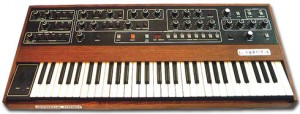
The P5 lacked MIDI (a feature that came later on the P5 spin-off, the Prophet 600). But it is still loved even today for its great string sounds, analog effects, and punchy analog basses. Unfortunately the P5 is not immune to the dark side of vintage synths – it has its fair share of analog synth problems such as unstable tuning, it’s difficult to repair, lacks MIDI, etc.
Realtime Composition and Performance
“A Demo of my University Final Year Project titled “An Investigation Into Realtime Aleatoric Composition and Performance””
Aleatoric music (also aleatory music or chance music; from the Latin word alea, meaning “dice”) is music in which some element of the composition is left to chance, and/or some primary element of a composed work’s realization is left to the determination of its performer(s). The term is most often associated with procedures in which the chance element involves a relatively limited number of possibilities.
The term became known to European composers through lectures by acoustician Werner Meyer-Eppler at the Darmstadt International Summer Courses for New Music in the beginning of the 1950s. According to his definition, “a process is said to be aleatoric … if its course is determined in general but depends on chance in detail”. Meyer-Eppler’s German terms Aleatorik and aleatorisch, however, both mean “aleatory”. By mistakenly rendering them, his translator inadvertently created a new English word, “aleatoric”, which quickly became fashionable.
Encountered the Ululatron before?
Here is some background info on it that I found in a forum:
The principle behind building it is very simple, although it can be time consuming. It is based around getting 555-based LED flasher circuits to trigger key hits on the keyboard. A 555 flasher circuit is very simple to build (see the Tiny Tremolo thread for an example – although that one is CMOS, which we don’t need for this project). I can post the specific layout of the circuit I used later. I experimented with some parts to get the most play out of the pots I was using, but it’s a pretty standard LED flasher.
1. Open up the keyboard you want to use. Inside you will find a long strip of contacts where the keys, when struck, make a connection that in turn makes the keyboard make a sound. Get rid of the keys and the rubber pads–you won’t need them. On the contact strip you will find that each key makes contact between two points (these will either be small copper pads or squiggles). Use a knife or something to scrape off the coating on the contact points to expose the copper underneath. Now, do some experimenting by touching a piece of wire in between various contact points. In my keyboard (and you can see this reflected in the design) the contact points were divided up into six groups. Each group of six connected to a common contact point. It looked something like this:
C C# D D# E F F# G G# etc.
——————————
1 1 1 1 1 1 2 2 2 etc.
If you see what I mean. Each keyboard will be slightly different, but in every one you will find that a group of notes connect to a common. You can also figure this out simply by following where the copper traces go. Figure out how many groups of notes your keyboard has – this will be how many timer circuits you will need to build. My keyboard had 6 groups on a 32 key keyboard – 5 groups of 6 notes with two notes left over on their own circuit.2. This is the tedious part: Solder a wire to every contact point on the keyboard contact strip. For the common nodes you only have to solder one wire to one of them–this will be the pole connection on your rotary switch.
3. Build the timer circuits. Make sure to connect two LEDs to each circuit – one will drive the photoresistor in a DIY vactrol and one will be a rate indicator.
4. Build the vactrols. All this is is a photoresistor (LDR) that a blinking LED shines on. You will need to encolse the pair in a light-tight package. Don’t use electrical or duct tape – these come unsticky and your vactrol will pull apart. You could do duct tape covered in hot glue, or one brilliant solution I saw was modelling clay (the kind that doesn’t dry out)
5. Get as many single pole rotary switches as you need (one for each group of notes). Solder each of the wires coming from the individual key connections to a throw point on the switch. Solder the common node wire from the keyboard to one side of the photoresistor. Solder the center pole of the rotary switch to the other side of it. Now, you see that the blinking LED will connect or break the connection between the common node and the note wire by raising or lowering the resistance of the photoresistor (you need to use pretty high value photoresistors – mine were 500M Ohms at complete dark, which I think is pretty standard and more than enough to completely resist the small charge that signals the keyboard keys. Repeat the proces for all the groups of keys your keyboard has.
That’s it. Now the pots on your timer circuits will control the rate at which the vactrols signal the key hits. You use the rotary switch to dial in the notes you want. You’ll probably want to label where each note is on the rotary switch on your enclosure.
Disclaimer: There are some weird keyboard designs out there. I can say that if you have a Yamaha PSS-50 this project is easy as pie. I have seen some weird configurations inside keyboards though. I do think, however, that they pretty much all work on the same principle. Some keyboards will be better than others for this particular mod.
Teaser of the new Generator module from Pittsburgh Modular
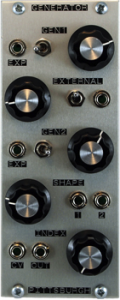
The Generator is a dual oscillator built around two triangle core, wide range, periodic waveform generators. Ideal as the basis for tuned percussion/noise, abrasive amplitude, frequency and timbral modulation. Tones, drones and textures. As a multipurpose signal generator, Generator can provide the basis of a wide range of complex sounds from drums to atonal, nintendo zipper/fart noises.
Free music creation app for mobile producers
This video shows some of the features of a FREE, new studio.M multitrack music creation app for mobile producers and songwriters. Based on the top-selling studio.HD app, it offers 4 audio tracks, mono or stereo (upgradeable to 8) with recording, editing, an extensive loop library plus automated mixing and effects all controlled by a fast and creative touch interface. Get ideas down fast and work with them anywhere!
Grab a beat and throw down a rap, capture the spark of a song before it’s gone or produce dance tracks on the go. It’s even great for making custom soundtracks for your next YouTube movie!
Features:
– 4-tracks of CD audio quality playback (with recording one-track-at-a-time)
– Streaming recording/playback engine for long recording times limited only by storage
– Automated mixing and effects
– Effects include Compressor, Reverb, Pan and Low Pass Filter
– Loop library spanning popular music styles (including Pop, Funk, Industrial, Hip Hop, Trance, Reggaeton, House, etc.)
PLUS there is an in-app Store that offers:
– The “MX” upgrade for:
— 4-more tracks (8 total)
— More effects (Delay, Flanger, Gate, Stutter, BitCrusher and Glitchy Repeater)
— 130 more loops arranged in loop construction kits called “Loop Sets”
– Loop Store
— Featuring 100’s of loops arranged in Loop Sets by both large 3rd parties (like Beatport, Sonic Reality, etc.) and indie producers
studio.M requires iPhone or iPod touch on iOS 4 or above. It will also run on iPad in 2x mode.
DATAMASKIN

