
Caustic 3 App Demo Sneak Peek…
Here’s a quick peek at the upcoming Caustic 3 App from SingleCellSoftware
Demonstrating the power of the new synths and many tracks now available. The maker of this video put this track together in just 2 hours.
Video review of the drum synth Kraftpad
This is definitely one of my favorite iPad apps right now, check out the video below to find out why, but I guess a hint would the choice of presets 
“Kraftpad is a Drum Pad. I really love it because you can edit the 6 available Pads. Shape the sound of each instrument, or change it.21 kits are available. All, as the name of this App implies, dedicated to Electronic Music. You also have a reverb, and you’ll be able to record and loop your Performances. No sharing features are available, and no Midi either. A Super + Drum Pad. I think that it could easily become a Killer One with AudioCopy / Paste and the Midi…”
Tape – Classic style recording with contemporary functionality for iPad
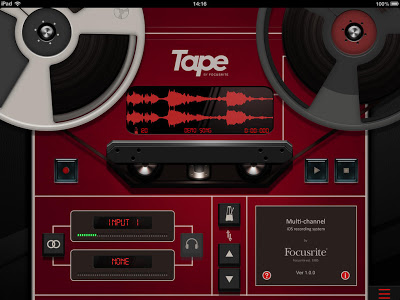
Tape – retro recorder from Focusrite. Simple, straightforward and free.
Tape is a beautiful recording solution, with easy to use 2-track recording, instant mastering, customisable tape artwork and social media connectivity.
Record from the inbuilt iPad microphone or any Core Audio compliant audio interface (including products from the Focusrite iTrack and Scarlett product ranges), and instantly add polish with one button mastering. Then simply add a title and album artwork and share online with friends and fans via Soundcloud.
Key Features
- Record two separate inputs, or link them as a stereo pair
- Use the meters to ensure input levels are just right
- Plug and play support for Core Audio Compliant audio interfaces (including the Focusrite iTrack Solo and Scarlett range)
- Low latency monitoring allows you to listen to your performance as you record
- Apply mastering effects and instantly improve your recording
- Keep time with an adjustable metronome
- Apply a custom title and image to your music via Soundcloud (free Soundcloud account required)
- Works on iPad 2, iPad (3rd gen), iPad (4th gen), iPad mini and above
- Support for iOS 6 and above
MIDImorphosis – an audio-to-MIDI app for iOS
Audio MIDI Connect has transformed into MIDImorphosis – an audio-to-MIDI app for iOS.
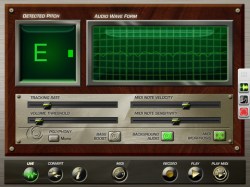
Here’s what’s new in MIDImorphosis:
- In this version, the speed and accuracy of pitch detection has been greatly improved.
- MIDI output now supports multiple destinations, both CoreMIDI and Virtual MIDI, as well as DSMIDI Wifi.
- Audiobus support has been added, for both input and output slots.
- Audio can be imported or exported using audio copy and paste. The app supports off-line conversion of audio to MIDI, with MIDI files being available using the “open in” method, or through iTunes file sharing.
- Pitch detection now supports polyphonic playing. A toggle button selected between monophonic, small intervals, and chords.
https://itunes.apple.com/us/app/audio…
Introductory pricing — ends July 28th
MIDImorphosis captures the pitch of incoming audio, and converts it into MIDI notes that can be used to control iOS synthesizers or external equipment. With support for CoreMIDI, Virtual MIDI, DSMIDI Wifi, Audiobus, and background audio, connecting MIDImorphosis is a snap. Connections to laptop and desktop computers can be made using WiFi or with MIDI adapter cables.
The app performs both monophonic and polyphonic pitch conversion, and is designed to work best with a guitar or bass. We recommend dock-based instrument adapters; connections through the headphone jack frequently have crosstalk and poor frequency response. We also recommend running MIDImorphosis on an iPhone4s or better, or an iPad2 or better (this is especially true when using Audiobus).
Complex sounds can be created by combining a typical guitar effects app along with MIDImorphosis and a synthesizer app. The guitar effects app can provide tone control and immediate response, while the synthesizer can augment this with a deep, evolving sound.
With any conversion system, there is latency between a note played on an instrument, and when the note can be correctly identified; the slight delay motivates the combination of guitar effects and synthesizers. MIDImorphosis should be fast enough to work well for playing at moderate speeds. For guitarists in need of a system that can handle “shredding,” we would recommend hardware converters by companies such as Roland or Fishman.
A number of videos are available on the app web page, to illustrate typical performance, and playing techniques to get the most out of the app. For guitarists, a light palm mute should be used to prevent unwanted notes from ringing. Pitch detection is typically best with the bridge pickup, and with a clean tone.
In addition to live conversion, MIDImorphosis can also convert recordings into MIDI (avoiding latency issues). The app can record audio; audio can also be imported using either Audio Copy or iTunes File sharing. Audio can be exported with Audio Paste. MIDI can be exported to other apps using the “open in” feature, or through iTunes. The app also allows scanning through audio files, to see the detected pitch at any given moment; this feature should be particularly useful to musicians interested in transcribing a recording. Recorded audio and converted MIDI can be played back through the app. The app is compatible with the Audiobus input and output slots.
For polyphonic pitch detection, the app supports both intervals and chords. Many guitarists play small intervals on adjacent strings; pitch detection has been optimized for this case. When set to chord detection, the app can find additional notes, but is less accurate.
mikrosonic RD4 Groovebox for Android
Get the free demo version on Google Play: https://play.google.com/store/apps/de…
Turn your phone or tablet into a musical instrument! RD4 – Groovebox is a music making app with virtual analog synthesizers, drum machines and effects. Compose and arrange your music in real-time. Choose instruments individually for the 4 channels. Record live or set notes with the dedicated sequencer or piano roll of each instrument. This multi-touch enabled app makes it simple to invent unique loops and musical phrases. Manipulate the sound of the synthesizers by tweaking the oscillators, resonant filters and audio envelopes. Add audio effects like reverb, distortion, phaser, filter and delay to your sounds. Appropriate both for experienced musicians and beginners. Loops you’ve created and exported with RD4 can also be automatically integrated into mikrosonic’s audio mixer app SPC – Music Sketchpad.
Feature Overview
Mixer:
– 4 channel rack mixer
– Instrument selection for each channel
– Volume control with level meter per channel
– Direct audio effect channel assignment
– Tempo control with tap tempo
– Channel mute and solo
Sequencer:
– 2 banks with up two 8 bars per instrument
– Adjustable play modes from 1 to 8 bars and random modes
– Song Mode with a length of up to 99 bars
Choose between two virtual analog synthesizers and the drum machine for each channel:
Analog
– Modeled after legendary monophonic synths of the ’70s
– For fat sounding bass and powerful lead sounds
– 3 oscillators with 6 different waveforms
– Each oscillator can be tuned precisely and has a warmth control for the typical analog sound
– Attack, Decay, Sustain and Release envelope generator
– Pitch wheel
– Low-pass filter (24dB/oct, 4-pole) with knobs for cutoff, resonance and an Attack/Decay/Sustain envelope generator
– Recording of played notes in real-time (depending on devices capabilities)
– Piano roll for editing recorded notes comfortably
– Or compose by drawing notes directly with the piano roll in 1/16 or 1/32 resolution
– Piano roll editing features: Transpose Pattern, Shift Sequence and Quantize Pattern
Bassline
– Reminiscent of the legendary 303 synthesizer
– Create bubbling basslines and screaming lead sounds
– High-quality low-pass filter with resonance, cut-off, and envelope controls
– Oscillator with 4 types of waveforms
– Real-time step sequencer with accent and slide
Beats
– Program beats with 10 classic drum kits: 808, 909, 606, CR-78, Linn, KR55, RX11, RZ1, DMX, DPM48
– Booming kick drums, snappy snares and throbbing percussions
– 8 channels per drum kit
– Punch control for volume and envelope adjustments
– Accent programmable for each drum channel
– Free assignable effects for each drum sound
– Channel mute, Closed Hi Hat can mute the Open Hi Hat
– Real-time pattern based step sequencer
Audio effects:
– 5 effects: Reverb, distortion, filter, phaser and delay
– Real-time controllable
– X/Y control field for each effect
– 4 effect sends
– Chaining of 2 effects
Technical features:
– Customized layouts for phones, 7 and 10-inch tablets
– Special additional rack view in portrait mode for 10-inch tablets
– Multi-touch control
– Live session recording
– Audio loop export feature
– SoundCloud Sharing Kit integration
– Session save capability
– Cut/copy/paste pattern
– OpenSL support for low latency*
– App2SD
System Requirements:
– Android 4.0 or higher
– Screen resolution 800×480 (WVGA) or higher
– 1 GHz CPU or faster supporting ARMv7
* Please note that for recording in real-time with the Analog synthesizer you will need a low latency Android device with Android 4.2 like the Google Nexus 4 or 10 or the Samsung Galaxy Nexus. Read more about audio latency on our FAQ: http://www.mikrosonic.com/faq
More details at: http://www.mikrosonic.com/rd4
Yello: The Yellofier App – Anything becomes music
Yello’s Boris Blank has teamed up with Swedish producer Håkan Lidbo for the new Yellofier app, which can turn any sound into music.
Use preinstalled tracks by music giants like Carl Craig, Trentemøller, Booka Shade, Matt Johnson and many more and take them to where you like or upload and mash your own tracks!
Head over to the App Store and try it out!
For everything else, head over to electronicbeats.net, follow us on facebook or Twitter @EBnet !
Checking out CasioTron Beats
CasioTron Beats re-creates the rhythm patterns found on the vintage home keyboards of the 70’s and 80’s. These popular keyboards were analogue and have now become collectors items because of their warm sound.
This particular version takes the drum sounds from the then popular Casiotone MT-70 which although was more modern than the earlier models, it is still analogue as you will be able to tell from the sound.
Remember those bossa-nova and samba beats? Well here they are!
Fingerlab releases Musyc music app
Fingerlab has announced Musyc, the a fun and innovative music application where touch turns into music, details below:
Discover the new music application by Fingerlab, winner of the Apple Design Award 2012 for DM1 – The Drum Machine.
Musyc on the AppStore :
https://itunes.apple.com/us/app/musyc…
Musyc is a fun and innovative music application where touch turns into music.
No use of piano keyboard or partitions, draw shapes and listen to your piece of music while viewing sounds bouncing on the screen.
Enjoy the 64 instruments (organized into 16 groups) exclusively created and produced at Fingerlab music studio as well as all the exciting and new physical and music tools provided in Musyc.
Musyc is free and its full version is available through in-app purchases.
WARNING: Musyc is not compatible with iPhone 4, iPhone 3GS, iPod touch 3 and iPod touch 4.
Features:
-Graphic design by Jonas Eriksson
-Retina Display
-Optimized for iPhone 5 and new iPad
-High quality sound engine
-Ultra-realistic physical engine
-Audio track mixer (level, pitch, length, pan, mute)
-2 effect channels with 5 effects (Delay, Overdrive, Reverb, Dalek, Compressor)
-Physical sequencer
-Motion recorder
-Advanced physical objects (planet, black hole, modulator, …)
-Real-time audio recording
-High-quality or compressed exports (DropBox, SoundCloud, Mail, AudioCopy and iTunes)
Watch Musyc video trailer:
http://vimeo.com/channels/musyc
Coming soon in next updates:
-iPhone4 & iPodTouch optimization
-Import & Export song project (DropBox, Mail, iTunes)
-User sound kit with samples import
-Audio background support
-Wist synchronization
-Midi synchronization
-AudioBus support
Placebo Battle for the Sun – Remix with 9 Apps
BitWiz Audio Synth / Gestrument / Audiobus / Anytune Pro+ – Music Practice Perfected. / Genome MIDI Sequencer / DrumsLive — touch and MIDI multisample drums / DrumJam / ThumbJam / LiveFX • DJ Effects Kit / Brian Molko – Placebo – Battle for the Sun
Touchscreen Sequencer Test
This is a quick demo of Yet Another Touchscreen Music App.
“I’m trying to come up with a global live performance / songwriting app for the touch interface, and this is my seventh attempt. Definitely getting closer. Still have to add the sound-sculpting interface; this is just a quick demo of the step sequencer scene switching.”
DATAMASKIN

