
DJ Template Pro: Walkthrough
Here’s a nice DJ Template using Ableton, check it out:
” This is a walkthrough of my DJ Template for the Akai APC40. It provides an overview of all the core features, but does not go into detail.
To download the template, visit WillMarshall.me“
New pad based controller: Traktor Kontrol F1 – Scratch Clips demo
Traktor Kontrol F1 is the definitive controller for the new Remix Decks™ in the included Traktor Pro 2.5 software. In stores May 30th, the F1 blurs the lines between DJing and live performance – the perfect addition to any Traktor-based setup.
Light up your DJ sets with 16 multi-color LED pads, and launch clips in a perfectly intuitive, DJ-centric way, switching between up to 64 tracks, loops and one-shot samples on each Remix Deck.
The second video in our series on different ways to use the F1 shows the Remix Decks working hand-in-hand with scratch techniques. Watch turntablist extraordinaire DJ Shiftee rock out with the multi-colored pads while old-school partisan Greg Nice has some fun on the mic.
Whatever your setup, Traktor Kontrol F1 puts your signature sound at your fingertips. Get ready to remix.
More info:
http://www.native-instruments.com/f1
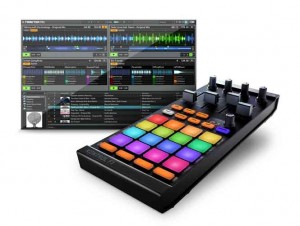
Native Instruments has announced TRAKTOR KONTROL F1, a pad-based, USB-powered hardware controller built to control the advanced Remix Decks™ in the included TRAKTOR PRO 2.5 software. TRAKTOR KONTROL F1 provides 16 multi-colored, touch-sensitive LED pads, an advanced global control section as well as an ergonomic mixer section including four volume faders and dedicated filter knobs. Designed specifically for DJing, NI says that the KONTROL F1 offers a DJ-centric workflow for launching clips in an intuitive way, allowing users to switch between up to 64 tracks, loops and one-shot samples on each deck.
TRAKTOR KONTROL F1 includes the full version of the TRAKTOR PRO 2.5 software, also available as a free update to all users of the TRAKTOR 2 generation. NI tells us that version 2.5 introduces the innovative Remix Decks, giving access to a powerful loop suite made up of 64 slots, each able to hold loops, one-shot samples or even tracks. DJs can control up to four Remix Decks at once and save their work as an entire Remix Set with its respective beat grids, BPM and key information in a new file format that can be comfortably imported into a track deck via TRAKTOR’s browser.
TRAKTOR KONTROL F1 was designed specifically to control the Remix Decks and provides full and tactile control over the new feature, benefiting from seamless bi-directional software-hardware integration and offering full visual feedback through the multi-colored LED pads. Advanced parameters such as Punch mode and FX assignment can also be comfortably changed from the KONTROL F1 and four smaller pads at the bottom of the matrix stop or mute a group of samples. Controlling Sync, Quantize, Sample Size, Reverse and other functionality, the comprehensive global section also features a push encoder to switch through the four pages of the 16 pads and offers a ‘Capture’ button, which allows DJs to grab samples from running tracks of each track deck within the TRAKTOR software, both before and during the actual DJ performance.
Each regular track deck within TRAKTOR PRO 2.5 can be switched to a Remix Deck, thus offering dedicated transport, sync and tempo master controls. This allows DJs to control an entire Remix Deck via Native Scratch timecode control with vinyl or CDs, or using the jog wheels of the KONTROL S4 and KONTROL S2 hardware.
TRAKTOR KONTROL F1 was designed to integrate perfectly into any TRAKTOR DJ setup. With the same form-factor as TRAKTOR KONTROL X1, KONTROL F1 fits neatly alongside standard DJ mixers and the all-in-one DJ systems TRAKTOR KONTROL S4 and S2. The TRAKTOR Bag provides reliable protection for the KONTROL F1 during transport, and also doubles as a solid stand, elevating the KONTROL F1 to standard mixer and turntable height.
Start Up & Mix with DJ Rig The Professional DJ Mixing App for iOS Devices
IK Multimedia has announced the release of what they say is their first professional DJ Mixing app: DJ Rig – a full-featured, double-deck DJ mixing app for iOS devices.
SPECIAL INTRODUCTORY PRICE $1.99 / €1.59 in the App Store!
http://www.djrig.net | http://www.irigmix.com for more information
DJ Rig is a full-featured, double-deck DJ mixing app for iPhone. It provides instant song-playing from the device’s music library, automatic tempo sync and beat match, sample-based pads and performance recording, plus an arsenal of high-quality DJ effects. When used with the new iRig MIX audio mixer for iOS devices, DJ Rig provides the most portable professional setup for mobile DJs and musicians.
DJ Rig has many professional features not found in other DJ apps like its unique beat match, its selection of 12 high-quality DJ effects with XY control, built-in sampling pads, multiple cue points, crossfade curves and X-Sync. X-Sync (available when used with iRig MIX) enables anyone to automatically synchronize the app audio with any other external audio source like a second iOS device but also regular CD or MP3 players.
DJ Rig — What you Get
DJ Rig comes with all the professional DJ features above — including 6 high-quality DJ effects (Low pass, Band pass, High pass, Delay, Stutter, Phazer) — and 8 built-in sound banks plus one adjustable cue point.
These can be expanded with 6 more effects (Flanger, Comp, Fuzz, Reverb, Auto Wah, Crush), 7 extra sound banks, 3 more cues points plus digital deck interface, all available together through in-app purchase in the Pro Bundle pack.
Stereoklang TV: Reactable DJ software – live performance in Barcelona 2012
Here’s a nice live performance of Reactable at this year’s MWC in Barcelona Spain, done by Reactable’s own music maestro in the Intel booth.
For more electronic news go to our website:
Steelberry Clones
http://stereoklang.se/blog
About Reactable:
The revolutionary Reactable instrument hits the stage with its new incarnation: The Reactable Live! It brings all the possibilities of the original Reactable and makes it portable and easy to setup. The Live! version of the instrument allows you to touch and see the music while performing. The different sound generation and manipulation modules, which are real physical objects, permit infinite flexibility and control in musical expression. Exploring and using modern techniques of music production has never been easier or more exciting.
The Reactable was conceived as an instrument to bring back the expressive possibilities of traditional instruments to musicians who are working with new technologies. It uses concepts of modular synthesis, sampling, advanced digital effects processing, and DJing and combines them with modern human computer interaction, multitouch technology and a tangible interface.
Midi Fighter 3D Controller from DJ TechTools
For more information and to preorder: http://www.djtechtools.com/2012/02/27/introducing-the-midi-fighter-3d/
DJ Tech Tolls tells us that their MidiFighter has now been released, here’s their pitch:
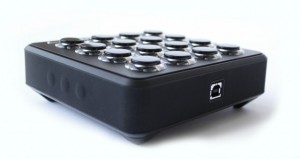
Today we’re very proud to usher in the newest DJTT creation: The Midi Fighter 3D controller. Equipped with 16 RGB arcade buttons and full three dimensional tracking of the controller’s movement in space, this latest addition to the Midi Fighter line is our most ambitious and expressive creation to date.
Key Features:
- Fully customizable high performance RGB arcade buttons
- 4 banks of controls
- 6 side buttons
- Optional hand strap for full instrument control
- Full 3D motion tracking of five degrees of movement (Patent Pending)
- Highly grippy rubberized feet and sleeve
- Gyroscope, Accelerometer and Compass for absolute orientation tracking.
MidiPads (MidiPadz) with Traktor Pro
MidiPads is the full version of MidiPadz Lite and it’s got several new features. It’s not just a drumpad controller, here its usage with Traktor Pro.
Learn about the user interface in the first part. For details in conjunction with Traktor skip to the last third.
Get MidiPads on the App Store: http://itunes.apple.com/us/app/midipads/id418216060?mt=8
Once connected, MidiPads sets itself apart with flexible control on each of those pads. Just tapping rectangles isn’t much fun on the iPad, of course – you lack tactile feedback and pressure sensitivity found on a physical pad. So, instead, MidiPads provides other modulation to exploit the touchable surface for continuous control. In fact, thinking of it as a “drum pad” is almost a bit unfair. New in this release:
- Presets, which you can share with other users – which could in turn make a nice little community of users here
- “Bouncing mode” for touch pads and sliders
- Send multiple messages with each axis and knob
- Individual up/down messages for each touch pad and slider, if you so wish
- Enhanced views, settings reset, and MIDI connection settings
- Resize pads and pad area (essential for either fat fingers or getting more controls!)
MidiPads (MidiPadz) with HALion Sonic
Steve Lawler on Dark Pressure
DJ/Producer Steve Lawler (VIVa MUSiC, UK/Ibiza) puts several of his exclusive patterns from the Dark Pressure Maschine Expansion to use in the studio and the club. All of the grooves heard in this video are from Dark Pressure.
http://www.native-instruments.com/darkpressure
DARK PRESSURE focuses on percussive one-shot samples and a wealth of exclusive pre-programmed patterns – many created by Steve Lawler himself. Fine-tuned for powerful club sound systems, DARK PRESSURE puts an impressive array of four-on-the-floor rhythms at your fingertips – from full-on energy to hypnotic groove and triplet-driven swing.
This is also the first MASCHINE Expansion to include pre-sliced percussion loops (64) for instant remixing. These loops are a source of inspiration when you’re composing, and a great way to apply some additional layered rhythms to your productions.
Novation TWITCH DJ Controller – Road Test
Here’s the background info:I n our latest video series “Road Test” — dedicated to road testing portable electronic music performance and production tools Dubspot Instructor, DJ and producer Abe Duque takes various music equipment out of the comfort of the studio and puts them to use while on the road as a traveling musician and performer. He documents his findings and details the creative possibilities these tools offer in a live performance setting.
In the first installment of Road Test, Abe brings the Novation TWITCH back into the Dubspot lab after a tour in Germany where he utilized the new DJ controller as his primary DJ equipment. Presented here are the results of his experience with the Twitch – from its light, compact, durable design, tactile and precise knobs, buttons, and faders to the multifunctional touchstrip controls and Fader FX feature. As you can tell by now, the Twitch absolutely passes Abe’s Road Test. Stay tuned for more.
DJ: Quick Look at New Behringer Modular Controllers
Here’s a new video featuring the Behringer modular DJ controllers together with Traktor:
For more information on the Behringer CMD series, please visit: http://www.djtechtools.com/2012/01/20/behringers-cmd-line-modular-dj-controll…
- Wide variety of modular units that apply to different uses
- Super precise jog wheel and 60mm faders
- Come with new Behringer 3-year warranty
- CDM-MM1 mixer unit includes a built-in powered USB 2.0 hub
Traktor / Maschine Tutorial – How to Midi Map + Free Mappings (Settings)
More info – http://bit.ly/xgwmpd
In this video, Dubspot Instructor, DMC World Champ, producer and demanding critic of sandwiches DJ Shiftee shares one of his most prized possessions – his Maschine mapping file for Traktor! In part one, he demonstrated an incredible routine using Joker’s “Slaughterhouse” track. In part two, he went into the complex world of LED mapping and modifiers. And now for the final installment of the Shiftee Trilogy, our generous instructor takes you through his Maschine settings, offering a detailed explanation of his mapping and shows you some very cool options for mapping to pads along with some basic functions for cue points setting, looping and syncing.
“Here it is, you hooligans. You thieving scoundrels. My precious Maschine mapping for Traktor. Why don’t you just take my wallet? Or key to my car? Why don’t you spit in my food and tie my shoelaces together? Why don’t you shave off my eyebrows and paint on new ones with a magic marker? Have you no decency? Have you no compassion? Where is your common courtesy? Stealing a man’s Maschine mapping (even though he’s willingly giving it to you for free)? For shame! For Shame!!! FOR SHAME!!!!!!!!!!!!!!!!” – Shiftee
DATAMASKIN

