
Op-1 with iPad mellotron sample
Mellotron sample recorded from an iPad running Super Manetron.
Soon on the app store: Electrify NXT – Teaser
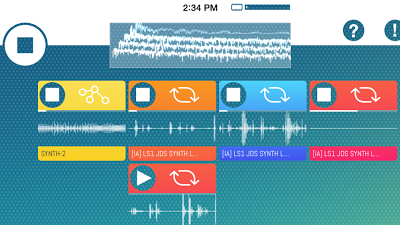
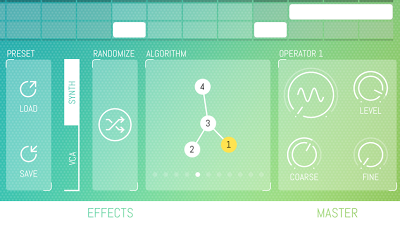
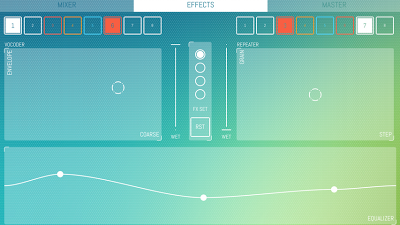
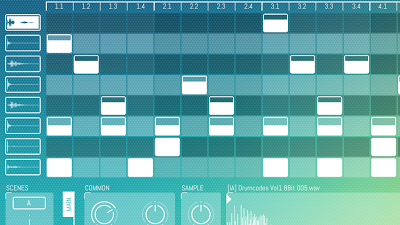
Stated as the next generation groovebox for iPad coming soon, screen shots below:
BIAS – Transformer
BIAS is an Amp Processor for iPad, it’s the most complete, accurate, and versatile modeling available in the world. Coming in 11.13.2013.
Signup: www.positivegrid.com/bias
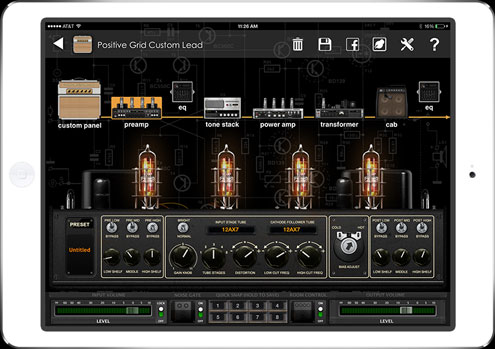
Create totally new sounds by designing your custom dream amp. It’s as easy as tap and drag.
Using Bias’ highly intuitive and lightning-fast interface, it’s child’s play to instantly swap out colorful tube preamps, lush distortion circuits, classic tone stacks, boutique power stages, custom-built transformers and cabs loaded with specially matched speakers.
The result is a depth and range of tones not possible using traditional guitar amps or other static modelers.
Features
- The most complete, accurate, and versatile amp modeling available in the world
- 36 amp models included with the introductory release
- Factory categories organize amps by music genre and sonic impact: clean, blues, twang, crunch, metal, acoustic and bass
- Fully customizable preamps, tone stacks, power amps, transformers, cabinets and mic selection and placement—mix and match!
- Customize the look and feel of your own amp panel, change name, tolex, panel and knobs.
- Works the way guitarists think: tweak gain and overdrive, swap out tubes and transformers, change the cabinet and mic position, and shape the tone with different tone stacks and two 8-band equalizers
- Included noise gate and room simulator
- Create a virtually unlimited number of custom amps
- Quick preset to recall each of your 8 favorite settings in turn with just one tap
- Seamless integration with JamUp XT and JamUp Pro XT, open and save your amp models inside JamUp with one tap
- Works with GarageBand and other audio apps via Inter-App Audio and Audiobus.
Minimoog Voyager Project for Liine Lemur on iPad
This is a project for the Liine Lemur App on the iPad. It’s a control surface for the Minimoog Voyager.
Turn your iPad in to a classic step-sequencer
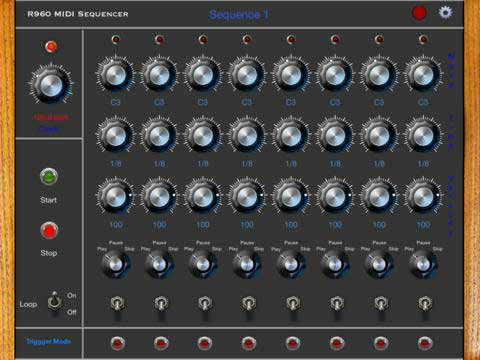
Roger Mann says that his new R960BSeq app turns your iPad into a classic step-sequencer. It does not generate audio, but sends MIDI to Synthesizers
Features:
- Supports Core MIDI
- Can control any background MIDI enabled App
- Runs in the background
- MIDI input for External Clock and MIDI Sync
- Compatible with iOS MIDI interfaces
- Supports MIDI clock and Transport
Pricing and Availability:
$4.99
Apple: New Garageband, OSX goes free and iPad Air
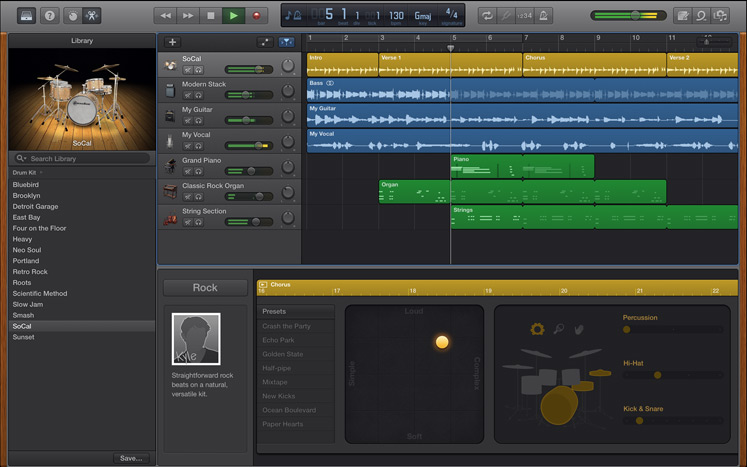
GarageBand for Mac has received its biggest update ever with a fresh new look, all new Sound Library, and new features, like Drummer and Smart Controls, giving you everything you need to easily make a great-sounding song.
GarageBand for iOS has been updated to match the look and feel of iOS 7 and taps the power of 64-bit to bring musicians a full recording studio with up to 32 tracks. With iOS 7 Inter-App Audio you can record third-party music apps right into GarageBand, and AirDrop allows you to wirelessly share your song projects with other iOS users so you can work on songs together. iCloud helps keep your song projects up to date across your devices, and users can start a song on iOS and pick up where they left off using GarageBand for Mac.
What’s New in GarageBand for iOS v2.0:
- All-new streamlined design.
- Create a song with up to 32 tracks* using Touch Instruments, audio recordings, and loops.
- Record compatible Third-Party music apps using Inter-App Audio in iOS 7.
- Drag and drop audio recordings to create Sampler instruments.
- Support for AirDrop in iOS 7.
- 64-bit support.
Pricing & Availability
GarageBand for Mac and iOS are free for all OS X Mavericks and iOS 7 users. Additional GarageBand instruments and sounds are available for a one-time in-app purchase of $4.99 for each platform. More info here >>
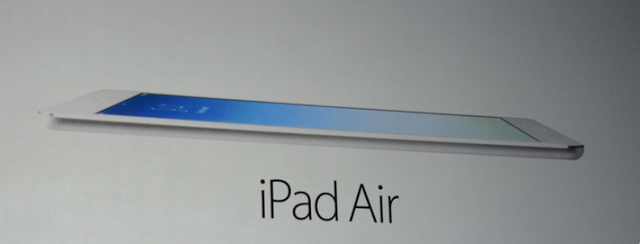
Apple has presented a new, slimmer iPad, the iPad Air, that is designed more like the iPad mini. The new iPad Air has the same 64-bit A7 chipset as the iPhone 5S, that is branded the A7X, with a slightly upgraded SOC that is optimized for the iPad’s Retina display.
- 7.5mm thin, 20 percent thinner than outgoing model.
- 9.7-inch Retina display with a smaller bezel. 43 percent thinner.
- Lighter as well: 1 pound, down from 1.4 pounds. Very light!
- M7 motion co-processor as well.
- Up to 8x faster performance, 72x faster graphics performance.
- Faster WiFI, with MIMO for multiple antennas for 2x speed 802.11ac More LTE bands
- 5MP iSight, FaceTime HD camera with larger pixels, dual microphones, 1080p HD video recording, improved backside illumination on the sensors
- 10hr battery life
- Comes in silver and white, and space gray and black.
- Replaces the existing full-sized iPad. Starts at $499 for 16GB WiFi, $629 to add in LTE
- iPad Air ships November 1st in a huge list of countries, including China in the first wave

Finally has Apple announced the final version of OS X 10.9 Mavericks, with a lot of new features. One of them is a new multitasking feature that saves battery life by putting apps that you don’t use at the moment in a kind of sleep mode, so that they don’t use any power anymore. When you then need to use these apps again, they start immediately, so you will not see or feel any difference. It will not slow down your productivity, just give you more battery life.
Another feature is a new way to keep users engaged with your website. You can now use the Apple Push Notifications Service to send notifications to your website users through popup alerts, the notifications will appear in your desktop and in OS X’s Notification Center even when Safari isn’t running. Safari Push Notifications work just like push notifications for apps. They display your website icon and notification text, which users can click to go right to your website.
Another new feature is the iCloud Keychain, it takes your saved passwords and credit card numbers in OS X, and makes them available on all your iOS devices.
OS X 10.9 is available from today, and it’s totally free. Free for existing users.
MOOG Sub Phatty Hidden CC parameters iPad template
Download (no registration or login required) at:
http://templates.demostudioberlin.com…
This TB MIDI Stuff ipad template covers all the hidden CC parameters from the manual. Amos may have added new ones since the manual was published. In order to use this template you have to have TB MIDI Stuff (under $5 in the app strore) on your ipad. I use and ipad 1 with a generic camera connection kit, going through a novation remote 37 SL MIDI out to the Sub Phatty…
Checking out the Arturia iSEM – Oberheim iPad recreation
Arturia has announced availability of iSEM, its second subtractive synthesizer recreation for Apple’s iPad. Here’s the story in their own words…
Like Arturia’s Oberheim SEM V desktop (or laptop) software solution before it, iSEM uses proprietary TAE (True Analog Emulation) technology to faithfully reproduce the analogue warmth and ingenious interface of the vintage Oberheim Synthesizer Expander Module (SEM) to which it also owes its inspiration and name, but brings it all kicking and screaming to this day and age in the most musical and ingeniously interactive ways possible by making the most of the latest developments available to its iPad host. Helpfully, Arturia has seen fit to take advantage of iOS 7’s inbuilt Inter-App Audio, allowing iSEM users to send MIDI commands and stream audio between apps on the same device. And that’s just for starters!
But first, a little history: hatched by legendary synth designer Tom Oberheim back in 1974, the dual-oscillator SEM was originally conceived as a way of beefing up weaker-sounding compatible analogue monosynths of the time before becoming a sought-after sound in its own right — so much so that its American creator came up with a series of successive SEM-based instruments, first pairing up two SEMs with a 37-note keyboard and a simple analogue step sequencer to form the Two Voice, Oberheim’s first self-contained compact, duophonic synthesizer in 1975, thereby beating rivals to the polyphonic punch. Programmability came courtesy of Oberheim’s breakthrough Polyphonic Synthesizer Programmer which — when hardwired into the fair-sized Four Voice (featuring four SEMs and a 49-note keyboard) in 1976 and enormous Eight Voice (eight SEMs set across two tiers) in 1977 — enabled the control voltages of many parameters for up to eight SEMs to be memorised for the first time. Though these instruments were undeniably groundbreaking, quickly finding favour with the likes of popular prog-rockers Rush and electronic music trailblazers Tangerine Dream, polyphony was, after all, achieved with multiple SEMs so each voice/module had to be programmed independently, which was quite a daunting task — even by somewhat shaky Seventies standards!
Fast forward, then, to 2013 and the truly 21st Century musical landscape has changed considerably, as has music technology itself. Today, of course, we take polyphony and programmability for granted, though not necessarily that still-sought-after Oberheim sound. Ingeniously, iSEM quite literally taps into all of this and then some, putting more musicality at anyone’s fingertips than its analogue namesake designer dared dream possible back in Oberheim’s Seventies salad days!
On the surface, anyone in any way familiar with the original Oberheim Synthesizer Expander Module® will immediately feel right at home when launching iSEM since the majority of its MAIN screen graphically mirrors the VCO 1, VCO 2, VCF, ENV 1, ENV 2, and LFO 1 layout and all associated controls to a tee — right down to the old Oberheim logo within the VCF section! Speaking of recognition, recreating that still- sought-after Oberheim sound is a challenge that iSEM readily rises to meet from deeper within thanks to that TAE® technology. This allows accurate modelling of analogue circuitry behaviour — in this case, an original Oberheim Synthesizer Expander Module®. Meaty, Seventies- sounding sounds stream forth from iSEM with over 600 highly-usable presets always accessible from its eye-catching browser — a quantum leap forward from Oberheim’s Polyphonic Synthesizer Programmer of way back when, surely?
Of course, communicating with the outside world in the pre-MIDI age was always a testing time back in the Oberheim SEM-launching Seventies. Not so today with iSEM… simply tap CONNECT and the iPad world is your musical oyster, thanks to Core MIDI, WISTTM, and Audiobus support — not forgetting the aforementioned Inter-App Audio.
But that’s not all iSEM has to offer. Far from it, in fact! Pressing the VOICE PROG button brings into play a voice programmer that makes simulating a huge polyphonic sound similar to Oberheim’s original Eight Voice hardware heavyweight a breeze — albeit without having to wrestle with eight monosynth modules hardwired together to create complex tones. Tellingly, MOD MATRIX makes creating complex modulation routings equally easy while the FX page brings built-in chorus, delay, and overdrive effects into the musical mix. Meanwhile, multiple performance parameters are accessible from the PERF page boasting ARPEGGIATOR controls, assignable sliders, and effects mix controls.
Amazingly, all of this is available in iSEM as an ear-opening iPad app for a tiny fraction of what its notable namesake analogue ancestor cost almost 40 years ago. The times they are a-changin’ here for sure! And admit it. Will you miss having to haul heavyweight hardware around? That’s progress. Portability pluses apart, iSEM is a supreme software recreation of a supreme subtractive synthesizer, pure and simple. So surely Apple’s App Store should be your next port of call? Get iSEM today and get back to the future of that still-sought-after Oberheim sound with Arturia!
Appropriate iPad owners can purchase and directly download iSEM from Apple’s App Store for $9.99 USD/€8.99 EURO/£6.99 GBP
AppSound Nave Essentials Song Demo
Nave Essentials – with over 160 patches for Waldorf Nave.
All sounds played with the iPad 3 running Waldorf Nave and the sound set “Nave Essentials”. Used Drum loops = demo content of Easy Sounds.
More infos: www.app-sound.com
Creative new iPad synth – Cube Synth
Cube Synth is a groundbreaking new iPad Synthesizer giving you the power and flexibility of additive synthesis together with easy editing and morphing capabilities. Macro parameters allow you to control this beast with unequalled ease.
Intelligent sound morphing capabilities enables you to easily create complex evolving sound scapes, vocal phrases or stunning rhythms simply by choosing up to four sound sources from a predefined set. Then add one of the predefined envelopes and a unique, complex sound preset containing thousands of parameters is created! If you want to dive deeper into the inner secrets of this synthesis monster you can manipulate each parameter individually to get precise control over the sound. A number of high level parameters such as Brightness and Harmonic spread control hundreds of synthesis parameters in a way modeled after the inner workings of natural instruments.
Cube Synth gives you also a new method of getting randomly generated sound patches in a way you never experienced before: roll the dice! Every single try gives you a new unique sound patch, really every try, promised…
Synthesis
• over 400 sound presets
• four morphable sound sources
• up to 512 partials per voice
• harmonic/inharmonic spectra
• arbitrary noise spectra
• morphable filter banks
• 3 Envelopes with tempo sync
• 64 time/level segments per envelope
Arpeggiator
• Uses programmable sequences with up to 32 steps.
• Can trigger single notes and chords.
• Unique randomizer generates Arpeggios with 100% usability.
• 32 Arpeggios included, unlimited useer arpeggios possible.
• For each step you can program tie, accent, transposition and note order
Effects
• Chorus
• Phaser
• Overdrive
• Ensemble
• Echo/Delay
• Reverb
Global
• Audiobus compatible (Output)
• CoreMIDI / Virtual MIDI
• Audio recorder with Metronome.
• Upload to SoundCloud and File Export.
• Audio pasteboard.
DATAMASKIN

