
KORG Gadget Automation Control Tutorial
Clear steps about recording,locating automated parameter,automating
pan and level in mixer,copying 1 bar to 2.
Pacemaker DJ app arrives for iPad with Spotify support
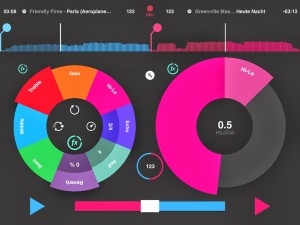
If you know your mobile music history you’ll remember that Pacemaker originally brought out their handheld DJ device in 2007. Two years ago it arrived on BlackBerry. Now they’ve brought their DJ skills to your iPad. Here’s what to expect from the app (and it’s free).
MILLIONS OF TRACKS AT YOUR FINGERTIPS
The first DJ-app with a revolutionary Spotify connection. Your iTunes favorites works too.
With its carefully crafted design, Pacemaker makes djing easy, beautiful and fun.
Sync with the tap of a button; and
with a full set of colorful effects and a crossfader, you’ll have unlimited creative influence over the music you love!
MIX IT
Spotify – Connect with Spotify and mix millions of tracks.
iTunes – Your iTunes favorites works too.
Sync – Automatically keeps everything in sync so you don’t have to.
Scratch – Put the needle to the groove and scratch like the grandmaster.
Crossfade – Swipe to blend your tracks together. Voilà! A mix has been born.
LOOP IT
With a tap you can loop it, extend it, half it and re-loop it.
DROP IT
Build it up, maximize the tension and take it through the roof. Everybody’s waiting. It’s time to kill the effects. It’s time to push the Drop button.
JUMP IT
Hop back and forth between the beats in a track to create your live remix with Beatskip.
BLEND IT
Adjust the Bass, Middle and Treble of your tracks and glue them together.
SAVE IT
Record the mix on the fly. Play it, cue it and rewind it (only with iTunes).
PEEK
Split the output and preview a track with the headphones crossfader before blending it into your mix (using the optional Urbanears Slussen adapter).
UPGRADE IT
Pick and choose from a wide range of colorful effects at the Pacemaker Store:
Hi-Lo – Remove the high or low frequencies from your tracks to create a swooping sound effect.
Echo – Echo echo…
Roll – Create a loop that spins on top of a track.
Reverb – Make the track sound as if it’s being played in a small hut or the largest of cathedrals.
Korg Gadget – a deeper investigation
Right from the beginning, KORG Gadget gives you 15 compact synthesizers and drum machines. Each Gadget possesses an irresistible presence and can function as the core of your electronic music productions. The parameters are carefully constructed to take you right to the sound that you want, and they’re ideal for producing all forms of electronic music. Even if you don’t play a musical instrument, no worries! Each synth offers a keyboard featuring a Scale function that makes it impossible to play wrong notes, combined with a sequencer that supports the function, Just download KORG Gadget to your iPad, and start exploring 15 Gadgets.
Background video description:
Here I take another look at the brand new app from Korg and attempt to unravel some of its hidden or less obvious functionality. You can read more about this app and me at my website www.gazwilliams.me
KORG Gadget Mobile Synthesizer Studio for iPad
KORG fully enters the realms of iOS with this powerful app, details below:
For every situation that creative minded people face, KORG’s answer is “KORG Gadget.”
KORG released the iELECTRIBE simultaneously with the appearance of the first-generation iPad in 2010, and ever since has maintained its position at the forefront of mobile music apps. And now we’ve brought you the ultimate all-in-one studio app for serious mobile music production.
KORG Gadget provides a collection of 15 different synthesizers and drum machines called “Gadgets”, which can be freely combined to produce powerful electronic music. Users can take advantage of the simple and intuitive sequencer, and experience track-making in an environment that’s been perfectly optimized for mobile use, while retaining professional quality in everything from the effects to the mixer. Also, songs created using KORG Gadget can be shared on “GadgetCloud,” a music sharing site for KORG Gadget users worldwide.
There’s a roadmap for future updates that will add new gadgets and support audio tracks, further perfecting the system as a mobile music production studio. KORG Gadget will continue to evolve in support of serious mobile music-making.
—————————————-
KORG Gadget is available on the App Store:
World: https://itunes.apple.com/app/korg-gad…
Japan: https://itunes.apple.com/jp/app/korg-…
—————————————-
Learn more about Gadget at http://www.korg.com.
Music & Video produced and performed by Mee Zanook
– The ultimate mobile synth collection on your iPad –
KORG Gadget – the all-in-one music production studio
Stix Digital Drum Synthesizer for iPad – Demo and Tutorial
Fantastic and very versatile drum machine from developer Alexander Smith.
https://itunes.apple.com/app/id698024…
STIX is a powerful 16 channel (8×2 voices) sampling synthesizer and sequencer.
Check out Audio and Video demos + download the user manual from our webstite now:
http://twisted-electrons.com/apps/stix/
Each kit features no less than 200 parameters that are controllable in real-time via touch or MIDI.
STIX is also a 8 channel 16 step drum sequencer with recording functionality. The sequencer’s 8 patterns can be chained into songs in Track Mode.
Up to 100 Preset Kits can be stored and the 8 drum modules can be performed on the pads throughout the app’s modes.
STIX also features Audiobus compatibility!
MultiTrackStudio for iPad, Getting Started and Setting Up
This is a great new DAW for your iPad from Giel Bremmers, details below:
Fantastic for many reasons two of them being its only 11 MB and it also has a fantastic suite of top quality effects built right in. In this tutorial take you through the basics by recording some midi and audio and explain how to set this up. There is so much more to this app than in the demo but it will give you a good starting point. You can pick up the app at the iTunes store.
https://itunes.apple.com/app/id776998…
Electrify NXT – nice virtual groovebox for iPad
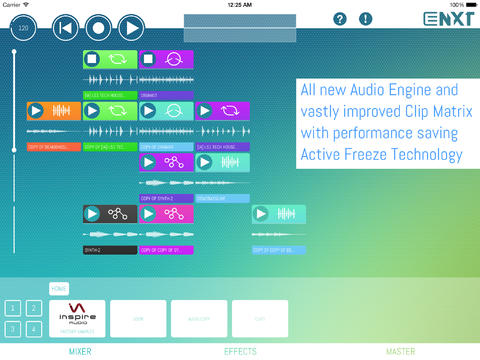
Ingolf Koch has released Electrify NXT, a virtual groovebox for iPad.
Features:
- Rewritten and enhanced audio engine.
- New session mode lets you perform with loops and clips by creating arrangements on the fly.
- New polyphonic FM-style Synthesizer: Electrify NXT comes with a fully fledged frequency modulating synthesizer with 11 Algorithms and wave-morphing oscillators.
- The new drumkit combines 8 samplers into one ‘grooving loop factory’.
- Looper and slicer lets you deconstruct audio loops or rearrange your own clips beyond recognition.
- Comes with more than 1600 audio loops and one shot samples
- A huge load of effects
- Powerful parameter modulation: nearly every parameter of instruments and effects can be modulated by LFOs, Envelopes or by realtime parameter sequencing.
- Flexi-Groove templates
- Audiobus, AudioCopy and Midi are integrated.
Electrify is back! Electrify NXT turns your iPad into a virtual Groovebox with drum loops, synths and effects. All in realtime! Create musical clips or load samples and loops from the 1600+ samples library and arrange them on the fly in the clip matrix. Create dramatic break downs and build ups with the performance effects.
Stylish miniMoog iPad controller
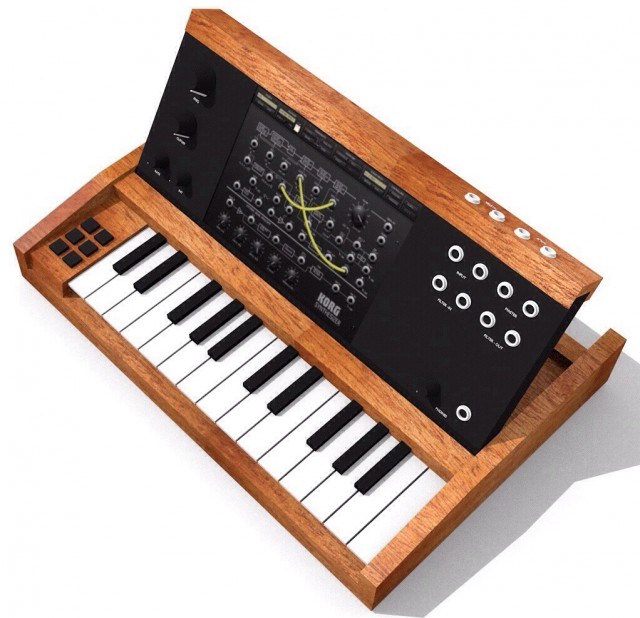
Inevitable Crafts shared this design for a Minimoog-style iPad MIDI controller.
It’s in the proof-of-concept stage, and the plan is to base it on inexpensive, readily available components, including an Akai LPK8, a Behringer 202 sounccard and various plugs and connectors and birch wood from Home Depot.
complete IO for the ipad
__symmetric audio IN/OUT
__midi IN/OUT
__MS20 filter, patchable IN or OUT
as this is a proof of concept, i will take the cheapest parts available
__birch instead of mahagoni at homedepot for around
__akai lpk8 instead of anything decent, so no wheels, but the only alternative would be the line6 and thats too big
__behringer 202 soundcard, unsymmetric and generally crappy and RCA …. but small and cheap
__cheap usb hub
__midimate
__female MIDI plugs and around 12 mono plugs (thats expensive ^^)
__some cables
__korg monotron for the filter
the controls left and right the ipad are mounted on dedicated panels to make it easier to expand and change layout.
Power up your iPad with this free synth – 432Hz Synth
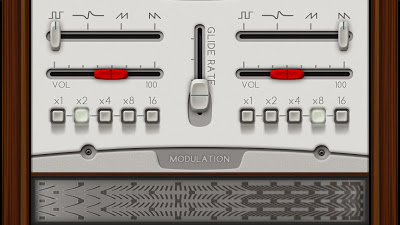
The 432Hz Synth is a Must For Every Music Love Fan Out There!
Features:
- Oscillator A’
- Oscillator A Waveforms:
- Square, Sine, Sow, Revers Sow.
- Oscillator A Volume.
- Oscillator A Step:
- X1 X2 X4 X8 X16
- Oscillator B’
- Oscillator B Waveforms:
- Square, Sine, Sow, Reverse Sow.
- Oscillator B Volume.
- Oscillator B Step:
- X1 X2 X4 X8 X16
- Modulation’
- Cutoff.
- Resonance.
- LFO Waveforms:
- Square, Sine, Sow, Reverse Sow.
- LFO Amount.
- LFO Rate.
- LFO mode:
- Filter, Pitch, Wave.
- Arpeggiator’
- Arpeggiator Step:
- Up, Down, Up & Down, Random.
- Octaves, 1 To 5.
- Arpeggiator Rate.
- Volume Envelope’
- Attack, Decay, Sustain, Release.
- Filter Envelope’
- Attack, Decay, Sustain, Release.
- Oscillator B Fine Tune’
- Oscillator A-B Sync.
- Semis.
- Cents.
Warning Before Use:
Please Volume Down, The Gain is +10db : )
Also The 432Hz Synth Has No Rules, Only Pure Fun. Enjoy!
Powered by Oren Fridman – Promobeat™. This Synth Dedicated To Mr Allen Porter Behind This Open Source Code.
Delora rsTouch Pro – iPad control surface for Reason
Harmony Systems, Inc. announced the worldwide availability of Delora rsTouch Pro, a major upgrade to their iPad application that provides control surface functionality for the Propellerhead Reason music application on a Mac or PC. rsTouch Pro adds support for Reason Device Rack editing and a new ‘perform’ mode for sending MIDI to Reason instrument tracks.
DATAMASKIN

