
CUBASIS+Animoog+LIVE FX – audiobus –
iPad mini is used. The sound of animoog is sent to CUBASIS through LIVE FX. AudioBus is convenient. It is splendid.
Samplr live session with Factory sounds iPad
Background video description below:
Samplr jam using only Factory sounds with iPad 2
Closed circuit t-shirt live sessions-90’s boy by diodo
Had some latency issues when I tried to play drums, sorry
My 2nd song for the RPM challenge
https://soundcloud.com/diodo
Audulus Demo – Custom Step Sequencer Demo
With Audulus, you can build synthesizers, design new sounds, or process audio. All with low latency real-time processing suitable for live performance. Audulus’s user interface is clean, simple, and easy to learn, allowing you to focus on sound.
“I made an improved version of the standard step sequencer that comes with Audulus, it includes controls for start, stop, swing and step and sequence length. This is a demo of a song using made using it, all sounds are coming from the standalone version and shows how Audulus can be used to create custom performance setups.”
Korg iPolysix ~ Solo Heaven
The iPolysix for iPad in action, details below:
I played chords and a 41 bar Keyboard solo showing the automation of Cutoff,Resonance and EG intensity.
All sounds came directly from the Korg iPolysix via the iPad.
PPG Wavegenerator run through
Wavetable generator by Wolfgang Palm, the guy who created the PPG Waves from the 80’s. Has 3 oscillators for control of pitch and waveform. 3D display for viewing sound from any angle and the ability to import or take your own photo to generate a waveform. This video is just a quick demo using one waveform. More videos to come. Buy it from the itunes store for $20.99.
Key Features:
• Creation of your own waves and wavetables.
• Playful sound creation simply by drawing or picking harmonics
• 3D page, visualization of the wavetables, transformation from photos into wavetables.
• 256 waves assembled within a wave grid
• 3 Audio Oscillators
• 3 Noise generators, for audio and modulations
• Classic 24 dB Lowpass Filter, combined with an overdrive simulation.
• Dual amplifier, for versatile control of 2 audio signals as well as panning.
• 13 Envelopes, for independent control of pitch, waveform, filter and noise gain and panning
• 4 LFOs
• Arpeggiator
• Delay/Reverb effect
• Audio engine with 2 synthesis modes, and variable wave blending quality.
• Directly accessible context help inside the app
• Use a camera, to shoot a picture and then transform it into a sound!
• Using state of the art technologies, but still the versatile and efficient synthesis system.
• Build your own keyboard, with the keys you prefer for your music.
• Audio recorder, up to 10 min. at 44.1 stereo
• Audio Copy to the pasteboard
• File Sharing via iTunes
PPG WaveMapper – Show and Tell
An extensive show and tell of the new PPG WaveMapper app from Wolfgang Palm.
For more info visit http://www.wolfgangpalm.com
PPG WaveMapper is the second next-generation iOS based synth from Wolfgang Palm, who in 2012 released the PPG WaveGenerator to critical acclaim from both press and public.
In final development the PPG WaveMapper offers iPad users a second synthesiser to compliment the already loved PPG WaveGenerator from Wolfgang Palm. PPG WaveMapper allows the user the opportunity to create limitless sounds from this unique and powerful new technology.
PPG WaveMapper features the Sound Map, which maps the various sounds in a way to easily access and experiment with them, more importantly the PPG WaveMapper features a new synthesis system which maps the waveforms of a sound into a new kind of wavetable which preserves the sound characteristics better than classic Wavetable synthesis and at the same time allows for the manipulations which make WT synthesis so unique.
The Mapping window is the visualisation of a pool of programs on which “modules” float. Those modules represent certain parameters of the synthesiser engine and each module can be placed on one of 32 programs. The moment an item is placed on map then the parameters of that module will take on the settings of those parameters in the underlying program on the Mapping window.
People who do not posses synth-programming skills can use this mapping technology as a starting point to create complex sounds. For example a user can drag a string sound source onto a drum envelope, or a guitar sound onto a string envelope – the concept is simple, yet incredibly powerful.
New vintage electro theremin for iPad

Vintage Electro–Theremin, Onassis Martino style synth.
This app captures the magic of early classic slider controlled synthesisers such as the Ondes-Martenot (1928) Trautonium (1929) and Tannerin/electro-theremin (1950s)
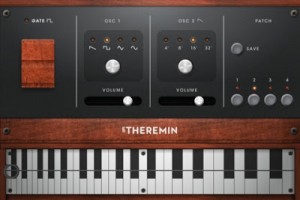
The E Theremin has three oscillators that generate a rich fat analogue tone, with a choice of 4 waveforms (saw, square, triangle and sine) octave shift and amp control. The E Theremin can achieve portamento, vibrato and quarter-tones with precise control. 4 presets allow you to store your sounds and jump quickly between them during performance.
– Ideal for professionals looking for an alternative to the keyboard controlled synth.
– Great for anyone interested in synthesizers, particularly early analogue.
In 1928 Maurice Martenot created one of the first electronic musical instruments, entitled; the Ondes-Martenot, the prerunner to the theremin, similar in sound but with a very different type of user interaction, an inspiring slider on a cord was used. Later in the 1950s Paul Tanner invented the Tannerin a.k.a. Electro Theremin. The Tannerin used the same slider controls as the Ondes-Martenot to control pitch. The Tannerin went on to play a large role in records such as The Beach Boys “Good Vibrations”.
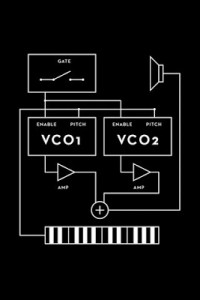
Summarized Features
- Three oscillators (osc2 unison)
- 4 waveforms
- 3 octave slide control
- Fat analogue sound
- Jump between 4 user presets
- Classic slider pitch control
- Retina GUI
Grab it before it goes up to regular price!
Audulus 1.9 for iPad: What’s New
With Audulus, you can build synthesizers, design new sounds, or process audio. All with low latency real-time processing suitable for live performance. Audulus’s user interface is clean, simple, and easy to learn, allowing you to focus on sound.
New features include:
• New Redesigned Patch Browser. View 9 patches at a time.
• Multi-selection. Tap to toggle node selection. Tap on the background to deselect all.
• Copy/Paste. A global clipboard allows copying between patches.
• Support for Sub-Patches. Group nodes and reuse patches.
Blofeld iPad Editor Demo
Video description below:
This is a quick demo of my custom midi editor template for the iPad app ‘TB Midi Stuff’
https://itunes.apple.com/en/app/tb-midi-stuff/id480953919?mt=8
The free editor download link is in the TB Midi Stuff forum here, note that it’s easy for you to edit and customise within the app if you like:
http://www.thiburce.com/TBStuff/forums/viewtopic.php?f=19&t=125&p=416…
Thanks to Fabien (app developer) for such a great midi control framework.
Arpeggionome Pro Controlling a Grand Piano in GarageBand
The Arpeggionome Pro is a professional MIDI controller designed specifically for iPad. With the Arpeggionome Pro, you design and perform intricate patterns of musical notes at incredible speeds and with precise control.
Introductory Sale: 25% Off! Offer valid until January 15th!
http://itunes.com/apps/arpeggionomepro
Download Audio: http://soundcloud.com/alexandernaut
DATAMASKIN

