
Animoog with The Grateful Dead Expansion
A quick tune with Animoog and The Grateful Dead Expansion
Synth X Guitar Demo
Synth X by Way Out Ware, programmed by Jim Heintz
Demo by Mackenzie Starr
Jim Heintz, showing his SynthX 2 being used with the Ion AllStar Guitar MIDI controller. With SynthX being used in this mode, you can change tunings and string assignment to increase its flexibility. SynthX is compatible with the iPad 1, but working with the Ion controller requires iPad 2 or better.
Auria LE has arrived – the professional digital audio recording system for iPad
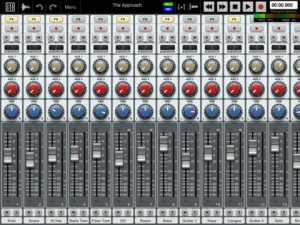
Auria LE – the professional digital audio recording system for iPad.
The mobile DAW you’ve been dreaming of has finally arrived. Auria LE is a 24-track digital recording system designed from the ground up for the iPad. With professional-level features and optional third-party plugin support from names like PSPaudioware, Overloud, Fab Filter and Drumagog (available via In-App purchase), Auria clearly sets a new standard for mobile recording.
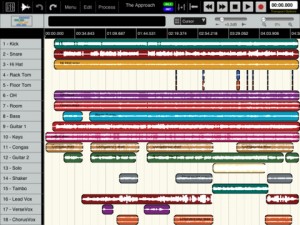

FEATURES:
- 24 tracks of simultaneous playback of stereo or mono files (upgradable to 48 tracks).
- Up to 8 tracks of simultaneous recording when used with compatible USB audio interfaces (upgradable to 24 tracks of recording) Camera Connection Kit required.
- 24-bit recording
- Supports sample rate of 44.1KHz only (upgradable to support 48K and 96K sample rates)
- Vintage-inspired ChannelStrip on every channel by PSPAudioware includes Expander, Multiband EQ and Compressor
- MasterStrip on all subgroup and master channels featuring PSPAudioware BussPressor, EQ and Mastering Limiter
- Third party VST effect plugin support available via in-app purchase (only iOS-version plugins are supported. All plugins must be purchased through the in-app store)
- ClassicVerb reverb plugin included
- StereoDelay and StereoChorus plugins included
- 2 Assignable subgroups(upgradable to 8) and 2 aux sends
- Powerful waveform editor with features like cut/copy/paste, duplicate, separate, gain, and more
- Flexible snapping tools allow snapping to events, cursor, bars, beats and more
- DropBox, SoundCloud and Audio Copy/Paste support
- Full automation support on all controls with graphical editing
- True 100mm faders when used in Portrait Mode
- Optional video import feature allows sample accurate sync of video to an Auria project with adjustable offset times and video export capability
- Timeline ruler options include minutes:seconds, bars:beats, samples and SMPTE time
- Auto-punch mode
- Full delay compensation on all tracks and subgroups
- Adjustable metering modes, including pre or post fader, RMS and peak
- Adjustable pan laws
- Sample accurate loop function
- Automatic sample rate conversion
- Built-in metronome
Includes a demo song mixed on Auria by Grammy winning producer/engineer David Kahne.
REQUIREMENTS:
iPad 2 or later strongly recommended.
Requires iOS 5.0 or later
USB audio interfaces require Camera Connection Kit
Logique Analogique – Simulation of a real circuit board on iPad
http://apps4idevices.com/read/logique-analogique
Logique Analogique is a simulation of a real circuit board that includes an 8-bit binary counter, analog implementation of logic functions, and 4 channel, 1-bit sound generation.
To quote the developer, “The Logique Analogique sequencer consists of an 8-bit binary counter and four tracks which generate pulse waves when a user-defined majority function depending on the counter bits is true. Switches which select the counter bits (or their logic inverse) and a threshold voltage define the majority function. The output is calculated as the XOR function of the four tracks’ signals, which produces a ring modulation like effect.”
“Complexities aside, this app creates incredibly powerful sounds, with a seemingly endless amount of rhythmic possibilities. The sounds can be layered to create ring modulation type effects, with both pitch and threshold control to further shape the sound. The sequencer makes it possible to create evolving patterns or complete songs, using the tap & drag method to easily create your sequence. I would suggest starting slowly with this app, to hear the effect of each switch or dial, but then dive in and explore. It has to be noted that this app does not offer any method of recording yet, but both MIDI and Audio Copy are currently being considered for the future. Despite these missing necessities, I have to say that I’m incredibly impressed with the power of this app, and for the first time, I’m willing to connect my iPad to another source to record my creations. I haven’t found another app that creates such intense sonic delights as this does. I’m so taken with Logique Analogique, that even without recording or MIDI, I still have to rate it … A Killer App!”
iPad Music Jam: Korg iMS-20, Magellan, GarageBand, Geo Synthesizer, iRIg MIDI and more
iPad Music Apps are improving fast. Now you can do almost everything using only one device. In this Jam I’m playing with Geo Synthesizer controlling iMS-20 (Lead) and Magellan (Synth Bass and ARP). The arp was programed in Magellan but played by Moog Slim Phatty (using the iRig MIDI interface). Drums by GarageBand.
MIDI Bridge was used for splitting notes played with geo synth for Magellan and iMS-20.
Making a simple song using the MIDI Pattern Sequencer
MIDI Pattern Sequencer for iPad. Make a simple song demo.
MIDI Pattern Sequencer is a tool with powerful and at the same time very comfortable, intuitive and easy interface. It is the main feature, through which the sequencer can easily used by anyone, from beginner to professional, and everyone will find it most necessary for their own purposes. The sequencer is designed to control via MIDI any external sound modules, samplers, synthesizers and other applications running on iPad or another computer. Full support for external MIDI interfaces, network and virtual ports, synchronization with external devices and transport control makes this sequencer like playback control center for music devices or other applications.
Main features:
- Classical data structure: Project – Song – Pattern.
- Four main control modes – Transport, Keyboard, Edit pattern, Edit cell.
- No need to save data. All changes will be saved automatically.
- Pattern tracks can be configured for notes or drum events.
- Real-time recording and editing patterns.
- Recording and editing events through internal keyboard or external devices.
- Playback one or more patterns at once. Start and stop patterns during playback.
- Changes pattern events (Transposition, Velocity, Duration) during playback.
- Editing individual events or changes all events in track.
- Length of pattern is defined by last note or can be set to fixed value.
- Correct simultaneous playback patterns with different length.
- Each pattern and song track have individual mute/solo function.
- Song can contain patterns from current project and patterns from any other projects.
- Extended set of editing functions for patterns and songs – insert, delete, move and scroll a single event or entire track.
- Ability to set track titles, pattern titles (pattern button titles) and drum pad titles.
- Set of different color schemes of interface.
See more:
Opening NLog AudioUnit in Apple’s Logic
Little video showing how to open NLog AudioUnit in Apple’s Logic.
Closer look at Samplr, Borderlands and Korg iPolySix
This episode Gaz takes a look at the beautiful Samplr – a sampling and playback app, plus Borderlands – a granular sample player with a unique interface. Nick checks out Korg’s new iPolysix synthesizer
Propellerhead – ReBirth for iPad and Figure
ReBirth for iPad: https://itunes.apple.com/us/app/rebirth-for-ipad/id401704148?mt=8
Figure: https://itunes.apple.com/app/figure/id511269223?ls=1&mt=8
What’s better than making music? Making music with a friend of course! And doing it instead of working, like Kalle and Mattias…
With ReBirth for iPad’s Duo mode two people can make squelchy techno music on the same iPad. Connect ReBirth to other equipment with MIDI Sync, or enable WIST sync to bring Figure or other WIST-enabled apps into the mix.
Cubasis for iPad – Effects review
In this video we are showing all the effects that come with Cubasis for iPad.
Download Cubasis from the AppStore – goo.gl/p25xN
Portable Music Production System
Cubasis is Steinberg’s streamlined, multitouch sequencer for the iPad. Specially designed for quick and easy operation, Cubasis makes recording, editing and mixing a breeze. Record tracks in CD audio quality, and edit your music with the Key and Sample Editors, while the included mixer and audio effects polish your song to perfection. Cubasis comes loaded with dozens of virtual instrument sounds which can be played in real time using the virtual keyboard and drum pads. Cubasis’ projects can be even opened in Cubase under Windows and OS X! Cubasis places touch-intuitive production tools in your hands, opening up a new world of possibilities for your creativity.
Key features
• Unlimited audio and MIDI tracks (depends on the device used)
• Over 70 virtual instrument sounds based on HALion Sonic
• MixConsole with over 10 effect processors
• Over 300 MIDI and audio loops
• Virtual keyboard and virtual drum pads
• Sample Editor and Key Editor
• Export projects to Cubase, Dropbox, SoundCloud, AudioCopy and email
• Core Audio and Core MIDI compatible hardware supported
• Sequence other CoreMIDI apps (MIDI recording only) and run Cubasis simultaneously via background audio
• Audio import from iTunes music library, AudioPaste, Wi-Fi server and iTunes file sharing
• Audio mixdown and MIDI export
DATAMASKIN

