
Angels We Have Heard on High: Orphion & Audiobus
Play Orphion and SoundPrism Pro through NLog to Loopy HD using Audiobus
Apps used:
Orphion – orphion.de
Audiobus – audiob.us
NLog MIDI Synth – temporubato.com
SoundPrism Pro – soundprism.com/pro
Loopy HD – loopyapp.com
ELECTRIFY
http://apps4idevices.com/read/electrify
Electrify is a very powerful and flexible sample based groove machine. It does look a bit complex at first but that is only because it contains so many features. It’s just a matter of setting up sequences for each sample, then triggering each clip to create your arrangement. There are 8 tracks to work with and 8 layers to create variation or multiple song parts. There is a non-destructive sample editor to shape each sample and 2 effect busses each with 9 effects each to choose from. The mastering section contains an equaliser and compressor to further tighten the mix. Samples can be pasted in from the general pasteboard but it also comes with a great collection so you can get straight in and start creating. It’s worth spending the time to understand the workflow of Electrify because it is designed for live performances so it is easy to use. The live recording feature is perfect for creating both evolving loops, complete songs and interesting rhythm tracks. I love this app because it creates such good results, so rating this app is very easy….A Killer App!
Review by Nick Trass
iPad Propellerhead ReBirth VS DSI Tempest
“In this video you can hear the fusion of the two worlds:
Digital vs Analog
Thanks to the latest update of ReBirth can be synchronized via midi
I love both analog as digital …”
Cubasis – Introduction video demo
Get it now! https://itunes.apple.com/us/app/cubasis/id583976519
More information: http://www.steinberg.net/cubasis
Cubasis is Steinberg’s streamlined, multitouch sequencer for the iPad. Specially designed for quick and easy operation, Cubasis makes recording, editing and mixing a breeze. You can also open your Cubasis projects in Cubase under Windows and OS X! Cubasis places touch-intuitive production tools in your hands, opening up a new world of possibilities for your creativity.
- Unlimited audio and MIDI tracks (depending on the device used)
- Over 70 virtual instrument sounds based on HALion Sonic
- Mixer with over 10 effect processors (insert and send effects)
- Over 300 MIDI and audio loops
- Virtual keyboard and virtual drum pads
- Sample Editor and Key Editor
- Export to Cubase, Dropbox, SoundCloud, AudioCopy & email
- Core Audio and Core MIDI compatible hardware supported
- Sequence other Core MIDI apps (MIDI recording only) and run Cubasis simultaneously via background audio
- Import audio from your iTunes music library or using iTunes filesharing, use AudioPaste or set up a Wi-Fi server in Cubasis
Cubasis from Steinberg arrives for the iPad
So here are some quite unexpected news from Steinberg – Cubase goes mobile:
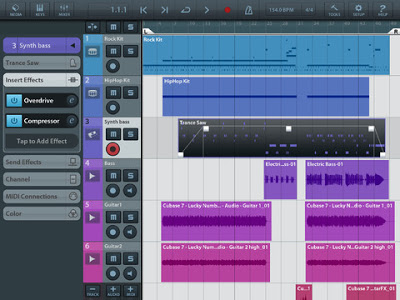
Portable Music Production System Cubasis is Steinberg’s streamlined, multitouch sequencer for the iPad. Specially designed for quick and easy operation, Cubasis makes recording, editing and mixing a breeze. Record tracks in CD audio quality, and edit your music with the Key and Sample Editors, while the included mixer and audio effects polish your song to perfection. Cubasis comes loaded with dozens of virtual instrument sounds which can be played in real time using the virtual keyboard and drum pads. Cubasis’ projects can be even opened in Cubase under Windows and OS X! Cubasis places touch-intuitive production tools in your hands, opening up a new world of possibilities for your creativity.
Key features
- Unlimited audio and MIDI tracks (depends on the device used)
- Over 70 virtual instrument sounds based on HALion Sonic
- MixConsole with over 10 effect processors
- Over 300 MIDI and audio loops
- Virtual keyboard and virtual drum pads
- Sample Editor and Key Editor
- Export projects to Cubase, Dropbox, SoundCloud, AudioCopy and email
- Core Audio and Core MIDI compatible hardware supported
- Sequence other CoreMIDI apps (MIDI recording only) and run Cubasis simultaneously via background audio
- Audio import from iTunes music library, AudioPaste, Wi-Fi server and iTunes file sharing
- Audio mixdown and MIDI export
Polyphony:
- 48 voices: iPad 2, iPad mini
- 64 voices: iPad 3, iPad 4
Project export to Cubase requires Cubase 7/6.5, Cubase Artist 7/6.5, Cubase LE AI Elements 6 or higherCubasis project importer extension must be installed and is available at http://www.steinberg.net/cubasisimporter
Cubasis is priced at $49.99.
Generation – 32 presets for PPG Wavegenerator
Generation –
Sunsine Audio’s new pack for PPG Wavegenerator features 32 presets including 5 basses, 7 leads, 5 keys, 2 arps, 9 pads, and more. In addition 20 unique wavetables have been included, and exchanging these between presets allows a large degree of tonal variation very easily. Each preset has parameters mapped to both the horizontal and vertical keyboard control for expressive performance opportunities.
*Requirements: Compatible with iPad. Requires iOS 5.1 or later and PPG Wavegenerator.*
Format:
• 32 Presets in 1 .bin file
• 20 WaveTables in .wts files
• Full horizontal and vertical key modulation support.
• Easy Installation Instructions
Price: $1.49
Available from – www.sunsineaudio.com
Free Preview Pack – http://www.sendspace.com/pro/dl/unlxtv
Using Koushion with WaveGenerator, Animoog, Alchemy, and more
A quick overview using the Koushion MIDI step sequencer iPad app to control a variety of synthesizer apps including WaveGenerator, Alchemy, Animoog, and more. Koushion is on sale for the holiday season until Dec 31. Buy it now for $4.99 in the App Store!
**Link to the App Store**
http://itunes.apple.com/app/koushion/id424454249
Koushion is a MIDI step sequencer that allows you to easily program drum patterns and melodies using your existing drum machine, hardware synthesizers, or soft synths and samples in your DAW.
Features:
* 16 steps per scene (up to 128 steps in chain mode)
* 8 scenes with independent midi channel per scene
* 4 playback modes: single, simultaneous, chain, rebound
* Key switching between any major, minor, or pentatonic scale
* Adjustable quantization (1, 1/2, 1/4, 1/8, 1/16 and 1/32)
* Quantized scene switching
* MIDI clock send/receive
* Tap to set tempo (great for syncing with a live band)
* Velocity control
* Monophonic drawing mode (only allows one note per step; great for programming leads)
* Wireless connectivity via CoreMIDI Network Sessions
* Automatic integration with other apps via CoreMIDI virtual ports. Open up a synth in the background and Koushion will trigger the notes!
AKAI – iMPC Music Production App for iPad
Akai has teamed up with Retronyms to bring the MPC to your iPad. With more than 1,200 samples, 50 editable programs, 80 editable sequences, and iconic MPC workflow, iMPC is the first app to bring all the functionality of a classic Akai Pro MPC to your iPad.
Developed in partnership with Retronyms, iMPC includes everything you need to create a beat quickly and easily, including built-in effects, plus the ability to create new sequences and record and overdub beats. Time correction from 1/8 note to 1/32T with variable swing, and Note Repeat from 1/8 note to 1/32T with latch control are also built in. The app’s built-in sampler can record samples three different ways: using the mic on the iPad, using the line input on the iPad, or using the multi-touch turntable interface in iMPC to record samples directly from iTunes or other music libraries.
Download the iMPC App here: https://itunes.apple.com/us/app/impc/id584548447?ls=1&mt=8
To learn more and download iMPC visit: http://akaiprompc.com/impc
Apps for Music Production – Magellan Soundbank
http://www.appsformusicproduction.com/2012/11/06/50-magellan-presets/
50 Magellan presets from Apps for Music Production!
“Grab yourself 50 high quality Magellan presets here for just £1.99. Ready to slot into any production style and bursting with inspiration for your iOS music!”
MIDI Designer and Maschine
This video shows how to control Maschine with MIDI Designer, both with Maschine as a standalone application and as a VST plugin inside Ableton Live. Parameters are controlled via track routing and via host automation.
Thanks for watching and for checking out MIDI Designer!
MIDI Designer (http://midiDesigner.com) is a professional MIDI controller for iPad, iPhone and iPod touch. Design your perfect MIDI control surface right on your device. MIDI Designer is used by professional musicians, DJs, sound engineers, lighting engineers, and robotics experts.
DATAMASKIN

