
Mint.io – Beta test
Background description below:
Only 1 basic 909 drum pattern, 1 synth bass pattern and preset, 1 Vibes realtime recorded loop and some chords… This came during the testing session, shot with the iPhone. Note that this is not the demonstration of the full sonic possibilities.
Maschine and MIDI Designer Duet
Dan Rosenstark, founder of MIDI Designer, plays a duet with Native Instruments Maschine and MIDI Designer. This video highlights MIDI Designer 1.4.2’s new position-sensitive drumpads and absurdly-low latency.
“Thanks for watching and for checking out MIDI Designer!”
MIDI Designer (http://midiDesigner.com) is a professional MIDI controller for iPad, iPhone and iPod touch. Design your perfect MIDI control surface right on your device. MIDI Designer is used by professional musicians, DJs, sound engineers, lighting engineers, and robotics experts.
Bong-Ra beats on Noisepad
Taking the Bong-Ra samples for a spin.
Dubstep
Drum & Bass
Hardcore
All used samples are available in the in-app store.
triqtraq – beat making in 10 minutes
Details below:
running “triqtraq” on iPad mini.
It’s so nice groove maker!!
Audio Interface : Presonus FireStudio Tube
DAW : Apple Logic
Effect Processor : Lexicon MX300
Camera : Sony DSC-HX30V
Music producers and DJ’s will find dozens of possibilities inside triqtraq to compose and tweak beats on the fly.
Jam out some grooves, tweak them with the advanced effect automation and the unique loop range feature, and chain patterns to build up entire tracks.
Are you just starting out making music? Don’t worry, triqtraq is straightforward enough to get you good sounding results quickly…
Grab your iPhone and start to improvise; live, in your studio or on your couch.
Pick sounds from the included sample library, or import your own samples to get that unique sound.
triqtraq strikes the right balance between musical possibilities and limitations and lets you focus on the most important part of making music… having FUN!
KEY FEATURES:
✔ create musical patterns fast and intuitively
✔ record beats live or by using the step editor
✔ automate all effects in real-time
✔ record/automate multiple tracks simultaneously
✔ specify the length of a sequence per track
✔ unlink automation envelopes from main tracks
✔ change sounds while jamming
✔ store up to 16 patterns
✔ chain up to 16 patterns with the queue feature
✔ switch seamlessly between patterns
✔ use the loop range to create poly-rhythms
✔ use sounds from the 350+ factory sample library
✔ import your own sounds via iTunes file sharing
LFA iPad Orchestra plays Meeting in the Aisle
The Laptop Orchestra of Lake Forest Academy plays Radiohead’s “Meeting in the Isle” as they open their Fall 2012 concert. 8 musicians play and project iPads on sound panels behind them while using a combination of apps including Animoog, iMS-20, iElectribe, Reactable, and Garageband. The Laptop Orchestra is held as a class within the Fine and Performing Arts department alongside Orchestra and Choir. 2012 marks its 3rd year as a class and 6th year as a part of Lake Forest Academy student life.
Audiobus: Recording SoundPrism PRO, Sunrizer and Funkbox in MultiTrack DAW
Sebastian uses MultiTrack DAW to record SoundPrism PRO, Sunrizer and Funkbox, with some Virtual MIDI magic. What are you going to do with Audiobus?
http://audiob.us
SoundPrism PRO: https://itunes.apple.com/app/soundprism-pro/id425733007?mt=8
Sunrizer: https://itunes.apple.com/app/sunrizer-synth/id443663267?mt=8
Funkbox: https://itunes.apple.com/app/funkbox-drum-machine/id350437349?mt=8
MultiTrack DAW: https://itunes.apple.com/app/multitrack-daw/id329322101?mt=8
Stylo-101 – Stylophone+SH-101 arrives
Details below:
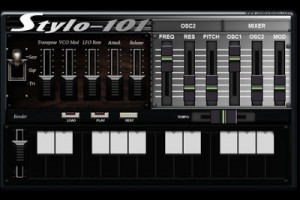
I-phone 5 friendly! What do you get if you cross a Stylophone with the famous Roland SH-101? Well We have circuit-bent a virtual Stylophone and added Roland SH-101 modifications. You can create wacky and eerie sounds to meaty bass lines. As well as the Stylophone sound, you now have an extra oscillator driving a sawtooth wave with filter and resonance from the SH-101. You can adjust the mixer for each oscillator and the LFO can control oscillators and amp. We have increased the LFO speed and depth of the pitch modulation. We have also added an SH-101 style sequencer for creating bass lines or arpeggios. It is still monophonic but the notes will continue to decay if you release your finger before playing another key. You can also play over the top of the sequence while its playing.
- 2 oscillator monophonic synth
- oscillator 1: saw, tri, square
- oscillator 2: SH-101 Saw with SH-101 filter, SH-101 resonance (4 preset levels) and detune
- LFO-pitch
- LFO-AMP
- Master Transpose
- Mixer for osc1 and osc2
- Arp/sequencer with tempo
- Release controls notes played and sequencer
- Attack controls notes only
- 2 oscillator monophonic synth
- oscillator 1: saw, tri, square
- oscillator 2: SH-101 Saw with SH-101 filter, SH-101 resonance (4 preset levels) and detune
- LFO-pitch
- LFO-AMP
- Master Transpose
- Mixer for osc1 and osc2
- Arp/sequencer with tempo
- Release controls notes played and sequencer
- Attack controls notes only
The app is priced at $2.99
App Heaven with Jordan Rudess
Wizdom Music’s Samplewiz, Morphwiz and Geo Synthesizer with some other favorites!! Samplr, Gestrument, TC-11, Animoog, iTabla pro, Ellipsynth, Borderlands and Garage band!
All you can eat apps 
In The Studio With Koushion: Moog, Ableton, And More
Koushion is a MIDI Step Sequencer iPad app that allows you to easily program drum patterns, melodies, and more using your existing hardware synthesizers, softsynths, samples, and other electronic music gear. In this video we use Koushion to sequence a variety of Moog analog synths, the Moog Guitar’s filter, and soft synths in Ableton Live. Look for Koushion in the Apple App Store.
iPad orchestra plays Squarepusher’s “Hello Meow”
Lake Forest Academy Laptop Orchestra plays Squarepusher’s “Hello Meow” during the Fall 2012 All School Concert. Members of the ensemble play iPads running various iOS performance/production apps including Animoog, iElectribe, iMS-20, Reactable, and Garageband. The 2 center players have synced their iPads using Korg’s WIST protocol via iMS-20. The rest are playing free hand. Laptop Orchestra is offered as a class through the Fine and Performing Arts department alongside Orchestra and Choir and is a part of the school’s electronic music program. Other courses include Electronic Music 1, Advanced Studies/Composition in Electronic Music, and independent studies.
DATAMASKIN

