
Magic Midi – Midi on the iphone with no extra hardware!
http://www.alkex.com/magicmidi
This app enables you to use your iphone as a 16 pad midi controller with no extra hardware.
Install the app onto your iphone, download the free software (pc/mac/linux) and simply plug your iphone into the MIC socket of your computer!
250 Electro Bass MIDI loops demo
This is a video demo of the Electro Bass MIDI loop pack by Audiovapor.
250 original, exclusive 16-step MIDI loops for electro, techno and house available for instant download for only $9.
In this video I use energyXT as my host sequencer but because these are MIDI loops they will work in all major DAWs (FL Studio, Logic, Sonar, Live, Reason, Cubase, etc.) My synthesizer in this demo is DUNE from Synapse Audio but any synth will work.
To download this MIDI pack go to my website: http://www.audiovapor.com/midi-sequences.html
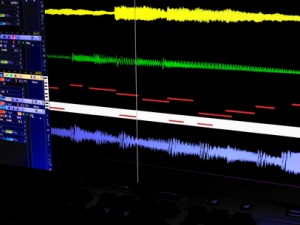
Wide variety of keys and scales
All loops are exclusive to this product
Works in all DAWs that can import MIDI
Instant download after payment received
No filler! Each file has been carefully programmed by hand
Royalty-free to use in your own commercial or private compositions
Launched: Lemur – Legendary multitouch MIDI & OSC controller
http://liine.net/en/products/lemur/
Lemur is a professional iOS controller app that doesn’t cut any corners. It lets you control anything, any way you want. Lemur can control DJ software, DAWs, VJ software, visual synthesis software, stage lighting and more. Any software or hardware that can be controlled by MIDI or OSC can be controlled by Lemur.
Major stadium-touring acts such as Bjork, Deadmau5 and Daft Punk use Lemur on stage. The original hardware version was introduced to the public in 2004 and Lemur software now benefits from nearly 10 years of development. These are just two of the reasons Lemur is the name cited when talking about multitouch control.
Find out more on liine.net
Creating a track using FunkBox, Little MIDI and the iRig MIDI interface
Demo of the CoreMIDI capabilities of two iOS music apps, FunkBox and Little MIDI Machine, when connected to an iRig MIDI interface. Other instruments used are a Monotribe, Little Phatty, Tattoo drum plugin, Arctic Keys synth app, NLog synth plugin, and Ableton Live. With CoreMIDI your music apps become musical instruments that can interface with the rest of your studio to make music.
FunkBox is a virtual vintage drum machine app designed to be fun and easy to use. It runs on your iPad, Iphone or iPod Touch.
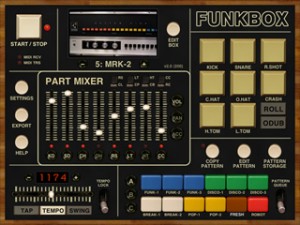
FunkBox features:
The look and feel of a vintage beatbox
Samples from classic drum machines
Thirty six preset drum patterns
Straightforward x0x style editing
Mix, mute and tap individual parts
Tempo, swing, emphasis, random controls
Audio and MIDI export plus audio copy
Fun, cool looking, and easy to use!
v2.0 JUST RELEASED! Includes more drum machines, sample import, customized boxes, CoreMIDI support, and tons more! FUNK YEAH!
The Choppertone – Custom MIDI Controller for Ableton Live + Nick Francis Interview
And here are the details:
More info: http://blog.dubspot.com/choppertone
Producer, programmer, radio broadcaster, music director and host of Quietmusic, Nick Francis recently stopped by Dubspot NYC for an inspiring interview and intimate live performance and demonstration on his own custom-built MIDI controller The Choppertone along with Ableton Live.
In this exclusive Dubspot video interview, Nick Francis talks about his musical evolution, from listening to rock and pop music of the 1960s and ’70s to delving into the world of jazz, experimental and electronic music (musical instruments and music technology); Francis embraced everything from Tangerine Dream, Kraftwerk, Brian Eno, Herbie Hancock and Weather Report to DJ Shadow, Moby, and Fatboy Slim. He has a strong appreciation for classic American soul and R&B and music of the 1940s and 1950s, but also pays attention to current music and recognizes the efforts of innovative electronic musicians and performers of the 21st century.
Lemur running on iPad – second sighting
Lemur app on iPad controlling Konkreet Lab’s custom MeeBlip hardware synth via iConnectMIDI interface for iOS.
Konkreet Labs: http://konkreetlabs.com
iConnect MIDI: http://www.iconnectivity.com
MeeBlip: http://meeblip.noisepages.com
With the groundbreaking Lemur controller Jazzmutant have revolutionised the way in which performers can now interact with light, video and sound. The Lemur offers an unrivalled package of intuitive features beneath a futuristic multitouch-sensitive surface, and as result has won fans across the globe including the groundbreaking musicians Richie Hawtin, Björk and Ryuichi Sakamoto.
With the new free version 2 firmware update Jazzmutant are taking the Lemur to another level of control, flexibility and intuitive operation. A host of new object features allows users to really interact with sound and manipulate it in real time like never before. Workflow improvements, scripting additions and other new features allow the controller to be used seamlessly with leading software applications. Ableton Live users, in particular, will benefit from some of the new features.
Experiment using an Opal Chameleon
“This video shows an experiment using my Opal Chameleon sending MIDI data, through Disarray, to M and, from there, to Spectrasonics Omnisphere, through Logic Pro. The tuning system is Carlos Alpha.”
Read my blog for details: http://www.seraph.it/blog_files/def789d378b3b72969210e2755e29369-118.html
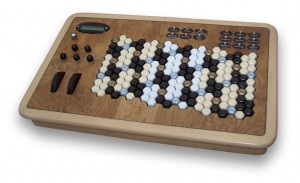
Keys and velocity
The keys are weighted and velocity-sensitive. There are 8 velocity settings and 32 weight settings. A pedal (included) adds further real-time control of velocity settings. The velocity switches are activated near the bottom of the key-press, giving a high degree of control and response. The key-return mechanism is positive, while light enough for fast playing without strain to wrists, hands and fingers.
Menu systen
The controls include a menu of 16 tunings including rotations and reversals of the original note pattern (Melodic Table), plus a separate menu of 100 pantonal serial progressions and 42 user-definable tunings. The 3 zones can be altered in enough ways for the possible combinations to number over 1 billion. However, the menu system is very user-friendly; a single data knob just below the LCD scrolls through all the options for each control button.
MIDI
Opal has the most comprehensive MIDI hub available on any keyboard and is compatible with all DAWs, MIDI Keyboards, synths and sound modules, old & new. There are 4 MIDI sockets; 3 are assignable and the 4th sends all MIDI. Therefore the three keyboard splits can be sent directly to different instruments without the need for a computer or some other interface to do the MIDI channel routing.
ShakeMidi: A Wireless MIDI App Like No Other
Background data: ★ ShakeMidi is probably one of the most advanced, feature-packed iPhone midi apps available. Do you know why? ★
☆ ShakeMidi is an accelerometer-enabled MIDI controller that turns your iPhone into a professional, high performance MIDI instrument. Move or shake your device to send notes over WiFi, at an unbelievable ★0ms latency★! Originally conceived to be used by dancers playing live music, ShakeMidi goes beyond live performances, providing a solid MIDI controller that you can use in your everyday music creation. This iPhone MIDI app will surely help artists find new and exciting ways of creating rhythm, both on and off the stage. The MIDI interface gives you all the freedom you need to create. Playing the notes any way you want allows for endless combinations.
FEATURE HIGHLIGHTS
✓ Built-in Quantization allows you to keep a perfect beat, no matter what. If turned on, notes snap to the nearest beat position, allowing for a flawless performance.
✓ 0ms latency. Absolutely stunning, never-seen-before 0ms latency over WiFi. Don’t believe us? Take it for a spin!
✓ Made from the ground up for the accelerometer: tilt, shake and rattle your device as you play your music!
✓ Fully compatible with Ableton Live, Cubase, GarageBand, Logic and other MIDI-capable DAWs
✓ Customize the note duration, tone, pitch and velocity using the in-app dashboard as you find your own rhythm
If you are serious about making music, you cannot miss ShakeMidi. Test it today and learn why it’s an iPhone MIDI app you’ll want to keep coming back to.
Learn more about us at: www.shakemidi.com
Phaedra iPad Sequencer First Look…
Last week we got a teaser of the upcoming Phaedra iPad sequencer, now the developers gives us some more details:
This is a quick overview of the highlights of Phaedra, the “analog” style four-channel MIDI sequencer for iPads, coming soon from NaughtyPanther.
In this video, Phaedra is driving a DSI TETR4, a Doepfer modular synth, a Korg Monotribe, and an Eventide Space and TimeWorks. No DAW is used in the sequencing. Everything is being clocked from Phaedra.
The Phaedra sequencer is soon to be released
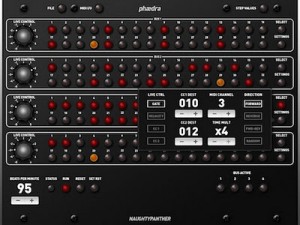
A new MIDI sequencer is coming from Analog Industries. The plan for Phaedra is to include background mode and WIST too for launch.
In my ludicrously ample free time, I’ve been working on this bad boy, Phaedra. It is an “analog” style four-channel MIDI sequencer for the iPad. Click the picture for the full-rez screenshot. In the interests of full disclosure, I borrowed heavily from the Moon Modular 568 Quad Sequential Trigger Source, which you can read all about up in here.
I still have a long way to go, but it is coming along nicely. Each step has note, velocity, gate time, and a pair of MIDI CCs of your choosing. I haven’t yet coded in the chaining feature, but it’ll be able to do 4 x 32, 2 x 64, and 1 x 128 modes. The steps can be 32nd note, 16th note, 8th trips, and 8th note, and each “bus” can run in arbitrary lengths. The “Live Control” knobs on the left can be used to modify one of the four destinations.
I haven’t yet conquered “MIDI background mode,” as used by many iPad synth apps, but I hope to include it, as well as Korg’s WIST. It already does normal hardware MIDI and Network MIDI fine, though, and can clock, or be clocked from, an external source.
I have no idea when I’ll have this done, as I’m only working on it in spare moments, but I hope to be done before Christmas. I’ll keep you posted. Note this is not an Audio Damage product. (I know that even though I say that, and it clearly does _not_ say “Audio Damage” anywhere on the UI, all the other blogs that pick this up will say it is. You can lead a horse to water…)
DATAMASKIN

