
KORG nanoSERIES 2 Slim-line USB-MIDI Controllers
And here the Korg salespitch:
Tune in to explore Korg’s nanoSERIES 2 USB-MIDI Controllers. Each model will fit perfectly in front of your laptop computer, iPAD, or desktop keyboard, offering impressive control while conserving valuable set-up space. Simply connect a single USB cable, and you’ve got a music production studio on your desk at home or on the go. Use one, or use them all. Each includes a License bundle of third-party software, plus Korg’s Kontrol Editor software. Visit Korg online at http://www.korg.com/nanoseries2
MIDI-triggered Pocket Piano MIDI + Catalinbread Montavillian echo
Here is the Critter and Guitari Pocket Piano MIDI being triggered by the Mellotron M4000D (we are not hearing the Mellotron, just the Pocket Piano).
The output of the Pocket Piano is going to the Catalinbread Montavillian Echo pedal. Sweet sound, huh? 
http://bigcitymusic.com
All post delivered from Moscow this week

TB MIDI Stuff – new modular MIDI control surface for iPad
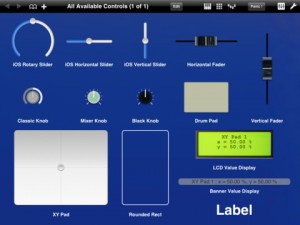
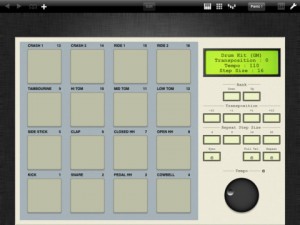
The app lets you create your own pages, or use the built-in MIDI keyboard (with Arpeggiator, modulation wheel, pitch wheel and accelerometer velocity), the built-in Pads controller (with customizable pads banks, accelerometer velocity, transposition, full velocity mode and repeat mode) or the 16 channels MIDI mixer (pan, volume and mute).
The page editor lets you create your own control pages. It contains some useful stuffs like pasteboard, undo manager, multi selection or z-order managment.
TB MIDI Stuff use CoreMidi : you can use any supported device, like the native WiFi driver or the camera connection kit with an external sound card. Each page can use a different CoreMidi driver.
Controls can use the iPad accelerometer as input (even faders and knobs), in each dimension (X, Y, Z or, for XY Pads, a mix of them).
The application library contains :
- Rotary sliders
- Horizontal sliders
- Vertical sliders
- Horizontal faders (with different colors)
- Vertical faders (with different colors)
- Mixer knobs (with different colors and flavors)
- Drum Pads
- XY Pads
- Value displayers
- Rounded rects
- Labels
Each control can drive simultaneously multiple MIDI messages like Control Change messages (single 7bits and coarse/fine 14bits), RNP/NRPN messages (7 and 14bits), Pitch Bend messages, Program Changes messages, Note On/Off messages.
You can open up to 32 pages simultaneously. You can change pages with three fingers swipe gesture, manage the pages order, open multiple instances of the same page and change the MIDI Out driver or the MIDI Out channel (or both) without entering the editor for each instance.
Swipe shortcuts (1, 2 and 3 fingers) let you access quickly to the MIDI keyboard, the pads controller or the 16 channels mixer.
TB MIDI Stuff contains some demo pages and 7 pads banks. For the pads banks :
- Default Bank
- Drum Kit (GM)
- Fifth
- Major Chords
- Minor Chords
- Simple Chord Generator
- Velocity
Modular MIDI Controller Prototype
Here’s a video featuring Livid’s soon to be released modular mid controller system. It’s based on the eurorack standard and will feature dozens of modules that can be arranged to create totally unique layouts. This will be our 4 modular skiff enclosure.
Animoog as a MIDI output device from a PC over WIFI using Fruity Loops
A video showing Animoog on the iPad running as a midi output device in fruity loops studio so that it can be sequenced
Just playing around with the iPad app Animoog, which I believe is still available for $0.99 at the iTunes app store. This is a huge bargain on a really really cool app. I won’t get into the specifics of the app, but if you want to know more about what Animoog is or how to use it, I recommend this YouTube video.
So, while playing around with the Animoog app, if you go into the setup menu there is a selection under ‘Refresh MIDI input(s)’ where you can select ‘Off’ or ‘Network Session 1′. This intrigued me! Apparently you can use MIDI over the ‘Network’. After some Googling I was still unclear on how to get this setup, so I thought I’d just tell everyone how I did it so you can get to making some cool tunes yourself.
Teaser video of the Livid Modular Midi Controller
“Here’s a video I made of our soon to be released modular mid controller system. It’s based on the eurorack standard and will feature dozens of modules that can be arranged to create totally unique layouts. This will be our 4 modular skiff enclosure.”
The Geo Synthesizer has been released
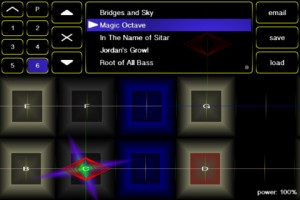
The long awaited Geo Synthesizer arrives! Here are the details:
Geo Synthesizer is a musical instrument and MIDI controller. A collaboration of Wizdom Music’s Jordan Rudess and Kevin Chartier (MorphWiz, SampleWiz) and Rob Fielding (Mugician), Geo Synthesizer is an incredibly expressive musical instrument specifically created for a multitouch surface.
Jordan says: “Since touching a preliminary piano keyboard on an iPhone screen and realizing the amazing potential for musical expression on a multitouch device, I have been inspired to create next-generation musical instruments for iOS. Geo Synthesizer is a dream come true in many ways. It is the fastest truly playable iOS instrument that I have put my hands on to date. I can fly through the range of an instrument while expanding on the kind of advanced pitch control we introduced in MorphWiz. As someone who grew up with synthesizers, I can tell you that pitch bending has never been this good!
“Geo features many of my custom sounds and in addition, Geo is also a MIDI controller, so you can use it with any external midi instrument or virtual MIDI. Virtual MIDI allows you to control an app running in the background on the same device! A great feature of Geo is that internally and externally we send independent voices on each note played, so as an example, you can pitch bend one note and not the other, or add unique expression on every note! I can’t wait to see the YouTube videos of all of you guys rocking out with Geo Synthesizer!!!”
Features:
- ability to load waveforms from SampleWiz presets
- octave rounding for effortless soloing over large ranges
- whammy slider with absolute and relative modes
- 12ET, 24ET, 53ET, and 665ET temperament options
- mono, string, and full-polyphony modes
- tuning and transposition controls
- snap speed control to affect how quickly the instrument pulls notes in tune
- playing surface options for number of rows and columns on screen
- octave and fifth harmonics synthesis options to rich, organ-like sounds
- gain control to add distortion to the sound
- FM and touch FM controls for timbal variation
- mono out for use with guitar amps
- sine, sawtooth, square, and custom (SampleWiz) wave options
- attack and release controls
- synthesis body control
- lowpass filter with resonance
- stereo delay
- reverb
- MIDI output with polyphonic note bending and multiple configuration options to allow compatibility with a wide range of hardware and software synthesizers
- performance menu lets you make your own custom menu so all the controls you need are always right at your fingertips
- 40 presets carefully selected by Jordan Rudess, including patches from Jordan’s personal sound library
The app is priced at $9.99.
Urban Grooves with SampleTank for iPhone / iPod touch and iRig MIDI
SampleTank® for iPhone / iPod touch is your key to R&B and urban groove construction and performance anytime and everywhere. With over 400 instruments and 900 patterns, you can create the perfect beat, the perfect groove, the perfect lead for modern R&B, classic Hip Hop, old school funk … any style you can think of. The power of SampleTank is now in your iPhone / iPod touch. Check it out today!
http://www.ikmultimedia.com/irigmidi/moreinfo/sampletank.php
iRig MIDI in action with SampleTank and GarageBand
iRig MIDI is a compact standard Core MIDI interface for iOS that connects any MIDI compatible device to the iPhone, iPod touch and iPad. iRig MIDI connects MIDI keyboards, drum machines, drum pads, pedal boards and more to an iOS device to control not only the included SampleTank FREE* but also a world of MIDI-compatible apps such as GarageBand. You can also use iOS apps to control external MIDI equipment such as sound modules, DAWs or lighting systems right from the mobile device. iRig MIDI is the only compact iOS MIDI interface sporting 3 MIDI ports: IN/OUT/THRU. These connect to any standard MIDI jacks using the included 2 x 1.6m/5.2′ cables. iRig MIDI also has 2 LEDs for displaying the MIDI activity on the IN and OUT ports.
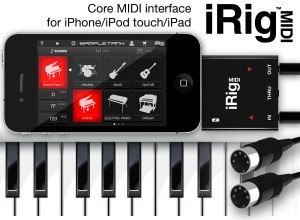
iRig MIDI also exclusively provides a micro USB port — with included cable — that connects to any standard USB power supply source so that the iOS device can stay fully powered during long sessions.
Features:
- Standard Core MIDI interface connects any MIDI hardware device to Core MIDI-compatible apps like SampleTank FREE and GarageBand®
- Directly connect MIDI keyboards, synthesizers, drum machines, drum pads, pedal boards and more using the included 2 x 5.2’ (1.6 m) MIDI 5-pin DIN cables
- 3 MIDI ports: IN/OUT/THRU
- 2 LEDs for MIDI IN/OUT activity display
- Micro USB port can charge the iOS device while in use
- Free apps included*: SampleTank FREE* the powerful sample-based sound module app and iRig MIDI Recorder FREE*
Arduino-Powered MIDI Arpeggiator
“Its not finished yet… but this yellow box is a MIDI arpeggiator. Its powered by an Atmega328 with Arduino bootloader and it also contains a PIC16F688 to receive MIDI synch on a second MIDI in port.
I wanted a standalone arp to go with some synth modules I’ve been building, and I was inspired by Reason’s RPG8 – although it does not look much like it.(does that make it a hardware emulation of a software emulation of hardware…?)
The minimal control surface (just LEDs and switches) actually works pretty well. Still need to implement a few more features like note insert, proper gate length control and to debug the weird things it does every now and then. When its all finished I’ll post some more clips and I intend to stick the source and schematics online too.”
DATAMASKIN

