
Allen & Heath introduces the Xone:K2 MIDI and audio interface
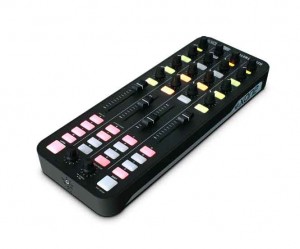
Allen & Heath has introduced the Xone:K2, a MIDI controller and audio interface with a 4-channel internal soundcard, configurable MIDI surface with tri-colour LED illumination, USB bus power, and incorporating A&H’s proprietary X:LINK to connect with other Xone equipment.
The K2 is designed to work with all MIDI-enabled DAW applications and interface with popular DJ software packages, such as Ableton, Traktor Pro and Serato Scratch Live. It has 52 physical controls – including 12 analogue and 6 endless rotary encoders with push switch, 4 linear faders, and 30 back lit performances switches – providing up to 171 MIDI control commands across 3 layers. The K2’s MIDI interface can be configured by the user, so the unit can be left in ‘Open Architecture (Latching Layers off) Mode’ or set to ‘Latching Layers Mode’.
K2 has an internal 4-channel high quality soundcard, that can operate at 44.1 and 48kHz, and all channels run from the PC to the unit, configured to provide 2 stereo channels, one for headphones one for master out L and R, allowing headphone cueing without interrupting the master out. There is also a dedicated 3.5mm headphone jack, and a master out on RCA phono connectors.
It is possible to link two K2 units together to double the control area using Allen & Heath’s proprietary X:LINK protocol. X:LINK uses a standard RJ45 connector and distributes power and data, which means two units can be connected to your DAW using only one USB port.
Xone:K2 is constructed with a strong plastic base and steel front panel employing A&H’s nutted pot construction to be both lightweight and hard-wearing. Finally, the K2 comes with a carry case that doubles as a stand for ease of use for travelling DJs.
Pricing and Availability:
SRP: £199 ex VAT
Availability: Jan ’12
More information:
Teaser: STS9 Controller with Modular Midi Modules
Here’s a prototype of our MIDI modules built into a custom controller we built for Sound Tribe Sector 9. The MIDI modules fit in a standard eurorack enclosure. This is a preview of what we will be releasing with our Livid Modules.
Improvised solos on the TouchContinuum
Background information:
The final release candidate version of the TouchContinuum!
I’m playing my Nord Modular G2X synth over MIDI.
The two solos were improvised over self made jamtracks.
Thanks to the new rounding algorithm, the intonation isn’t that bad this time 
###################
HOW TO GET IT
###################
There is NO DOWNLOAD AVAILABLE so far, but I’m working on it! The source code will be released on github.com under the GPLv3 licence.
###################
For more Informations about the multitouch table hardware I refer to my other videos.
How to use Slide Control FS & virtual midi
This is a video who explain how use virtual midi with NLog, MoDrum & BassLine. Virtual midi is very very COOL !!
NLog:
Professional Virtual Analogue Synthesizer supporting Core MIDI, WIST and interfaces from Akai, Alesis, Line6, IK Multimedia & others
::: Demo videos on YouTube channel nlogmusic ::: Check Mac & Audio Unit version in Mac App Store :::
Most versatile iOS synth with professional grade virtual analogue low latency sound engine:
– Play it from on-screen keyboard
– Use MIDI keyboards & controllers via MIDI interfaces
– Connect to your digital audio workstation via MIDI interfaces
– Play NLogSynth from other iOS apps like SoundPrism, polychord or Genome Sequencer via virtual Core MIDI
– Synchronize via Korg’s WIST to other iOS devices running iElectribe, iMS20 or other WIST compatible apps
– Synchronize NLog to beat-oriented apps like MoDrum, Molten or Funkbox running on same device via virtual Core MIDI
– Share patches with NLog Audio Unit Mac version
– Make audio or MIDI recordings on the run and share your files
– Export patches & recordings to iTunes, SoundCloud, Email, WiFi, Beatmaker & Sonoma AudioCopy pasteboards
MoDrum – Synthesis-based Drum Machine for iOS
An 808 style percussion synthesizer that offers pure electronic drum sounds, plenty of editing capabilities, effects, audio sharing, and state of the art MIDI support.
Key Features
Ten real time operating synth modules (no sampled sounds are used): Bass Drum, Snare Drum, Low Tom (∗), Mid Tom (∗), High Tom (∗), Rim Shot, Cowbell (∗), Closed Hi-hat, Open Hi-hat, and Cymbal
Programmable sequencer with 32 steps and global accent pattern
Beat clock with tap tempo and rhythmic shuffle (swing)
MIDI Clock sync/generate, Note in/out (GM drum mapping)
Dotted 8th delay effect unit
Hard knee dynamic range compressor
Tube amp overdrive effect processor
Audio sharing via General Pasteboard, AudioCopy by Sonoma Wire Works, E-Mail or iTunes File Sharing
Universal support for iPod touch, iPhone and iPad
Background Audio/MIDI Processing
Including twenty patterns by DJ/producer Myagi (www.popandlockrecords.com)
Featuring the Xotica BX-1 Various Demos – Roland GI-20 VG-99 GR-300 GR-700 US-2
Collection of video demos featuring the Xotica BX-1. This is one of a few hand crafted boutique guitars built by Xotica, and custom guitar shop based in Kenosha, WI. Features of this guitar include a Roland GK-3 pickup, Buzz Feiten tuning system, Sperzel locking tuners, Baby Grand Hip Shot bridge, Rockfield pickups and a Honduras Mahogany body with g\orgeous Fiddle Back Maple binding.
Millioniser 2000 • MIDI wind controller
http://www.millioniser.com Walt Miller Walter Müller Originator of Millioniser. Amazing Grace player by Rock Erickson.
Rock Erickson -The first American called to Europe to play and record with Walter Mueller’s Millioniser 2000. (Ronald Schlimme Engineer) Harmonica like in principal giving the end user complete control over synthesizer and midi functions with the sensitivity of your own breath. This instrument is a one of a kind powerhouse. The video starts off by showing the functions of Millioniser 2000 and then merges into the on stage video which was shot in London. Rick Fenn of “Lie For A Lie” Sony Music was the music director and lead guitarist along with Charlie Barret from The FIXX on bass. The Millioniser Breath Controller units that I’m currently using in the studio are breathing new life (literally) thru their capability to dynamically control some of the most popular software and rack synths ( Garritan Personal Orchestra, Roland Sound Canvas, Yamaha VL70 ect ) and samplers like SampleTank & Tascam Giga Studio ) in both the mono and polyphonic arena. If you have comments or questions please post here or email rock@millioniser.com
First preview of the new MIDIbox SEQ V4L
This video demonstrates the brand new MIDIbox SEQ V4L, a variant of MBSEQV4 with minimalistic user interface. Buttons and LEDs are directly connected to the MBHP_CORE_LPC17 module (which is under the small table). An external keyboard is required to enter Notes, Pitchbender and CCs.
MBSEQV4L controls a virtual Mk II with Seq1, and a Wurlitzer with Seq2. Both sequences have been recorded live and at once, only the Stylus RMX based drums have been added later in Logic Pro to make this video a little bit less boring. 😉
What happens:
[0:05] configuring Seq1 for 32 steps (2 bars)
[0:14] a basic pattern is entered in Live Recording mode to define the basic rhythm
[0:19] now this sequence is automatically looped
[0:25] switching to Step Recording mode
[0:27] and entering additional notes for selected steps
[0:32] activating force-to-scale: Pentatonic Minor (previously forgotten)
[1:05] yes, we can also enter chords!
[1:55] activating the Humanizer with extreme settings (random keys/velocity/length – always in scale!)
[2:04] activating Groove with Shuffle feel and modified Delays/Velocities/Lengths
[2:11] now it gets more funky!
[2:12] trying some magic LFO presets – affecting note and velocity
[2:36] trying different Step Progressing presets – affecting step increment/decrement/repeat
[2:35] some different LFO presets again
[3:08] break
[3:17] entering a second sequence, played by a virtual Wurlitzer
[3:26] notes are entered in Step Recording mode
[3:57] trying different MIDI Echo effects on Seq1 with Note increment (but forced to scale)
[4:28] introducing our special guest! 😉
[4:32] my beloved app “Pianist Pro” is running on the iPad, it sends OSC messages to MBSEQV4 which are converted to MIDI and thereafter sent to Logic Audio via USB
[5:21] additional notes are entered, making the sequences more complex
[5:33] muting Seq1, the Wurlitzer plays alone
[5:58] all MIDI effects are activated – MBSEQV4L jams a bit out of human control meanwhile, but it still sounds nice 😉
[6:40] unmuting and modifying the MIDI effects of Seq1
[7:04] slowly some steps are disabled to thin out the sequences
The all new Novation Impulse – Professional USB/MIDI controller keyboard
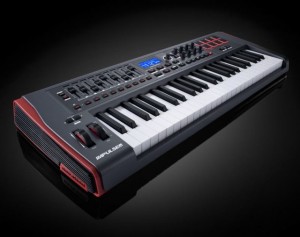
Impulse is a range of professional USB/MIDI controllers. They each have a precision keyboard and a full control surface powered by a brand new version of Novation’s Automap control software – Automap 4 (which makes getting hands-on with your DAW/plug-ins fast and simple). Impulse also has 8 back-lit drum pads which can warp arpeggios, roll beats and launch clips in Ableton live.
Impulse also comes with a stack of free software and sounds:
• Ableton Live Lite – powerful loop based music-making software
• Novation Bass Station – legendary analogue bass synth as a software plug-in
• Loopmasters sample library – over 1GB of royalty-free samples
• Mike The Drummer – 502MB of live drum loops and breaks
Some unique features:
- Aftertouch. Keybed quality is paramount for obvious reasons. What’s typically missing, for those who like it, is aftertouch support, available here.
- Full DAW control. Available on the Axiom but previously missing on Novation’s offering, you get 8 knobs, 9 faders and buttons, and an LCD for controlling your DAW. (Only one fader on the 25-key model, since all of that wouldn’t fit.
- Automap. It wouldn’t be a Novation keyboard without the company’s Automap feature. Whether that’s good or not depends on whether you like the functionality; I’ve tended to find it a bit fiddly at times, though the implementation with Propellerheads’ Reason is fantastic. (Hosts are a big part of the variable here.)
- Pads that do more. This one’s rather interesting: you get drum pads set up to do arpeggios, rolls, and Ableton Live clip launching. You could do that with any pads, but neat to see it on the keyboard, and I’m curious to learn more about the specific implementation.
NEW Misa Kitara – Sustainer & ZynAddSubFx VST (shipping this month!)
There have been lots of requests for showing the misa kitara connected to an external software synthesizer via MIDI:
“So in this video I have connected the kitara to my PC running my favourite open source synthesizer – zynaddsubfx (I recommend checking it out, it has some really interesting features). Also in this video, I show you how to sustain notes – you just drag upwards and any strings you have pressed down will not stop playing when you release them. Pressing another button on the string will set the sustained note to the newly designated one.
Also you can see “tap mode” in this video, where the screen is red. in this mode you can press the buttons on the neck and hear a sound, without pressing the touchpanel. it’s good for two handed tapping technique (although you can see how important using the touch panel is to re-attack the notes you are playing).
ps. use headphones if you want to hear the bass!! :)”
The future of iOS music continued
This is a preview of an upcoming polychord release. In this video, we’re using polychord (BETA) as a MIDI keyboard for nLog Pro (BETA) — all on one iPad, all without any cables. App makers are starting to work together to make all of your iOS music apps play nicely with each other through virtual MIDI. This is still experimental, and it will be a little while until app makers optimize their apps for multitasking, and enable virtual MIDI. It’s very exciting and clearly the future of iOS music making.
If you are a developer, get involved with the open music app group: groups.google.com/group/open-music-app-collaboration
DATAMASKIN

