
NAMM 2012: Livid CNTRL-R
Designed with Richie Hawtin, this step sequencer and controller is an Abletonators dream!
CNTRL:R is a contemporary MIDI performance instrument for creative music production. Housed in a lightweight aluminum body, this controller is ideal for live performance and studio production. Create rhythms, sequence and perform drums, launch clips, mix tracks, and have complete control over your performance with CNTRL:R’s advanced set of features. High quality faders, push button encoders, rotary knobs, expression pedal inputs, and keypads backed with RGB lights give you all the controls you need for an interactive performance. With scripts available for Ableton Live and NI Traktor, the CNTRL:R meets the needs of anyone looking to perform electronic music.
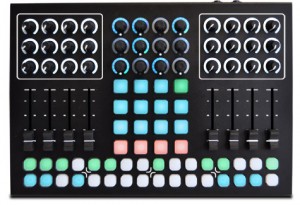
CNTRL:R was designed over a one and a half year period with electronic music pioneer Richie Hawtin and the artists on m_nus records. The controller is designed to provide a high quality controller sized small enough to fit into a backpack, but large enough for extensive hands-on control. The instrument has all of the essential controls for music creation and can be adapted to many different software and styles. The “sequencer” section of the controller can be set to create sequences and grooves, or control cue points and triggers. The central 4×4 keypad can launch clips, play drums, and control functions. The fader and knobs are ideal for channel strip controls, device control, EQ, and effects. The CNTRL:R is totally programmable and adaptable to any software that supports MIDI.
NAMM: Check out the new Akai Pro MAX49 – Overview demo
And here’s their pitch: MAX49 from Akai Professional places revolutionary MIDI and CV control at your fingertips. With an intuitive layout and included AkaiConnect automatic-mapping software, MAX49 offers an instant, fully immersive experience with your favorite music software and virtually all VST plugins. From its 49 semi-weighted keys and 12 real MPC pads, to its groundbreaking LED touch faders and vintage CV & Gate outputs, MAX49 combines cutting-edge Akai Pro technology with classic capability to give you an unprecedented music-making experience.
Two new videos of AtomoSynth’s KOE plexi glass synth
“Hello this is the Koe mini modular, this time making some percussive and weird sounds.
KOE synth voice and KONEKO midi to CV eurorack modules.”
“Hello, this is the Koe desktop mini modular from AtomoSynth, showing some bass and lead sounds.
Koe synth voice eurorack module and Koneko midi to CV interface module. UMX61 midi controller.”
Background info:
This is the KOE module, it is japanese for “voice” because it is a complete synth voice in just one affordable module, it is 28 HP width and needs +/- 12V power.
Main features:
One VCO with square and ramp wavefoms with depth and tune controls, tune control is a ten turn potentiometer which allows you easily set octave, tune and fine tune with
just one knob.
Noise sourse, it can be set to affect the VCO frequency or it can be mixed with the VCO and audio input.
One LFO with square and triangle waveforms is can be set to affect the VCO frequency or the Filter cut off, it also features an output jack.
High pass and Low pass vactrol based filter with cutoff and resonance/peak control, it also features an input jack to control the cut off frequency.
Two Envelope generators: EG1 with decay control which is set to affect the cut off frequency of the filter and EG2 with attack and release controls, set to affect the volume, it has an output jack and input jack for the incoming gate signal.
Also it features an audio input, it allows process any axternal audio signal with the filter and envelopes.
NAMM teasers from Eowave – featuring the Domino Filter and Reaktor
Here is a quick look at the Eowave Domino, focusing on the sound of the filter, using the sawtooth oscillator
Eowave Domino’s LFO sync’d to MIDI clock. This video shows LFO waveforms: triangle, ramp up, ramp down, square and random. You can have fun manipulating the LFO speed setting while sync’d to MIDI clock. The LFO is modulating the 24db/oct filter and the pulse width of the square waveform oscillator in this video.
Using the audio input to route a drum beat from a Reaktor Ensemble Krypt, through the Domino’s 24 db/octave filter. Domino’s LFO is tempo sync’d to Reaktor’s MIDI clock, and is modulating the filter cutoff.
Easy MIDI turns your Mac keyboard, trackpad and mouse into a powerful MIDI keyboard controller
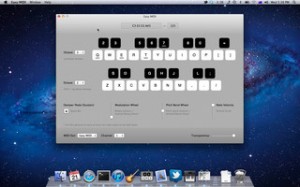
After a year flodded with specific apps targeting the iOS side of the coin – it is nice to see someone taking a stab at improving or updating the controller side of thins for OSX users. Nikolozi Meladze has released Easy MIDI, an app that turns your Mac keyboard, trackpad and mouse into a powerful MIDI keyboard controller. It sends MIDI notes and control messages to any soft synth or DAW such as GarageBand, Logic Pro, Ableton Live, Cubase and Digital Performer. This is very useful when you want to jot down some musical ideas quickly and easily whilst travelling, sitting in a coffee shop or even on your couch at home.
Easy MIDI even allows you to control iPad apps that support CoreMIDI or hardware synth via MIDI interface.
Easy MIDI features
- Send MIDI notes and control messages to any DAW or MIDI driver.
- Notes can be triggered using alphanumeric keys.
- Over 3 octaves under your fingertips.
- Easily change keyboard octave with up/down arrows.
- Visual feedback eliminates the need to look down on your Mac keyboard.
- Sustain on/off can be triggered with a space bar.
- Vertical scroll changes note velocity.
- Pitch bender can be controlled with a pinch zoom gesture or a vertical mouse drag.
- Modulation can be controlled with a rotation gesture or a vertical mouse move.
- Adjustable Easy MIDI window transparency.
Easy MIDI for Mac is available to purchase for $29.99 USD.
IK Multimedia has announced that SampleTank® 1.1 for iOShas been released
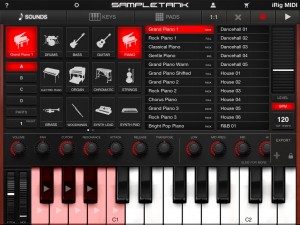
IK Multimedia has announced that SampleTank® 1.1 for iOS is now available as a universal app for iPhone, iPod touch and iPad.
The SampleTank 1.1 update adds a 4-track MIDI recorder that enables the mobile musician to record beats, grooves or complete songs anytime and everywhere. The new recorder features quantize and loop functions, export to audio and integration with the built-in pattern player making SampleTank a full-featured mobile sound and groove workstation. Plus the new beat-making interface with assignable pads makes groove creation a breeze.
The impressive number of sounds and patterns has grown even further with this update. The number of included instruments has doubled in the regular version and now exceeds 500 total available instruments. SampleTank now also includes over 1,000 professionally programmed patterns so that anyone can make music regardless of prior musical ability. Instruments and patterns are organized into 16 categories including Pianos, Organs, Strings, Basses, Guitars, Drums, Synths, Woodwinds, Brass, Ethnic Instruments, Percussion and more all instantly accessible from a single app to create any style of music.

Additionally SampleTank 1.1 update also adds increased compatibility with third party iOS docks and accessories plus many more new features.
SampleTank 1.1 for iOS is available to purchase for $19.99 USD / €15.99 EUR. A free version of SampleTank is also available with 8 sounds plus their selection of patterns. An additional 22 expansion sound packs are available for in-app purchase starting from $4.99 USD / €3.99 EUR each or all together for a competitive bundle price.
Features:
- 4-part multi-timbral professional quality sound and groove workstation
- Expandable sound library with more than 500 instruments in 16 categories
- Over 1,000 melodic and rhythmic patterns for groove creation or accompaniment
- Included 4-track MIDI recorder with audio export
- Built-in insert effects and master reverb
- Easy-to-use, intuitive interface
- Sound and effects editing with multiple parameters
- Play interface with piano keyboard, scale-based keyboard and drum pads
- Compatible with iPhone 4S, 4 and 3GS, iPod touch 4th and 3rd generation, iPad 2 and iPad with iOS 4.3 and newer
- Designed in concert with iRig MIDI interface for iOS devices
- Free version also available
SmackTop is back! – Using your laptop as a MIDI
Imagine your laptop as a MIDI drum kit. SmackTop is an open-source application for Mac laptops which translates physical motion into MIDI messages. Through real-time analysis of the built-in accelerometer’s output, SmackTop is able to classify four different ‘smacks’. Now you can control your favorite DAW by simply tapping your computer. Slap samples, ping notes and hit record – SmackTop is the MIDI controller you already own.
Try it yourself, free:
http://code.google.com/p/smacktop/
Phaedra driving midi-modded Monotribe
This is a quick demo of Phaedra driving a midi-modded Korg Monotribe, just for fun. Synth is bus 1 on Phaedra (MIDI ch 1) and drums are bus 2 (MIDI channel 10).
Rheyne – Lemur Jam
Improv jam using Lemur on an iPad 2, with analog keyboards and USB controllers connected to Ableton Live. Lemur is wirelessly controlling effects on NI’s Massive (synth played on the M-Audio Oxygen 25) and NI’s Kontakt (drums played on the Akai MPD26). The bass is on a Moog Prodigy, and the lead is a DSI MoPho. All loops are recorded live, nothing is pre-recorded.
About Lemur:
Lemur – the legendary multitouch MIDI/OSC controller returns. All these major artists can’t be wrong: Daft Punk. Björk. Nine Inch Nails, Deadmau5. M.I.A., Justice, Hot Chip, Ryuichi Sakamoto, Orbital, Richie Hawtin, The Glitch Mob, Matthew Herbert, Joris Voorn, Stephan Bodzin, Modeselektor, Alva Noto, Richard Devine, Gui Boratto, … you?
Rock solid standard
Major stadium-touring acts use Lemur on stage. The original hardware version was introduced to the public in 2004 and Lemur software now benefits from nearly 10 years of development. These are just two of the reasons Lemur is the name cited when talking about multitouch control.
Control anything
Lemur is a professional iOS controller app that doesn’t cut any corners. It lets you control anything, any way you want. Total flexibility means it can go as deep as you need it to. Lemur can control DJ software, live electronic music performance software, studio production software (DAWs), VJ software, visual synthesis software, stage lighting and more. In fact, any software or hardware that can be controlled by MIDI/OSC can be controlled by Lemur.
A controller unequalled
Lemur has often been imitated but never equalled. The physics engine, which can make faders and balls bounce, is entirely unique: allowing anything from a slight organic feel to absolutely chaotic modulations. Lemur goes deep: it comes with more than twice as many objects as comparable apps. Options for adjusting the look and feel of objects are vast, and connection to your gear is simple.
User Library
Access templates from top artists and the Lemur community. Some of these are actual templates used on stage, others are pure studio or creative tools. Share your own or simply browse the library and download whatever suits your needs.
SPECIFICATIONS
– Objects
Fader; Multislider, Range; Multiball; Knob; RingArea; Switches; Pads; Custom Button; Container; Breakpoint; Leds; LemurMenu; Monitor; SignalScope; SurfaceLCD; Text
– Physics
Hated physics at school? Now you’ll love it! The behaviour of many Lemur objects can be affected by powerful and easy to use physical models which can make your controller bounce, rebound and oscillate. Make your controller come alive.
– Scripting
There’s absolutely no need to dive into scripting if you don’t want to. But if you’re the type who likes to get their hands dirty then there’s a powerful scripting engine inside Lemur. Harnessing this power will allow you to build extremely dynamic templates.
– Editor
The Lemur editor, is a cross-platform (OS X/Windows) interface builder. It allows you to create new Lemur templates or edit existing ones. The drag & drop interface makes it easy to use. It allows you to create anything from the simplest set of faders to the most complex groovebox with no hassle.
– Connectivity
Simply connect your iPad/iPhone to your laptop over Wi-Fi and make the connection! Lemur also supports CoreMIDI allowing you to use hardware interfaces such as Alesis’ iO Dock or the iConnectMIDI or class-compliant USB MIDI interfaces (with a camera connection kit). You can even control up to 8 computers from one iPad with Lemur!
Building nice grooves in SampleTank
SampleTank® 1.1 is a universal app for iPhone, iPod touch and iPad that gives you the power to quickly build grooves with its enhanced PADS interface and 4-track MIDI recorder with unlimited overdubbing. The familiar drum machine-style interface lets you lay down beats easily with adjustable quantize values that you can change on the fly as well loop record and a click track that you can turn on and off at will. Put a drum kit on part A, a bass on part B, a piano on part C, sound FX on part D … anything you like! You can export your recording as a stereo audio AAC file via E-Mail or iTunes File Sharing to use it in another app like AmpliTube or VocaLive or a computer DAW like Logic or Pro Tools. You can also export a .MID standard MIDI file. SampleTank 1.1 is a free update for all existing users and is available in the App Store. Check it out today!
DATAMASKIN

