
Video introduction to the new “CLAUDE CONTROLLER”
Here are the background details from the inventor himself:
This is my latest (and greatest) invention. It is a very sophisticated MIDI controller, allowing the player to articulate many parts of the sound – filters, envelopes.effects etc simultaneously using your left hand and feet. The right hand plays a keyboard with my patented ‘Vibe Bar’ for imparting vibrato & pitch bend.
I think it’s going to be the future of the synthesiser controller!
It consists of 36 wheels and 2 joysticks…….with a pedalboard – 2 peddles and 4 switches..very playable, very cool.
The MIDI circuit is Livid Instruments MIDI Brain.
I like to think of a synthesiser more like an acoustic instrument – rather than an instrument containing 1000 different sounds, you have 1 sound with 1000 articulate-able variations.
Moogerfooger Cluster Flux is a MIDI Synth!
The Moog Moogerfooger MF-108M Cluster Flux is fully MIDI-controllable.
Moot demonstrates one of the most powerful uses for that feature by using the Cluster Flux as an analog synthesizer in its own right. No other sound source or processing (besides some reverb) was used in this piece.
For a full demo of what this baby can do, check out Moot’s review of the Cluster Flux.
Enjoy!
Moog Minitaur Analog Bass Synth with Critter and Guitari Pocket Piano
Here is the all new Moog Music Minitaur analog bass synthesizer being triggered by the Critter and Guitari Pocket Piano MIDI.
More on the Critter and Guitari Pocket Piano:
The Pocket Piano MIDI has all the functionality of a Critter & Guitari Pocket Piano synthesizer, now with MIDI capabilities! It can interact with many other MIDI devices: drum machines, sequencers, computers, synthesizers, and other Pocket Piano MIDIs. It is both a sound module and a controller, sending and receiving MIDI note messages, and MIDI clock signals.
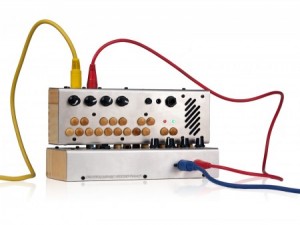
In addition to its intuitive interface, maple keys, built-in speaker, and aluminum and wood enclosure, it features the same six unique synth modes found on our original Pocket Piano:
• Vibrato Synth
• Harmonic Sweeper
• Two-Octave Arpeggiator
• Octave Cascade
• Mono FM Synth
• FM Arpeggiator
As a controller, the Pocket Piano MIDI sends out key presses as note messages, useful for triggering other synthesizers, samplers, or software. As a sound module the Pocket Piano MIDI responds to all 88 notes of a full size piano, so you are not limited to the 16 key range of the Pocket Piano. Using a full size controller, you can take advantage of the Pocket Pianos unique sounds and arpeggiators over a much larger range. Larger range = more fun !
But the fun doesn’t stop there! The Pocket Piano MIDI also sends and receives MIDI clock, so you can synchronize the Pocket Piano’s arpeggiators with your favorite drum machine, sequencer, or computer software. The Pocket Piano MIDI passes all received clock messages to its output, allowing you to chain many Pocket Pianos together to create an orchestra of Pocket Pianos.
Midi Fighter 3D Controller from DJ TechTools
For more information and to preorder: http://www.djtechtools.com/2012/02/27/introducing-the-midi-fighter-3d/
DJ Tech Tolls tells us that their MidiFighter has now been released, here’s their pitch:
Today we’re very proud to usher in the newest DJTT creation: The Midi Fighter 3D controller. Equipped with 16 RGB arcade buttons and full three dimensional tracking of the controller’s movement in space, this latest addition to the Midi Fighter line is our most ambitious and expressive creation to date.
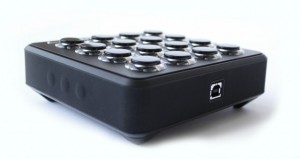
Key Features:
- Fully customizable high performance RGB arcade buttons
- 4 banks of controls
- 6 side buttons
- Optional hand strap for full instrument control
- Full 3D motion tracking of five degrees of movement (Patent Pending)
- Highly grippy rubberized feet and sleeve
- Gyroscope, Accelerometer and Compass for absolute orientation tracking.
Free iPad Control Surface for JP-80
This is a free file I created which you can download by going to jupiter80.music-technology-online.com. This control surface for the iPad adds extra control to your JP-80. The “JP-80 Mixer” runs via the MIDI Touch app which can be found on the iTunes app store.
This control surface for the iPad adds extra control to your JP-80. The “JP-80 Mixer” runs via the MIDI Touchapp which can be found on the iTunes app store. The control surface offers the following control for your JP-80:
1. Global control of Upper, Lower, Solo and Percussion parts.
2. Independent On/Off control of tones for the Upper and Lower parts.
3. Independent control of Cutoff and Resonance for the Upper and Lower parts.
4. Independent Toneblender control for the Upper and Lower parts.
5. Independent Matrix controls of the Cutoff and Resonance for the Upper and Lower Parts.
“To use the control surface, you will need to download MIDI Touch from the iTunes app store and install it on your iPad. Then simply send me an email to request the control surface plug-in and installation instructions. You will also need the Apple Camera Connection Kit in order to connect your iPad to the JP-80 via USB.”
Testing the Midi Ratchit module on one simple sequence
Here is only one simple sequence modified by the Midi Ratchit
MIDI plugin for Windows designed to deliver the classic Tangerine Dream step sequencing ratcheting effect:
Ratchit is a tool to achieve the “ratcheting effect”, which was made famous by Tangerine Dream on their old records.
It is meant to be placed behind ClockWOrK but will of course work with any step sequencer or manual MIDI input.
Ratchit is a VST-plugin that repeats incoming notes according to the selected clock divider. It can be triggered manually or via MIDI CC controller. That way it can be controlled by the CC knobs of Clockwork to have different divide speeds at different steps.
MIDITRIBE IO – MIDI-fy Your Monotribe
Third party retrofit kit from Amazing Machines, for adding MIDI in and out to the Korg Monotribe.
Amazing Machines has officially released the MIDITRIBE I/O – a mod for the Korg Monotribe that adds MIDI In and MIDI Out.
Here’s what’s new in the MIDITRIBE I/O, vs their earlier MIDITribe mods:
- MIDI OUT functionality (Outputs MIDI Clock / The Synth Part works as an arpeggiator running at 1/16, which responds to pitch information recorded in each of the internal sequencer’s 16 steps for controlling external synths on MIDI Channel 1 / The Rhythm Part sends trigger information to MIDI Channel 10)
- Control external synths using the Ribbon Controller for Note ON / OFF, Volume Controller – CC 7 and Gate Time
- Send Continuous Controllers 1, 16, 80, 81, 82 and 83 to MIDI OUT Channel 1
- Couples as a MIDI Clock to Sync Pulse or Sync Pulse to MIDI Clock converter using the MONOTRIBE’s built-in Sync I/O
- Added the best MIDI (Female DIN5) connectors available on the market
- Added a Manufactured PCB
MIDITRIBE I/O is pre-assembled and no soldering is required for installation.
See the Amazing Machines’ site for full details.
Pulse Surface Controller System
For more information and purchase:
http://www.pulsecontroller.com
Pulse Surface Controller liberates computer-based musicians from conventional input devices of predetermined form factor and layout, allowing the user to turn a surface of various size, orientation and material into an expressive, flexible, reconfigurable MIDI controller.
The Pulse Controller is a hardware / software solution that liberates computer-based musicians and performers from conventional input devices by allowing a surface – i.e. desk, laptop, objects and more – to become a playable MIDI controller. An included piezo microphone coupled with a simple yet powerful software interface converts acoustic impulses into MIDI Note messages for playing your software instruments in an intuitive, responsive and connected manner.
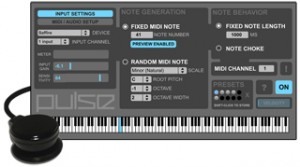
The idea behind Pulse Controller was born out of the belief that as computer-based musicians and performers we should not feel relegated to a grid of small 1×1″ pads or a keyboard to create our rhythms and provide pulse to our music. Controllers once intended to give us the immediacy of playing an instrument often end up feeling more disconnected and distracting. With the Pulse Surface Controller System, controlling percussive instruments has a more visceral, immediate quality, and via a powerful MIDI generator that generates notes in predefined musical scales the user can easily extend into the melodic domain to tap into an inspiring world of happy accidents. Power to the fingers!
System Features:
+ Piezo microphone and powerful software interface
+ Attaches to any surface via integrated suction cup
(velcro strips also provided)
+ Connects to external audio device or built-in audio inputs
(1/4″ and 1/8″)
+ Velocity-sensitive and highly responsive
+ Low-latency performance
+ Compatible with all software that accepts MIDI Note messages
(Cubase, Ableton Live, Pro Tools, VST/AU plug-ins, etc)
+ Generate fixed note or random notes in a selected scale,
with control of octave, octave width, root pitch and 21 Scales
+ Fixed note length and note choke modes
+ Store and recall presets
+ Keyboard shortcuts for quick access to presets and important controls
+ Mac OS 10.5, 10.6, 10.7 compatible
(Windows / Ableton Live users, please contact us about M4L version)
Introducing the Chomp: the bite-sized, affordable MIDI box for creative music projects
Max Justicz has announced a new DIY MIDI controller ‘brain’, the CHOMP, that looks awesome.
Basically, the CHOMP (Configurable Hardware Open-source MIDI Platform) is a cheap board you plug switches and pots into to create custom MIDI controllers.
Features:
- Completely open-source.
- Affordable ($50).
- Compatible with ANY MIDI configuration.
- 48 Inputs/Outputs!
- Made and assembled in the USA.
- Programmable
- Tiny, only 100mm x 60mm x 25mm
Here’s what Max Justicz has to say about the CHOMP:
It has come to my attention that the world needs an inexpensive (but extraordinarily solid) MIDI controller. That’s where the Chomp comes in. With zero technical skills, you can hook up dozens of buttons, knobs, switches, and sensors to control endless parameters of digital software.
The Chomp is the first open-source MIDI controller that’s been designed right. Other MIDI controllers on the market are proprietary, difficult to use, non configurable, and most of all: expensive. The only other commercial option available ships exclusively from Europe and costs the US equivalent of $240.
But because it’s Arduino powered and completely user programmable, the Chomp is more than an awesome MIDI controller. With new code, Chomp can do just about anything: play Bach on a digital keyboard, or help you along in a live musical performance.
Zynaptiq PITCHMAP: Changing Melodies and Harmonies in Musical Recordings in Real-Time via Live MIDI
Video demonstration of and step-by-step tutorial on changing melodies and harmonies of a mixed musical recording in real-time, using the Zynaptiq PITCHMAP AudioUnits Plug-In controlled by live MIDI input in Apple Logic Pro. Original recording provided courtesy of absolutesongs.com
DATAMASKIN

