
Livid Instruments: Brain Jr Shields
Just a preview of the Brain Jr shields we will be releasing for the Brain jr. These shields will have one for a breakout, expanding the IO of the Brain jr. A Shield for connecting an omni board, and one for direct solder connections. Coming soon to lividinstruments.com
The Brain Jr. is a MIDI micro controller that lets you create your own custom MIDI controller. The three new shields are designed to make connecting other electronics to the Brain Jr. easier.
Koushion MIDI Step Sequencer – NEW FEATURES
Koushion was just updated, adding a host of new features that make it an even more powerful music composition and production tool. It now has eight independent layers, each with its own MIDI Channel, Scale, Octave, Clock Divider and more. Each layer can have a different number of scenes (up to eight), making long, evolving patterns possible.
It works great with external hardware synths and softsynths, as well as other iPad music apps. Use this link to download Koushion: http://appstore.com/koushion
Some extra footage from a video that ‘Experimentalsynth’ created for the Koushion Step Sequencer app.
Roland MIDI system from the 80’s
Movie demonstrating the Roland MIDI system, with MKB-300, MKS-80, MKS-30, TR-707, MSQ100 and MPU-401 and IBM PC with Personal Composer.
Video by Tom Gjertsen, Gustring Studio, Music by Brynjulf Blix. Narration by Kjell Kjær.
Logic Tutorial: Programming Trap Beat Patterns Using a MIDI Controller
More info: http://blog.dubspot.com/logic-trap-3/
Matt Shadetek returns with another episode of Secret Knowledge, our video tutorial series of production tips, techniques and advice for Logic users. In this concluding chapter tutorial on trap drum programming, Shadetek explains how to put all the ingredients together in a mapped MIDI instrument so you can easily trigger kick, snare, hi-hats, and snare rolls. In case you missed the previous tutorials within this series, check out parts one and two.
Reason 7 Tutorial – MIDI Output, ReCycle, Retro Effects +
More info: http://bit.ly/175awvf
In this video, Reason guru James Bernard takes a look at Propellerhead Reason 7’s new features including MIDI / CV output, the spectrum EQ analyzer, parallel processing, some new retro effects, and the addition of ReCycle to the already powerful music production and sound design software.
How about all your Animoog settings on one page?
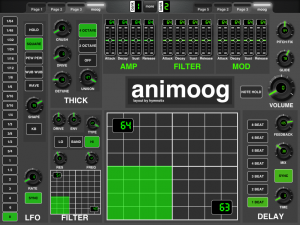
This is not the final version, but in honor of the new 1.5.1 release, here is MIDIDESIGNER’s Animoog page, for running Animoog on two iPads so you can play the keys on one hand and adjust knobs with the other hand.
Here is the layout. It should open right in your iPad
http://mididesigner.com/qa/?qa=blob&qa_blobid=15252773772362233623
but you might have to long-press the download link to choose the correct app.
One of these days I’ll get to making a video demo… maybe.
MidiBridge: Splitting a midi controller between two apps
In this tutorial Ryan Hemeon shows how to hook up an external midi controller and send the midi to two separate apps using MidiBridge. H uses Audiobus to keep the apps running in the background, iGrand and Magellan.
Getting started with mSequencer
Here is a tutorial on how to get started with mSequencer (MIDI Pattern Sequencer). In this video I use mSequencer to control all 8 channels of Korg’s iPolySix via virtual midi. This video doesn’t even begin to touch what a great app this is. If there is interest in it, I will definitely be making more videos on some of the more advanced procedures you can use as well as a lot of other options I couldn’t get to in this video.
I highly recommend using an external midi controller with this app to build your sequences.
Conclusion: This is an excellent app for anyone wanting to program midi sequences and send them to apps via virtual midi. It gives you a larger range of control then any other sequencer app I have ever used. This app does not support Audiobus but it definitely should. Well worth it’s price.
Grab this app on the AppStore: https://itunes.apple.com/ca/app/midi-…
And be sure to visit http://www.iosmars.com for more great demos, reviews, and tutorial videos.
Using MIDI Hardware with Reason – Micro Tutorial
More info on Reason: https://www.propellerheads.se/product…
The Reason Rack offers nearly endless sonic capabilities. But what if you just want the sound of your favorite hardware synth? Or that weird little drum machine you got half-price. In this tutorial we take a look at the External MIDI Instrument and how it can help you expand your Reason rack with your hardware.
Meganome — DIY Arduino MIDI Controller
The Meganome is inspired by the monome controller and powered by an Arduino Mega. Like other grid controllers like the Launchpad and Push, it has performance modes for triggering drums, playings synths, and launching clips and effects. I like the feel of arcade buttons and look of exotic hardwoods, so mass-market products just weren’t right for me.
You can see how the grid-based layout makes octave jumps and glisses really easy in this video: http://youtu.be/Gsph_10sb64?t=2m18s
Watch the Meganome be used as a drum machine: http://youtu.be/rMrk-pZ4RBk
Patrick writes with more details:
I just uploaded a demo video for my custom grid-based controller, the Meganome. The design is obviously inspired by the monome, but it departs in a couple ways from the monome and its cousins. I wanted larger buttons with light but solid action for triggering drum hits and synth notes–buttons that are hard to miss and give you a nice “clack” sound when struck. The rectangular arrangement with 14 buttons per row lets me display the entire
chromatic scale plus two notes of overlap when the Meganome is in synth control mode. Like the Push controller in its chromatic mode, the notes of the scale I’m in light up, but unlike the Push, the Meganome lays octaves along its columns, which makes for easy traversal of octave space and wide chord voicings. Triads, on the other hand, are tricky.
I did a blog post on difficulties I encountered while building it and posted my Arduino code on my blog:
http://jazarimusic.com/finally-a-diy-midi-controller-with-purpleheart/
DATAMASKIN

