
Henry Homesweet – Live-Mode
“Live-Mode” is the latest manifestation of experimental hardware only performances from Henry Homesweet.
Fabio Lendrum – Out The Water (LIVE)
Fabio performing Out The Water on an Emulator DVS
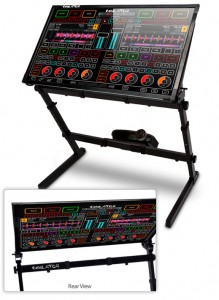
Emulator Dual View System (DVS) is the most revolutionary experience for on-stage performers in the last 30 years! Emulator DVS is the first REAL and USABLE Multi-Touch MIDI Control System that allows the crowd to see exactly what the artist is doing on a huge transparent touch screen. Whether you are a VJ, Lighting Programmer, Controlling Lasers or the DJ, you can use the Emulator DVS to control your software all while the audience watches in awe!
The art of performing on stage is now part of the clubs lightshow, this is the next level in performance!
The Emulator DVS can also be used as a multi-touch podium & presentation tool for meetings, conferences, lectures and any public address situations. Corporate events are made more interactive because the podium is transparent and the audience can see right through it while watching the presenter. Audience attention is increased, presenters feel enlivened with new technology!
What is the backbone of Emulator DVS?
Emulator is multi-touch midi control software for Musicians, DJ’s, Lighting Designers, Video Editors, VJ’s, Radio Broadcast Stations, Recording Studios and much more.
Our patent-pending technology allows you to make a custom multi-touch layout on top of any software you wish to control. Our easy to use control editor gives you unlimited options for how you create your dream midi interface. Emulator really is the best midi controller you will ever own. When new versions of your software come out, you can quickly and easily change your multi-touch controller so your hardware NEVER becomes obsolete (well, unless we invent something that doesn’t require a screen).Emulator Modular & Emulator for Traktor (FT) software come bundled with the DVS hardware.
Emulator for Traktor is a complete multi-touch midi controller software. Emulator for Traktor contains over 130 buttons, knobs and faders covering all common features of the underlying software. Emulator Modular includes a complete set of objects so you can completely custom design your own multi-touch interface with buttons, sliders, circular knobs, jog wheels and even your own custom graphics.
You have NEVER seen a crowd react to DJ equipment like this before.
The reaction is simply incredible.
Modular Synth Live Performance
Gregg Wilson shows off his nice modular in this live performance, enjoy!
“Live performance on my modular. No edits or overdubs. I adjusted levels and added some reverb and delay plugins afterwards to improve the mix. Let me know what you think.”
Teaser: Bitwig Studio – Demo Song for the upcoming Beta
Bitwig Studio. The new music production and performance system. Below are a list of key features as they were mentioned when we posted about this product back in January.
Here are the features for this new live performance and production DAW:
- Multitrack recording – Record and produce your music in an intuitive workflow. Bitwig Studio’s arranger is a mix of editing power, ease of use and flexibility.
- Arranger clip launcher – A non-linear environment that lets you trigger clips in real-time.
- Mixer clip launcher – An alternative view of the clip launcher aligned with the mixer, optimized for live performance and DJing
- Generic tracks – Tracks accept any kind of material. Audio and notes can live on the same track. You can bounce note clips to audio in place.
- Clip automation – In addition to traditional track automation, automation can also be recorded and packaged inside clips, both on the clip launcher and the arranger.
- Per-note automation – Pitch variations can be applied to individual notes directly in the piano roll. You can also edit a note’s panning, timbre and volume curves.
- Simultaneous multitrack editing – Edit contents of multiple tracks together. You can see them all juxtaposed and isolate only the ones you want to edit
- Multiple audio events per clip – An audio clip can contain multiple audio events. You can chop and edit audio files inside a clip non-destructively and loop it all as a package.
- Real-time time stretching – Bitwig Studio’s proprietary technology lets you match any audio material to the document tempo and get everything in sync.
- ‘World-class’ sound devices
- Device nesting – Devices can contain other devices, and the whole package can be saved as a preset. Many of preset instruments and effects use nesting in new and powerful ways.
- 32/64 bit VST support – Use your VST plug-ins. In case of a plug-in crash, a protective mechanism prevents the application from crashing and you from losing your work.
- Metadata-based browser – Find your musical material quickly. Add tags and search by content type.
- Open multiple documents – Exchange musical material between documents. Drag and drop, copy and paste back and forth.
- Multi-monitor support – Bitwig Studio offers flexible screensets to take full advantage of your monitor configuration
- ‘Slick’ user interface – Bitwig Studio’s user interface has been designed with the goal of making your music creation experience ‘fun and intuitive’.
These are the key features for Bitwig 1.0.
Bitwig has several more interesting features under development. These are planned for a later release:
- LAN multi-user jamming – Multiple users can jam on the same document, and everything can be captured in the document’s arrangement
- Multi-user music production over the internet – Multiple users can compose music on the same document from different locations. Bitwig Studio keeps everything in sync.
- Native modular system – Create your own instruments and effects or modify existing ones. Design their appearance and share them with the world.
(Music by Eugenijus Kostantinovas)
Brett Domino plays Stylophone featuring David Bowie, Kraftwerk and more
The Stylophone is a miniature analog stylus-operated synthesizer invented in 1967 by Brian Jarvis and going into production in 1968. It consists of a metal keyboard played by touching it with a stylus — each note being connected to a voltage-controlled oscillator via a different-value resistor – thus closing a circuit. The only other controls were a power switch and a vibrato control on the front panel beside the keyboard, and a tuning control on the rear. Some three million Stylophones were sold, mostly as children’s toys.
The Stylophone was available in three variants: standard, bass and treble, the standard one being by far the most common. There was also a larger version called the 350S with more notes on the keyboard, various voices, a novel ‘wah-wah’ effect that was controlled by moving one’s hand over a photo-sensor, and two styluses.
In the mid-70s a new model appeared which featured a fake wooden effect on the speaker panel, and, more importantly, a volume control. (Previous Stylophones had been infamous for being too loud in quiet situations). This was shortly before the Stylophone ceased production altogether in 1975.
Rolf Harris appeared for several years as the Stylophone’s advertising spokesman in the United Kingdom, and appeared on many “play-along” records sold by the manufacturer.
To hear individual performances, click on the desired song/s at the end of this video.
Nice live looping improvisation jam
Rheyne in a nice session featuring lots of nice controllers, synths and pads, enjoy
Live looping improv jam using analog keyboards, USB controllers, and iOS devices. iPads are running Animoog, Lemur, and SoundPrism Pro. SP Pro is triggering NI’s Massive through an iConnectMIDI. A DJ TechTools MIDI Fighter 3D is controlling loopers, drums, and a monophonic synth. Its rotation is mapped to filters and vibrato. Normally my drums are played on an Akai MPD26, but wanted to get used to the MF3D for a portable live rig. An Akai APC20 and Novation Launchpad are controlling the recording and playback of loops in Ableton Live. The DSI MoPho, Fender Rhodes, and Moog Prodigy are all running through a PreSonus 1818VSL connected to a Macbook Pro. All loops are recorded live.
Download or stream the audio at SoundCloud: http://snd.sc/LP21G9
Glitch Factory: APC40 Performance Template
http://youtu.be/8LVm_F_mRI
A collaboration between Australian producers Mr Bill and Will Marshall, this is a stems-based template for the Akai APC40, designed to help producers get started performing their own material live on stage.
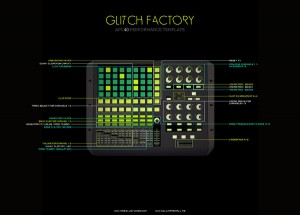
“We’ve built some awesome performance FX, as well as writing a custom script for the APC40 to streamline your live sets. Included in the template are four tracks worth of stems, to help get you started.”
More info here – http://willmarshall.me/products/glitch-factory
Geo Synth and the Talking Machine
First experiments with the Electro-Harmonix Talking Machine.
CASIO XW-P1 Performance Synthesizer
“Showing off CASIO’s latest synthesizer XW-P1. This video was made right after delivery. Read my review in OKEY-magazine #107. www.robert-karasek.com”
The XW-P1 is a 61 key performance synthesizer with Casio’s exclusive (HPSS) Hybrid Processing Sound Source. Providing screaming virtual analog monophonic leads and basses, drawbar organs, complex layers, stereo pianos, drums and more, the XW-P1 has the sounds and real-time control the performing musician needs.
- 6 Oscillator Monophonic Solo Synthesizer
- HexLayer
- Drawbar Organ Mode
Full spec:
- 6 Oscillator Monophonic Solo Synthesizer
- HexLayer – A single sound made up of 6 components for gig ready splits and layers
- Drawbar Organ Mode with 9 sliders, adjustable rotary speaker, key click, vibrato and percussion
- 400 fully editable PCM based sounds like stereo pianos, vintage electric pianos, strings, guitars, drums and more
- Step Sequencer with 9 instrument tracks and 4 controller tracks
- 16 step programmable Arpeggiator
- Phrase sequencer to record and playback your riffs
- Performance mode providing 4 internal or external instrument zones with instant recall of effects, Step Sequences, Arpeggiators and Phrases
- 4 real-time controller knobs
- Pitch and Modulation Wheels
- 1/4” Mic and Line puts to process your voice or other instruments
- Stereo 1/8” line input to connect an MP3 player, laptop or tablet
- USB and MIDI ports
- 1/4” Line Outputs
- Included Power Supply
- Can operate on 6 D batteries
Torley & OMG-1 – Late Nite Layering
WHAT IS OMG-1? http://www.spectrasonics.net/contest/winners.php
WHAT IS TORLEY? http://torley.com
DATAMASKIN

