
Ampex ATR-102 Mastering Tape Recorder Plug-In Trailer for UAD-2
Introducing the Ampex ATR-102 Mastering Tape Recorder plug-in for UAD-2. In this short video, you’ll see (and hear) side-by-side hardware to plug-in comparisons, as well as testimonials from artists and engineers on one of the most beloved two-track tape machines ever made.
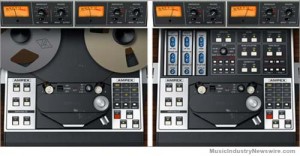
Background info:
For more than three decades, the two-channel Ampex ATR-102 Tape Recorder has turned music recordings into records. The perfect complement to the workhorse Studer® A800 Multichannel Tape Recorder Plug-In, the officially sanctioned ATR-102 plug-in provides the final, cohesive analog polish and punch for any in-the-box mastering session, without the ongoing maintenance and calibration of a physical tape machine.
Impeccably developed over a nine-month period in the renowned UAD engineering tradition — and incorporating presets from noted ATR-102 users Chuck Ainlay, Richard Dodd, Buddy Miller, and Mike Poole — the ATR-102 Mastering Tape Recorder Plug-In faithfully replicates the unique dynamics, frequency response, and saturation characteristics of the original hardware. Scrutinized and fully authenticated by Ampex Corporation, the sound of the ATR-102 plug-in for UAD-2 is virtually indistinguishable from its analog cousin.
“With the Ampex ATR-102, we’ve taken the time to provide all the popular tape formulas and hands-on calibration options of the original hardware,” said Matt Ward, President of Universal Audio. “With a mastering tape deck as iconic as the ATR-102, we wanted to make sure that its sound remained fully intact in the virtual world.”
“To bring the complexity of a such an iconic tape recorder as the ATR-102 to the digital world is no small feat,” said Gordon Strickland, Chairman and CEO of Ampex Corporation. “Universal Audio is the only company we could trust to faithfully and accurately model our Ampex legacy products, as they too have a legacy that spans back half a century with their analog products.”
Available for purchase via UA’s Online Store, the Ampex ATR-102 Tape Recorder Plug-In sells for $349.00.
The Ampex ATR-102 Tape Recorder Plug-In is available as part of the new UAD Software v6.0 release. In addition to the Ampex ATR-102 plug-in, v6.0 includes the release of the Brainworx® bx_digital V2 EQ and SPL® Vitalizer MK2-T direct developer plug-ins, as well as highly anticipated Pro Tools compatibility enhancements and Mac OS X Lion support.
ATR-102 Mastering Tape Recorder Plug-In features include:
Ampex-authenticated plug-in emulation of the ATR-102 Mastering Tape Recorder — the most popular professional 2-track machine ever made
Provides rich, cohesive tape sound, without the hassles of calibration, maintenance, tape degradation, etc.
Adjustable (L/R) Tape Delay, Wow, Flutter, and Crosstalk
Requires a UAD-2 DSP Accelerator Card available from authorized dealers worldwide
Models entire ATR-102 electronic path, including transformers, amplifiers, Input, Record. and Repro paths
Featuring multiple Tape Formulas and Calibration Levels for mix down
Independent L/R Input Gain (Record) and Output (Reproduce) Level
IPS Speed/Emphasis Curve chooses between 3.75 NAB, 7.5 NAB, 7.5 CCIR, 15 NAB, 15 CCIR, 30 AES
Independent L/R record Bias, Record EQ, and Playback EQs, with Auto and Manual Cal capabilities.
More information on the ATR-102 Mastering Tape Recorder Plug-In:
www.uaudio.com/store/special-processing/ampex-atr-102.html .
In beta: Groove Machine – new groove box instrument plug-in by Maxx Claster
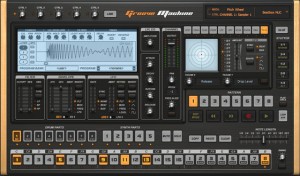
Image-Line has released a beta version of Groove Machine, a groove box instrument plug-in by Maxx Claster.
Groove Machine is a performance-oriented multichannel (drum)sampler, multitimbral hybrid synthesizer, sequencer and last but not least a ‘Groove Box’ inspired by hardware Groove Boxes. Special attention is paid to live performance via MIDI controllers.
Groove Machine features
- Step sequencer with integrated Note Editor driving 8 sampler tracks, 5 synth tracks and 10 performance oriented effects for every track.
- Synthesizer features a hybrid additive, FM & RM design.
- Per step automation with automation graphs.
- Pre-mapped to general MIDI keys.
- Stutter, beat repeat effects module.
- 2 envelopes, 2 LFO’s.
- Multi-mode filter.
Groove Machine beta is currently available to download as a VST plug-in for Windows for registered Image-Line users.
More information: Image-Line
Spectral Machine – interesting new frequency-domain plug-in
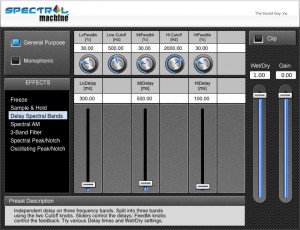
The Sound Guy has released Spectral Machine, a frequency-domain plug-in featuring a wide range of unique spectral effects.
Spectral Machine™ is an advanced frequency-domain multi-effects plug-in. Like SFX Machine, Spectral Machine wraps a great deal of power and flexibility inside an easy-to-use interface.
But unlike time-domain plug-ins like SFX Machine, Spectral Machine starts by converting the audio into the frequency domain using a Fast Fourier Transform (FFT). This gives us direct access to the signal’s frequency spectrum, enabling a number of effects that simply would not be possible in the time domain.
Spectral Machine features
- General Purpose Effects
- Delay Spectral Bands – Apply separate delays to different spectral bands, with individual control over the amount of feedback in each band!
- Spectral Freeze – Click the “Fire” button to freeze the sound, which then decays at different rates for high and low frequencies. Click the “Reset” button to unfreeze.
- Sample & Hold – Similar to Spectral Freeze, but it automatically retriggers at a specified interval.
- 3 AM – A tremolo effect with individual control over the modulation rate and depth in three frequency bands.
- 3-Band Filter – Precise control over the gain in three user-selected frequency bands.
- Spectral Peak/Notch – Lets you boost or attenuate an arbitrarily narrow frequency band around a specified frequency.
- Oscillating Peak/Notch – Interesting peak/notch effect with an oscillating center frequency.
- Monophonic Effects (for monophonic sources such as solo voice, clarinet, sax, etc.)
- Pitch Shift – Frequency-domain transposition with timbre preservation.
- Harmonize – Multiple transposition with timbre preservation
- Pitch Quantizer – Nudge each note to the nearest semitone, for pitch correction or to create an interesting vocal effect.
- Pitch Isolate –Isolates the tonal portion from the rest of the sound.
- Sine / Noise – Gives you independent control over the sinusoidal and noise/transient portions of the sound.
- Spectral Shapeshifter – Lets you change the shape of vocal formants (spectral envelope) without affecting the pitch.
- Vibrato – Frequency-modulates only the sinusoidal component.
- Robotization – Changes the pitch to a fixed frequency for a robotic effect.
Spectral Machine for Windows and Mac (VST/AU) is available to purchase for $75 USD excl. VAT.
Turbulence – a new modular waveshape sequencer AU plug-in
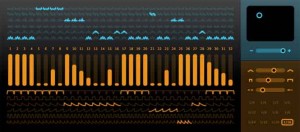
Sinevibes has announced Turbulence, an AudioUnit effect plugin for creating rich animated synth textures. At it’s core it employs unique waveshaping algorithms that drastically transform the input signal, enriching it’s spectral content. But most fun stuff comes from it’s flexible step sequencer which drives waveshape modulation, envelope matrix and model matrix, allowing you, say Sinevibes, to create almost any rhythmical pattern imaginable. With all these tools combined, Sinevibes believes that Turbulence can easily turn simple waveforms into a huge variety of complex motion sounds with incredible richness and character.
Turbulence features:
- Sequencer with up to 32 steps, variable swing and speed.
- Waveshape matrix with 6 high-definition algorithms.
- Envelope matrix with 6 shapes, adjustable time and smoothness.
- Intuitive, high-contrast user interface.
Pricing and Availability:
Turbulence is immediately available as a download for $39. It requires Mac OS 10.5 or later, and a 32 or 64 bit AudioUnit host application that supports Cocoa user interface technology.
More information:
New synthesizer specifically designed for creating electronic kickdrum sounds
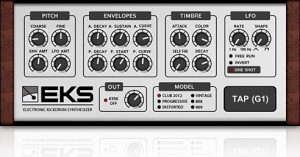
Synapse Audio has introduced EKS Pro, a VST/Audio Unit plugin for Mac & Windows, designed for creating electronic kickdrum sounds.
The plugin offers six high-quality sound models, a mix of vintage hardware emulations, and new, modern kick drum sound models. Despite their fundamentally different nature, all models respond to the sound parameters in largely the same way.
The user interface is organized into four sections controlling the pitch, the amplitude and pitch envelopes and its curvature, the attack stage and finally pitch modulation. This layout makes it simple and straightforward to program your own patches or modify existing ones.
EKS Pro for Windows and Mac (VST/AU) is available now for US $39. A free demo is available.
Rob Fabrie using Rob Papen plug-ins
Artist testimonial by Rob Fabrie aka Waxweazle, aka Headbanger. Rob Papen’s virtual synthesizers define the cutting edge of contemporary music production: powerful instruments and plug-ins that bring together innovative design, uncompromising sound quality, and musical, production-grade presets to make your tracks shine. At the age of 15 Rob started with the Korg MS-20 synthesizer and a SQ-10 sequencer. On these machines he learned how to program synthesizers and they inspired him to compose music. He did study also electronic organ and b.t.w. loves Bach….Through groups like Tangerine Dream, Kraftwerk and artist like J.M. Jarre, Georgio Morroder, Vangelis and Klaus Schulze he started making electronic music, also at the age of 15.
www.robfabrie.com
New plugin to add more color and character to your sounds
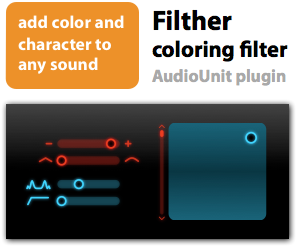
Sinevibes has introduced Filther, an AudioUnit effect plugin designed to add color and character to any sound.
Here’s what they have to say about Filther:
At it’s heart is a steep -48 dB/octave low-pass filter with innovative dual-stage waveshaping distortion. Coupled with an input envelope follower, this filter can do anything from deep low-end isolation, juicy wah-wah to growling sweeps and waveform sculpting. And with clever automatic balancing, Filther always stays incredibly smooth and punchy.
Features:
- Eight-pole, -48 dB/octave low-pass filter with dual-stage waveshaping distortion.
- One-pole finishing high-pass filter.
- Input envelope follower with adjustable sensitivity and smoothness.
- Intuitive, resolution-independent user interface.
Filther is available now for $19. Audio demos and a demo version are available at the SoundVibes site.
MashTactic mashup tool!
MashTactic is a plug-in that can separate various parts of a full audio mix.
Many sounds, include vocals can be cut or isolated from a track.
* 8 stereo areas of sharp cut-off filtering.
* Adjust levels separately in all selected zones.
* A great tool for mashup music makers, as vocals and other sounds can be identified and manipulated within a full mix.
* Works on transients, allowing the user to emphasise or cut percussive sounds giving control over punch in drum tracks.
* Great for analysing balance and frequency mix of a track you’re composing.
Coming soon to:
http://www.quikquak.com
Updated multi-functional vocal channel strip effect plugin
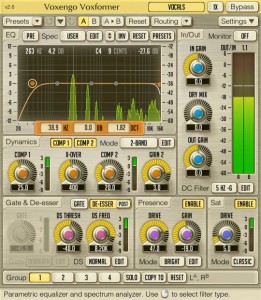
Voxengo has released version 2.6 of Voxformer, a multi-functional vocal channel strip effect plugin for Windows and Mac.
The most important change this version implements is the addition of 3 new saturation modes that extend the sound coloration palette you can use to process your tracks.
Changes in Voxformer v2.6
- Added 3 new modes to the saturation module.
- Plugin’s popup-windows now recover last position after reopening.
- Mouse backward and forward buttons can be used for filter type and parameter value selection.
- The “Alt” key can now be used to adjust knob parameters synchronously in several channel groups.
- The “Min Infrastructure” user interface display mode added.
- The “Flat Level Meters” level meter display mode added.
- The “Show All Filter Shapes” global switch added.
- Version change history information window added.
- The “Do Not Show Latency Changes” global switch added.
Voxformer for Windows and Mac (VST/AU) is available to purchase for $69.95 USD.
Background info:
Voxformer is a multi-functional vocal channel strip plug-in for professional audio applications. Combining several professional quality processing modules, Voxformer was designed to be a comprehensive solution for all your vocal processing needs – be it spoken or sung vocals.
The coolest feature of Voxformer is its one-knob vocal compressor. Using only a single knob, you can get a tight, open and definitive professional vocal sound with an excellent articulation in no time. You do not have to worry about common ratio and make-up gain controls since they are automatically selected by the advanced compression algorithm while attack and release parameters are stored in a mode preset. Moreover, Voxformer features two compressors of this type, allowing you to apply either a two-band or a two-stage (serial) vocal compression.
Voxformer also features the de-esser with selectable center frequency and threshold. Multi-band noise gate is available, which, in a manner similar to the compressor, was designed to bring ease of tuning while providing excellent sonic results. For those who like a saturated vocal sound, Voxformer implements a special module which applies a smooth saturation. Another useful feature Voxformer has to offer is the presence boosting module, which you can use to add some shine and space to the vocals.
As a finishing touch, Voxformer offers you a flexible easy-handling 5-band parametric equalizer (pre/post selectable) with a real-time output stage fast Fourier transform (FFT) spectrum analyzer display. In most cases Voxformer can be used for processing of a wide range of instruments beside vocals.
Beta 2.0 of the LiveProfessor
LiveProfessor is designed to be a effect rack of VST-plugins. It has been designed specifically with live sound in mind. The concept is very simple. Using a ASIO audio card you can route inputs and outputs through your VST-plugins. The program supports snapshots, MIDI and both VST-effects and VST-instrument.

ifoundasound has announced the release of LiveProfessor Beta 2.0, which brings some big changes, although most of them are under the hood.
The audio engine has changed: There was a need for more flexible routing and better multi-core support. Each plug-in input can now mix any number of sources, from sound card inputs or other plug-in outputs. Routing is done like before but you can now use the CTRL-key to add more then one input to a plug-in. In the same way all plug-in outputs can be split to multiple destinations.
Multi-core processors are now supported so that each signal chain can run on its own core. So if you have 4 plug-ins and 4 cores each plug-in gets its own core. But if all the plug-ins are connected to each other, they run on the same core, as they have to wait for each other any way. You don’t have to think about this, it’s just to give you a hint that routing affects the efficiency of the program.
MIDI controllers: The next big change is the way MIDI controllers are handled. Users reported that they where limited by the early system of a global map with 8 layers. The system has now been split up. You now add a new Controller, you add as many knobs, buttons, sliders as you want to match your physical device, and then assign MIDI messages to these (instead of directly to the plug-in-parameters).
Each plug-in instance can now have as many controller maps as you want, and you can switch between them like you do with snapshots. There has also been added a bunch of filter, scale and logic options so you can tweak the controllers just the way you like.
LiveProfessor Beta 2.0 Change Log:
- Feature: New audio engine. Summing on all plug-in inputs, split on all plug-in outputs.
- Feature: Better multi core support. All cores are now used. The cores are divided pr. “Signal-chain”.
- Feature: “Route back” you can now split a signal and route it back to a plug-in earlier in the signal chain. (Please look out for feedback).
- Feature: New MIDI controller system. The way hardware MIDI controllers control plug-in parameters is completely changed.
- Feature: Library. Most LiveProfessor settings (Snapshots, Cues, Cue Actions, Controllers, Controller Maps, etc) can be saved in a global Library so you can use them in other projects.
- Feature: Each cue now has a button to assign a MIDI trigger.
- Fix: MIDI learn ignore active sense message.
- New: Comment action. Empty cue action that can be used as a note/hint/memo.
- Fix: Bug in patch window when hiding plug-ins with multiple I/O.
- Feature: Warning when opening a project on a system with less IO then the one the project was saved on. (Will remove the patch points).
- Feature: 88.2 KHz sample rate.
- Feature: Snapshot masks. When recalling a snapshot in a cue action, you can now choose to not recall selected parameters.
- New: Export cue lists. Cue lists can now be saved (Only makes sense for cues that are not linked to a plug-in).
- Feature: Expand/Hide all in cue list.
- Feature: New location of program settings. The program settings are no longer saved in the Program Files folder but in the AppData folder, as this is the Vista/Win7 way.
- Fix: Bug when replacing snapshots when using the global cue tool.
- Fix: Cues could get stuck to the mouse.
DATAMASKIN

