
How to use the new SodaSynth in GarageBand
A quick demo showing how to use a new software instrument, SodaSynth, in GarageBand. Spice up your tracks with SodaSynth – Download a copy today from http://www.oscillicious.com
Oscillicious has introduced an Audio Units version of its SodaSynth, allowing it to be used in GarageBand, Logic, MOTU Studio, and other workstations in addition to those that support VST plug-ins (Ableton Live, Cubase, Reaper).
SodaSynth is a VST and AU plug-in synthesizer designed to give artists clean sounds that fit easily into tracks.
Starting with an ensemble of oscillators, SodaSynth smoothly adds or subtracts harmonics while modulating the frequencies of these new components in novel ways. The results are clean harmonies that sound familiar, yet can morph in new ways.
SodaSynth for Windows and Mac is available to purchase for $23 USD. For existing SodaSynth users, the new AU plug-in is now included in the SodaSynth for Mac OS X download alongside the VST version.
Padshop – new VST Granular Synthesizer from Steinberg
Coming straight from the Steinberg sound lab, Padshop is a state-of-the-art granular synthesizer that provides out-of-this-world atmospheres and far-out effects — and a user interface that’s a breeze to work with.
Granular synthesis is one of the most fascinating fields of experimental sound design, but the conversions for programming sounds based on granular synthesis algorithms have always been too complex for every-day sound design or too shallow for serious in-depth sound manipulation.
With Padshop, Steinberg offers a granular synthesizer that raises the standard in terms of handling, flexibility, musicality and sound.
Top features:
• Advanced granular synthesis engine with 2 independent layers and individual oscillator, edit and FX sections
• Up to 8 grain streams per oscillator for impressively rich and spacious structures
• Intuitive user interface for effective usability and direct accessibility
• More than 400 presets dedicated to atmospheric pads and evolving textures
• SoftGrain Wave ROM with hundreds of sounds for custom presets
The Padshop VST Granular Synthesizer will soon be available as a download product from the Steinberg Online Shop. So, fasten your safety strap and get ready to expand your universe with this high-class virtual synth.
Find out more and listen to audio demos on www.steinberg.net
Features at a glance
- Advanced granular synthesis engine with 2 independent layers, each with individual oscillator, edit and FX sections
- Up to 8 grain streams per oscillator for impressively rich and spacious structures
- Intuitive user interface for effective usability and direct accessibility
- More than 400 presets dedicated to atmospheric pads and evolving textures
- SoftGrain Wave ROM with hundreds of sounds for custom presets and individual tweaks
- 10-stage Modulation Matrix with Note Expression support for unlimited flexibility
- 12 different high-quality filter types for each layer
- Step Modulator for rhythmic triggering of oscillators, filters, amp and pan
- 2 LFOs and ADSR for filters and amp envelopes
- Mono and Poly Mode with Legato and Glide
- FX Section with high-class modulation and delay effects
- VST 3 compatible host application support
The Grain Science iPad synth has been updated with Chorus and new synth options
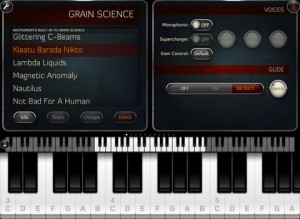
Wooji Juice has updated Grain Science , its software synth for the iPad, adding a new chorus effect and additional synth options.
Grain Science is ‘built on similar principles of granular synthesis, but is vastly more powerful’, according to Wooji Juice. Unlike many “experimental” granular apps, Grain Science combines it with traditional synthesis techniques to make a hybrid synthesiser.
Here’s what’s new in Grain Science 1.2:
- New: Chorus FX unit
- New: Pulse Width Modulation blend mode
- New: Wave list shows a count of how many instruments use each wave
- New: More musician-friendly BPM system, goes up to 180bpm with 1/4, 1/8, 1/16 and 1/32 options (old system can still be selected)
- New: Multiple-octave chord arpeggiation
- New: Swipe to delete unwanted audio from wave & audio import lists
- New: “Reed” built-in wave
- New: 6 additional built-in instruments
- New: Tube Resonance Bass can be programmed. Note: It can bite! Slow, gentle programs are recommended, unless you want artefacts!
- New: UI improvement — swap FX units by dragging them around by their names
- New: Setting to choose whether recording is hold-to-record or tap-to-start/tap-to-stop
- New: Mini VU meter on recording button during recording (or, in hold-to-record mode, tap to toggle on/off)
- New: Cropping selections now snap to zero-crossings for smoother results
- Improved: Easier to see when a cropping selection is about to begin
- Improved: Avoids “popping” while installing/uninstalling FX units
- Improved: Slightly more useful naming for newly-created instruments
- Fix: Crash bug when mapping certain kinds of parameter in otherwise-unmodified instruments
- Fix: Issue with reverb resetting itself after re-opening Grain Science
- Fix: Control Mapper shows the same names for Tube Resonance parameters as on their FX dials
- Fix: Issue with Control Mapper Auto-Reset not always auto-resetting to the correct value
- Fix: Issue with Single-Shot grain mode
iOS jam – NodeBeat, SoundPrism, and Lemur
An iOS jam using NodeBeat on an iPad 2, SoundPrism on an iPod Touch, and Lemur on an iPhone 4. Audio is passing through a PreSonus 1818VSL into Ableton Live, and Lemur is wirelessly controlling effects in Ableton. All audio is from NodeBeat and SoundPrism, and the tempo-sync’d delay on the drums is NodeBeat’s echo.
Best Service releases Nitron – Sample-based Synth for Kontakt & Kontakt Player

Best Service has released Nitron, a new sample-based synthesizer powered by Kontakt Player.
The more than 1000 included Nitron patches are high quality multi-samples from more than 50 different synthesizers. You will find a broad range of classics as well as lesser known synthesizers from the last 30 years in this collection. The library is focused on providing the fattest possible lead and bass sounds. This product is well suited for techno, drum ‘n’ bass, dubstep, hip hop, bigbeat, trance and electro, as well as pop and ambient music.
Nitron is based on Native Instruments’ Kontakt 5.
Best Service says “Nitron cannot be compared to other sample-based libraries, which give you very limited or no access at all to editing and tweaking your sounds. Nitron is like a real synthesizer, using high end source samples as oscillators”. If you own the full Kontakt 4 version (or newer), you can use the countless possibilities of this sophisticated sampler to tweak your sounds, giving you access to an almost infinite number of sound creations for any music style imaginable. Tweaking of course is also possible with the included Kontakt Player.
Top features included are low pass filters, high pass, band pass, vowel and phaser filters. The user can choose between poly and mono mode as well as an authentic legato mode. A unison mode plus a global saturator make your sounds as fat and rich as possible. Via the mod wheel you can access useful parameter assignments for all patches like additional high pass filters, tremolo or vibrato giving this must have package a finishing touch.
Most patches use effects like Chorus, Flanger, Delay and Convolution Reverb. In the Kontakt Player version you need to turn on the FX button to use this effects. In the full Kontakt version, the effects can be edited or replaced with other effects you like.
This synthesizer/library has been produced by the Swiss producer & sound designer Urban Riedo – Tunebeast.
Pricing & Availability
Nitron costs €189 but is currently available for the introductory offer price of €149.
As it is powered by Kontakt Player it is available for 32- and 64-bit Windows and Mac OS X in VST, AU and RTAS instrument formats.
HandySynth – sample based emulation
“Icebreaker Audio have recently released HandySynth – a sample based emulation of a custom circuit-bent Yamaha HandySound.
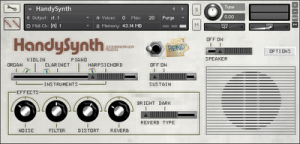
Key Features include:
All original instrument sounds chromatically sampled at 24-bit 48kHz
8 circuit-bent sound variations
Convolution based emulation of the original speaker at various microphone positions
Authentic emulation of the HandySound volume envelopes and tuning via custom scripts
Additional Effects: Distortion, Filter and Spring Reverb
Download also includes a copy of C-Bent Kit for Battery
Available now from the Icebreaker Audio website for £5 (€6/$8 approx.)”
Orphion and the Moog Voyager Touch Surface
Playing the Orphion iPad app through a Moog MF-102 Ring Modulator and MF-104Z Analog Delay. Moogerfooger parameters are controlled with the Moog Voyager Touch Surface CV outputs. Learn more at www.experimentalsynth.com
Moog Minitaur becomes Webitaur – check it out
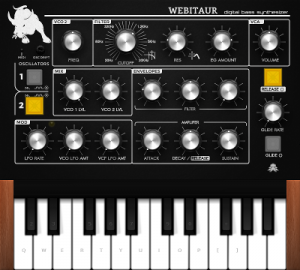
Perhaps not the real thing but still quite fun to play around with for a short while I guess:
“Once again the NAMM videos have inspired me to have a go at a web version of an analog synth. This time round it’s the awesome looking Moog Minitaur. As usual it is unlikely to sound anywhere near as good as the real thing but will give you some idea of the types of sounds it is capable of. The filter in this one sounds a bit better than my previous synths as a result of trying out some delay-less feedback techniques.
Any midi controllers in the system should be connected automatically. ”
MPV Synthex Interview
In this video, developer Jim Heintz (Way Out Ware) demos and explains his SynthX software synth for the iPad.
Heintz is also the creator of TimewARP 2600, KikAXXE and several other apps for desktop and iOS.
You can chose to play using the intuitive XY mode that automatically makes every touch tuned to the selected scale, grid mode where you explore harmonies in a fun new way, and the keys mode that provides a standard piano keyboard. Built using Way Out Ware’s award winning virtual analog technology and heavily optimized for the iOS operating system, SynthX delivers a great looking and sounding analog experience to the iPad.
A mathematically modeled synthesizer, SynthX contains no samples. As a result, it is very small in size, yet it has an extremely large and professionally design sound library. An effects chain including distortion, flanger, delay and limiter are included. Additionally, a separate identical effects chain is provided to process an external signal connected to the iPad’s audio input. SynthX has been designed from the beginning for the iPad and multi-touch. It has a comprehensive MIDI implementation using CoreMIDI including MIDI Note send and receive and MIDI Beat Clock LFO sync.
You can also record your performances within SynthX and use Sonoma Wireworks AudioCopy to share your performance with other iPad apps. It also supports iTunes file sharing which allows you to drag your performances in full quality into your favorite digital audio workstation.
Grain Science — Quick Overview
A quick tour of our new iPad synthesiser, in which I make a lot of strange loud noises.
The intro tune was created in Grain Science itself by using the built in performance recorder on each track, and sending them to our Hokusai Audio Editor for mixing and mastering.
Grain Science is out now in the App Store: http://itunes.apple.com/app/id487233637
For more info: http://www.wooji-juice.com/products/grain-science/index.html
Grain Science is an iPad Synthesiser that makers, Wooji Juice, say is designed for musicians, soundscape artists and SFX engineers who want to go beyond their Sylo Synthesiser. They say that Grain Science is built on similar principles of granular synthesis, but is vastly more powerful.Here’s what they have to say about it…
Use the built-in waveforms, or record or import your own — then use the sophisticated grain engine to create something completely new from them! Grain Science is easy to get to grips with, but offers lots of depth to explore: instead of offering one or two LFOs, almost any parameter in the system can be programmed to vary over time in complex ways.
Using new optimisations available in iOS 5, we can provide two grain units per voice, which you can combine for morphing or complex modulated sounds, then send through a configurable FX chain. Pick any 4 from the collection of FX units (including various types of distortion, high- and low-pass filters, phaser, resonance and echo), and connect them up in any order. Other audio tweaks include soft loop, reverb, glide and supercharger controls, and the ability to affect granular synthesis in realtime (live grainbending).
Also featured are an arpeggiator with both chord and step-sequence modes; Core MIDI support, including “tap & twist” learning for setting up controls; and a customisable performance screen with a collection of XY Pads and wheels.
Rounding it off, Grain Science plays nicely with others: Dropbox, Twitter and email integration are all included, for sharing or exporting your waveforms, recordings of your performances, and instrument (patch) designs.
Pricing and Availability:
$9.99
DATAMASKIN

