
Volt Precision Fader – new high quality software plugin for fine control of gain
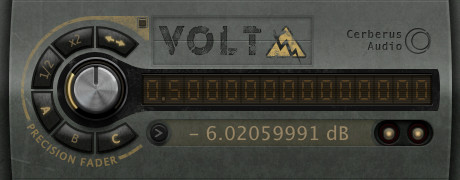
Cerberus Audio has released Volt Precision Fader, a high quality software plugin for fine control of gain.
Volt was designed to produce smoother fades and more precise gain staging than is possible with conventional DAW faders.
Volt Precision Fader features
- Shuttle and Transition Speed knobs.
- Linear gain control by “virtual voltage”.
- Logarithmic fader control by dB value.
- Memory banks to store and recall gain values.
- Text entry for directly entering or copy/pasting values.
- A/B between any two values using included memory banks or undo/redo.
- Half/double buttons for perfect signal splits.
- Unity/mute button.
- 300dB control range.
- 64-bit signal path.
- MIDI control for all major functions.
Volt Precision Fader for Mac (VST) is available to purchase for $15 USD.
More information: Volt
Small Steps on SynthX 2
http://vimeo.com/30688078
>> One of my very first steps on the awesome SynthX from Wayoutware on my iPad 2. I’ts the first synth I love to play without MIDI keyboard.
Built using Way Out Ware’s award winning virtual analog technology and heavily optimized for the iOS operating system, SynthX delivers a great looking and sounding analog experience to the iPad. A mathematically modeled synthesizer, SynthX contains no samples. As a result, it is very small in size, yet it has an extremely large and professionally design sound library. An effects chain including distortion, flanger, delay and limiter are included. Additionally, a separate identical effects chain is provided to process an external signal connected to the iPad’s audio input. SynthX has been designed from the beginning for the iPad and multi-touch. It has a comprehensive MIDI implementation using CoreMIDI including MIDI Note send and receive and MIDI Beat Clock LFO sync. You can also record your performances within SynthX and use Sonoma Wireworks AudioCopy to share your performance with other iPad apps. It also supports iTunes file sharing which allows you to drag your performances in full quality into your favorite digital audio workstation.
Check out the Wowcoder
VST effect plug-in for Windows that recreates a classical 16-band digital vocoder.
Do you want an Oberheim as software
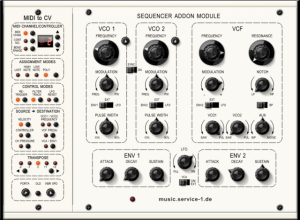
WOK has introduced SAM (Sequencer Addon Module) – a WIndows software recreation of the Oberheim SEM analogue synth module.
Here’s what they have to say about SAM:
Our goal was to catch the typical analog sound of the original hardware emulating circuit instabilities, while leaving some limitations behind; so the plugin is polyphonic, allows more than one MIDI modulation source, has an extra LFO for pitch (reacting on the mod wheel) and a noise oscillator.
But besides this extensions, the plugin is following the simplicity and sound options of the original. Clear layout, easy to use, full sound.
64 presets included. A demo version is available.
SAM for Windows (VST) is available now for 41 EUR. Audio demos are available at the WOK site.
Serato DJ Intro
http://youtu.be/G2N2vO_gM3g
Serato DJ Intro is the latest software from Serato Audio Research, designed for people who love music.
http://www.serato.com/dj-intro
Music: “Young Blood” – The Naked and Famous [Universal]
Technical Specifications
Two tracks can be mixed simultaneously using traditional DJ controls – scratch, nudge, pitch bend, EQ.
Serato Sync locks tracks together for seamless grooves.
Serato Crates make audio file management easy and advanced iTunes integration gives you instant access of personal library and playlist information.
Cue points allow you to quickly access specific parts of songs.
Loops repeat selected sections and can create new intros, outros and extended mixes.
DJ-FX will enhance any DJ set, allowing you to color songs and create unique sounding transitions.
The Sample Player can play up to four short samples, audio loops, sound effects or full length tracks in addition to the two tracks you’re mixing.
Plug-and-Play connectivity makes it simple and fast to setup your supported Serato DJ Intro controller, computer and software and start DJing.
Introducing ARP – advanced polyphonic arpeggiator and note sequencer
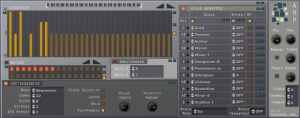
Homegrown Sounds has introduced ARP, an advanced polyphonic arpeggiator and note sequencer with scale remapping for powerful sequencing possibilities.
Here’s what they have to say about it:
With ARP, sequences can be re-mapped based on the played note – so, for example, a sequence can be forced to fit to the major scale. The idea behind this is to break away from the typical note sequencer where every key simply transposes the sequence, the ability to remap each note results in a much more creative sequence.
The Muter Section is a gate sequencer which decides which notes will play. ARP is also polyphonic and so can be used as a typical Gate Sequencer, or even more interesting as a polyphonic sequencer that syncopates. There is also the ability to offset the start note of each sequence so that when 2 notes are pressed together they automatically play syncopated. Finally there is OmniChorder which allows triggering up to another 2 notes when one note is pressed to create a chord, this becomes interesting when used with the Scale Remapper which can leave you with a selection of interesting one finger chords.
The demo version is fully featured, but times out after 10 minutes, it can downloaded here.
Full Feature List:
- Arpeggiator – Can be used as a classic ARP with the usual UP/Down/Alternate modes.
- Note/Sequence Repeats – This is used to play the note or sequence x amount of times before moving to the next note in sequence.
- 32 Note Sequencer Mode – This has a 2 octave range, centre value represents actual note pitch.
- 32 Note Muters – Basically a gate sequencer that decides if a note should play or not, can be used with the Sequencer or the Arpeggiator.
- 1-4 Octaves – Once the sequence is complete it will go up an octave as far as 4 Octaves.
- Fixed Velocity Mode – can use a fixed Velocity instead of played velocity, which is set via a knob.
- Latch Mode – Holds the note until the next one is played.
- Pulse Width – When Latch is off, this determines how long the pulse is, affecting how long the note trigger is held.
- Hold – This will hold any pressed keys until hold is depressed.
- OmniChorder – This can be used along with the Sequencer and also when the ARP is disabled. It allows setting 2 further notes to trigger to form a chord from pressing one key. Once this is enabled, the Scale Remapper can be used to manipulate the chord for each note in the octave, reminiscent of the classic Omnichord.
- Scale Remapper – Allows changing the Scale on each note (C – B) so that a sequence can be squashed to the scale:
- Over 70 scales to choose from.
- Sequence Offset – This allows offsetting the start note of each sequence when it is triggered. For example in Poly Mode pressing 2 keys together will start both sequences running, one could be set to start on step 2 so that it will syncopate. In Monophonic mode it allows building more complex sequence patterns as they iterate.
- Pitch Disable per note – This can prevent a sequence playing on the selected note, so that for example note C won’t play the sequence but just C notes. This is useful in Polyphonic mode so that one key can be consistent whilst another note can play a sequence alongside it.
- 7 Scale Mapping Modes – The mode decides how the scale is altered, when a note doesn’t match the scale, Up will select the next above, Down the next one down etc. There is also nearest, furthest and alternate. There is also a mode which holds the pitch of the octave, and simply uses the scale remapper to force the scale, useful for music without key changes.
- Works with the OmiChorder even when the ARP/Sequencer is switched off.
- Polyphonic – When used with a polyphonic instrument, notes can trigger individual sequences which is great for use with the Muters(Gate Sequencer) which can create complex rhythmic patterns.
- Midi Out – Can be used with any software or hardware midi instrument with host that support midi routing such as Reaper and Cantabile.
- Midi Volume and Pan – These can be used to set the volume and Pan of external gear (CC7 and CC10).
- Midi Channel – Use this to set which midi channel should be used.
- Manual Tempo – Normal Operation is based on the Host Tempo so that it remains in sync with the project, however manual mode can be used in the fashion of an old analog sequencer.
- Swing – Swing can be applied when the tempo is set to 32, speed can be reduced by changing the master clock tempo.
- Full VST Automation.
- Global / Local Randomizer/Default Buttons.
ARP for Windows (VST) is available now for US $20.
The Early Days of Software Sequencers
KVR’s Chris Halaby is a skilled writer and in this editorial he takes on the early days of sequencers, enjoy:
This is the second part of my perspectives and it’s about the beginning of the transition from tape and hardware devices to computers.
Technology drives music. Once a talented individual gets a hold of a new technology and makes beautiful music with it the technology will evolve quickly. This was certainly the case with the computer. There was clearly a need for these software products. Sequencing musical events was taking off and the new technologies allowed music that couldn’t have been created without these new tools. In fact computers can make mediocre musicians sound good, good musicians sound great, and great musicians incredibly productive.
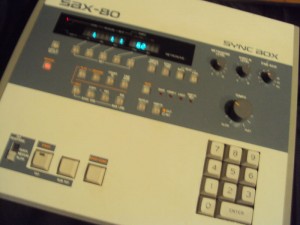
Everything changed for musicians and recording engineers in 1982 and 1984 with the standardization of MIDI and the introduction of the Macintosh computer. It also started a sea change for the musical instruments industry. MIDI allowed a standardized way to send musical data between devices. The Mac had a Graphic User Interface by initial design and the 512 x 342 screen of the Mac could display significantly more information than any LCD display at the time.
There were already some MIDI sequencing software products available for the PC running DOS in 1984, but the lack of a PC graphic user interface made them unusable by the faint of heart. Windows didn’t appear until later and wasn’t useable by musicians in any kind of professional environment until Windows 2.0. Always an innovator under the guidance of Ikutaro Kakehashi Roland had an early software sequencer application, but its interface was one step above command line, making it very cumbersome.
One Silicon Valley engineer who noticed the potential of MIDI and the Mac immediately was Dave Oppenheim, who had recently stopped working for Androbot (an early venture capital backed personal robotics company), and was thinking about what to do next. Dave and I had been housemates while we both attended Stanford University in Palo Alto, CA. Dave was a Music/EE major (also a classically trained pianist with perfect pitch!) and I was an Music/Art Major (Hunh! No really. I’m not joking).
Dave had been messing around with synthesizers as long as I had known him. In fact he had created his own interface to play an Oberheim SEM from the keyboard of a Vox Continental organ in the late ’70s. (An unfortunate side effect was the voiding of his warranty.) A later project was a hardware device that intercepted the keyboard connector inside an Oberheim OBXa. His box had several buttons, each of which would record or play back a small sequence.
Dave’s idea was to use the Mac to replace the dedicated hardware that people like me were using in recording sessions. In November of 1984, he bought a Macintosh, and after learning to program in a GUI environment, wrote the first version of ‘Sequencer’ (a software version of the aforementioned box) in six months. I loaned him my DSX for a couple of weeks so he could make sure that his software would be able to everything the DSX could do.
In order to connect to the Mac he designed a simple MIDI interface that could be connected to the printer and modem ports (RS-422) and in a stroke of brilliance made the package narrow enough so that one could screw two separate interfaces to the ports on back of their Mac and get a total of 32 MIDI channels.
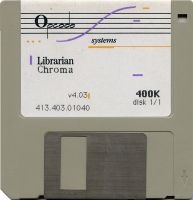
In 1985 he hooked up with Gary Briber, a friend from high school, and formed Opcode Systems. Though he asked me to get involved at the beginning I was too busy trying to be a rock star, and opted instead to help once a week with tech support and writing user manuals. Briber lost interest after about a year so Dave asked me to be fully involved. It was an easy decision given the momentum the company had generated. A new category within the musical instrument industry was growing very rapidly and Opcode was part of it.
Propellerhead Software in the Classroom
For the past 10 years music producers, beat-makers, sound designers, and game composers have made Reason’s highly creative environment a mainstay of their toolbox. All the while Reason has become a mainstay of the education process as well.
To see how Propellerhead Software’s Reason 5, Record 1.5, and Recycle are being taught in the classroom, we visited some top institutions around the world. These educators let us into their classrooms and studios to discuss how they’re leveraging the power of the Reason rack to teach not only in-the-box desktop audio production, but hardware-based studio production and even studio wiring/design as well.
New software synthesizer for the iPad
Way Out Ware has introduced SynthX, a new software synthesizer for the iPad.
Features:
- Intuitive XY mode automatically makes every touch tuned to the selected scale;
- Grid mode where you explore harmonies in a fun new way;
- Keys mode that provides a standard piano keyboard;
- Large and professionally designed sound library.
- An effects chain including distortion, flanger, delay and limiter are included. Additionally, a separate identical effects chain is provided to process an external signal connected to the iPad’s audio input.
- Ccomprehensive MIDI implementation using CoreMIDI, including MIDI Note send and receive and MIDI Beat Clock LFO sync.
- Record your performances within SynthX
- Sonoma Wireworks AudioCopy support
SynthX was developed by Jim Heintz, who’s behind several well-respected software synths, including TimeWARP 2600.
TAL-NoiseMaker has been updated
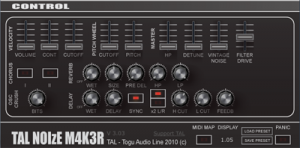
TAL has released an update to its free software synthesizer, TAL-NoiseMaker.
Here’s what’s new:
- Vintage delay added (version 3.03).
- Filter overdrive (version 3.03).
- Own preset save and load functionality for preset exchange (version 3.03).
- Osc 2 noise waveform added (version 3.03).
- LFO 1/2, OSC 1&2 modulation support (version 3.03).
- Full automation support. Drop downs also compatible with VST automation (version 3.03).
- Changes in the preset management, single preset support (version 3.03).
- Envelope Editor: Fix tempo option added (version 3.03).
- Envelope Editor: One shot option added (version 3.03).
- Envelope Editor: Reset button (version 3.03).
- 256 presets by Frank “Xenox” Neumann / Particular – Sound FN, The Unshushable Coktor TUC, Alexandra Sendy AS, Patrick Kunz TAL (version 3.03).
- Small volume correction in the 24 dB filter at high cutoffs and full resonance (version 3.03).
TAL-NoiseMaker is available for Mac & Windows.
DATAMASKIN

