
Nuage and Nuendo – Introduction
Steinberg has announced Nuendo 6, the latest version of its audio post-production software.
Highlights of Nuendo 6:
- New mixing console for enhanced operational speed, including a new channel strip with ‘high-quality’ effects
- Nuendo 6 ADR Taker solution for voice recording and language dubbing
- Fully integrated loudness measurement, featuring EBU-compliant metering plus a large choice of RMS metering scales and a dedicated loudness lane
- Anymix Pro from IOSONO for state-of-the-art surround productions and Voxengo CurveEQ with sound-matching technology
- More professional workflow, with new tools such as MemZap quick-jump tool, Remote Control Editor and Steinberg ASIO Guard with intelligent dropout-prevention techniques
- Professional sound library by the specialists of Pro Sound Effects with more than 1.5 GB of dedicated post-production sounds
In addition, Nuendo 6 represents the core of the Nuage system solution, a top-end post-production platform introduced by Yamaha and Steinberg.
Background video description:
The Nuage integrated audio production system offers top-class hardware and software working in perfect harmony, for unprecedented mixing, editing, or dialog replacement efficiency in audio post production applications.
Yamaha control and interface hardware seamlessly integrates with Steinberg Nuendo DAW software in a purpose-built system that offers all-new productivity and flexibility as well as premium audio quality.
More information: http://www.yamahaproaudio.com
Absolute VST Instrument Collection – Teaser
Consisting of HALion Sonic, Padshop Pro, Retrologue, Hypnotic Dance, Triebwerk and Dark Planet, the Absolute VST Instrument Collection offers thousands of sounds, advanced technology and state-of-the-art sound design for contemporary music production, composing and live performance. Absolute combines exceptional quality and premium value at a fantastic price.
Key features
• 6 high-quality VST instruments comprising thousands of presets
• HALion Sonic is Steinberg’s premier VST workstation, featuring the latest sampling and synthesis technologies, a world-class library and an intelligent user interface that excels in the studio as well as on stage.
• Padshop Pro introduces a new way of granular sound design. Get yourself ready for out-of-this-world atmospheres and far-out effects.
• Zero Gravity is the exceptional expansion pack for Padshop Pro and comes with 250 new presets and a fully loaded new SoftGrain Wave ROM.
• Retrologue offers old-school analog synth sounds and biting sonic blocks and is ideal for creating fat and funky lead and bass sounds.
• Hypnotic Dance is a treasure trove for electronic music producers with solid bass lines, cutting leads and beautifully textured pads.
• Triebwerk is the go-to choice for club-worthy dance sounds including soaring synths, four-to-the-floor drum kits and queasy vocals.
• Dark Planet is best-suited for cinematic scores and musical excursions, comprising creepy sounds, shattering loops and eerie instruments.
• VST 3, VST 2 and AU host compatibility.
• Cross-platform 32/64-bit for Windows and Mac OS X Intel.
• Steinberg USB-eLicenser included.
More info
www.steinberg.net
Nuendo Live – the DAW for recording live performances has now been released

Steinberg has announced the immediate availability of Nuendo Live, a new version of Nuendo, designed specifically for multitrack recording live performances.
Nuendo Live offers a single-window user interface, designed to let you focus on recording. Transport control, marker insertion and recording options can be accessed with just one click. And a convenient Record Panel gives you an instant overview of all relevant parameters. Other highlights include on-the-fly session setup, a 60-second pre-record buffer and auto-save functionality.
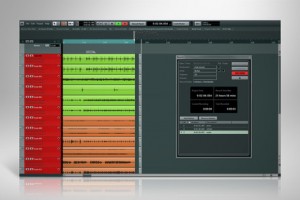
Features:
- Advanced live recording system featuring a straightforward single-window operation, a record panel, a pre-record buffer and more
- Seamless integration with Yamaha CL-series consoles for controlling essential Nuendo Live functions straight from the live console
- State-of-the-art recording quality based on Steinberg’s award-winning audio engine with up to 192 kHz lets your production stand apart from the competition
- Nuendo Live Record Panel shows all essential session information at once — creating confidence in demanding live situations
- Advanced Session Management with auto-naming of recorded files, multiple folder creation, easy-to-use marker track, auto-save and notepad
- Zero setup time thanks to automatic track creation function that make Nuendo Live record-ready in less than a minute
- 24+ hours recording time thanks to EBU-compliant RIFF 64 broadcast wave format in standard recording mode
- Virtual Sound Check allows for easy use of previous recordings for sound check, including marker recall and 1:1 output
- Deliver with confidence due to standardized rendering formats and Nuendo
- Editing on the road: Nuendo Live includes essential editing functions, making it possible to create a rough edit of the recordings right after the show
Nuendo Live is available now for US $329.
Steinberg Dark Planet review
Nice review of Steinberg’s Dark Planet:
http://soundsandgear.com/steinberg-dark-planet-review checking out a new vst instrument expansion set from Steinberg called Dark Planet for Halion, Halion Sonic, and Halion Sonic Se. It is a cinematic sound design type library with some really great sounds at a crazy good price
Specifications:
The Dark Planet VST Sound Instrument Set is loaded with hundreds of creepy sounds, shattering loops and eerie instruments, including leads, basses, drums and effects that will inspire and give you the shivers at the same time.
Dark Planet’s earth-shattering sounds are equally suitable for impactful cinematic scores, massive industrial tracks and spacious dark ambient productions.
The integrated MorphFilter and the onboard effects provide everything needed to add spine-tingling ingredients to your productions and fuel your fantasies with the gloom of the Dark Planet.
Touch down on the Dark Planet and be prepared!
Cubase 6.5 with two new software synthesizers, new effects and other enhancements
Steinberg has released Cubase 6.5, an update that adds two new software synthesizers, new effects and other enhancements.
Here’s what’s new in Cubase 6.5:
- Two new synths: The brand-new Padshop granular synth and the Retrologue virtual analog synth provide more than 700 extraordinary presets.
- Supersonic sidekicks: Check out the DJ-EQ and MorphFilter effects and VST Amp Rack 1.5 with new stomp boxes and signature presets made by world-class guitarists.
- New comping and audio quantizing tools give you the results you want in a more intuitive and faster way.
- Intercommunication 2.0: Export your mixes directly to SoundCloud, save up to 60% disk space while recording with the new FLAC support and connect ReWire client applications to Cubase in a pure 64-bit environment.
Pricing:
- Updates to Cubase 6.5 and Cubase Artist 6.5 are available for 49.99 EUR.
- Customers who have activated Cubase / Cubase Artist 6 after January 1, 2012 are eligible for a free update.
- The Cubase 6.5 and Cubase Artist 6.5 full retail versions are available for 599 EUR (Cubase 6.5) / 299 EUR (Cubase Artist 6.5). All prices incl. German VAT.
Retrologue features two oscillators, each with a maximum of eight widely detunable voices, one sub and one noise oscillator, alongside 300 presets and sounds.
Padshop features two individual layers in granular textures that are mixed and processed with a dozen high-quality filters, modulation and delay effects. Each layer consists of two LFOs, two ADSR envelopes and one oscillator together with new control parameters for generating up to eight grain-streams, plus 400 quality onboard presets for immediate inspiration.
Padshop – new VST Granular Synthesizer from Steinberg
Coming straight from the Steinberg sound lab, Padshop is a state-of-the-art granular synthesizer that provides out-of-this-world atmospheres and far-out effects — and a user interface that’s a breeze to work with.
Granular synthesis is one of the most fascinating fields of experimental sound design, but the conversions for programming sounds based on granular synthesis algorithms have always been too complex for every-day sound design or too shallow for serious in-depth sound manipulation.
With Padshop, Steinberg offers a granular synthesizer that raises the standard in terms of handling, flexibility, musicality and sound.
Top features:
• Advanced granular synthesis engine with 2 independent layers and individual oscillator, edit and FX sections
• Up to 8 grain streams per oscillator for impressively rich and spacious structures
• Intuitive user interface for effective usability and direct accessibility
• More than 400 presets dedicated to atmospheric pads and evolving textures
• SoftGrain Wave ROM with hundreds of sounds for custom presets
The Padshop VST Granular Synthesizer will soon be available as a download product from the Steinberg Online Shop. So, fasten your safety strap and get ready to expand your universe with this high-class virtual synth.
Find out more and listen to audio demos on www.steinberg.net
Features at a glance
- Advanced granular synthesis engine with 2 independent layers, each with individual oscillator, edit and FX sections
- Up to 8 grain streams per oscillator for impressively rich and spacious structures
- Intuitive user interface for effective usability and direct accessibility
- More than 400 presets dedicated to atmospheric pads and evolving textures
- SoftGrain Wave ROM with hundreds of sounds for custom presets and individual tweaks
- 10-stage Modulation Matrix with Note Expression support for unlimited flexibility
- 12 different high-quality filter types for each layer
- Step Modulator for rhythmic triggering of oscillators, filters, amp and pan
- 2 LFOs and ADSR for filters and amp envelopes
- Mono and Poly Mode with Legato and Glide
- FX Section with high-class modulation and delay effects
- VST 3 compatible host application support
New HW/SW bundle from Steinberg
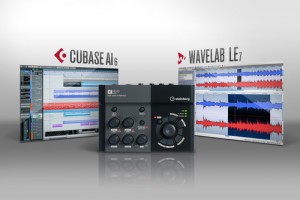
Steinberg has launched a new hardware/software bundle – the CI2+ Production Kit.
The kit combines the CI2+ audio interface with the music production software Cubase AI 6 and the audio editing suite WaveLab LE 7.
Features:
- Hardware: The CI2+ unit is interface and controller in one. It offers two phantom-powered microphone preamps, one with Hi-Z for direct guitar connection, and two TRS outputs. The controller section features the AI Knob and dedicated transport buttons. It also gets its power supply via USB.
- Software: The CI2+ Production Kit comes with Cubase AI 6, plus WaveLab LE 7. Together, the CI2+, Cubase AI 6 and WaveLab LE 7 present a complete system solution.
Steinberg revives Model E and VB-1 as free downloads
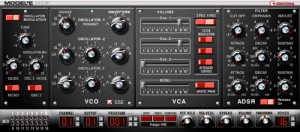
Throughout the long history of Steinberg, many products have come and gone, many have been superseded by new variants and others have been dropped completely. Once in a while, however, some of our developers like to dig up one of these long forgotten gems and polish it ready for current operating systems.
As these revived products remain discontinued, their updates are not officially supported. Updates for discontinued products are sporadic as these are voluntarily provided by our engineers in their free time.
Today, Steinberg would like to share with you the following:
Model E — classic analog synth with ultra-low CPU load
VB-1 — virtual bass emulation with selectable pick position
Steinberg puts out an updated version of Cubase
Steinberg has released the previously announced and officially supported 6.0.5 maintenance update for Cubase 6, Cubase Artist 6, Cubase Elements 6, Cubase AI 6 and Cubase LE 6. Including refined automation handles, full support for two WK-Audio remotes and improved decoding performance under Windows, the 6.0.5 update integrates several enhancements and fixes.
The 6.0.5 maintenance update introduces the following improvements:
- Automation handle visibility: Automation handles are now displayed independently from any zoom level as soon as the mouse cursor is placed over an automation lane. If automation handles are selected, handles on all other automation lanes are displayed as well.
- Support for WK-Audio ID-Console / ID-Mix-VU: Cubase 6 now fully supports the WK Audio ID-Console / ID-Mix-VU to ensure seamless integration.
- Video engine optimizations: Under Windows OS, Cubase 6.0.5 features further improved decoding performance for Motion JPEG OpenDML video in AVI containers as well as Photo JPEG material.
The following issues that have been resolved in this version:
- Project: “Delete time” command now works properly if signature track is enabled.
- Record: Sample rates different than 44.1kHz no longer lead to multiplication of lanes due to wrong overlap resolution on project load.
- Record: Recording MIDI in “merge” mode no longer creates additional MIDI parts instead of merging.
- Comping: Copying comped audio events no longer leads to moving instead of copying the events.
- MIDI: Reloading a previously saved project in Cubase Artist no longer disables the input transformer of MIDI Tracks.
- MIDI: Dragging a part no longer leads to inaccessibility on newly created MIDI tracks.
- VST Expression: When playing back in cycle mode all VST Expression commands are executed entirely.
- MediaBay: Enabling the “Align beats to project” and “Wait for project play” options no longer leads to playback issues with loops in the MediaBay previewer.
- MediaBay: Naming folders with dots no longer leads to cropped names in the result view.
- MediaBay: Deleting multiple attributes for an item no longer affects other attributes than those selected.
- MediaBay: When the preference “Scan unknown file types” is active, audio files without file extensions are now properly recognized when scanning.
- VST Bridge: VST 2 32-bit plug-ins in Cubase in 64-bit mode under Mac OS X Lion are now displayed properly.
- VST-Bridge: Under OS X certain plug-ins no longer show up as bridged even though they were updated to support 64 bit.
- Plug-in: The range scale of the Micro Tuner MIDI plug-in now reflects +/-100 Cents accurately.
- Plug-in: When using HALion Sonic SE in GM mode and exporting MIDI tracks, the resulting Standard MIDI files include all program changes.
- Plug-in: Using REVerence as an offline process plug-in now works properly.
Steinberg’s Yamaha Vintage Plug-in Collection
Steinberg has released the Yamaha Vintage Plug-in Collection. Announced at this year’s Musikmesse in Frankfurt, Germany, the Yamaha Vintage Plug-in Collection comprises three groups of plug-ins: the Vintage Channel Strip, Vintage Open Deck and Vintage Stomp Pack. Based on Yamaha’s Virtual Circuitry Modeling (VCM) technology, each plug-in can be used in multi-instances and is compatible with VST 3, VST 2.4 and AU plug-in formats.
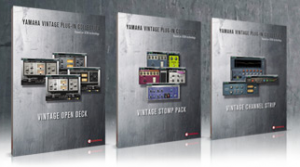
The Vintage Channel Strip consists of the EQ 601, Compressor 260 and Compressor 276, reproducing the sound characteristics of several classic Yamaha hardware equalizers and compressors from the 1970s.
The Vintage Open Deck recreates the analog circuitry and characteristics of four legendary tape recorders: Swiss ’70, Swiss ’78, Swiss ’85 and American ’70. For an even wider range of variation, the characteristics can be individually applied to the record and playback decks.
Vintage Stomp Pack features the Dual Phaser, Yamaha Phaser and Max 100 phaser plus one Yamaha flanger and one first-class wah-effect, providing effects processors for the typically 1980s’ rock sound.
A 30-day evaluation copy of the Yamaha Vintage Plug-in Collection is available through the Steinberg website.
Vintage Channel Strip features at a glance
- Yamaha EQ 601: six-band vintage EQ based on a legendary hardware model
- Compressor 260: replicates the trademark sound of a sought-after 1970s’ compressor
- Compressor 276: delivers classic-style compression with analog punch and fatness
- Brings the classic sound of top-end studio staples to your DAW
- Based on the popular VCM add-on effects for Yamaha’s digital mixing consoles
Vintage Open Deck features at a glance
- Four different machine types: Swiss ’70, Swiss ’78, Swiss ’85 and American ’70
- Various tweaking options: tape speed, tape type, bias, EQ settings, distortion and saturation characteristics
- Different machine types and parameters can be individually applied to the record and playback deck
- Faithfully replicates the unique sonic characteristics of legendary open reel tape recorders
- Based on the popular VCM add-on effects for Yamaha’s digital mixing consoles
Vintage Stomp Pack features at a glance
- Phaser galore: Max 100, Vintage Phaser and Dual Phaser for beautifully evolving phaser sounds
- Vintage Flanger provides authentic, ’70s-drenched flanger tones for every taste
- Vintage Wah brings back the distinct character of classic wah-wah stomp box effects
- Faithfully replicates the trademark sound of classic analog stomp box effects
- Based on the popular VCM add-on effects for Yamaha’s digital mixing consoles
Pricing and Availability:
The bundled versions of Yamaha Vintage Plug-in Collection are available through the Steinberg Online Shop and at certified Steinberg dealers. The exact time of availability is subject to regional variations. The plug-ins of the Vintage Channel Strip can be purchased individually and are exclusively available through the Steinberg Online Shop.
The suggested retail price for the Vintage Channel Strip bundle is EUR 379, including German VAT, and GBP £320, including British VAT. The suggested retail price for the Vintage Open Deck and Vintage Stomp Pack bundles are EUR 199 each, including German VAT, and GBP £168, including British VAT.
The suggested retail price for the Yamaha EQ 601, Yamaha Compressor 260 and Yamaha Compressor 276 plug-ins, also available as bundle in the Vintage Channel Strip, are EUR 149 each, including German VAT, and GBP £126, including British VAT.
More information:
DATAMASKIN

