
Just for fun – JoySynth VST Synth
Very fun free synth even if you are just in the mode to screw around. You can change the sounds by moving the different atari-esque objects.

– can be played with a joystick (direct support), graphic tablet or simply with the mouse
– 2 oscillators, multimode filter, 2 LFOs, dual channel delai, reverberation
– all the values of the parameters are interpolated on the 2D view relative to the distance between the object that represents them and the pointer
– free arrangement of the eight speakers
– the sound position and the parameters pointer can be linked
– integrated movements recorder that can be instantly replayed with speed and direction variation
FabFilter has released FabFilter Volcano 2
FabFilter has released FabFilter Volcano 2 , the successor of the Volcano filter effect plug-in. More filters and routings and practically unlimited modulation possibilities make FabFilter Volcano 2 much more powerful. Yet at the same time, the “revolutionary” new ‘what-you-use-is-what-you-see’ interface makes it also far easier to use.
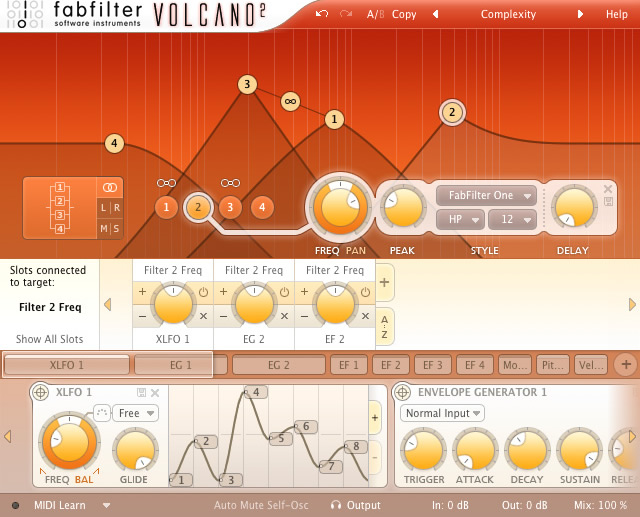
To start with, Volcano 2 now contains four full-featured filters which can be routed in almost any possible way, including per-channel and mid/side modes. Each filter supports low-pass, high-pass and band-pass responses with 12, 24 and 48 dB/octave slopes and a eleven different high-quality filter characteristics that define the unique sound and overdrive of the filter. All characteristics have been tuned very carefully, using FabFilter’s state-of-the-art filter technology. They range from clean with no distortion and smooth with moderate overdrive to raw, self-oscillating and over-the-top. Finally, each filter incorporates a delay line which enables the creation of chorus, flanging and phasing effects.
FabFilter Volcano 2 also introduces new and improved modulation sources. The new XLFOs extend the classic LFO, offering you anything from a simple sine or saw wave to a fully programmable 16-step sequencer. The XLFO features global and per-step glide parameters with adjustable glide curve type, synchronizable frequency, and FabFilter’s classic wave form balance feature. The new MIDI modulation sources let you modulate parameters using any form of MIDI data, like modulation wheel, pitch bend, keyboard tracking, velocity and controller data. Finally, the new well-tuned envelope followers and the classic envelope generators can use both regular input and side chain input, opening up a world of new modulation possibilities.
But undoubtedly the best feature of FabFilter Volcano 2 is the highly improved user interface with a 24-slot drag-and-drop modulation matrix that enables you to easily set up modulation connections using the 6 XLFOs, 6 envelope generators, 4 envelope followers and 10 MIDI sources. To make working with this virtually unlimited modulation power easy and understandable, FabFilter introduces the “revolutionary” new ‘what-you-use-is-what-you-see’ interface concept. The idea is simple yet powerful: Do you want another filter? Just add one. Do you want an envelope follower? Just add one and start modulating things. At all times, the interface only contains the filters, modulation sources and slots that you are actually using. This results in an intuitive user interface that will appeal to experienced producers and novices alike.
Like all FabFilter plug-ins, FabFilter Volcano 2 also offers large, perfectly fine-tuned knobs that offer quick and precise control in both vertical and circular drag modes, interactive MIDI Learn, Smart Parameter Interpolation for smooth parameter transitions, an extensive help file with interactive help hints, sample accurate automation, AltiVec and SSE optimization and much more.
AmpliTube X-Gear – Free download for Ampli-reg-users…
…which of course I am not hehe

IK Multimedia has announced that AmpliTube X-GEAR has been made available as a free download for all AmpliTube 2 Live users and StealthPlug users.
AmpliTube X-GEAR is an expandable guitar amp and effects modeling software system, available as a plug-in and standalone for Windows / Mac OS X. It allows you to mix and match all the gear models from all current and future “Powered by AmpliTube” products in a single host interface, providing seamless control over every parameter directly from StompIO, or any generic MIDI controller.
AmpliTube X-GEAR (which stands for eXpandable Guitar Effects and Amps Rig) represents the first fully modular and customizable amp and FX modeling software environment, providing instant access to more than 150 superbly modeled amps and effects from all current “Powered by AmpliTube” range and even further expandability with future products.
- The first fully modular, customizable and expandable amp and FX modeling software system
- Provides a single host interface for AmpliTube 2, Ampeg® SVX, AmpliTube Jimi Hendrix™, AmpliTube Metal, and future “Powered by AmpliTube” products
- Full mixing and matching between all the modeled gear
- Opens and reads all “Powered by AmpliTube” presets
- Allows full automation of each opened model’s parameters
- Allows complete integration with StompIO audio interface/floor controller
- Allows MIDI controls with MIDI learn functionality
- Works both as a RTAS/AU/VST plug-in and standalone version on Mac/PC
AmpliTube X-GEAR 1.1 is available as a free download for all registered StompIO users.
For a limited period, all registered users of at least one “Powered by AmpliTube” product* including AmpliTube 2, Ampeg® SVX, AmpliTube Jimi Hendrix™ and AmpliTube Metal will also receive a free download of AmpliTube X-GEAR 1.1 in their User Area.
Eligible users are able to download X-GEAR for free from their IK user area here: www.ikmultimedia.com/userarea
Free Moog VST

If you are looking for a free Moog emulator in VSTi format, the Minimogue VA is a cpu friendly synth producing lead, FX and bass using the same sound architecture of the real Minimoog. It is programmed to be as expressive as possible. It is created by Voltkitchen group with Synthedit, a Modular Synthesiser for Windows XP and Vista that allows you to create your own synth and save it as a VST.
From the Minimogue’s site: “The first 3 rows of knobs represent the original Minimoog. The only additions here is a button for retrig and legato. The original Minimoog is always set to legato. Also there are sliders for fine tuning that is not present on the Minimoog, but these works just like the pitch knob, only that it is more sensitive. Its just there to help you, because the Mini moog sounds best when it is almost in tune, but not 100%. Tuning plays a big part in the MM sound. Also release in the envelope generators is added. The upper section is where you create sounds.
The last row of knobs represent new features not present on the original Minimoog: midi control, oscillator sync, LFO, autopan, overdrive, chorus and a delay section that you can sync to host BPM. The LFO has 3 functions. At low level settings it is intended to simulate the small tuning and instabilities in an original MM. At high level settings it simulates the tweaking of a knob so that you can focus on the playing. The third function is to give oscillatorsync pitch variations to work with. It also syncs to host BPM. ”
To download this this free full-functional plugin + presets click here.
Free trial of Transfuser for Pro Tools

Digidesign has introduce the Transfuser™ Preview — a free three-month prerelease version of Transfuser, a brand new, upcoming RTAS® virtual instrument plug-in for Pro Tools® from the Digidesign Advanced Instrument Research (A.I.R.) group.
Transfuser includes a heap of loops and phrases to get you started. You can use multiple drum and effects modules, slice and tag loops live, convert loops into MIDI patterns and replace sounds as you go. You can also drag and drop Pro Tools regions and audio files from your browser.
Transfuser is an innovative, real-time loop, phrase, and groove creation workstation that allows you to quickly and easily create, manipulate, and perform loop- and rhythm-based music on the fly. Ideal for electronic, hip-hop, and dance music production, remixing, and anyone working with loops, Transfuser comes packed with a variety of loops and phrases to get you started creating right away. It also offers a great way to quickly and easily modify your existing loop libraries to breathe new life into your creations.
Features
- Easily develop and tweak grooves on the fly within Pro Tools
- Offers unique tools for working with audio files, including:
- Real-time slicing and tagging of loops
- Automatic conversion of loops into
MIDI patterns/drum kits - Sound replacement in existing loops on the fly
- Musically intelligent randomization of loops for instantly crafting variations on a whim
- Offers a wide range of real-time effects for electronic, hip-hop, and dance music creation
- Includes a variety of loops and phrases, and breathes new life into existing loop libraries
- Supports full drag and drop of Pro Tools regions and audio files from your computer browser
- Powerful live performance-oriented features allow for both creative arranging and performing of grooves
For those of you who have tried it – feel free to leave a review – THANKS 
DrDrone VST – electro beauty
Make sure to check this little sucker out, I have tried it with Live and it works really well

The DR1 DR.DRONE is a VST synth plugin created by Martin Wheeler (aka. Vector Lovers). The DR1 makes it easy to produce fat electro bass, rich analogue style drones, and circuit-warped FX from the convenience of your laptop. Developed and tested alongside vintage hardware (Moog, Octave Cat, Polivoks) the DR1 has a classic analogue-inspired sound all of its own. Arriving March the 1st 2008! Check for more at www.drdrone.com! First Samples now up!
Freeware: Groove Analogizer – audio controlled drum synthesizer

Groove Analogizer is an “audio controlled drum synthesizer”, it means that like a vintage electronic drum tone generator (e.g. Simmons) the percussion sound is triggered by an audio input, not by a MIDI message. This also means that you must not load, in the host, Groove Analogizer as a VST instrument, it loads as a VST effect, usually in an insert slot.
But it’s really a synth: the sound of three oscillators is triggered and shaped by the audio input in many ways.Groove Analogizer is an “audio controlled drum synthesizer” or a drum tone generator triggered by an audio input rather than a MIDI message.
Groove Analogizer must load as a VST effect, even though it’s actually a closer to a synth. Sounds of three oscillators are triggered and shaped by your audio in. Here’s how triggering works:
Any sort of percussive (meaning anything with a fast attack and moderate to fast decay / release) sound can be triggered in mono or stereo as a .wav file or VST instrument. Three generators each allow you to select left, right or left+right inputs before a band pass filter defines which frequency range will work as the trigger.
This allows you to create different patterns from a single audio source by separating the hi, mid and low tones. You can also use a Pre-Listening feature to monitor your trigger. The Sensitivity control more precisely selects the loudest triggers so that you can take or leave ghost notes as triggers.
If you want to move beyond the 128 presets, you’re afforded ample control:
- Sound Controls For each generator:
- Release time: amplitude and pitch envelope time
- Bending: positive or negative pitch envelope amount
- Offset : pitch base
- Timbre: from pure tone to noise, with FM option. New: overtone mode
- Output Controls For each generator:
- Effect: send to internal stereo delay
- Pan: stereo image
- Volume: output level
- Master Controls:
- FM: global amount
- Smooth: slope time for all envelopes
- Delay effect controls
- Dry: output of the trigger (source audio)
- Master : output level of all three generators
Fill up your studio with VSTs and more from Maschinenmusik

Maschinenmusik has been around for some time but if you haven´t come across them before, than you need to do so now and perhaps get a boost in your creativity and btw Maschinenmusik also hosts a couple of artists in the electro/EBM space that can be worth checking out. Honestly I have not tried all their stuff myself, but if someone has please make sure to post any comments you may have.
A couple of snapshots of what you can find:
 |
Orion Platinum |
| Orion Platinum is the most advanced Software Studio software avaliable today. Everything you ever need for professional music production and then some… | |
 |
Audiomulch |
| Audiomulch is a modular audiosoftware with extraordinary effects and great parameter automation , great for live performances. | |
 |
VST FX and VST instruments |
| for the adventurous musician. Here you find some VST FX and VST instruments made by MASCHINENMUSIK for free download. |
Cool on-line sequencer tool from Hobnox

Here it is, it’ll supply you with an emulator of some famous little machines, used by DJs, producers and bands all over the planet. Right now, we can equip you with a rebuilt Roland TR-808, TR-909, TB-303 and some floorboards. Interested? Give it a try!
Nice demo and tutorial of Kontakt Scriptorium

35 Unique KSP Processors for Kontakt
60 Advanced Kontakt Instruments
4 Video Tutorials on Sound Design Using KSP Scripts
Kontakt 2 / 3 Format
Super-charge Your Kontakt Sampler
Native Instruments Kontakt is a powerful sampler and musical tool, yet many people barely scratch the surface of what it can do for their music. Soniccouture aim to change all of that with this unique package – Scriptorium.
What is a KSP Script?
Way more than just a sound library, Scriptorium is a collection of unique KSP scripts – kind of like ‘plug-ins’ for Kontakt. A different concept entirely to traditional effects like compressors or reverbs, these ingenious tools open up new worlds of sonic possibility within Kontakt. KSP allows you to manipulate Kontakt parameters at a microscopic level, creating new behaviours, unique timbral characters or even generative sequences.
35 different Script processors are included in Scriptorium. Click here for a complete list.
To read about the scripts in detail, you can download the PDF manual
DATAMASKIN

