
Sad Song (official) | The Cars
http://www.youtube.com/watch?v=xxqxNzlEFM4
http://thecars.org – Here’s the official music video for “Sad Song,” the new single from The Cars from their forthcoming May 2011 album release, MOVE LIKE THIS.
Pre-order MOVE LIKE THIS now at amazon.com: http://amzn.to/carsMOVE
Director: Patrik Bolecek and Peter Jennings
Producer: Erik Iversen
Editor: Eron Otcasek
A very special thanks to The Lab, NYC’s premiere media arts company, http://thelabnyc.com
Duel: Action heros vs. Real heros
Review: The Fairlight app, regular version
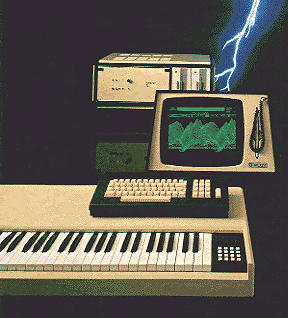
Anyone being casually interested in making synthesizer based music in the 80s have probably dreamed of owning and using a Fairlight. A complete workstation with sampling and synthesizing sonic capabilities, hugh sound library, muliti timbral, pattern and song sequencing, total recall, all in one computer and controlled by a light pen resembling of a miniature lightsaber. Only issue was that it costed as much as a house. A nice house. You could even have to add the garage. And a car.
Now fast forward 30 years and you can get all those features and capabilies for close to free if you happen to have a computer, a midi keyboard and Internet access. That’s progress for you. Still, the concept defined by the Fairlight inventors still applies apart from the lightsaber… the all integrated computer based workstation with a huge sound library still rules.
Last week the empire striked back and released the first Fairlight software only product in shape of an IOS app. It’s available in the Apple App Store for iPhone and iPad for 9.99USD, or in whatever currency you have. But unlike many other app developers that have a free or light version AND a full version in the App store, Fairlight have a only one version in the store. The uppgrade to the Pro version (as they call it) is only available from within the App itself. And the price for the Pro version is 39USD. It’s a bit of an easter egg approach.
The regular version gives you alot of vintage feel in terms of whirling floppy disc noise, load waiting time and 500 accurate sounds from the original Fairlight library including Orch 2 hits, Ahhhs and glass crash. Also the the original GUI using pages is used and fit’s like a glove in the IOS world. But from the original 20 pages the IOS app leaves you with 6 pages.
Once started you are confronted with a menu of 5 pages where one tells the history of the Fairlight. Head over to Wikipedia or Holmes page to get the full story though.
Page 2 and 3 is about loading sounds and combining them but as you can’t create or edit combinations (called instruments) page 3 is meaningless in the regular version. So what you can do is to browse though the library and load one sound at a time and then play it from the one octave keyboard. It’s here thing gets too limited, though. You get not only just one octave of keyboard to use, but it’s only from C to C. You can select which octave but is have to start with a C! This makes it hard to play just anything but tinkle little star. To load you own sounds you have to upgrade to the Pro version which I havn’t tried yet.
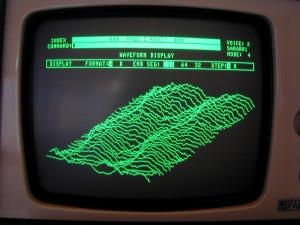
You do get the famous R page sequencer but you only have 2 demo songs to play – no edits, no save, no load. And the cool looking page D to inspect the waveform landscape is not only hard to use as you have to tilt the iPhone and keeping it still is kind of hard – but it’s kind of meaningless as you can’t load you own samples and you can’t loop the ones you get with the library. Looping is disabled. And the whole point of page D is to match the sample rate to the sound frequency to find good loop points.
Conclusion
The regular version of the Fairlight app I would call demo version. You can’t really use it in a musical context as it’s too limited. What you get is an app demonstrating the classic Fairlight library, however made with love and care it’s only a novelty app. Unless you are prepared to buy the pro version don’t expect to make any music with this app.
As I still feel a bit ripped off, I havn’t bought the Pro version but I guess I will once calmed down. What’s worring though is that although with the Pro version you can load your own samples via email or iTunes you cannot record them directly via the mic. Also the synthesizer side of the Fairlight CMI like drawing waveforms and harmonic profiles is not included in the Pro version either.
The history page in the app sais that “the app is as powerful as the first Fairlight CMI” but I really don’t agree. This is more like the marketing deparments ploy trying to find customers for the new CMI-30A. And the CMI-30A cost you ….like a house, a nice house. And the garage. And a car. Now, where’s my lightsaber!
Full demo of the Kraftwerk Kling Klang Machine No1
The app offers you the possibility to create loops with Kraftwerk’s trademark kling klang sounds. In order for users to see the possibilities of this app, they have now released a demo video. Albeit the lack of Kraftwerk sounds this is a nice demo:
Kraftwerk Kling Klang Machine No1
iPad demo iOS 4.3
http://www.kraftwerk.com
http://www.normanfairbanks.com / nf@normanfairbanks.com
Download: http://itunes.apple.com/de/app/kraftwerk-kling-klang-machine/id423962784?mt=8
Fairlight iPad / iPhone App – Tutorial Part 1
A quick overview of the main features of the Fairlight Instruments iPad / iPhone app.
For more background see:
http://www.youtube.com/watch?v=iMy0p__Rx50&feature=related
or visit the app’s website http://www.fairlightinstruments.com.au/ios
Transmit On All Stations
Transmit On All Stations is an electronic experimental composition comprising of selected loops of electronic tonalities, rhythms and software synthesizer passages and sequences. The idea was to use the concept of the tape loop – and its software equivalent to become the foundation for compositional structure and music synthesis. Inspiration was taken from past tape loop composers, and apply their approach to create an almost semi-random combination to steer direction of a possible melodic collage. In honouring the tape loop composers of the past, this composition aims to equal their level of complexity and ingenuity. To start, several electronic loops were created. To start with, an electronic base collage loop was created. Various electronic sequences – including a ring-modulated bass sequence, sinewave pulses, mixed tones ring-modulated with a 500 Hz sinewave, a rumble reverbed rising passage, electronic pulses ring-modulated by noise, pulses modulated by a Doppler bounce effect, and a very low-frequency winding down vibration were combined to form an electronic rhythm track. This then provided a timing frame of reference for additional musical elements to be overlaid.
A bass rhythm track was constructed from the Hammerhead Rhythm Station, then spliced and re-arranged to fit the bass collage loop. Added to this was a sequence created on the MiniMogue LUXUS VST synthesizer with added Hall reverb to create depth and mystery ambience. A “choir track” was created from choir samples and string samples from the Adobe Audition 2.0 sample library. These tracks were then mixed down to a sub-master track, and a new session included a bass organ tone created on the Krakli Cygnus SF VST Space Synthesizer. The Cygnus Space Synth is incredible for ambient space sounds and other-worldly effects, and it is possible to create totally unique FM tones that are dynamically variable within the sound itself. The Cygnus synthesizer also created the atmospheric tones that are faded up periodically to create interest. Some of the tones sound like space sirens or whales – quite an eerie combination. The Cygnus also created the ending electronic tonalities – something like a Forbidden Planet-like electronic sequence. This then provided the final mix of the composition. The whole work is really an exercise in loop development, but other aspects reference ambient experimental combinations. In particular the string samples almost illustrating traffic on a busy highway. The result is a strange and unusual combination with various rhythm loop and ambient textures.
The visuals include traffic scenes filmed in Sydney, Australia with various modulating coloured forms superimposed on top. The traffic scenes use a positive/negative delay to create a “cutout” like effect. Of particular note is the “rolling tube” effect. A striped pattern was modulated by a semi-circular waveform and doubled, creating a striking 3D cylinder effect. Of interest are the animated textile weave patterns – all based upon modulating coloured striped patterns then doubled with itself. The result is a surreal and steamy complex of light and modulating formations.
Get to know the “The Swarm” Free Noise Drone Synth
Nice spacy sounds in this one:
It gets loud at moments, so watch your speaker volume : A demo of the new free standalone synth “The Swarm”. Rather unique compared to most other free synths available (Mac too!). I really enjoy the deep tone. Inspired by Leon Dewan’s “The Swarmatron”. A good alternative for people who don’t have several thousand dollars readily available. Obviously, this is no substitute for the real analog version but it does give the user a taste of the massive power of 8 Saws layered and detuned a bit from a central tone. Leon makes some of the most unique analog pieces around. Kontrolled by a Korg “NanoKontrol”
An impressive piece of code.
Check out : http://www.dewanatron.com/
Kebu – The Lunar Effect (Yamaha S30 demo)
This time I wanted to explore the limits of my Yamaha S30, so I decided to compose, arrange and record a whole tune only by MIDI sequencing the S30.
The song was programmed/performed using Cubase SL solely as a MIDI sequencer controlling the S30 (in “Performance” mode). The song was then recorded straight to 2-track tape in one go. No overdubs, multitracking or external effects were used. Only mild EQ and limiting was used for the digital master. The video was later compiled showing how the various parts were played or programmed.
Many of the patches used are from JayB’s free bank of sounds for the S80, which are also compatible with the S30 (and most of them works also on a CS6x):
http://www.jaybmusic.net/
Doepfer A-189-1 Voltage Controlled Bit Modifier
About 2 weeks ago I bought a second hand Doepfer A-189-1 Voltage Controlled Bit Modifier. I build a +/-15V to +/-12V converter to power the module (though not necessary I understood) and now it’s working. And yes, I now can reproduce that beautiful Mark Shreeve bass sound with that metal edge to it. Anyway, this is a new improvisation but I heard some elements of the Warriors Theme I did before.
The Synthesizers.com Modular , which is connected to the Doepfer A-189-1 module, initially does a 4-step sequence and after a while I switch that to an 8-step sequence. The sawtooth output Ian Fritz Teezer Through-Zero VCO is modulated by the GCS Steiner filter and drives the Blacet Miniwave. This produces a modulated sound. This procedure is described on the Muff’s forum by Bob Borries/VOLT and is called ‘MiniWave Table Tilting’. The self-built Modular does a 4-step sequence. The theme is played on the Roland XP-80 doing the Mellotron strings. The Waldorf Q Keyboard produces some agonizing sounds and the odd solo is performed on the Clavia Nord Lead 1.
You can download/see/hear the video and music from my website.
Via attorks
New module 4031 tap looper
A 4031 64bit shift register set up as a tap programmable looper. If you don’t want to hear the description of the patch skip to 2mins to hear it in action.
DATAMASKIN

