
New drum machine for the iPad
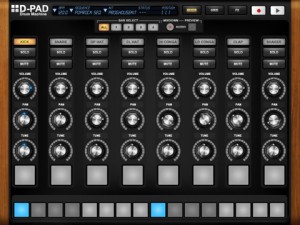
MyElectronica has introduced a new iPad drum machine – D-Pad:
D-Pad is an old-school style Drum Machine exclusively made for the iPad. It brings you a simple and easy to use instrument to create drum rhythms in an instant. With D-Pad, you are able to create new sequences, play with patterns, have a full overview of the drum track and add up to 7 effects in real-time. D-Pad includes many kits, from old machines to new up-to- date styles. D-Pad has a build-in 4 bars sequencer as well as a live mode. Last but not least, D-Pad natively comes with audio export.
Specifications:
- 8 track Sequencer (bpm from 40 to 240)
- 4 bars: sequenced play mode, single bar edit, copy and paste between bars
- Swing feature
- Live pad mode with recording capability (length up to 32 bars or 64 seconds)
- Volume, pan and tune adjustment for each individual track
- Manage your sequence through the sequence menu
- Kit selection menu
- Mixer view, Sequencer Grid view and Effect Rack view
- 7 effects: Reverb, compressor, Filter LPHP, Delay, Bitcrusher, Phaser and 3 band EQ
- Audio Mix-down to reuse your tracks in other audio applications (Wav files)
- Info screen (touch the logo) with parameters modifications (mix-down and swing)
Unfortunately, MIDI support is currently missing in action for D-Pad. The developer says MIDI sync and export are under developement.
D-Pad is $4.99 in the App Store. Details below.
D-Pad comes with 3 different sections: the mixer, the grid and the effect rack.
The Mixer offers you:
- To individually change the Volume, the Pan and the Tune of each track
- To play each track in live mode with dedicated pads, where changes and effects also apply
- To record in live mode with a quantize functionality
The Grid allows you:
- To have a full overview of the rhythm you are creating
- To quickly assign events to each track with the multi-touch enable. Just swipe the pads with your fingers.
- To easily identify when one or more tracks are in solo
The Effect view allows you:
- To control which effect is applied on the whole track
- To set each single parameters of each effect. Here again, the multi -touch enable allows you to modify many parameters at the same time.
D-Pad also comes with the great audio Mix-down feature: create a rhythm (with the sequencer or with the live mode) and record it. The corresponding audio file is stored in the document folder of the D-Pad Application.
Currently under development
- Midi export
- Mid sync
- More effects
New music video from Solar Fake – More than this
The track taken off the album “Frontiers” by Solar Fake
Biography
The German electro act SOLAR FAKE, created by Sven Friedrich, presents a really extraordinary work with their new album, “FRONTIERS“. Though 3 years have passed since the debut album “Broken Grid” was released, followers of Sven’s musical activities have pleasantly eased their waiting with the “Resigned” E.P. (2009), by SOLAR FAKE, and the album “Whiteout” (2010), by Zeraphine.
Due to SOLAR FAKE supporting VNV Nation on their last tour and playing several festivals, they have attracted great attention, constantly increasing their number of fans, and not only amongst Zeraphine’s audience.
What was indicated on “Broken Grid” and “Resigned” now finds a felicitous continuation in “FRONTIERS”: driving beats and danceable floor fillers melt with great melodies you can’t get out of your head once you hear them. Sven’s voice is multifaceted like never before, but still it’s the element connecting all 11 tracks to a whole complete work.
There’s one thing SOLAR FAKE puts a strong emphasis on: variety! When listening to other albums of this genre you know how it will proceed after hearing 2 or 3 songs. SOLAR FAKE is different. That’s why it seems difficult to categorize them clearly. Sven: “I simply like too many styles within this giant field of electronic music to limit myself to only one of them. It would be a shame and somehow it would be bore me. I don’t want to compromise. The only restriction I impose on myself is to use synthetically generated sounds only, apart from my voice.”
Checking out the KORG microX Synthesizer
The MicroX is a compact and portable music synthesizer with the typical Korg Triton HI sound synthesis (64MB ROM), advanced control and computer-based music system integration. Although it has the word ‘Micro’ in common with other instruments in the Korg line-up, the more significant family connection is with the X50, a general purpose, entry-level synth that was launched at the same time as the Micro X.
Although its appearance may suggest it’s intended for techno-style music-making, one of the selling points of the Micro X is that it is a keyboard for all seasons. Its 640 preset Programs include a great many ‘conventional’ instruments — pianos, organs, guitars, strings, tuned percussion and so on. Plus you’ve got the GM soundset — which doesn’t float my particular boat, but it would make the Micro X appealing to people looking for an easily portable instrument to use in conjunction with a MIDI file player. But that’s to say that the Micro X doesn’t cut the mustard when it comes to more contemporary styles. Also on offer is a wide variety of digital and analogue-style keyboard pads which are both fresh and inspirational. Korg have developed many of these specifically for this keyboard, so you won’t find them anywhere else.
The overall quality of the voices is very, very good indeed: the pianos are particularly excellent, the organs are exceptional, the strings sublime. Even the acoustic guitars are pretty convincing. Among the more ‘synth-y’ type presets there are loads of fresh-sounding and really quite inspirational sounds. Also worthy of a mention are the drum sounds — a bonus here being that you can assemble them into your own kits.
For ease of selection, all the sounds are grouped into logical categories, which Korg have made easy to navigate with the provision of both a data wheel and what they call a ‘Click Point’. Looking like the miniature air nozzle you get above your aircraft seat, it’s a sort of cross between a joystick, a trackball and a mouse. To help you decide which voice might be right for the job, the Micro X offers an audition button, which triggers the sound with an appropriate musical phrase.
For real-time tweaking, the Micro X provides four controller knobs, plus a button to switch their function between three sets of parameters, giving you fast access to 12 controller parameters in all. Four of these are user-programmable per Program, four control the filter/envelope, and four cover the arpeggiator. When you’re using the Micro X as a controller keyboard, the knobs can be switched to control 12 soft synth parameters or DAW functions. You can program and store up to 64 different setups of this type, and to get you started, Korg give you a set of preset templates covering popular software packages and programs such as Reason, Garageband, Cubase and Korg’s own Legacy soft synth collection.
The Sound of “Rise of the Planet of the Apes”
Acting as a foundation with an origin story for a new film series, Director Rupert Wyatt takes the audience on the science fiction summer hit, Rise of the Planet of the Apes. The stunning visual effects produced by Weta Digital for the apes are complimented by the wide range of sounds recorded and edited for the film.
Leading the sound team is supervising sound editor and sound designer Chuck Michael and co-supervisor John Larsen with the talents of first assistant sound editor Smokey Cloud and sound re-recording mixers Doug Hemphill and Ron Bartlett.
Chimp Haven serves as The National Chimpanzee Sanctuary. They are an independent, nonprofit organization whose mission is to provide lifetime care for chimpanzees who have been retired from medical research, the entertainment industry or no longer wanted as pets. For more information visit:
chimphaven.org
Donut lets you record loops in two dimensions
Here’s a new interesting concept for those of you who like to manipulate loops – as of course we all do 😉
You can use it like a phrase looper, by recording horizontally while using the step controls to step through vertical recording position. You can use it as a realtime processor by using ThruRecord mode. You can record and playback at completely differently speeds. You can even record backwards! You can record and playback diagonally across the Donut™ surface, creating glitchy staccato sounds. You can record and playback with multiple heads, recording or playing multiple positions at once. You can spread the heads vertically to access different portions of the Donut™, or you can spread them horizontally to create an echo effect.
Imagine two dimensional time!
Polychord virtual MIDI – future of iOS based music, or…?
The upcoming MIDI update to polychord lets you do some exciting and powerful new tricks with your iPad. Now you’ll be able to have your music apps talk to each other, while they run in the background, and use polychord to control them.
In this video we show how polychord can control another app (MoDrum) running in the background — all through virtual MIDI, all without any cables. Polychord sends MIDI clock signals out, keeping everything in sync.
Chords made easy
Polychord gives you instant access to a lot chords. By wrapping the different types of chords around each circle, we were able to fit a lot into a small space, while keeping them big enough to press easily. This gives you easy access to over 60 chords at any time!
Auto Accompany
Turn on Auto Accompany, press any chord, and the drums and bass will play along in tune –there’s also an arpeggiator which dynamically plays the notes of the selected chord. Switch to a different chord and they’ll follow you. Beginners can button-mash their way to a song, while more seasoned song-writing pros will find that polychord is a great way to break out of a rut.
Picking & Strumming
This is what truly sets polychord apart. Have you tried to play a piano keyboard on a small touchscreen? It’s not ideal. Polychord’s strum keys change automatically with the chords, so it doesn’t have to make room for keys you don’t need. They’re incredibly fast and responsive, so you can slide up and down the keys with many fingers at one time.
Realtime Pattern Recording with Numerology
Shows Numerology’s updated Launchpad mapping with realtime pattern recording into the DrumSeq, PolyNote and MonoNote sequencers. The laptop is running Ableton Live with three instances of the Numerology VST, as well as Camel Audio Alchemy for synth lead and NI Massive on pads. The drum sounds are from Numerology’s DrumKit module with a patch designed by Jason Wolf of Tripl3Tone.
Reason 6 – Producer Sessions Live Preview
Producer Sessions Live 2011 takes place at SAE London on September 3rd and 4th 2011. Check out this video for a flavour of what you can expect, and head to www.producersessionslive.com for full details and tickets!
The first public preview of Reason 6 and its accompanying audio interface Balance will take place at our upcoming event, Producer Sessions Live.
Run by the teams behind Computer Music and Future Music, Producer Sessions Live 2011 takes place at SAE London on 3-4 September 2011. This is the event’s second year, and a swarm of big-name producers including Stonebridge, D.Ramirez, Nu:Tone and chart-topping mixing engineer James Reynolds are all signed up to spill their secrets in a series of intimate masterclasses.
Swedish producer Mattias Häggstrom Gerdt will showcase both Reason 6 and Balance in the Propellerhead room at Producer Sessions Live throughout the weekend. Reason 6 is a huge update, with the long-running DAW now capable of all of Record’s audio-recording, -editing and -mixing functions. Three brand new effects – “demolition” plug-in Pulveriser, studio/live delay The Echo and rhythm-creating gate Alligator – round off the package.
Audio interface Balance works as a two-in-two-out unit, but has more physical connectivity than that description would imply. There are four line ins on 1/4″ jacks, two 1/4″ guitar/bass inputs with pads and a pair of mic preamps with phantom power via XLR. Balance is designed for use with Reason, with several of its features offering tight integration with the DAW. One innovation is the Clip Safe function – when enabled, this records a take on two channels, with one at a lower volume in case the other one clips.
www.producersessionslive.co.uk
More power to your Reaktor ensemble with 8080F
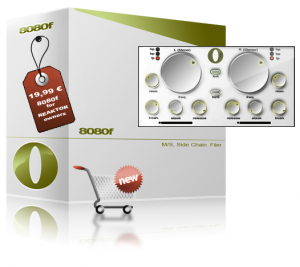
SoulViaSound has announced the release of 8080F, a side chain filter ensemble with M/S processing, built for Reaktor 5 users.
It’s a creative tool perfect for pads processing but not only. You can use it whenever you want to modulate the cutoff envelope with an audio signal. With 8080F you can process only the stereo(side) signal or for example you can apply a low pass filter on the mono(mid) signal and a high pass filter on the stereo(side) signal while the cutoff envelope is modulated independent in the mono and stereo signal. The cutoff envelope is modulate by the difference between the side chain signal and the threshold settings with your attack and release settings.
All you have to do for feeding 8080F side chain is to send an audio signal in the 3/4 inputs from Reaktor 5. You can do this in your DAW (Ableton Live, Logic, Cubase, Reaper, Pro Tools) or in to you NI Maschine software.You have independent controls for the both channels (L-Mono/R-Stereo) but you can also control the filter parameter in link mode. Just press the link switch and start tweaking the left parameters.
8080F for Reaktor 5 is available to purchase for 19.99 EUR.
Teenage Engineering’s OP-1 – Full Review
Here’s a nice review of the OP-1:
Firstly, you’ll be surprised at how well built this is – CNC machined case (think unibody) massively over specified buttons and four, rotary encoders (industrial grade avionics quality) and a gorgeous AMOLED 360×120 LCD display.
The 24-key keyboard is just switches (think well built nanoKey) and does not transmit velocity, but the synth will respond to it via MIDI over USB. A tiny but surprisingly loud built-in speaker as well as stereo output, built in mic and line in complete the connections. The unit is battery powered, with up 16hrs from this non user removable Li-ion cell. Charging is handled via USB.What Is It?
So the Teenage Engineering OP-1 (Operator 1) is a synth wirth up to 6 voices, with eight synthesis engines which can played one at a time – its monotimbral.
Synth Engines:Cluster – Multi layered oscillator cluster
Digital – True digital synthesis
String – Waveguide String Model
Pulse – Dual Pulsetrain Oscillator
FM – Four operator FM synthesis
Phase – Phase Distortion
Dr Wave – Frequency Domain Synthesis
Synthesizer Sampler Engine – Teenage Sample PlayerEach engine has a single VCA envelope ADSR, single effect and an LFO for routing and modulation – sources include – LFO, FM radio – yes there is one built in, and G sensor – that’s gravity – shake it and modulate baby.
DATAMASKIN

