
More on the eyoControl 1.5 for the iPad
eyoControl is a multi MIDI controller application for the iPad, including control surface and virtual instrument type controllers.
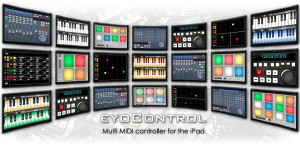
eyoControl lets you control a Mac/Windows DAW (Digital Audio Workstation) software or a MIDI synthesizer from your iPad in various ways, such as a control surface or virtual instrument.
Features:
Surface is a control surface enabling access to various settings of your tracks through faders, knobs and buttons. Surface includes a Mixer and a Panel view, enabling fast access to a large number of tracks.
Transport lets you intuitively control basic playing/recording abilities of your DAW or recorder software in the studio or live environments.
Pad is a MIDI controller with 4,6,8 or 12 programmable, touch-position sensitive pads. Each pad can be assigned a MIDI channel, color… Pad lets you play one or more virtual instruments from your DAW/synthesizer, such as drums or percussions.
Keys is a dual keyboard MIDI controller. Choose among three different key widths per keyboard to best fit your style, assign each keyboard to a different MIDI channel to play two instruments on your DAW/synthesizer in parallel.
mXY is a multi X/Y controller, featuring four independent, highly configurable MIDI X/Y controllers. Assign them to one of the many available MIDI Continuous Controllers to modulate in real time the sounds of your virtual instruments or synthesizer.
Far out: Audio-Haptic Navigation Environment
This is a demonstration video of AHNE – Audio-Haptic Navigation Environment. It is an audio-haptic user interface that allows the user to locate and manipulate sound objects in 3d space with the help of audio-haptic feedback.
The user is tracked with a Kinect sensor using the OpenNI framework and OSCeleton (github.com/Sensebloom/OSCeleton). The user wears a glove that is embedded with sensors and a small vibration motor for the haptic feedback.
This is just the first proof-of-concept demo.
The all new Novation Impulse – Professional USB/MIDI controller keyboard
Impulse is a range of professional USB/MIDI controllers. They each have a precision keyboard and a full control surface powered by a brand new version of Novation’s Automap control software – Automap 4 (which makes getting hands-on with your DAW/plug-ins fast and simple). Impulse also has 8 back-lit drum pads which can warp arpeggios, roll beats and launch clips in Ableton live.
Impulse also comes with a stack of free software and sounds:
• Ableton Live Lite – powerful loop based music-making software
• Novation Bass Station – legendary analogue bass synth as a software plug-in
• Loopmasters sample library – over 1GB of royalty-free samples
• Mike The Drummer – 502MB of live drum loops and breaks
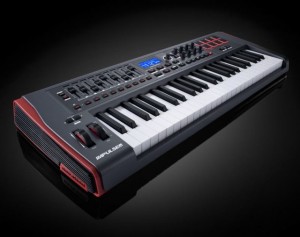
Some unique features:
- Aftertouch. Keybed quality is paramount for obvious reasons. What’s typically missing, for those who like it, is aftertouch support, available here.
- Full DAW control. Available on the Axiom but previously missing on Novation’s offering, you get 8 knobs, 9 faders and buttons, and an LCD for controlling your DAW. (Only one fader on the 25-key model, since all of that wouldn’t fit.
- Automap. It wouldn’t be a Novation keyboard without the company’s Automap feature. Whether that’s good or not depends on whether you like the functionality; I’ve tended to find it a bit fiddly at times, though the implementation with Propellerheads’ Reason is fantastic. (Hosts are a big part of the variable here.)
- Pads that do more. This one’s rather interesting: you get drum pads set up to do arpeggios, rolls, and Ableton Live clip launching. You could do that with any pads, but neat to see it on the keyboard, and I’m curious to learn more about the specific implementation.
Ableton Retro Synths for free
Starting now, Ableton gives all users of Ableton Live 8 or Suite 8 its most popular Partner Instrument: Puremagnetik’s Retro Synths! Registered users of Ableton Live 8 or Suite 8 can now download Retro Synths free of charge. In addition, purchasers of Ableton Live 8, Suite 8 or any relevant upgrade before October 31, 2011 will also receive Retro Synths for free.
We invite you to enhance your Ableton Live experience with a free download of Retro Synths by Puremagnetik, our most popular Partner Instrument. Retro Synths represents the best of Puremagnetik’s meticulously multi-sampled vintage synthesizer packs, including samples from classics such as the Korg MS-20, Roland D-50 and more. With intelligently selected macros, Retro Synths is immediately playable in Live.
Retro Synths is free for all Ableton Live 8 and Suite 8 users. It is also included with any upgrade or new purchase of Ableton Live 8 or Suite 8 until October 31, 2011.
Experimental Percussion Box
Experimental Percussion Box + loop station, triggering LZX Monolith, Modified Gakken SX-150 and DIY Sequencers.
**Modified Gakken and Experimental Percussion Box soon to be for sale on Etsy.com
Reaktor 5.6.1 update out now – including OSX Lion support

Usually minor software updates are not reported here but as Reaktor is our favorite software baby here’s the news of the now available for update.
New:
– Mac OS X 10.7 Lion compatibility
– Improved Master Snapshot system
– Added Save/Open Preset functionality
– Added ports copy-pasting support in Core Macros
– Changed Core Constants default value to 1
– New 5.6.1 manual addendum
Most important bug fixes:
– Fixed Cubase CPU spikes issue
– Fixed Multi-Tap Delay crash
– Fixed incorrect PNG alpha channel support
– Various miscellaneous bug fixes
Messing around with an Analogue Systems “French Connection”
Given that it was an early electronic instrument, the Ondes Martenot was singularly playable, so it’s not surprising that composers such as Barry Gray (see the box on the penultimate page of this article) continued to experiment with it throughout the ’50s, ’60s and 70s. Even today, its unique method of control and expression attracts musicians keen to develop new sounds and playing styles. So when Johnny Greenwood of Radiohead asked Analogue Systems to develop a Martenot-style controller for his modular analogue synthesizers, the company was keen to oblige.
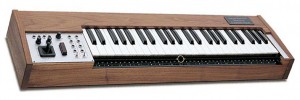
Named the French Connection, Analogue Systems’ design adopts the control mechanisms of the classic Martenot, but leaves the sound generation out, and packages everything in a neat unit designed to sit in front of any of the company’s RS Integrator modular synths or, for that matter, similar modulars produced by other manufacturers. The keyboard itself is four octaves wide, and in front of this you’ll find the wire controller with the small ring through which you insert your index finger. The wire (which is actually a fine nylon cord) is stretched above a fingerboard in which you’ll find small circular depressions that represent the white notes on the keyboard; and protruding metal studs that mark the positions of the black notes.
To the left of the keyboard and the wire controller, there’s a control panel reminiscent of those that you’ll find on other Analogue Systems products. To the far left of this, there’s a sprung X/Y joystick that returns to the central position when released. Above the joystick itself you’ll find two knobs that determine the output range for each axis, with a maximum maximum (if you see what I mean) of approximately 10V. There are four joystick outputs, two each for the ‘X’ axis and for the Y axis. These, like all other Analogue Systems devices, use 3.5mm sockets. To the right of the joystick you’ll find the large, sprung wooden button that also harks back to the original Martenot. If left untouched, this sits in its uppermost position, and generates an output CV of 0V. As you depress it, the CV rises progressively to a maximum of approximately 10V. Again, a knob located above the button itself controls the actual range of operation.
There are just two further controls on the French Connection, and these are the switches located immediately to the left of the keyboard. The first of these determines whether the pitch CV is controlled by the keyboard or by the wire controller. The other determines whether the keyboard produces a conventional trigger and gate, or whether the button produces an amplitude CV. There are eight physical outputs for these – three pitch CV outputs, three button CV outputs, a trigger output, and a gate output. And that’s all there is to it. Add an IEC mains input and an illuminated on/off switch to the right-hand side of the unit, and mount everything in a gorgeous, polished wooden case, and you have a French Connection.
In this video:
I had the oppurtunity to mess around with an Analogue Systems “French Connection”, an imitation of an early electronic instrument called the Ondes Martenot. This controller is CV’d up to an MFB Kraftzwerg. Just a demonstration of some of it’s capabilites. I’ll make a more musical video soon.
Ableton Live Super Glitch Machine
Free Weekly Ableton Live Rack #23: Super Glitch Machine (Part 1). This week AfroDJMac brings you not one, not two, but three Ableton Effect Racks, all designed to mangle, twist, and mutilate your audio. Get your Glitch on people!
Download @ http://bit.ly/freesynth23
Greetings boys and girls, this week I have part one of a two part series on creating glitchy music. As fun as it is to create things, there’s a whole other sense of satisfaction in destroying them. For your downloading pleasure, I’ve constructed three different Ableton Live Effect Racks that are designed to mutilate, mangle, destroy, and crush your tracks up. I built up groups of effects that will take your sounds and twist them into oblivion so that you wind up with something totally new and down right nasty. These are great for individual tracks or entire mixes, experiment with them and take the music you have worked so hard to create and destroy it to your hearts content! Follow the destruction in the video below. Next week in part two, we will take these very racks and go through the steps to take just about any sound and mangle it into a large group of glitchy noises that can then be reused again and again.
Digital Drums – free sample pack
http://vimeo.com/28150767
Beatmatch.info has released Digital Drums, a download sample pack.
With more than 40 synthesised, professionally produced drum sounds in Wav format, this library is ideal for all electronica, minimal techno and electro producers.
Digital Drums features
- 40+ royalty free audio samples.
- Includes 9 Kicks, 9 Snares, 11 Hi-Hats, 11 Percussion sounds.
- Wav & Aiff format, 16 Bit/44.1 khz, Stereo.
- 100% royalty free.
Digital Drums is available as a free download from Beatmatch.info
More information: Digital Drums
Kinect 3D sensor studies
Johannes Kreidler, a musician and artist known for inventive experiments in music, shares his studies for the Kinect, which he terms “conceptual music.” A solo “for violin” can involve literally waving a violin around. “House music” can mean making music whilst ironing a shirt. Any gesture in space becomes musical. Without tangible feedback, that can be challenging, and since these are just gestures in air, precision and nuance may not be a strong suit.
And here is another interesting Kinect video:
Experiments in balloon motion and sound using an MS Kinect depth sensing camera.
Created for the Carnegie Mellon 1st & 2nd year MFA Graduate show entitled “Fresh Baked Goods” at Bakery Square, April 2011.
A machine stands in a room surrounded by balloons. Circulating fans blow the balloons over the machine which creates sound based on their movements.
DATAMASKIN

