
Closer look at the Addictive Synth Version 2
Addictive Synth – Wavetable Synthesis meets Noise
The new spectral noise generator adds a new dimension to the already huge sound universe of Addictive Synth. This generator is the first of its kind and allows for extraordinarily detailed control over the dynamic spectrum of the noisy part of sounds. Despite its complexity it’s pretty easy to use and integrates naturally into the sound design philosophy of Addictive Synth.
With the integration of a hi end reverb we closed the last gap to get fully addicted.
One more thing…
…the revised GUI is now compatible to the retina display of the new iPad !
MusikMesse: Introducing UNVEIL – De-Reverberation and Signal Focusing
More things are “unveiled” as we approach tomorrows MusikMesse, here’s one from Zynaptiq:
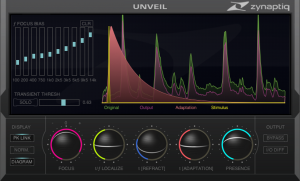
UNVEIL is a real-time, de-mixing based plug-in that allows attenuating or boosting reverb components within a mixed signal of any channel count, including mono sources, as well as modifying reverb characteristics. Additionally, UNVEIL allows you to bring the key features of a recording into focus, or move them to the background, by attenuating or boosting perceptionally less important signal components. Based on our proprietary, artificial intelligence based MAP (Mixed-Signal Audio Processing) technology, UNVEIL allows fixing previously unusable location audio and dialog, tightening up live music recordings, removing reverb and “mud” from musical signals, as well as creative sound design.
UNVEIL has many uses, some of which are:
- Audio engineers can attenuate reverb in recordings
- Film mixers and dialog editors can remove reverb from dialog and location sound
- Music producers can turn vintage drum-loops rich in reverb into dry recordings, and vice-versa
- Foley artists can remove ambience from sub-optimally captured sounds
- Mix and mastering engineers can bring key mix elements into focus by attenuating components commonly referred to as “mud”
Good Bye, Reverb
Removing reverb from recordings has always been difficult to impossible. Existing de-reverberation strategies either manipulate signal dynamics, require specific channel formats, are limited to certain signal types, or all of the above. Enter UNVEIL.
UNVEIL is not an expander or envelope shaper, is not a spectral thresholding processor, does not use phase cancellation techniques or inter-channel correlation analysis, and thus works with any channel count from mono to whichever surround formats your DAW supports, and without changing signal dynamics. To achieve this, it utilizes a model of the human auditory system to discern which parts of the signal are reverb, effectively “listening” to your signal much like a human would. These components are then separated from your signal for processing using our MAP technology. From there, reducing the amount of reverb in your recording is as easy as adjusting the value of one of our slick track-ball-esque sliders.
Hello, Reverb
Conversely, UNVEIL allows increasing the amount of reverb in a recording, too. You can turn a close-miked drum kit into a full-on room-heavy monster, move a sound back in the sound-stage or adapt the amount of reverb on different location recordings to match each other better. Additionally, UNVEIL gives you several parameters that allow manipulating reverb characteristics…like all of it’s features, within a mixed signal, in real-time and even using mono source material. No, that’s not magic, that’s advanced science.
UNVEIL The Detail
UNVEIL’s algorithm isn’t limited to processing reverb. Actually, it processes any signal components that the human auditory system considers as being of little significance, which includes the parts that many engineers refer to as “mud”. As a result, UNVEIL allows reducing the level of all the stuff that clouds your signal and masks the detail you work so hard to capture, bringing the key features into focus and, well, unveiling all the inherent detail. As a bonus, this also increases headroom, so you’ll even be able to increase perceived levels without having to slam the meters. And again, you can use the inverse function to add grit and a less up-front character to your recording.
One Small Step…
Except for the mathematics under the hood, everything about UNVEIL is simple and easy, results are always just one small step away. That being said, UNVEIL allows adjusting the process in a very wide range. No dumbed-down “easy-mode” in sight, just a perfectly stream-lined, no-nonsense GUI that looks as slick as UNVEIL sounds. And oooooh yes does it sound good. But don’t take our word for it, grab the demo for a test-drive!
Music Advertising – Ideas for musicians when it comes to gig and show social media promotion
A lot of musicians and bands are playing on any given night, at any given club in any given city. So taking a smart approach to music advertising and gig advertising when it comes to social media promotion of the performance date is a good idea. One of the best ideas for musicians that I share with artists as a music consultant is to figure out special things happening on that date, anniversaries for that city, that state, that club or even birthdays on a more famous level. The music industry market is over saturated with artists plugging shows in the same way and at the same time. If you can take a specialized and specified marketing approach, you will stand out that much more.
——————————
Loren Weisman is an accomplished music producer, author and music consultant. He is the author of “The Artist’s Guide to Success in the Music Business”, a book to help independent artists, musicians, bands, labels and managers achieve self sufficient and sustainable success in the music industry. For more info on Loren and music consulting services, visit: http://www.lorenweisman.com
MusikMesse: Pioneer announces the new REMIX STATION RMX 1000
At the Musikmesse 2012, Pioneer is introducing the RMX-1000 Remix Station, a three-in-one system made up of editing software, a hardware controller and VST and AU plug-ins. The RMX-1000 is designed to deliver the possibilities of studio effects and beatboxes, with the added physicality of pro-DJ equipment. Pioneer’s remixbox editing software lets you customize the RMX-1000 hardware to your own performance style and load it up with your own banks of samples. The RMX-1000 VST and AU plug-ins lets you use the Remix Station with your current digital audio workstation software.
The RMX-1000 is expected be available in May 2012 for 699 Euro, including VAT.
Pioneer is setting a new benchmark in pro-DJ equipment, with the awe-inspiring RMX-1000 remix station. Taking a totally new direction to effectors and samplers, the RMX-1000 is a three-in-one system comprising editing software, innovative performance hardware and VST and AU plug-ins.
For more detail visit, http://pioneerdj.com
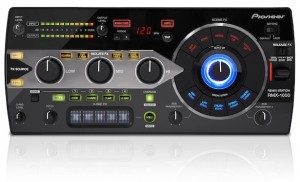
Features:
- Customizable remix station unit
- The RMX-1000 can be used with mixers, CDJs and laptops in the booth, or with a PC in the studio for recording and producing.
- The control parameters can be completely modified using the remixbox software included.
- The hardware offers three ways to access settings. Default activates Pioneer’s intuitive factory settings. And User settings can be stored on the unit, or on an SD card to be taken along to the booth – DJs simply plug their SD card in to get immediate access to their personalised controls.
- Pioneer plans to make settings from internationally renowned DJs such as Chuckie, Kissy Sell Out, Kutski, James Zabiela, Doorly and Laidback Luke available for DJs to download.
The unit’s controls are divided into four categories:
- Scene FX
- The Scene FX wheel allows DJs to build up and break down tracks by combining ten types of effects.
- Use the top section to build up, adding effects like Noise, Echo and Spiral Up and the bottom section to break down, cutting sounds with effects like Crush Echo, Spiral Down and Reverb Down.
- Twist the central knob to move from Wet to Dry to add pitch and intensity to the effect that’s in play.
- Plus, two sub-parameter dials allow DJs to manipulate the Time and Resonance parameters for even more character.
- Isolator FX
- Inherited from Pioneer’s high-end DJM-1000 mixer, the RMX-1000′s isolators allow DJs to change the main audio input’s rhythm and timbre using hi-, mid- and low-frequency bands.
- Plus, three effects are loaded into the dials for more flexibility: Cut/Add, Trans/Roll and Gate/Drive.
- X-Pad – with Pitch control
- DJs can instantly get involved with the unit’s drum samples by tapping the individual sample buttons (Kick, Snare, Clap and Hi-Hat), or by using the X-Pad to roll (repeat) the samples at different speeds.
- DJs can record their own beats and patterns on the fly by switching on Overdub, then use Roll and Mute to manipulate each sample in a variety of impressive combinations.
- The Quantize button snaps each tap of the sample pads to the nearest beat, so DJs always sound on time.
- DJs can add up to 16 samples across the four sample banks, which they can trigger and manipulate during live performance.
- DJs can edit the sample banks through remixbox and even alter them during play.
- The RMX-1000′s Pitch knob alters the pitch to add even more character to each repeated beat.
- Release FX
- The Release FX allows DJs to exit complex effect combinations and return to the original track.
- Three modes with three customisable speeds – Spin Back, Echo and Break – allow DJs to choose exactly how they want to return to normal play.
- For even more flexibility, DJs don’t have to exit totally from the engaged effect; they can come partially out and go back in by manipulating the highly sensitive Release switch. Or they can cut the original track out completely so just the engaged effects are heard.
- Fully customizable with specially designed remixboxsoftware
- Designed by Pioneer exclusively for the RMX-1000, the remixbox software allows DJs to prepare sets – while the hardware leaves plenty of room for spontaneity.
- And DJs can use the software to modify the unit’s features and change its parameters. By hovering their mouse over the remixbox’s virtual RMX-1000, DJs can edit features, change parameters or adjust effects on the hardware itself.
- First DJ-dedicated controller for Virtual Studio Technology/Audio Units
- As the first VST/AU controller dedicated to the DJ industry, the RMX-1000 brings the operability of hardware into the recording studio.
- By just plugging the unit into a laptop, DJs and producers can use the RMX-1000′s dedicated controls to manipulate the VST/AU’s features.
- There’s no need to fiddle around with the mouse and keyboard: just hit a button, twist a dial, or turn a knob – the RMX-1000 literally puts every effect right at producers’ fingertips.
- Other features
- High-quality sound design reduces noise for clear and pristine sound.
- The Quantize function can be applied at any stage during play or production for real-time music analysis and automatic synchronisation of the beat.
- Auto BPM function automatically measures and follows the tempo of the music.
- USB-MIDI connection means the RMX-1000 can be used as a MIDI controller.
- Compact and sleek design makes the RMX-1000 highly portable – and it looks good as part of any DJ set-up.
MusikMesse: Clavia unveils the new Nord Electro 4D SW 61 keyboard
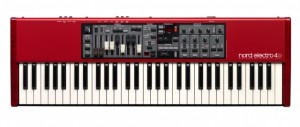
This week at Musikmesse 2012, Clavia DMI AB will be unveiling its new Nord Electro 4D SW 61. This announcement comes just in time for the 10th anniversary of the very first Electro keyboard.
Lightweight and full of improvements, the Nord Electro 4D SW 61 has a 61-key semi-weighted waterfall key bed, plus the same sturdy, drawbars found on the Nord C2D for full hands-on control. The keyboard also offers support for both of the company’s expanding Sound Libraries.
As far as sounds go, the Nord Electro 4D delivers a number of improvements: The Organ section features a new tone wheel engine derived from the flagship Nord C2D organ. Click-modeling has been improved and there is a new Rotary Speaker simulation with a new Drive. In addition, the Nord Electro 4D supports Long Release suitable for legato playing and selectable String Resonance. Handling programs is said to be easy with four Program Banks and four Live Locations. The Effect section now includes a flexible new Delay Effect with tap-tempo, rate, amount, and a stereo Ping-Pong mode. Lastly, the USB port on the Nord Electro 4D SW 61 doubles as an USB-MIDI interface.
Changes in the Nord Electro 4D SW 61:
- The Organ section features a new tone wheel engine derived from the flagship Nord C2D organ.
- The Click-modeling has been improved and there is a new Rotary Speaker simulation with a new Drive.
- The Nord Electro 4D supports Long Release suitable for legato playing and selectable String Resonance. According to the manufacturer, handling programs is easy with four Program Banks and four Live Locations.
- The Effect section now includes a flexible new Delay Effect with tap-tempo, rate, amount, and a stereo Ping-Pong mode.
- The USB port doubles as an USB-MIDI interface.
The Nord Electro 4D SW 61 will make its official debut at Musikmesse in Frankfurt, Germany this week, March 21 to 24, 2012 at the Nord Booth (B90, Hall 5.1). Learn more at nordkeyboards.com.
DJ Template Pro: Walkthrough
Here’s a nice DJ Template using Ableton, check it out:
” This is a walkthrough of my DJ Template for the Akai APC40. It provides an overview of all the core features, but does not go into detail.
To download the template, visit WillMarshall.me“
Aesthetic Perfection – A Nice Place to Visit (Official Video)
Aesthetic Perfection – A Nice Place to Visit
Taken from the album “All Beauty Destroyed” now available from Metropolis Records in North America and Out of Line in Europe
Buy it here: http://www.aestheticperfection.carbonnine.com/abd-2cd-only/
Filmed on location in Evansville, ID
Produced, directed, shot and edited by Mitch Massie
Ethero 2 Live Demo
Ethero is the iPhone’s answer to the etherophone, or Theremin as it’s better known. The Theremin is one of the earliest electronic instruments ever created and it’s now famous for it’s signature eerie sound.
The traditional Theremin is usually controlled without any physical contact, with the player using each hand to control both the pitch and the volume of the sound. Ethero works in a slightly different way, but it still attempts to emulate the real instrument! Ethero takes the amount of light coming into the device’s camera and translates it into a sound frequency. So, waving your hand or another object in front of the device camera will change the pitch of the sound. The more light coming into the camera, the higher the pitch. To control the volume of the sound, simply touch the screen of the iphone and move it up and down the screen.
“This is just a quick demo of Ethero 2 running live on my iPad 2.
The video shows a couple of the preset scales in the app. The synth sounds are from the Moog Animoog which is running in background-audio mode and being controlled via virtual MIDI ports.
Ethero 2 will run on iPhone 3GS, iPhone 4, iPhone 4S and iPad 2.
MIDI is sent over virtual ports, WIFI and via the Camera Connection Kit. Of course, your mileage will vary with the use of virtual MIDI ports as there’s quite a lot of processing going on. It works best on the iPhone 4S and iPad 2 (and I guess ‘the new iPad’, but I can’t test that… yet!) “
Yamaha SY85 Realtime Control
Quick demo on using the faders in real time to effect the sound while you’re playing.
About the Yamaha SY85:
In the early 1990’s most synth manufacturer’s quest to use digital forms of synthesis to re-create acoustic sounds (as well as analog sounds) led to an onslaught of rather boring instruments. Among the mob of digital synths some stood out such as Korg’s M1, Roland’s D-50, and Yamaha’s SY-85. Fading away were the days of Yamaha’s FM-synthesis, replaced by Advanced Wave Memory (AWM2). Throughout the 1990’s Yamaha used AWM2 in many of their successful products because of its high sonic quality and advanced synth-like editing features. The SY-85 was a powerful workstation keyboard capable of some great sounds and full arrangements.
It’s a 16-part multitimbral MIDI synth with a nicely weighted 61-note keyboard designed to be the main keyboard in your MIDI studio, with tons of sounds and sequencing features built-in. It has a long but narrow 40 character x 2 line LCD display and a 5×5 mode selection matrix which enhances operation by allowing fast easy access to any of the SY-85’s modes. In addition to pitch & modulation wheels and dual output level controls, the SY-85 has eight slide controls that can be used to control a range of parameters while performing for expressive real-time power. Best of all it’s got multi-mode filters and a dual-effects processor with chorus, flange, reverb, delay, exciter, parametric EQ, echo, ring modulation, leslie, distortion, etc. The effects can be used in series or parallel, and there are 4 busses to route sounds through them. Other features include a 3.5″ floppy disk drive, external memory card slots and two assignable stereo outputs.
Expresso – new free distortion effect plug-in for Windows
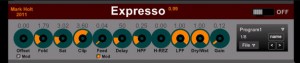
Mark Holt has released Expresso, a free distortion effect plug-in for Windows.
My first ever release of a VST effect. Made in Synthmaker v2.0, so, sorry, no Mac version.
Most of the modules are my own (rather simple) code rather than stock modules. I’ve been using it a lot and thought I should give something back to a community that’s given me a lot over the years.
The first knob is called offset and this adds DC offset to the input signal (the mod LED below changes the direction of offset). The next knob is labelled fold and adds some fold back distortion. The next knobs are sat (saturation), feed (feedback – the mod LED changes the signal slightly), delay (for the feedback), HPF (high pass filter), H-REZ (high pass resonance), LPF (low pass filter), clip (hard distortion), followed by a dry/wet control and finally gain (for output). The feedback path actually goes after the clip module and re-enters before the fold back distortion stage, so maybe a future update will change the knob order to reflect this (it’s like it is for chronological reasons). Beware that on settings where all settings are high that you will get proper high squealing feedback. I’ve kept that as a feature and the tone can be changed with the delay knob when it appears.
DATAMASKIN

