
Panel discussion: Past, present and future of MIDI
At NAMM 2013, MIDI creators and innovators Alan Parsons, Tom Oberheim, Dave Smith, Jordan Rudess, George Duke and Craig Anderton discussing the past, present and future of MIDI.
Eye candy: MS-20 Mini — The Legend Reborn
Take a look at the new MS-20 Mini! Overseen by the engineers who brought us the original MS-20 back in 1978, MS-20 Mini features the exact true-analog signal path. The incredibly powerful dual filters with peak/resonance, CV functionality, external signal processing, and unique hands-on patching system are all here – with 5-pin and USB MIDI to boot — and all at 86% of the original size.
For more info, check out:
http://www.korg.com/ms20mini
http://www.facebook.com/KORGusa
http://www.twitter.com/KorgUSA
iPad: Magellan with Artificial Intelligence and Audiobus
Yonac has released a major update to Magellan, its software synthesizer for iOS.
The update includes intelligent preset generation, two new effects, configurable FX signal flow, user-friendly additions to the preset system and more. The update also opens up Magellan as an FX processor you can use with Audiobus.
“Some synthesizers have a random preset feature that haphazardly chooses sound parameters, which mostly produces unusable sounds,” explains chief engineer Jim Yonac. “Instead, we use artificial intelligence to generate unique and usable patches for Magellan.”
Magellan’s new SPAWN feature uses a balance of expert knowledge and well-informed randomization to generate presets in a given category or combination of categories, selecting something in the order of 180 parameters in a mutually compatible manner. SPAWN settings allow the user to choose among or mix bass, lead, pad, or “weird” sounds, with an option to also generate an arp. The “Surprise Me” feature transfers tonality decisions to the system.
New in Magellan 2.1:
- Smart Preset Aggregation with Windowed raNdomization (SPAWN)
- Uses specially designed artifical intelligence algorithms to generate new presets on-the-fly
- Makes decisions based on the user-specified tonality parameters, such as Bass, Lead, Pad or “Weird”
- Algorithms intelligently decide and generate over 100 synth-related parameter and over 80 fx-related parameters
- Generate arp patterns in any chosen scale, or in a random scale
- Use “Surprise Me” option to give complete control to the system
- Retains 16 most recent spawns in memory under the dedicated “Recent Spawns” bank
- Use Magellan as an effects processor in Audiobus connections!
- Two new free effects,
- HEXEq: a very powerful and highly configurable 6-channel parametric equalizer with 9 filter types you can choose from for each channel, including shelving, peak, band and more.
- VC-93 Compressor: a juicy compressor with built in I/O VU meters
- Change the FX signal flow via easy to use drag-n-drop interface. Allows you to experiment with any possible linear ordering.
- MIDI inlets for all the new features
- Master output meter with clipping indicators on the main panel
- Improved launch procedure
- Favorite presets bank to collect your preferred presets in a single place. Simply star or unstar a preset to add or remove it from favorites.
- Recent presets banks
- Restore Factory Presets option, so you can reinstall factory presets without having to reinstall the whole app
- Various other improvements
CUBASIS+Animoog+LIVE FX – audiobus –
iPad mini is used. The sound of animoog is sent to CUBASIS through LIVE FX. AudioBus is convenient. It is splendid.
Samplr live session with Factory sounds iPad
Background video description below:
Samplr jam using only Factory sounds with iPad 2
Closed circuit t-shirt live sessions-90’s boy by diodo
Had some latency issues when I tried to play drums, sorry
My 2nd song for the RPM challenge
https://soundcloud.com/diodo
Twisted Tools | Micro Kits 05 by Delect
Twisted Tools has announced the arrival of Micro Kits 05 by Delect, the fifth release in its series of Micro Kits. Each Micro Kits release features 5 drum kits developed by a cutting edge sound designer and formatted for a wide variety of samplers. To celebrate Twisted Tools 3 year anniversary and thank their customers for their support, Micro Kits 05 is being released for free at http://twistedtools.com/.
Micro Kits 05 by Delect comes with 5 masterfully designed electronic drum kits by electronic duo Delect, a new collaboration between Chris De Luca [Funkstörung] and Leonard de Leonard [Leonizer Rec.]. The kits will work in nearly any electronic genre, from techno to hip hop.
The sample pack’s kits are formatted for a wide variety of samplers, providing instant inspiration within nearly any type of production environment. Additionally, MK05 features a custom Reaktor map and presets for Twisted Tools S-LAYER. By harnessing the power of S-LAYER’S advanced randomization and sample layering engine, the possibilities for generating new content from MK05 is literally endless. MK05 comes with over 40 S-LAYER kits and generator presets to get you started.
About Chris De Luca – As Funkstörung, CLP and as a solo artist, Chris de Luca released an uncountable amount of records on !K7, Boysnoize Rec, Shitkatapult and many more. His remixes for Björk, Wu-Tang Clan, Apparat and The Glitch Mob have attracted worldwide attention and acclaim. de Luca’s diverse music portfolio shows his passion for electronic music and hip hop and his dedication to defying conventions. His innovative, bass heavy sound is a radical and refreshing take on the stale electronic music scene.
About Leonard de Leonard – the man with the bushy beard is a producer, sound designer and founder of Leonizer Rec. From Shanghai to Cairo, Seoul to Berlin, Leo has been rocking clubs all over the world with his ass-kicking sets. After releasing numerous albums and EPs as a solo artist on labels like Musiques Hybrides, Ekler’o’shocK and BEE Records, Leo started a new chapter with Chris de Luca, and the Delect story began…
Pricing and availability:
Micro Kits 05 by Tonebuilder is available for free download at http://twistedtools.com/shop/micro-kits/micro-kits-05-Delect
Supported Sampler Formats:
S-Layer, Maschine, Battery, Kontakt, Ableton 7/8, Reaktor 5.8 and EXS24.
A few Roland JD-990 pads, plucks, pianos, and strings
The Roland JD-990 is a classic module featuring great waveforms in ROM, and deep editing capabilities (it was known as a “programmer’s dream” when it came out). These are a few examples of its classy, beautiful, lush sounds.
The JD-990 is an enhanced version of the JD-800 and was the top o’ the line JD-synth. Its rack-mount design and impressive power and functionality within the studio paved way for the hugely successful JV-series rack modules which lead, ultimately, to the XV-series monster-modules! The JD-990 is a digital synth with 6MB of ROM sounds with “analog-like” edit parameters and features. These include lowpass filtering, ring modulation, osc. sync, frequency cross-mod, etc. The JD-990 is also compatible with JV80 and JD800 expansion boards.
The JD-990 has a large LCD display which makes editing very easy and intuitive, you can actually see the envelopes and LFO rates. There’s an on-board multi-effects processor with Delay, Reverb, Phaser, Distortion, Chorus, and EQ. For the studio, the JD-990 has MIDI IN/OUT/THRU and eight outputs in four stereo pairs. The JD-990 can hold one internal expansion board and the best choice is to put the Vintage expansion in it because that gives you about 512 patches (Only 255 from JV-series!) of which 256 are specially programmed for the JD-990.
XenFont – new two oscillator, hybrid SF2 SoundFont & Subtractive Synthesis VST
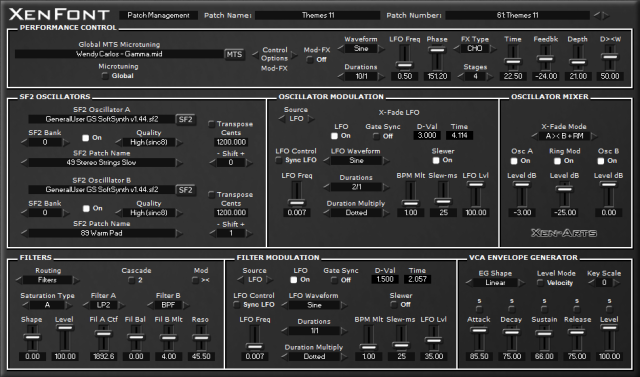
Xen-Arts has released XenFont – a two oscillator, hybrid SF2 SoundFont & Subtractive Synthesis VST for Windows.
It features full-controller MIDI Pitch Microtuning, using the MTS (MIDI Tuning Standard) format, where any MIDI Note Number can be freely microtuned to any desired pitch across the MIDI range, enabling computer musicians and composers to explore the expressive possibilities of composing music with alternative intonation systems.
XenFont is ‘a microtonal sound-designer’s SF2 sample-based synthesizer’, with a carefully designed workflow for quickly creating powerful sounding and musical useful timbres. The instrument lets you load your own SF2 SoundFont files. Routing the SF2 SoundFont Oscillators through the internal synthesis functions of the VSTi, provides a way to radically transform the original sounds and create new synthesized timbres.
XenFont is also an educational tool for learning about computer music sound-design, sampling and subtractive sound synthesis, as well as musical instrument intonation (aka microtuning and xenharmonics).
Key Features:
- Load your own SF2 SoundFonts into a fully microtonal, hybrid sampling & subtractive synthesis based VSTi.
- A ‘knob-less’ design featuring slider controls only, which enables intuitive direct control with a computer mouse.
- A dedicated control signal system mapped to the most important synthesis functions.
- Settings are made by typing values into fields, dropdown lists, left-and-right arrows, switches and sliders.
- Specify precise microtonal pitch-bend settings.
- Features arbitrary microtonal oscillator transposition settings.
- Velocity modulation of harmonics enables dynamically playing harmonics of the fundamental pitch.
- Envelope generators with per-stage ADSR keyboard tracking.
Audulus Demo – Custom Step Sequencer Demo
With Audulus, you can build synthesizers, design new sounds, or process audio. All with low latency real-time processing suitable for live performance. Audulus’s user interface is clean, simple, and easy to learn, allowing you to focus on sound.
“I made an improved version of the standard step sequencer that comes with Audulus, it includes controls for start, stop, swing and step and sequence length. This is a demo of a song using made using it, all sounds are coming from the standalone version and shows how Audulus can be used to create custom performance setups.”
Cubasis video tutorials
In this video tutorials Steinberg shows you how to use Cubasis.
Cubasis is Steinberg’s streamlined, multitouch sequencer for the iPad. Specially designed for quick and easy operation, Cubasis makes recording, editing and mixing a breeze. You can also open your Cubasis projects in Cubase under Windows and OS X! Cubasis places touch-intuitive production tools in your hands, opening up a new world of possibilities for your creativity.
Key features:
- Unlimited audio and MIDI tracks (depending on the device used)
- Over 70 virtual instrument sounds based on HALion Sonic
- Mixer with over 10 effect processors (insert and send effects)
- Over 300 MIDI and audio loops
- Virtual keyboard and virtual drum pads
- Sample Editor and Key Editor
- Export to Cubase, Dropbox, SoundCloud, AudioCopy & email
- Core Audio and Core MIDI compatible hardware supported
- Sequence other Core MIDI apps (MIDI recording only) and run Cubasis simultaneously via background audio
- Import audio from your iTunes music library or using iTunes filesharing, use AudioPaste or set up a Wi-Fi server in Cubasis
DATAMASKIN

