
Shapesynth and Sphero – NEW Controls test
Testing out some code having sphero control arpeggio, delay and the filter in shape synth.
Shape is a polyphonic synthesiser allowing the user to draw the shape of the oscillator wave form. The positive side of the oscillation is represented by 32 blocks and the negative side is its mirror, generating all sorts of possible raw retroish sounds. Shape is best experienced with akai synthstation 25 or any other midi device.
Powered by Sparrow.
+++ 16 voices.
+++ Attack.
+++ Decay.
+++ LFO envelope.
+++ Delay.
+++ Akai synthstation 25 compatible.
+++ On screen 25 key stylophone style keyboard.
+++ Arpeggio.
+++ Finite inpulse respons pong filter.
+++ sequencer.
+++ sampler.
+++ coreMIDI (usb and network).
+++ MAPI audio copy.
+++ Soundcloud upload.
Roland Juno 2 iPad controller with Arduino Ethernet demo
Demo of a custom device build around Arduino in order to control the Roland Alpha Juno 2 via Wifi.
The Arduino connects the Juno2 to the Wifi network of the iPad via an Airport router, an Arduino Ethernet shield and a midi shield.
I used Touch OSC to design the controller.
Touch OSC sends OSC messages (e.g /jun/DCO_Range 2.000) which are translated by the Arduino into Midi SysEx messages.
But the Arduino also translates Midi sysex messages from the Juno 2 into OSC messages (sort of loopback) so that when you change the patch on the Juno2, faders automatically move to the right position !
The code and detailled instructions will soon be published on http://4colors.free.fr
The control design mimics Roland PG300, but better !
Using Sphero with Shapesynth
A very brief test of Sphero as a controller for Shapesynth
Wearable music interface – Jacket MIDI Controller
This video features Moi from Los Macuanos demonstrating the MIDI Controller Jacket. Then he talks with MACHINA’s electronic artist Leslie Garcia about his conception of interacting with music using the jacket.
Machina plans to sell the jacket in two different colors, with and without the technology, through www.machina.cc.
Beatsurfing – The Organic MIDI Controller Builder – Official Teaser
BEATSURFING – THE ORGANIC MIDI CONTROLLER BUILDER
beatsurfing.net
It allows you to draw a 3-dimensional controller and use it in two different and complementary ways. You can tap it like you would with your regular MPC or any other beatmaking device, but the best and most innovative use you can make of it is definitely by surfing your fingers along routes, colliding with objects, triggering samples or effects. It’s all about movement, and bringing back this intuitive way to make music.
It can control any MIDI-enabled device (Software, Hardware, or even selected iPad apps through Virtual MIDI), features a very intuitive in-app editing system and integrates seemlessly in any existing Studio or Live setup.
Objects Behaviours can be set to link objects together and multiply the available commands on the surface of the iPad.
It’s been developed by Herrmutt Lobby & Yaniv De Ridder.
facebook.com/herrmuttlobby
It’s based on concepts Herrmutt Lobby developed for Hardware MIDI controllers (like the Beatfader and the MIDI scratch devices).
Released by VLEK as VLEKAPP08
vlekdata.org
———————————————
Draw your own controller
Work with the Controller you need, not the one you were given. Simply draw it on the screen with lines, polygons, circles and faders. Size, color, orientation and 3-Dimensional location are all yours to choose.
>> LEARN MORE: beatsurfing.net/?p=186
Surf!
Use the full potential of the iPad touchscreen: You can tap on the screen, but you better add the Surfing to your production and performance skills to integrate more of that human feel in your music.
>> LEARN MORE: beatsurfing.net/?p=152
Link any MIDI device
Dj, VJ, Production softwares, Hardware devices, and even selected iPad apps: you can route BEATSURFING to anything that allows for MIDI.
>> LEARN MORE: beatsurfing.net/?p=198
Objects Behaviours
Each object of your controller can be set to control the others. It creates a system of objects that allow you to add much more to a controller than what meets the eye.
>> LEARN MORE: beatsurfing.net/?p=159
Intuitive In-App editing
Forget about separated editing software, lenghty changes and whatnot. You can swap between the EDIT and PLAY modes at the tap of a finger. All your objects even remain playable when they’re be re-arranged!
>>LEARN MORE: beatsurfing.net/?p=100
MacBeth – test stylus keyboard
More from MacBeth:
Here is a very short video fearuring a small two octave stylus control keyboard! The outputs are Glide 1 (1v/octave), Glide 2 (1V/Octave), Standard 1VOctave, Negative (reverse going) 1V/Octave and finaqly +5V gate. The keyboard is driving the soon to be released MacBeth micromac analogue synthesizer. It’s a handy accessory for any modular synthesizer user! The copper plate that I’m using is highly reflective!
Your First Controllerism Routine: Basic Cue Point Juggling
To download the files visit: http://www.djtechtools.com/2012/06/12/in-the-studio-with-ean-golden-your-firs…
“In today’s tutorial video I go deep into the basics of building a basic controllerism technique through cue point juggling that anyone can learn. With a few key timing and setup principles under your belt, it becomes very easy to build expressive live remixes that will work in a real DJ set.”
Livid Elements – new completely modular MIDI controller platform
Introducing Livid Elements, the completely modular MIDI controller platform. Now you can finally create your own controller layout without any soldering, electronics, or complicated assembly required. Element modules come in many different configurations and layouts so you can rearrange, replace, and mix modules, creating your own MIDI controller with ease.
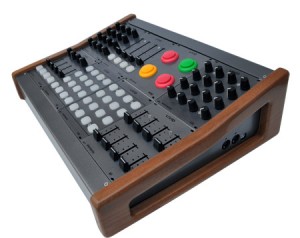
Each module connects to the Elements Brain for easy plug-and-play configuration and setup. Elements modules are housed in one of our custom Eurorack cases for total plug and play integration. The standardized, modular format allows for an incredible amount of flexibility and expansion. More info at lividinstruments.com
Spooky Sequencer
Background information:
I’m experimenting with different sequencer approaches on the Launchpad. The code is running on a DIY microcontroller board, turning the Launchpad into a standalone MIDI hardware sequencer.
In this clip the top 6 rows of the Launchpad grid are mapped to MIDI notes (counting along and upwards from note C3). When the step counter in the lower 2 rows hits a green square it plays the next green note selected in the grid, same goes for red notes.
A yellow square in the step counter plays next red and green notes together. A yellow note in the grid behaves like both a red and green. The result is two cycling note lines that fall in and out of synch with each other depending on how many notes are selected of each colour. It comes out kind of hypnotic and spooky – not really what I was originally going for, but I ran with it anyway.
The hardware is an FTDI VNC2 chip on a DIY board. I am fighting with the buggy IDE and compiler to try to get a useful standalone hard sequencer/control surface from the Launchpad.
Fsynthz releases ProgAte free MIDI router VST
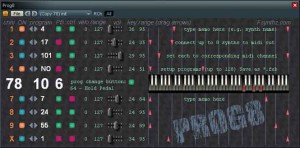
ProgAte is a MIDI processor/router, which allows you to control up to 8 synths with one MIDI keyboard.
“You send midi program changes, together with all the rest midi events, to ProgAte. ProgAte splits and filters the stream, remaps the ProgChange messages – and outputs the processed midi stream, one channel per synth (up to 8 for one instance of ProgAte).”
Pricing and Availability:
Free download
More information:
DATAMASKIN

