
MIDI In Motion – turns the iPhone into a motion controller
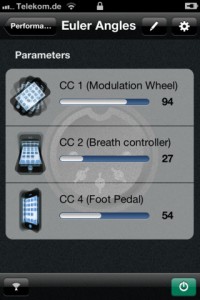
Florian Schwehn has released MIDI In Motion – an app that turns an iPhone into a motion controller for MIDI capable hardware and software instruments.
With MIDI In Motion, up to four assignable parameters can be controlled by your device’s spacial attitude.
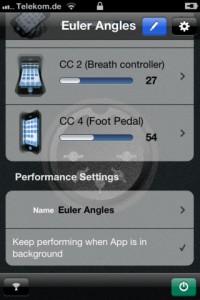
Features:
- MIDI data can be sent over Wi-Fi network or to special hardware devices like iRig MIDI
- freely adjustable sphere of action
- two different performance types, more coming
- connections to MIDI services can be restored automatically
- perform while the app is in background or even when the screen is locked
- stable attitude tracking over long time intervals
MIDI In Motion is available now in the App Store for $4.99.
Checking out the new Samson Carbon 61 Midi Controller with iPad Dock
Fresh from Summer NAMM, here’s a closer look at a new controller, the Samson Carbon 61
New from the floor of summer NAMM 2012 Samson introduced the new 61-key version of their popular Carbon MIDI controller series.
The new “Carbon 61” even has an iPad dock! This is expected to be released in the next few months!
Innovating: Moldover’s Jamboxes
Background info:
Born from the union of a passion for controllerism, and the love of community-collaboration, Moldover’s jamboxes are some of the most radical and innovative instruments he’s ever created. The OctaMasher, The SyncoMasher, and The MiniMasher are completely unique designs; each explores a different realm within the multi-player universe. Like jukeboxes in the 1950s and boomboxes in the 1980s, jamboxes are now playing a crucial role in the new explosion of social music and culture.
Quick tour of the Nektar Panorama P4 Controller
Tim Chandler form Nektar takes us through the use and applications of the new Panorama P4 MIDI controller. Designed to seamlessly integrate with Reason 6, the Panorama P4 will also offer control for any of the other major DAWs out there.
For more information or to buy a Panorama P4 today, please visit our store:
http://www.dv247.com/computer-hardware/nektar-panorama-p4-keyboard-controller…
Details:
The Nektar Panorama P4 49-Note Keyboard Controller has been custom designed for the user to have full control over all the functions and features in Propellerhead Reason. The Panorama is different to other generic controllers. It’s sole purpose is to cater for Reason producers and musicians who have been looking for a controller that does it all.
The Panorama P4 from Nektar Technology uses a unique protocol custom designed to work flawlessly with Propellerhead’s Reason 6. Its clever design and clear layout help put control at the fingertips exactly in the same way as hardware would. With its 49-note keyboard, 12 velocity-sensitive pads, a vast array of knobs and faders, and a white on black crystal clear display, the Panorama P4 provides everything required for hands on control of Reason on stage or in the studio.
The Panorama P4 layout is divided between the Mixer Section and the Channel Strip control Panorama let’s you operate Reason like no other controller. The mixer section of the Nektar Technology’s Panorama offers 9 faders (8 channel faders and a master fader) mirrored in the display controlling Volume, pan, inserts, send and returns, mute and solos.
The Channel Strip control gives all the control necessary to each channel strip in a clear layout. The channel Strip is broken down into the different sections, namely EQ, Dynamics, Inserts and Sends. Each section is easily accessible at the touch of the relevant button. Once selected the 8 encoders map to the relevant controls of the selected channel strip in the mixer.In addition, the Panorama features a silent multi-function, touch-sensitive motorised fader that can be used with any instrument, sequencer or mixer channel, delivering precise control of Propellerheads flagship DAW.
Voxkit – a sound-triggered MIDI drum controller for iOS
Voxkit is a universal app for the iPhone, iPad, and iPod Touch.
It’s designed to trigger drum samples (either internally, or through MIDI), and distinguishes between four different tones at a time.
The app is currently in review in the iTunes store, and should be available shortly. For the release, it’ll be priced at $1, and we’ll have some promo codes available on our Facebook page…. http://www.facebook.com/SecretBaseDesign
For more info, go to http://www.secretbasedesign.com/apps
Experimental Giant Pinata MIDI Controller
Here’s a quick demonstration of the giant pinata MIDI controller that has been built. The demo shows how the sensors work. There is also some footage from its showing in the Children’s Museum.
See more at:
http://seaweedfactory.blogspot.com/2011/11/building-trojan-chorus.html
MonoSynth Controller for Mssiah
Testing the MonoSynth Controller for Mssiah (C64 Midi cardridge)
Available at the Apple AppStore for iPad
MonoSynth Controller for Mssiah
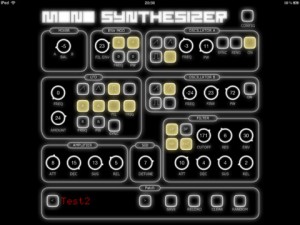
The Mssiah is a Midi cardridge for the Commodore C64. With this app you can easily control the mono synthesizer component of Mssiah via a midi connection.
– load/save patches
– generate random patches
– share your patches with your friends (itunes file sharing enabled)
a Commodore 64 and the Mssiah-Midi-Modul is required.
** this is not an official 8bitventures app **
** this is just a little homemade project to support the mssiah community **
Synth Arp & Dr Pad – Yamaha –
Here are the details:
http://ios-music.homewoke.net/
It is a first impression.
The easiest operation was photoed.
Although this has the strong side as a MIDI controller, it makes a very good sound also with an application simple substance.
Although the performance using Arpeggiator is main, only few of programming is not sensuous.
However, various usage is done.
Available on the iOS App Store
http://itunes.com/app/syntharpanddrumpad
The special release price for a limited time until July 31th 2012!
☆★☆ 2012/7/31まで発売記念価格350円にて販売 ☆★☆
Learn more about Synth Arp & Drum Pad on our website:
– UK: http://uk.yamaha.com/products/apps/synth_arp/
– other EU countries: http://europe.yamaha.com/products/apps/synth_arp/
– Australia: http://au.yamaha.com/en/products/music-production/accessories/apps/synth_arp/
– Canada: http://ca.yamaha.com/en/products/apps/synth_arp/
– Japan: http://jp.yamaha.com/products/apps/synth_arp/
Use Yamaha’s new iPad app “Synth Arp & Drum Pad” to easily create fabulous phrases and enjoy a performance freely!
Synth Arp & Drum Pad is an iPad app with arpeggiator and drum pad that allows you to easily play the internal synthesizer or any connected MIDI device and produce music with phrases having an abundant variety of musical styles.
(The arpeggiator automatically plays the individual notes of a chord in a selected pattern.)
Getting to know the SYNTHBOY+
Here is a detailed video describing the features and use of the SYNTHBOY+.
Please refer to http://www.ninstrument.com for more information and to inquire or ask questions about the product.
Some of the features include, a very cool GBLFO filter effect by NeX for LSDJ. Enhanced midi CC control of mGB, very efficient DB9 connector that contains all of the necessary connections, including data I/O – prosound and power. We added perfboard so you can expand it with more upgrades and customize it to your liking. We hope you enjoy it as much as we have building it.
QuNeo controls Minimoog V
Keith McMillen QuNeo controlling Arturia Minimoog V Origina in Ableton LIVE, X controlling bend on all drum pads with note, sliders controlling oscillator volumes with pressure, and filter cutoffs with slider location.
QuNeo is a different species of pad controller for electronic musicians, DJs, VJs and DIY hackers. While it covers all of the functionality of other pad controllers, QuNeo adds the power of touch recognition in other dimensions.
Tactile Pads, Sliders, Rotary Sensors and Switches
Each of the 27 pads, sliders and rotary sensors are pressure, velocity, and location sensitive. Even the 17 switches respond to how hard you press.
LED Light Feedback
A remarkable lumination scheme combines variably diffusive elastomers with 251 multi-color LEDs providing visual feedback that is immediately responsive and delightfully informative. Man and machine are coupled through light, feel and sound.
Trigger Pads
16 square pads provide 127 levels of Velocity response. And X-Y location. And continuous pressure. For each pad. Times sixteen.
Rotary Sensors
2 rotary sensors allow you to scrub, trigger, stretch, pinch and play phrases and sound files, manipulate continuous controllers and more . Each rotary sensor measures angle, pressure and distance from the center.
Multi-touch Sliders
9 touch sensitive sliders can be mapped to fader and effects controls. LEDs within each slider act as VU meters or remind you where you were. Multi-touch lets you select a length between two fingers to set stereo locations or filter resonances. Tapping a slider can mute or toggle any track or function.
Switches
The switches are located in smart groupings to select samples, fader banks, and transport controls. Each of the switches can scan up and down through files at speeds variable with your touch. Great for quickly locating that perfect fill or telling your looper you really meant it.
DATAMASKIN

