
Ableton Live Users Zürich – Interview with Ander
http://youtu.be/cpanACmN1Uo
The first shot of our new “Artist Series” of Ableton Live Users Zürich, Switzerland: An Interview with Ander who built his own controller to perform with Ableton Live. Further information at: http://www.facebook.com/abletonzuerich or http://www.ander.fm – Interview held by www.modul8tor.com – Go create some music!
Background:
Ander began his journey into techno after a fabulous new years eve party in Zurich. He got hooked on the beat and traded in his earlier career as solo flutist in a Jazz band for an existence in the dark and sweaty niches of the Swiss minimal scene. His starting idea was to directly influence all his musical output at any time in space, making every single of his appearances a unique experience. So he built his own controllers and made his own software for his very own kind of live performance.
Three years ago, Ander began working on the first ancestor of Station, as he calls his live performance controller. Today he reigns over 800 glowing knobs and blinking switches and a fast growing reputation in the minimal scenes of Germany and Switzerland. Among the places he rocked so far are names such as Schatzalp, Satisfactory, Hive, Schanzenfest and Formbar.
Some guy once called Ander’s sound dubby, but you will rather find elements of minimal and strange electronica in his livesets – the only constant is it moves your ears and feet, for hours.
Artist Interview: Surkin
When a young Benoit Heitz saw a friend’s computer running Reason he had an epiphany: “His computer isn’t better than my parent’s computer. That means I could be making music.” He started out not knowing the first thing about drums or music in general. Three years later he was touring the world as an international DJ. Surkin had us over to check out his wild yet danceable cut-up sample work.
Benoit Heitz (born 1985), known by his stage name Surkin, is a French electro DJ and producer. He gained attention with his releases on the French Institubes music label as well as a remix for Teki Latex released on Virgin. In 2011 he launched the record label Marble along with Para One and Bobmo.

Heitz was born in southern France, and is now located in Paris.
Lemur and NanoStudio
Presented by Gaz Williams and Nick Batt
This new Lemur app allows you to control DJ software, studio production software (DAWs), live electronic music software, stage lighting, and more – this is no everyday keyboard situation. Any software OR hardware that can otherwise be controlled by OSC/MINI is able to be controlled by this Lemur app. For those of you new to the platform, you’ll be able to access a user library of pre-made templates from top artists and unknowns from the Lemur community – artists from around the world are now sharing their own templates, strengthening the platform by the minute!
You’ve only to connect your iPad OR iPhone to your laptop over Wi-fi to work with a cross-platform (Mac OS X or Windows) interface builder to bring your experience to a whole new level, dragging and dropping with ease as you do so. You’re able to control up to 8 computers from one iPad if you wish, Lemur also supporting CoreMIDI allowing you to use such hardware interfaces as the iConnectMIDI or USB MINI interfaces to your heart’s content. Physics in objects are able to be controlled with physics models, allowing you to bounce, oscillate, and rebound across your tracks — objects including, but not limited to: Fader, Multislider, Range, Multiball, Knob, RingArea, Switches, Pads, Custom Button, and text.

SPECIFICATIONS
– Objects
Fader; Multislider, Range; Multiball; Knob; RingArea; Switches; Pads; Custom Button; Container; Breakpoint; Leds; LemurMenu; Monitor; SignalScope; SurfaceLCD; Text
– Physics
Hated physics at school? Now you’ll love it! The behaviour of many Lemur objects can be affected by powerful and easy to use physical models which can make your controller bounce, rebound and oscillate. Make your controller come alive.
– Scripting
There’s absolutely no need to dive into scripting if you don’t want to. But if you’re the type who likes to get their hands dirty then there’s a powerful scripting engine inside Lemur. Harnessing this power will allow you to build extremely dynamic templates.
– Editor
The Lemur editor, is a cross-platform (OS X/Windows) interface builder. It allows you to create new Lemur templates or edit existing ones. The drag & drop interface makes it easy to use. It allows you to create anything from the simplest set of faders to the most complex groovebox with no hassle.
– Connectivity
Simply connect your iPad/iPhone to your laptop over Wi-Fi and make the connection! Lemur also supports CoreMIDI allowing you to use hardware interfaces such as Alesis’ iO Dock or the iConnectMIDI or class-compliant USB MIDI interfaces (with a camera connection kit). You can even control up to 8 computers from one iPad with Lemur!
Mixmo DJ Promo video
Teaser for a new DJ app for iPad – Mixmo DJ Pro Promo Video
Please bare with me with the horrible techno tune  >> shit it really sucks
“Special thanks to: Paul Veth & Parc Breda”
Taking a closer look at the Mixr 1.1 Update – Sample Pad
http://youtu.be/q64JYj3SOXc
Featuring a 9-Pad Sampler and a completely redesigned UI, Mixr 1.1 makes it easy to add that extra layer of awesome to your mixes! Check out the all-new 1.1 video on youtube and check out the full list of features and improvements on our blog. Think adding a wicked sampler pad to your decks is going to cost you big time? Wrong! Mixr 1.1 is a free update for existing users. Just our way of saying thanks to our users for all the incredible support over the past two months.
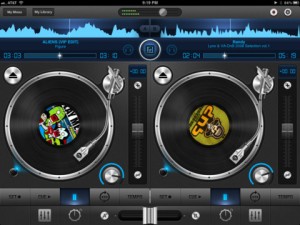
Description:
Mixr was designed to capture and redefine the mobile DJ experience.
Mixr delivers a rich feature set designed for mobile DJ’s. You can pitch, tap to tempo, scratch, multi-cue and mix with precision. You can manage your iPod library with the revolutionary Crate Manager. Make crates with the touch of your finger in the drag-n-drop interface, you have complete control over your mixes. Featuring high quality DSP effects, you can add Delay and Reverb to your mixes to add that extra punch to your sets. Supporting mono split audio output, you can monitor pre-cueing with your headphones for live performances. Record your mixes and play them back in a sleek player. Recording a mix automatically creates playlists! Turn your iPad into the best mobile DJ Turntable Studio, with Mixr.
Features
Interface
✓ Dual Multi-Touch Turntables
✓ Audio Waveforms
✓ Multi Cue Loops
✓ Tempo
✓ Equalizer
✓ Effects
✓ Quick Loader
✓ Double-Tap Slider Reset
✓ Manual Crossfader
✓ Crate Manager
✓ Settings
✓ My Library
✓ My Mixes
✓ Recorded Mix Player
✓ LCD Track: Artist, Song/Album. Elapsed/Remaining Time.
Audio
✓ Tap to Tempo
✓ Tempo control (+/- increments)
✓ Pitch-Bend (6%, 12%, 25%)
✓ 4-band equalizer (-24 dB to +6 dB)
✓ 3 Manual Loops
✓ High Fidelity Vinyl Scratching
✓ Ultra-low latency
Music Library
✓ Direct iPod library access
✓ Quick track load popover
✓ Browser by play list, songs, artist, genre
✓ AAC, AIFF, WAV, MP3
✓ Create, delete & rename Crates
General
✓ Pre-cueing thorough headphones (Mono Split)
✓ Advanced recording
✓ Auto track listings
✓ Auto-saving (cues, crates, bpm, waveforms)
✓ Fully optmized for iOS 5
Tips & Tricks
★ Crossfader: Use the A and B buttons to perform a smooth auto crossfade
★ Library: You can rearrange crates and tracks in wiggle mode
★ Sliders & Faders: Tap any where to instantly change values
★ Mixr Academy: Watch training tutorial videos to sharpen your DJ skills at http://mixrdj.com/academy
For more information, please visit: www.mixrdj.com
For news and updates, please follow us on Twitter: www.twitter.com/ipadmixr
500MB free samples

Loopmasters has announced a DJ Mixtools Giveaway, offering a collection of sample taken from the DJ Mixtools libraries.
DJ MIXTOOLS from LOOPMASTERS is a brand new concept for forward-thinking DJs and live artists. Imagine buying a track but then being able to separate that track into its key elements and having ROYALTY FREE access to remix, effect, chop and loop the parts in your own individual style to create an exciting and refreshing new mix…
If you are curious just how the DJ Mixtools Packs are wrapped and delivered, here’s a great chance for you to sample it. We are giving away a free pack that has audio material from the following packs: DJ Mixtools 14 – Groove Tech Vol. 2, DJ Mixtools 16 – Mix FX Vol. 1, DJ Mixtools 19 – Swedish House Vol. 3, DJ Mixtools 22 – Progressive House & Tech Vol. 2, and DJ Mixtools 24 – Progressive Tech House.
More information: Loopmasters
DJ Unkut Demonstrates Traktor Native Scratch Technology
In this performance video, 2011 DMC Online Champion Unkut introduces the next step in Traktor Scratch performance: Native Scratch Technology.
All scratch products by Native Instruments now contain Native Scratch technology – delivering tight, accurate performance via MK2 timecode for fully authentic vinyl feel. Unkut employs advanced scratching and drumming techniques using Traktor Scratch Pro 2 with X1 and Maschine controllers, combining the best of turntablism and controllerism. He adds Traktor effects like Flanger and Gater, using the Gater similarly to the classic “transform” scratch.
More info about Native Scratch Technology and special offers: http://www.native-instruments.com/nativescratch
Using Multi Cues & Loops – Tutorial
http://youtu.be/ktADwlMuDnU
Here’s a brand new tutorial from MixrDJ – Learn how to master the multi cues to quickly produce loops, cuts and remixes with muscle memory exercises and technique. Mixr features 4 hot cues that allow you to instantly go back to a specific point in time. You can tap on multi cue/loop button to activate the panel. To set a cue, simply tap on the “set” button, or the “in” buttons in the multi cue panel to set your markers. Each marker is color coded to help differentiate the multi cues.
You can set up to 3 manual loops by setting “out” points and enabling the “loop” function. You can clear out the in and out points by tapping on the “in” and “out” buttons. Each multi cue is saved and can be used when you reload your tracks. Each deck can save a different set of multi cues per song allowing you to customize your cue sets. Alright, and thats how to use multi cues and loops. Remember, each deck can save a new set of multi cues per song. Don’t forget to follow us on twitter, Facebook and subscribe on youtube, we’ll see you guys in the next video.
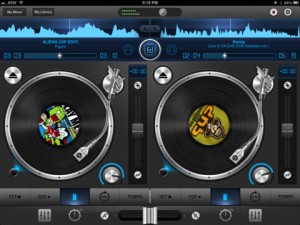
Mixr delivers a rich feature set designed for mobile DJ’s. You can pitch, tap to tempo, scratch, multi-cue and mix with precision. You can manage your iPod library with the revolutionary Crate Manager. Make crates with the touch of your finger in the drag-n-drop interface, you have complete control over your mixes. Featuring high quality DSP effects, you can add Delay and Reverb to your mixes to add that extra punch to your sets. Supporting mono split audio output, you can monitor pre-cueing with your headphones for live performances. Record your mixes and play them back in a sleek player. Recording a mix automatically creates playlists! Turn your iPad into the best mobile DJ Turntable Studio, with Mixr.
Artist Interview: DJ Lucky Date
When Jordan Atkins-Loria (DJ Lucky Date) was introduced to Reason, he instantly recognized the potential of it’s synths and set about to master them. Originally following tutorials he found online, Lucky Date began making his own tutorials which showcased his penchant for modern electro dance synths in Reason. As his tutorials grew in popularity, so did his career as a DJ and Producer.
In just a couple short years, DJ Lucky Date has gone from making his first video tutorial to completing 4 dirty electro dance ReFill sound libraries, charting on Beatport, and massive club and festival gigs as a headlininer.
We met up with Jordan one night in LA where he had a few thousand Angelinos jumping and screaming at Avalon in Hollywood, CA. Before the show he walked us through some of the secrets to his massive sounds and even gave us the patches so we can share them with you all.
More about Propellerhead and Reason:
http://www.propellerheads.se
http://www.propellerheads.se/reason/
Download the patches from this video:
http://www.propellerheads.se/stuff/luckydate.zip
DJ Lucky Date’s Electro ReFills:
http://store.payloadz.com/results/results.asp?m=96514
Interview with Redinho: Change It All Up
Redinho captivates us with his talk box-enhanced rhythms. Following his excellent performance and Ableton Live demo at Sonar 2011, we sat down with Redinho to learn more about his setup.
DATAMASKIN

