
David Guetta and UVI – ElectroBeats new version 1.5
NEW version 1.5
◆ New lower price : $4.99 instead of $9.99
◆ Support for iOS 6 and the iPhone 5
◆ New features : MIDI Input Support & User Samples Support
◆ New sounds and songs
ElectroBeats is a very intuitive beat making application for iPhone, iPad and iPod touch, conceived in collaboration with the worldwide-renowned and the most demanded producer David Guetta.
With a powerful real-time approach and an impressive sound library, you’ll create great sounding beats at a glance.
FEATURES
◆ Realtime workflow experience with sixteen pads and five different modes:
Pad, Pitch, Velocity, Erase, Mute/Solo
◆ Exclusive and electro oriented sound library, with hundreds of sounds including Bass Drum, Snare, Clap, Rimshot, Cymbal, Hi-Hat, Open Hi-Hats, Acoustic Percussion, Electronic Percussion, FX, Bass, Chords, Leads, Instruments, Vox…
◆ Synthesis oscillator
◆ Dozens of ready to use drum and construction kits
◆ Hundreds of patterns to use with the drum kits
◆ Note Repeat in multiple resolutions
◆ Dynamically change the quantize/repeat resolution while recording : the key to build beats very fast
◆ Default quantization for instant gratification
◆ Save and share your tracks using iTunes
◆ Bounce song in Wav format
◆ Import your files via File Sharing in iTunes
◆ Multitrack export for use in sequencers like Logic™, Live™, ProTools™, Cubase™ and many more.
◆ MIDI input support
◆ Tap Tempo
◆ Realtime previews (pattern, kits and sounds)
◆ Convenient undo with snapshots support
◆ Embedded help in English, French, Spanish and Japanese.
Richie Hawtin’s CNTRL: Beyond EDM
More info: http://bit.ly/TjYhoo
Dubspot teamed up with Richie Hawtin and Sennheiser to present CNTRL: Beyond EDM – a series of seminars at colleges across North America addressing the current state of technology, production, performance, and creativity in electronic music. In this video, Richie Hawtin and Loco Dice along with Carl Craig and DJ Sneak discuss the tour and the meaning behind it.
Bangarang on Noisepad – Load your own samples
Bangarang by Skrillex, remixed on Noisepad. Noisepad, a powerful soundboard, sequencer and live-set DJ app, available for iPad & iPhone. Load your own samples or use the in-app shop, create beats, apply real-time effects, be creative!
Soundbanks: Each bank holds 12 samples Load unlimited samples: Organize, create, (re)name, add and remove soundbanks
Sequencer: The onboard sequencer allows you to program up to 12 patterns on-the-fly, each with their own duration (1 – 99 bars).
Rhythm: Set BPM manually. Tap button for BPM: Set amount of swing (0% 100%)
Import / Export: Export individual patterns (.wav) Share samples/patterns between apps with AudioCopy/Paste
Sample settings: Noisepad offers a number of settings which determine how samples are played. Cut, hold, volume , mute, solo.
Effects panel: Real-time effects such as pitch, delay, cut-off, phase, reverb and bit-crush will bring your noise to life.
Bass Kleph shares his tricks for Maschine performances
Austrialian tech house producer, live remixer and finger drummer Bass Kleph shares some of his tips and tricks he uses when building a performance on his Maschine.
Learn more about Maschine here: http://bit.ly/PjED9I
Check out Bass Kleph’s site here: http://www.basskleph.com/
Nuclear Musicians: Radioactive Orchestra
Radioactive orchestra is a cross-boundary collaboration of nuclear physicists, a DJ and one media artist. The project wishes to inspire young people to learn about the natural sciences, but it also has an artistic aim to find new musically interesting patterns. By giving every radioactive isotop its own sound based on scientific algorithms they turn nuclear science into music, hence making a world available to us that our senses can not otherwise percieve.
beatMaker DJay simple unboxing
http://youtu.be/NgF_TbALpJQ
A short unboxing video of the beatMaker DJay app by Keith McMillen Instruments
DJ/Producer Dom Kane gives us a studio tour
DJ, Producer, engineer and Sample creator Dom Kane takes us on a tour of his studio.
EDM: Mash Up – Live In Studio (iPAD Lemur, Touch-Able, Ableton)
DJ Zinkus speaks about his own vision of EDM Live performance at events and makes live performance demo of personally designed music control panel on iPad (Lemur).
www.djzinkus.com
DJing With Traktor Pro
Native Instruments 214: DJing With Traktor Pro by Olav Basoski
Video 1 of 28 for Native Instruments 214: DJing With Traktor Pro
Traktor Pro 2.5 gives the modern DJ countless creative alternatives when performing their sets or crafting that perfect remix. Master DJ Olav Basoski turns on the inspiration in this detailed look at Native Instruments’ amazing digital DJ-ing software and hardware.
There is lots to learn here and Olav dives right in with a tour of the interface that will get you comfortable navigating around Traktor Pro. You’ll quickly learn how to cue up your tracks and, using Traktor’s high-quality analysis tools and how to move around the music while staying perfectly in sync between your digital decks. The looping feature gives you even more creative control: you can loop that break and build it up on the fly to make your set as high energy as you want!
Olav also shows you the awesome Traktor Kontrol F1 hardware controllera must for any serious Traktor Pro user! The Kontrol F1 really shines when using the remix decks: it makes creating loops and quantizing or pitch-shifting super intuitive.
When you’ve learned and marveled at what Traktor Pro and Traktor Kontrol F1 has to offer, stick around for a while and dive into our ever-expanding collection of Native Instruments courses!
More info on this title: http://j.mp/PwdAFG
The brand new Traktor Z2 DJ 2+2 Mixer, soundcard and controller from Native Instruments. We had a visit from the NI team on their way to BPM and they gave us the lowdown on their first pro DJ club mixer hardware.
Pricing and Availability:
TRAKTOR KONTROL Z2 will be available at retailers worldwide and at the NI Online Shop from November 1, 2012. Pre-orders are currently being taken.
$899 / 799 € / 83800 ¥
Introducing the Traktor Kontrol Z2: Controllerism
Traktor Kontrol Z2 is the first 2+2 control mixer designed from the ground up for Traktor. Watch it in action in this new 4-deck video — controllist guru Ean Golden performs a chilled-out, downtempo composition, showcasing the all-new Macro FX and Flux Mode in the upcoming Traktor software version, using 2 Traktor Kontrol F1 Remix Deck controllers with the Z2.
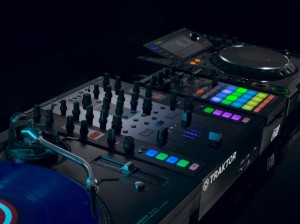
Traktor Kontrol Z2 excels equally as a control hub, or as a standalone mixer, with its aircraft-grade aluminum chassis and rock-solid, ultra-dependable Innofaders™. Step up to the future of mixing — in stores November 1, 2012.
More information: http://www.native-instruments.com/z2-dj-mixer
The features of the Z2:
- Aircraft-grade aluminum – which, by the way, is what we just saw in the DIY Apollo 13 controller yesterday
- Traktor Pro software bundled (and integrated with the controller features).
- Innofader-brand faders, “high-quality” knobs.
- Multi-colored LED buttons, assigned to Remix Decks and cue points. (For those of you who hate the color disco-fication of NI’s hardware, sorry, there’s more.)
- Two standalone mixer channels for external analog inputs – think Pioneer CDJs or turntables.
- Two channels from the soundcard for independent control of the Traktor Remix Decks, cue points, and effects (and, for audio signal, anything you want to route from your computer).
- Dedicated Remix Deck section, and Master section for Traktor file browsing, Sync and Quantize.
- Macro FX, so that you can combine multiple effects on one control. (Also known as “Skrillexing.” Joke. Yes, you can also do classic breakdowns.)
- 24-bit internal soundcard with – at last – XLR balanced outputs.
- Separate booth output, separate mic input. (This is a DJ mixer, after all.)
- Additional aux input, atop the turntable connections. (iPad, perhaps?)
- HID controller implementation.
- USB hub
DATAMASKIN

