
PixiTracker – new music scetcher and chip tune app
PixiTracker is what you need! It is a simple and fun tool to quickly create musical sketches or chip tunes. Without requiring a lot of musical knowledge!
PixiTracker is a simple and fun sample based tracker with minimalistic pixel interface.
It is portable application, available for iOS (iPhone, iPad), OSX, Windows, Linux, Windows Mobile (WinCE) and other systems.
Official page: http://www.warmplace.ru/soft/pixitracker/
Features:
* 16 sounds per song;
* unlimited number of patterns;
* five packs with unique sounds;
* MIDI keyboard support;
* export to WAV;
* audio copy/paste;
* iTunes File Sharing;
* true warm pixel interface!
Get a lot of fun using PixiTracker together with SunVox, PixelWave or SpectrumGen iOS synths!
The new iSynth iPad Synthesizer – Review
“This is my review for iSynth Version 1.0 – iSynth (not to be confused with the iPhone photo editing app) is a virtual monophonic analog-synthesizer for your iPad. iSynth is designed and optimized for live performances. So far NOT my favorite synth. This is version 1 and there is no support for CoreMidi. The key selling point to this synth is the fact that you can stream the audio from it to an AirPlay device. I do not have an AirPlay amplification system so I could not test this feature. Other than that it’s pretty much your basic monophonic dual oscillator synth for the iPad. I did not like how the knobs behaved. They were difficult to control. I also did not like the fact that this synth can not be flipped horizontally. I use an Alesis iO Dock and it is designed to be used horizontally. I also noticed clicking in one preset.”
Features At A Glance:
✔ Dual Oscillator:
– Generating square, triangle, saw tooth and reverse saw tooth waves.
– Octave selector
– Lag processor
– Cross-Fader
– Oscillator fine-tuning
– Oscillator synchronization
✔ LFO Filter:
– Supporting square, triangle, saw tooth and reverse saw tooth waves.
– Filter, vibrato and tremolo modulation
✔ ADSR Volume Envelope Generator:
– Control attack, decay, sustain and release
✔ ADSR Filter Envelope Generator:
– Control attack, decay, sustain and release
✔ Low Pass Filter:
– Frequency cutoff from 10 kHz
✔ Arpeggio Modul:
– Up to five notes
– Select between up, down, up/down and random playing
✔ Keyboard:
– Switch between 4 octaves
✔ Patches:
– Shiped with default patches
– Save unlimited user defined patches
– Share your patches with others via iTunes filesharing
✔ AirPlay:
– Stream directly from iSynth to any AirPlay compatible device
iSynth is available for $1.99 for a limited time
http://ipadloops.com/wireless-synthesizer-ipad/
A couple of nice iPad app walkthroughs
76 Synthesizer demo
http://youtu.be/icefGnEehJ0
iKaossilator demo
Soundprism demo
Nice new free mono soft synth for your iPad
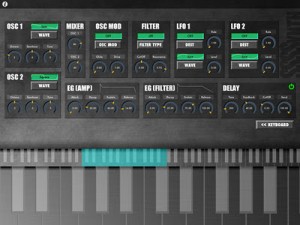
“SSSSYNTH is Monophonic Virtual Analog Synthesizer. Since the basic analog synthesizer’s parameters are implemented, this app is perfectly suitable for beginners! You can easily create impressive phrases from 35 types of keyboard even if you cannot play the piano.
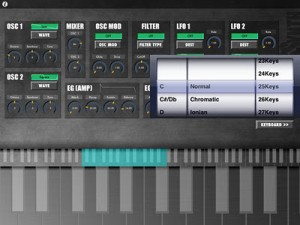
[Specifications]
– OSC x 2
– MODURATION
RING MODURATION
OSC SYNC
– GLIDE
– FILTER x 1
– EG x 2(AMP,FILTER)
– LFO x 2
– FX
DELAY
OVER DRIVE
– KEYBOARD(SCALE) x 35″
Curtis UI Study – exploration
Curtis – Turns any recording into a totally unique synthesizer! Curtis uses an unusual hybrid of wavetable and granular synthesis to create tones and timbres quite apart from the standard FM or subtractive synthesis fare. Add this app to your arsenal to create sounds you simply cannot squeeze out of any other synth, no matter how much you’ve twiddled its knobs.
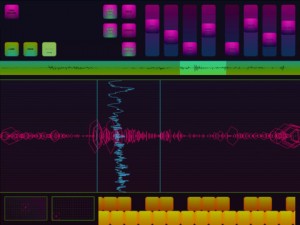
Granular synthesis works by combining many tiny grains of sound from an existing recording, creating new sounds with the texture of the original, now with endless temporal possibilities. Play the sound forward, backward, or even at a single point!
Unlike scratching a record, pitch doesn’t depend on how quickly you move through the recording. Try with spoken word, singing, synths. Mangle your recordings or create soft, gentle textures! If scratching is your thing, Curtis now also includes a scratch mode, letting you shred your recordings turntablist style.
About:
The Strange Agency designs and builds sites and software. We focus on apps for mobile devices, and we make everything from rich media banners to heavily trafficked websites to small music-making robots. We love open-source, standards-compliant, platform-spanning code.
Get going with RS4000 Polyphonic Subtractive Synthesizer for iPad
RS4000 Polyphonic Subtractive Synthesizer – have a peak at the new synth here in action >>
The fully programmable subtractive synthesizer comes with 50 presets and the ability to tailor all the following parameters and save the new sounds for future use:
- Two oscillators with sine, sawtooth, square and triangle waveforms
- Phase, phase modulation, balance and drive controls for oscillator interactions
- Octave, semitone and tune controls for Oscillator A
- Low pass, high pass, band pass, notch and peak filters with frequency, Q, mod envelope, and ADSR controls
- Amp envelope with ADSR conrols
- LFO with sine, sawtooth, square and triangle waveforms, rate, fade, pitch, filter frequency, filter Q, balance and gain controls
- Mod touch ribbon with hold, LFO rate, LFO fade, filter frequency, drive and balance controls
- Pitch wheel, six scrollable octaves, and sequencing
+verb Soundpack
Newly added to the Gridlok Sampler, RS3 Keyboard, and M8RX Tone Matrix are brand new and unique sounds from +verb, an electronic producer out of Arizona who records for Robox Neotech and has recently remixed Starkey.
SoundCloud Sharing
After synthesizing the perfect sounds with RS4000 and recording, Tabletop 1.2 now allows users to post studio quality 44.1kHz, 16bit audio to their SoundCloud account. Tracks can be labeled either public or private, and public tracks can be posted to Twitter, Facebook, Tumblr and Foursquare as well. Retronyms is pleased to have increased the capabilities of Tabletop production and provide effortless audio sharing, and the company looks forward to seeing how Tabletop community utilizes the new features. Users are encouraged to upload tracks created with Tabletop to the SoundCloud Tabletop group: http://soundcloud.com/groups/tabletop
And even better, the app has dropped to just $0.99
Learn more: http://retronyms.com
Tabletop is a modular environment where you can mix and match different devices. Select from more than a dozen devices including samplers, mixers, effects, sequencers and more.
Nice demo of the vintage clone soft synt – 76 Synthesizer
“Demo of this old fashioned styled synth. It’s an interesting sounding app but the dials are difficult to use. Hopefully a future version will clear up a few of the issues that will make this synth a must have. Will not work with a keyboard controller.”
76 Synthesizer is a virtual analog monophonic synth for the iPad. Inspired by synthesizers from the 70’s, the 76 Synthesizer combines playability with style.
For a limited time only, get 76 Synthesizer for 50% off!
Features:
• Three Oscillators with sine, sawtooth, triangle, square waves and switchable filter LFO.
• Voltage controlled filter
• ADSR
• Glide
• Pitch bend/modulation touch pad
• Three octave touch pad for note input with nine different scales
• Eight different effects: reverb, phaser, flanger, chorus, overdrive, delay, tremolo and vocoder— tap the outputs to patch into two effects simultaneously
• Eight different writable presets
• Stunning retro interface
Cool sound textures generated by SoundMashine
SoundMashine is a granular synthesis based sound sampling and sequencing app for the iPhone and iPad. This video demonstrates some of the sound textures that can be generated from a basic input source, in this case the tapping of a table surface and rattling of a cup.
Description
SoundMashine is a granular synthesis based sound sampling and sequencing instrument. Fully utilising touch gestures to provide a fast and easy to use compositional tool. The app records sound using the devices built-in microphone, then using a beat slicing process divides the sound and automatically assigns the slices to each of the 16 screen tiles. Each tile has its own set of parameters allowing you to adjust window size, playback rate, pitch, feedback, delay and delay modulation, all of which are easily set by the swipe of a finger. Each parameter listed can also be randomised between a set of assignable values. This flexibility allows you to build up a palette of sounds which can be stretched and processed to the extreme allowing rich and diverse creations far removed from the input source .. if so desired.
In addition the built-in sequencer allows you to record patterns of tiles that can be played back at different speeds, again using simple touch gestures. If you add in the parameter randomisation functions to this, diverse and changeable sequences can be produced. With its flexibility for working with sound at different pitches, rates and sequencer speeds, SoundMashine lends itself well to a variety of compositional paradigms, from beat based through to drone or noise based music forms.
Sonified translates what your video camera sees into sound in real time
Here’s a new app that sounds/looks pretty interesting:
Sonified translates what your video camera sees into sound in real time. Record onto QuickTime movies. The sonifying video camera for the iPhone and iPad.
Hear what your video camera sees

Sonified takes real time visual information from your iPhone/iPad video camera and uses it to mix 16 stereo tracks of CD quality music in real time, translating what your video camera sees into sound. A real time instrument, Sonified uses your iPhone/iPad’s video camera to translate qualities of light and color into music, a process called “sonification”. Using Sonified allows the iPhone and iPad user to connect vision and sound in new ways, creating video and soundtrack at the same time. Record Sonified QuickTime movies with CD quality audio and share with friends and other Sonified users.
Specifications:
Real time mixing of audio based off of brightness and or color values.
16 different ways to combine sounds and visual response.
4 Sonified “instruments”, each with its own unique way of mixing sound based off of visual information: mixing sound based off of brightness, based off of color, based off of both brightness and color simultaneously, or based off of brightness and color proportioned towards color.
A total of 64 stereo tracks of sound in four separate Sonified “scenes” all in 44.1 kHz 16-bit CD quality audio.
Extremely responsive, with close to zero-latency between what your camera sees and what you hear.
Record video and CD quality sound simultaneously onto QuickTime movies and save on your iPhone or iPad.
Intuitive, with an easy to use interface.
Designed for use with headphones.
Closer look at the iPad Sylo Synthesiser
Background information: Demo of Sylo Synthesiser. I only scratched the surface of the possibilities for this app doing basic stuff. It’s worth digging in deeper and creating amazing sounds.
Sylo Synthesiser allows you to play music, or create sound effects, using sounds you can design yourself. Sylo Synth includes a collection of pre-designed sounds which you can use as they are, tweak them to your heart’s desire, or you can make new sounds from scratch.

Build sounds from basic waveforms, or capture them from the world around you using the iPad’s built-in microphone. Then, tinker with Sylo Synthesiser’s filters and other settings to make a sound all your own.
Sylo Synthesiser features live time-stretching technology based on granular synthesis and a suite of filters:
• Speed up or slow down a recorded sound to use as an instrument
• With a regular wavetable synthesiser, higher-pitched notes are also faster, like chipmunks, and lower-pitched notes are also slower, as though they are moving through treacle
• But enable Sylo’s “Sync Speed” feature, and lower or higher-pitched notes still play back at the same speed, keeping them in sync with each other
• Fiddle with the speed control even while you’re playing notes: Slow, stop or even rewind the sound in the middle of notes — without changing the pitch
• Granular synthesis allows you to create instruments or effects from a recording, that do not sound like the original, yet retain its realistic, natural sound
• FX units: Frequency modulation, ring modulation, echo/delay, distortion, and a low-pass filter with resonance control
Sylo Synthesiser also supports Core MIDI: play music from another device via MIDI.
Upgrade to Sylo Synthesiser Pro and you gain these additional features:
• Use existing audio files as the building-blocks of your instrument: import audio from wave, aiff, mp3 and aac/m4a files
• Save recordings to your iPad or to Dropbox* online storage
• Save your new instruments to the preset list for quick access
• Exchange audio with other apps via AudioCopy/AudioPaste or “Open in…” (where supported)
DATAMASKIN

