
Checking out the new Samson Carbon 61 Midi Controller with iPad Dock
Fresh from Summer NAMM, here’s a closer look at a new controller, the Samson Carbon 61
New from the floor of summer NAMM 2012 Samson introduced the new 61-key version of their popular Carbon MIDI controller series.
The new “Carbon 61” even has an iPad dock! This is expected to be released in the next few months!
Atlantic landing – iFretless bass midi controller on iPad / iPhone
iFretless is a new musical instrument app for iPad / iPhone. In this video you see an iPad jam session, showing how iFretless works as a MIDI controller, sending the notes we play to synthesizer apps running the background on the iPad.
If this video makes you wish you had a copy of iFretless, head on over to the app store: http://itunes.apple.com/us/app/ifretless-bass/id512929963?mt=8
We used several other iPad synthesizer apps as background MIDI synths:
Sunrizer – http://itunes.apple.com/us/app/sunrizer-synth/id443663267?mt=8
(An excellent imitation of a classic analog synthesizer)
BS-16i – http://itunes.apple.com/us/app/bs-16i/id388149926?mt=8
(A soundFont compatible synth. It has great sound if you put great soundfonts in it. We’re using the AKAI-SteinwayIII piano soundfont in this video.)
Experimental Giant Pinata MIDI Controller
Here’s a quick demonstration of the giant pinata MIDI controller that has been built. The demo shows how the sensors work. There is also some footage from its showing in the Children’s Museum.
See more at:
http://seaweedfactory.blogspot.com/2011/11/building-trojan-chorus.html
Live Looping with a MIDI Fighter 3D and Ableton Live
A live looping improv jam performed on a DJ TechTools “MIDI Fighter 3D.” No phrases or pre-reocrded loops were used. Only single notes are being triggered from an instance of NI’s Kontakt for drums, and three separate instances of NI’s Massive for the bass, lead, and polyphonic synth. The bank-select buttons at the top of the unit selects the proper instrument in Ableton Live.
Tilting the unit to the right controls a low-pass filter on the synths. A backward tilt controls the resonance on those filters, and tilting the unit forward controls modulation/vibrato. The side buttons are controlling Ableton’s loopers, and are also used to engage the master filter at the end of the song.
Lemur on the iPad is being used to clear loops and control reverb and delay on all four instruments.
More info on the DJ TechTools MIDI Fighter 3D can found on DJTT’s site: http://store.djtechtools.com/midi-fighter-3d.html
Synth Arp & Dr Pad – Yamaha –
Here are the details:
http://ios-music.homewoke.net/
It is a first impression.
The easiest operation was photoed.
Although this has the strong side as a MIDI controller, it makes a very good sound also with an application simple substance.
Although the performance using Arpeggiator is main, only few of programming is not sensuous.
However, various usage is done.
Available on the iOS App Store
http://itunes.com/app/syntharpanddrumpad
The special release price for a limited time until July 31th 2012!
☆★☆ 2012/7/31まで発売記念価格350円にて販売 ☆★☆
Learn more about Synth Arp & Drum Pad on our website:
– UK: http://uk.yamaha.com/products/apps/synth_arp/
– other EU countries: http://europe.yamaha.com/products/apps/synth_arp/
– Australia: http://au.yamaha.com/en/products/music-production/accessories/apps/synth_arp/
– Canada: http://ca.yamaha.com/en/products/apps/synth_arp/
– Japan: http://jp.yamaha.com/products/apps/synth_arp/
Use Yamaha’s new iPad app “Synth Arp & Drum Pad” to easily create fabulous phrases and enjoy a performance freely!
Synth Arp & Drum Pad is an iPad app with arpeggiator and drum pad that allows you to easily play the internal synthesizer or any connected MIDI device and produce music with phrases having an abundant variety of musical styles.
(The arpeggiator automatically plays the individual notes of a chord in a selected pattern.)
Quicksilver 303 MIDI RESYNC tutorial
This video demonstrates the MIDI RESYNC capability of the Quicksilver 303 CPU. MIDI RESYNC allows the Quicksilver 303 to switch back and forth between an external MIDI clock and the internal clock without stopping the sequencer.
For more information: http://www.socialentropy.com/quicksilver
Wearable music interface – Jacket MIDI Controller
This video features Moi from Los Macuanos demonstrating the MIDI Controller Jacket. Then he talks with MACHINA’s electronic artist Leslie Garcia about his conception of interacting with music using the jacket.
Machina plans to sell the jacket in two different colors, with and without the technology, through www.machina.cc.
Beatsurfing – The Organic MIDI Controller Builder – Official Teaser
BEATSURFING – THE ORGANIC MIDI CONTROLLER BUILDER
beatsurfing.net
It allows you to draw a 3-dimensional controller and use it in two different and complementary ways. You can tap it like you would with your regular MPC or any other beatmaking device, but the best and most innovative use you can make of it is definitely by surfing your fingers along routes, colliding with objects, triggering samples or effects. It’s all about movement, and bringing back this intuitive way to make music.
It can control any MIDI-enabled device (Software, Hardware, or even selected iPad apps through Virtual MIDI), features a very intuitive in-app editing system and integrates seemlessly in any existing Studio or Live setup.
Objects Behaviours can be set to link objects together and multiply the available commands on the surface of the iPad.
It’s been developed by Herrmutt Lobby & Yaniv De Ridder.
facebook.com/herrmuttlobby
It’s based on concepts Herrmutt Lobby developed for Hardware MIDI controllers (like the Beatfader and the MIDI scratch devices).
Released by VLEK as VLEKAPP08
vlekdata.org
———————————————
Draw your own controller
Work with the Controller you need, not the one you were given. Simply draw it on the screen with lines, polygons, circles and faders. Size, color, orientation and 3-Dimensional location are all yours to choose.
>> LEARN MORE: beatsurfing.net/?p=186
Surf!
Use the full potential of the iPad touchscreen: You can tap on the screen, but you better add the Surfing to your production and performance skills to integrate more of that human feel in your music.
>> LEARN MORE: beatsurfing.net/?p=152
Link any MIDI device
Dj, VJ, Production softwares, Hardware devices, and even selected iPad apps: you can route BEATSURFING to anything that allows for MIDI.
>> LEARN MORE: beatsurfing.net/?p=198
Objects Behaviours
Each object of your controller can be set to control the others. It creates a system of objects that allow you to add much more to a controller than what meets the eye.
>> LEARN MORE: beatsurfing.net/?p=159
Intuitive In-App editing
Forget about separated editing software, lenghty changes and whatnot. You can swap between the EDIT and PLAY modes at the tap of a finger. All your objects even remain playable when they’re be re-arranged!
>>LEARN MORE: beatsurfing.net/?p=100
Closer look at BEATSURFING – the organic MIDI instrument builder
This iPad application lets you design MIDI instruments from the ground up and then play them in a unique way: by sliding (‘surfing’) your finger across the screen. This very special approach to beat making and production allows for more creative expression and brings back a human touch and feel to your MIDI habits.
→ FOLLOW THE DEVELOPMENT ON FACEBOOK & TWITTER.
facebook.com/beatsurfing – twitter.com/beatsurfing
Fsynthz releases ProgAte free MIDI router VST
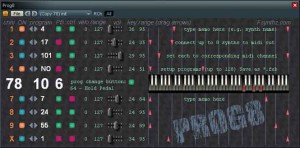
ProgAte is a MIDI processor/router, which allows you to control up to 8 synths with one MIDI keyboard.
“You send midi program changes, together with all the rest midi events, to ProgAte. ProgAte splits and filters the stream, remaps the ProgChange messages – and outputs the processed midi stream, one channel per synth (up to 8 for one instance of ProgAte).”
Pricing and Availability:
Free download
More information:
DATAMASKIN

