
New release of ANIMOOG featuring MIDI CONTROL
Animoog v1.1.0 is here! New features include longer recording time in the looper, categorized presets, and fully assignable MIDI cc’s. In this video Moog’s Product Development Specialist, Amos Gaynes, shows you how to use Animoog’s new MIDI control features and explores some of the creative possibilities.
You can learn more about Animoog at:
http://www.moogmusic.com/animoog
MUZA – musical instrument and MIDI Controller for iPad and iPhone
Background information:
Muza is on the AppStore for a SPECIAL LAUNCH PRICE!
http://itunes.apple.com/us/app/muza/id538100916
http://muzamusic.com/
If you like the music in this video you can download it for free here http://snd.sc/QKogC8
Here are some testimonials from professional reviewers:
“Muza is a gorgeously done midi controller with its own built in smooth sounds. Quality design and control is of the essence with this app- too many controllers have a boring look and clumsy feel.
However, Muza changes all that and adds a vital factor- your intuition!”
Zaxis, http://www.zaxism.com.
“Muza is pretty cool and looks stunning! I’ve been playing around with this instrument for a day now and it’s a lot of fun and has a huge amount of potential to develop and grow into a very powerful tool.
It’s very easy to play and can help to come up with ideas and melodies you wouldn’t arrive at if you sat down and started composing on a conventional keyboard.”
Sam, http://www.appsformusicproduction.com/
NORD DRUM as Expander
A plain vanilla video with Nord Drum under a) MIAMI audio out control and b) MIDI control for the four internal synth channels
Beatmaker 2 – Walkthrough
BEATSURFING – THE ORGANIC MIDI CONTROLLER BUILDER
It allows you to draw a 3-dimensional controller and use it in two different and complementary ways. You can tap it like you would with your regular MPC or any other beatmaking device, but the best and most innovative use you can make of it is definitely by surfing your fingers along routes, colliding with objects, triggering samples or effects. It’s all about movement, and bringing back this intuitive way to make music. It can control any MIDI-enabled device (Software, Hardware, or even selected iPad apps through Virtual MIDI), features a very intuitive in-app editing system and integrates seemlessly in any existing Studio or Live setup. Objects Behaviours can be set to link objects together and multiply the available commands on the surface of the iPad.
Video background information:
Second part of the appsformusicproduction.com walkthrough of building a track in beatmaker. Hope you’ve found it useful so far.
Twitter: @appsformusic
For music app reviews tutorials, tips, and more:
http://www.appsformusicproduction.com/
HEXTEP Analog Style Live MIDI Step Sequencer – Introduction
Short teaser of a new step sequencer called Hexter, below are the details.
Sequencer Specs/Features:
16 Steps each with Pitch & Velocity, On / Off switches
Active Step LEDs (Dim)
Clock LED (Bright)
TEST step with Scrubbing (While Stopped)
Scrubbing/Nudging while playing and ‘Test’ button triggers step overriding step switch
Internal Clock
External MIDI Clock Sync – With Variable Resolution
MIDI Notes output
MIDI Channel Selection
NOTE Features: (Midi only not not on-board oscillator)
Transpose – UP / DOWN & ‘+1’
Chord – Type Selection, momentary or latching
TIME Features:
Adjustable Sequence Length, momentary or latching
Reverse Sequence Order
Variable Swing
Variable ‘Active Step’ Pattern Shuffler and play toggle
Playhead Step Jitter – 1 to 5 playheads and variable time between them (‘Root note only’)
EFFECTS:
Variable Delay – independent delayed note repeat at half velocity (Root note only, No chord)
Variable Beat Repeat
Tempo, RUN, STOP LEDs
Internal 9v battery or USB Power
Internal Oscillator and speaker
Not to forget the…….
EUCLIDEAN RHYTHM MODE
Koushion and the Moog MIDI MuRF
A quick example of using the Koushion app to sequence the filter bands on a MIDI MuRF, esentially creating your own patterns on-the-fly. Learn more at www.experimentalsynth.com.
Teaser: Muza – new musical instrument and MIDI controller for iPad
Muza is an upcoming musical instrument and MIDI controller for iPad, iPhone and iPod Touch. Will be available August 1st.
All the sounds came from Nord Rack and MFB Nanozwerg.
iPad is connected via camera connection kit to USB MIDI interface.
Four MIDI channels used:
1) Nord Pad (harmony instrument)
2) Nord Drone
3) Nord “Wind”
4) MFB Nanozwerg lead.
Subscribe to channel for Muza news and tutorials.
http://muzamusic.com/
Muza App: Forest Teaser
Muza is an upcoming musical instrument and MIDI controller for iPad, iPhone and iPod Touch.
Subscribe to a channel for Muza news and tutorials.
http://muzamusic.com/
- “Harmony” instrument that was made specially to generate sweet harmonies.
- Easy to use side keyboard “Stripe” that allows you to play up to 4 notes in a selected scale.
- 2 extra pads for one-shot or looped samples and a pitch wheel. Great for making sketches on the fly.
Connect your Muza to Ableton, Cubase, FL Studio, Reaper or any other digital audio workstation (DAW) via MIDI!
You can also connect to hardware synthesizers using third party midi interface.
MIDI In Motion – turns the iPhone into a motion controller
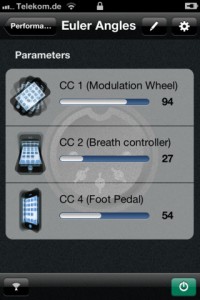
Florian Schwehn has released MIDI In Motion – an app that turns an iPhone into a motion controller for MIDI capable hardware and software instruments.
With MIDI In Motion, up to four assignable parameters can be controlled by your device’s spacial attitude.
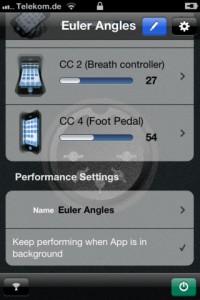
Features:
- MIDI data can be sent over Wi-Fi network or to special hardware devices like iRig MIDI
- freely adjustable sphere of action
- two different performance types, more coming
- connections to MIDI services can be restored automatically
- perform while the app is in background or even when the screen is locked
- stable attitude tracking over long time intervals
MIDI In Motion is available now in the App Store for $4.99.
Playing the Wurlitzer SideMan (vintage 1950’s drummachine) with MIDI retrofit
The SideMan is a drum machine from 1959 that fires valves/tubes to generate the tones, which are then passed trough a tube amp. The cigar box houses Doepfer MTC components and a direct line out. Interconnect is over DB37, fed into the SideMan from underneath. No drilling or irreversible mods were done to the SideMan, although I did tweak it a bit to get a longer decay from the kick bass.
A lot of thanks to Eric Noel, who gave his time, expertise and some of the Doepfer components to this project; and to Steve Craig (Midwest Music Menders), who patiently repaired the SideMan when I acquired it in “almost working” condition.
DATAMASKIN

